





JustinBH
Members
-
Joined
-
Last visited
-
Would anyone have managed to get an APC Smart-UPS X 3000 with an AP9631 management card (latest firmware upon all) working with APC modbus driver? Modbus is enabled on port 502 on the AP9631 however I've been able to get NUTS working with it. Thanks.
-
-DA2 so 2 x SFP+ type connector 'holes'.
-
Are there any other suggestions to get this working (Dell X710-DA2) on UNRAID 7.1.4, as I have added the 'pci=realloc=off' and tried different PCI slots and all of them show the card, see lspci -k: "01:00.0 Ethernet controller: Intel Corporation Device 154b (rev 02) Subsystem: Intel Corporation Device 0000 01:00.1 Ethernet controller: Intel Corporation Device 154b (rev 02) Subsystem: Intel Corporation Device 0000 01:00.2 Ethernet controller: Intel Corporation Device 154b (rev 02) Subsystem: Intel Corporation Device 0000 01:00.3 Ethernet controller: Intel Corporation Device 154b (rev 02) Subsystem: Intel Corporation Device 0000 01:00.4 Ethernet controller: Intel Corporation Device 154b (rev 02) Subsystem: Intel Corporation Device 0000 01:00.5 Ethernet controller: Intel Corporation Device 154b (rev 02) Subsystem: Intel Corporation Device 0000 01:00.6 Ethernet controller: Intel Corporation Device 154b (rev 02) Subsystem: Intel Corporation Device 0000 01:00.7 Ethernet controller: Intel Corporation Device 154b (rev 02) Subsystem: Intel Corporation Device 0000 01:01.0 Ethernet controller: Intel Corporation Device 154b (rev 02) Subsystem: Intel Corporation Device 0000 01:01.1 Ethernet controller: Intel Corporation Device 154b (rev 02) Subsystem: Intel Corporation Device 0000 01:01.2 Ethernet controller: Intel Corporation Device 154b (rev 02) Subsystem: Intel Corporation Device 0000 01:01.3 Ethernet controller: Intel Corporation Device 154b (rev 02) Subsystem: Intel Corporation Device 0000 01:01.4 Ethernet controller: Intel Corporation Device 154b (rev 02) Subsystem: Intel Corporation Device 0000 01:01.5 Ethernet controller: Intel Corporation Device 154b (rev 02) Subsystem: Intel Corporation Device 0000 01:01.6 Ethernet controller: Intel Corporation Device 154b (rev 02) Subsystem: Intel Corporation Device 0000 01:01.7 Ethernet controller: Intel Corporation Device 154b (rev 02) Subsystem: Intel Corporation Device 0000 " But the only NIC that remains visible is the r8169 on the ASUSTeK PRIME B760M-A motherboard. TIA. home-nas-1-diagnostics-20250722-1316.zip
-
Thanks I hadn't seen that. Updated to the new version and it works fine. BTW would anyone know if there's a way to have folder groups wrap to 2 rows? Currently when I have a bunch of dockers in a folder group it reaches a point where it can only display 6-7 and then any more than that don't appear in the box showing their status. TIA.
-
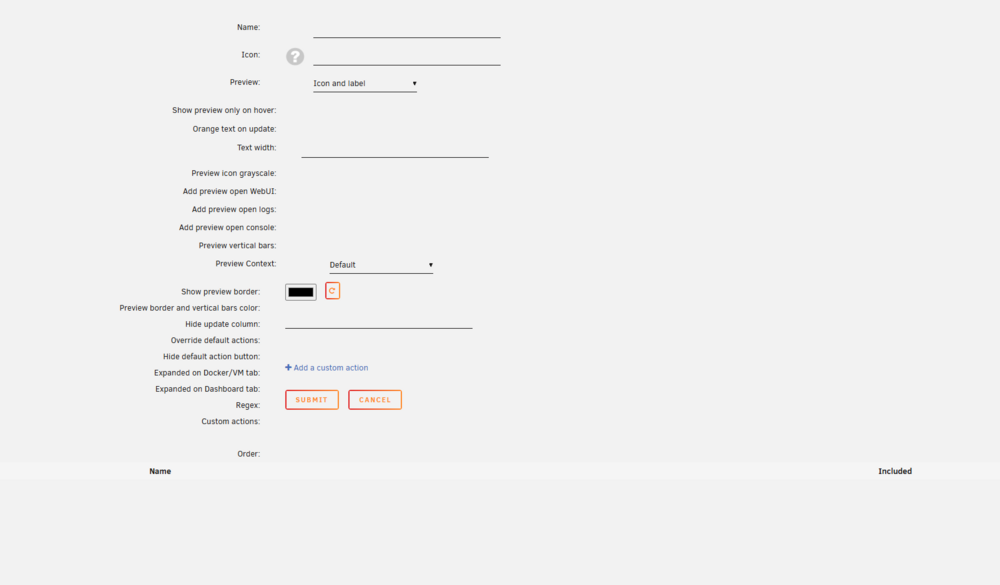
@aglyons No, running 7.0.1 here (on a couple of boxes) and for a while now you can open the Edit option for a Folder, but when you go to the section with the switches against different Dockers to add them into a folder, that section is bare. Here's the view of an existing FolderView group, and what it shows when you click edit: Note: This is an NOT a new FolderView / group trying to create from scratch, this is a long existing group that when you try edit it, everything appears blank and you can't edit it. I've just tried uninstalling and reinstalling the plugin and it makes no difference. It is possible to import the existing settings/groups, but you can't edit/update them in the WebGUI.
-
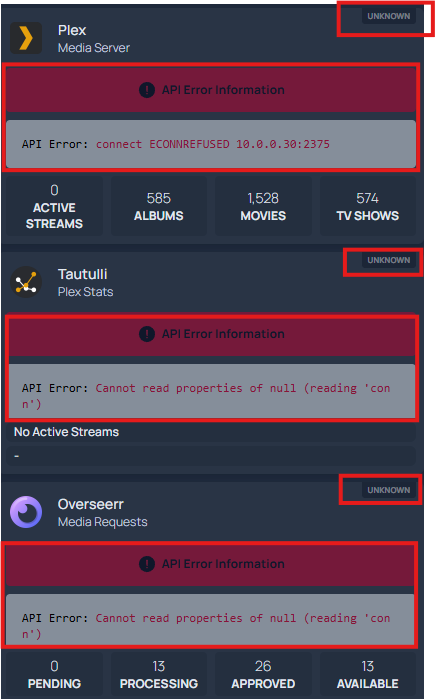
Has anyone been able to work out how to get the 'my-server' configured to work with UNRAID (local and a remote one) so that it can show the status of the dockers running the applications ?
-
OK that's why I asked re /appdata... as looking in my appdata folder since I added this new version, I do NOT have any folder created/being used for GoAccess. Hence my query, as it would appear this is all being stored in the docker image (and I assume could blow it out in size over time?).
-
Understood re the /opt/log mapping, I was just wondering if GoAccess is creating any of its own logs, as typically map a /logs to /mnt/user/logs (that is restricted to a spinning HDD only share, so as to avoid wear on SSD drives). Assume that means your going to have to keep updating the image in future, to release a new docker image each time the GeoLite2 database file is updated by MaxMind. Thanks for the effort of putting this together !
-
Xavier, Does this use an /appdata directory? None appears using the docker template. Is this generating any logs of its own (if so, and if no /appdata directory would be storing in the image file)? Assume GeoLite2-City.mmdb and GeoLite2-Country.mmdb are being automatically updated from MaxMind? (if so, and if no /appdata directory would be storing in the image file)
-
xavierh - You could provide some info on how to manually add it to UNRAID? As I have added a /config mapped to /appdata folder, yet the goaccess.conf and other files still appear to reside within the docker image. Also if there was some way to allow adding in a MaxMind license key and having the GeoIP City and Country latest database download and unzip (to /config/geoip directory in /appdata of unraid), it would be great !

