





kutzilla
Members
-
Joined
-
Last visited
Everything posted by kutzilla
-
Hello @Venari, that's a good point. There is no solution for other CNAME's yet. Could you create an Issue on https://github.com/kutzilla/docker-hetzner-ddns? Then I can look into that in the future.
-
@unraid-user I'm going to look into this. The configuration folder inside the container you are looking for is: /opt/unbound/etc/unbound
-
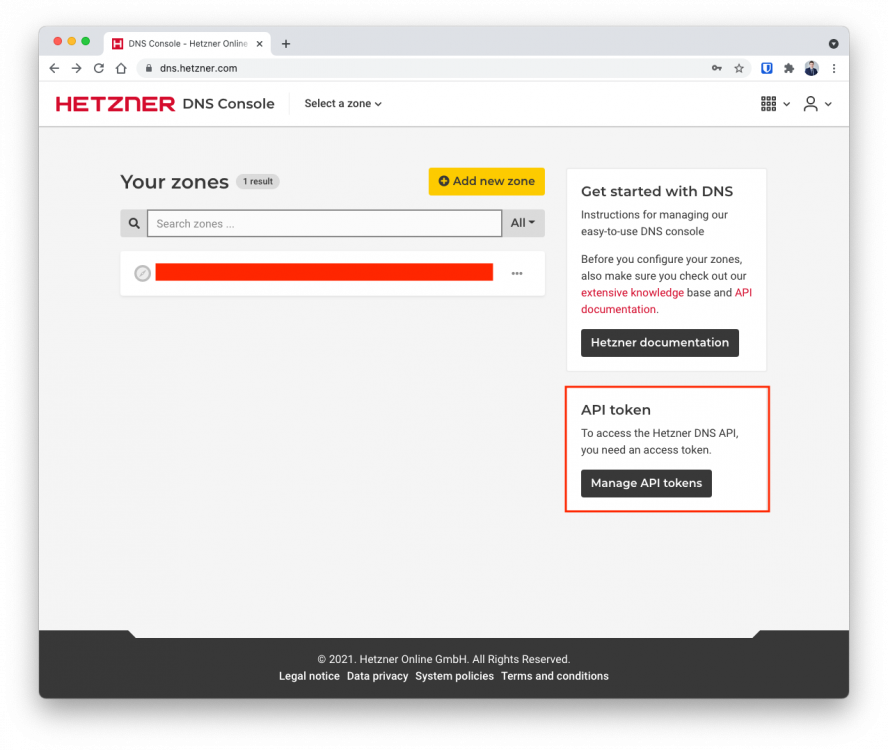
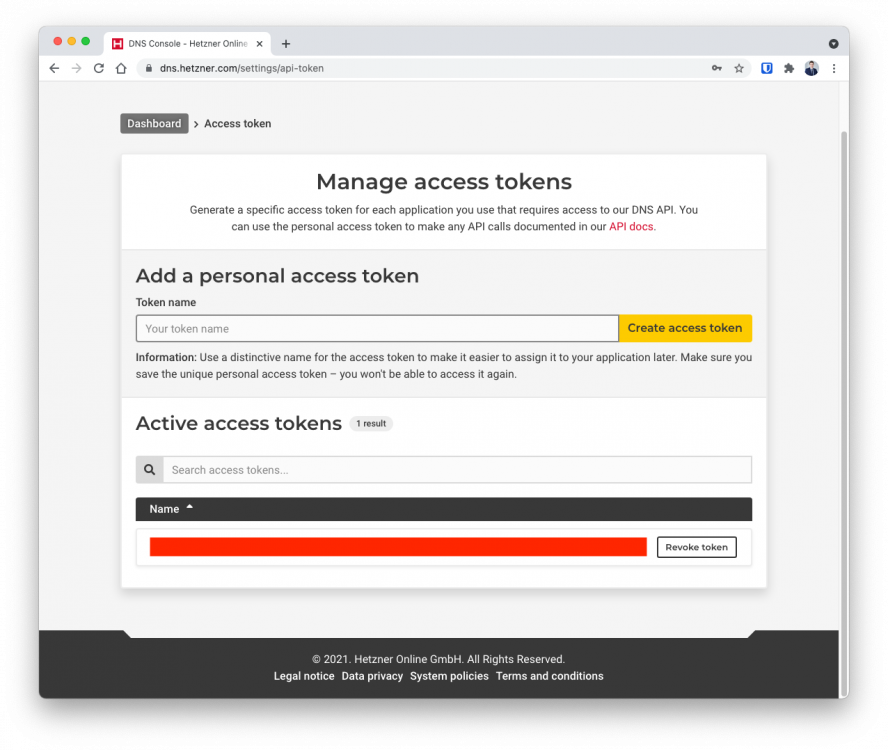
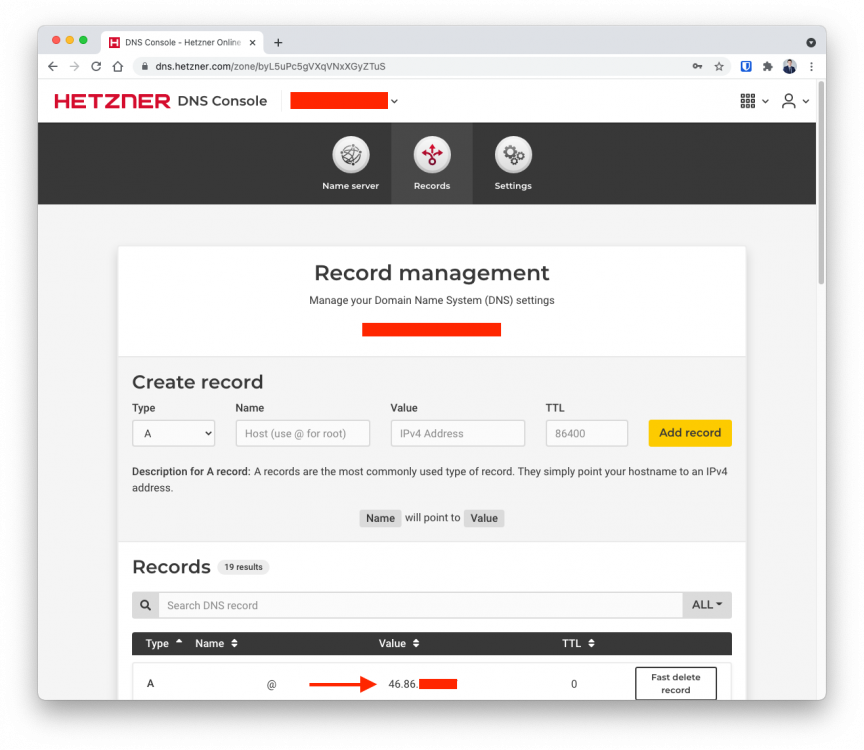
Hello @Alwerich, besides the Domain you need to use the DNS Console of Hetzner for your domain. Configure your domain as a zone and then you can create a personal API-Token: The API-Token will be used by the Docker Image to authenticate to your zone. Create an Token with a name such "Unraid" or what ever you like: Provide the necessary attributes zone-name, API-Token and record type (A if you use a IPv4 or AAAA for IPv6) to the Docker Image. Afterwards the docker image will connect to Hetzner DNS and will update your @-Record (A or AAAA) to your public IP (respectively the IP the app is running on). Then you will find your IP here: Afterwards you will be able to create DNS-Records (such as subdomains with CNAME-records) for your domain in the console. And they will point to your Unraid-System. I hope this helps.
-
Overview: Support for the Hetzner-DDNS Docker Container Docker: https://hub.docker.com/r/kutzilla/hetzner-ddns GitHub: https://github.com/kutzilla/docker-hetzner-ddns This Docker image will allow you to use the Hetzner DNS Service as a Dynamic DNS Provider (DDNS). How does it work? The Go script inside this Docker Image periodically checks the DNS record with the Hetzner DNS API. It also checks the current public IP of the network, the container is running on. If the DNS record does not match the current public IP, it will update the record. Therefore your DNS record updates dynamically to the public IP.
-
@ySkNight Sorry for the long silence. I was working on other projects and totally forgot about this issue. This sounds weird, because the syntax looks right. I might sound stupid, but did you keep the hash symbols on the description fields "# A Record" and "# PTR Record"? Those symbols need to stay, because those are just descriptive comments. Hopefully this helps. @BelgarionNL I didn't forget about you either. I try to provide a "Getting started"-guide soon. Cheers, kutzilla
-
@BelgarionNL Thank you for your feedback. I'm going to provide a more detailed introduction for unraid soon. Any suggestions what I should include? PS: I know what you mean about my name. Many dutch ppl think it is funny. But my last name is part of this pseudonym. Thats why I chose it
-
Overview: Support for the Unbound Docker Container Docker: https://hub.docker.com/r/kutzilla/unbound GitHub: https://github.com/kutzilla/unbound-docker This is an unofficial Docker implementation of Unbound. It was build to run Unbound on your Unraid machine. Unbound is a validating, recursive, and caching DNS resolver. It can be used to create your own recursive DNS-Server at home. You can use Unbound for services such as Pi-Hole or you can create custom DNS Records for your local network. Here is a tutorial how to configure Pi-Hole with Unbound (Not exclusively on Unraid):




