





Zeze21
Members
-
Joined
-
Last visited
-
so i guess sleep/suspend is equaly good for powsersaving?
-
Hi, i can't really find anything on my question (maybe my search skills are bad) but i have found nothing on how to achive the following: I have 2 Windows VMs which are working perfectly, they have set ips within my network. Now what i want to do is they should start up as soon as there is an incoming connection on rdp or sunshine/moonlight. That could of course mean that the first connections attemt might fail (because the vm is not done with the startup) but the 2nd 3rd or maybe 4th reconnect will work. Why do I want this? Well we live in times where electricity is expensive, something not running consumes less power than something running (the vms have gpus passed through). Is something like that at all possible? I mean unraid would have to act as sort of a network sniffer as the ips work via br0... I am open to any ideas.
-
Which one paperless nxg or ai? Also how is the local AI docker going to do the same as any of the paperless dockers? I didn't quite understand?
-
Hi @ all, I am at a loss. Usually I try to solve me problems by myself googing or asking chatgtp/perplexity. I recent years I think I have become quite good at solving these problems even though IT stuff is just a hobby and my dayjob has nothing to do with any of it. To help you all understand my problem I will first tell you a little bit about my system: Hardware: CPU: AMD Ryzen Threadripper 1950X 16-Core @ 3400 MHz Mainboard: ASRock X399 Professional Gaming American Megatrends Inc., Version P4.01 BIOS dated: Tuesday, 02-05-2023 RAM: 128 GiB DDR4 Multi-bit ECC HDDs: Array 7x 10 TB WD red (2x Parity) Cache: 2x Kingsotn NVME 2TB Addtional Storage (a couple of usb Drives for Backup options) and Samsung SSD 980 PRO 2TB nvme and SD Ultra 3D 2TB ATA My Server is a mixture of FIle Storage and computing - what does that mean? - I use my server to make my life easier. I have mainly 2 VMs running (my General purpose Windows 11 VM and Home Assistant) Then I have quite a few Dockers running: Name of Docker Container (Autostart or Manual start) why I use it/what i use it for antennas (Autostart) to have dvb input on emby ApacheGuacamole (Autostart) to have access to my vm via web browser from everywhere binhex-emby (Autostart) to access my media binhex-krusader (manual start) to move files around calibre (Autostart) to sort my ebook library dashy (Autostart) to have a startpage for my wife so she can access all the docker containers etc Dozzle (manual start) for logging dockers evcc (Autostart) to charge my ev via my pv firefox (Autostart) so i can browse uncensored from anywhere in the world. frigate (Autostart) for home assistant all together 6 cams round the house jDownloader2 (manual start) i rarly use this mariadb (Autostart) database for nextcloud MusicBrainz-Picard (manual start) when i get around to rip a cd myself which rarly happens these days nextcloud (Autostart) as a google service replacement Nginx-Proxy-Manager-Official (Autostart) so i can access all my containers with my own domain ollama (Autostart) to use AI open-webui (Autostart) web UI for ollama Paperless-AI (manual start - since it keeps crashing) i want to automatically tag and sort my papers (see below) paperless-ngx (Autostart) - do digitalize my incoming mail - everything is saved inside a nextcloud folder which automatically syncs with nextcloud Redis (Autostart) this is needed for ollama stable-diffusion (manual start) I rarely use it but never had any troubles using it teddycloud (Autostart) to play custom tonies for my kids tvheadend (Autostart) to distribute my tv signals vaultwarden (Autostart) to store my passwords what happens is that i want to use paperless-ai the server completely freezes, it becomes unresponsive (i cant even ping it) and the log files do not help me either (or i am not looking at the right place). usually this happens whenever i scan documents using paperless-ai but lately it also happened when using the open-webui. The weird thing was, that after the next reboot the nvidia driver plugin seemed to be missing. Also as a sort of a fail safe restart method, I had a shelly plug between the PSV and the Server, so that when the server crashed i could use wireguard (running on my router) to turn the power to the server off and on again therefore restarting it from whereever. Now i had to remove the shelly plug since it kept shutting down my Server after a couple of seconds. So i replaced the shelly plug with another shelly plug - same exact behavior, the server starts (does not even come up to boot unraid) and just turns of. Without the shelly plug i now don't have this behavior anymore. I added a couple of logs hopefully someone can help me. unraid.log.1.gz unraid.log.2.gz
-
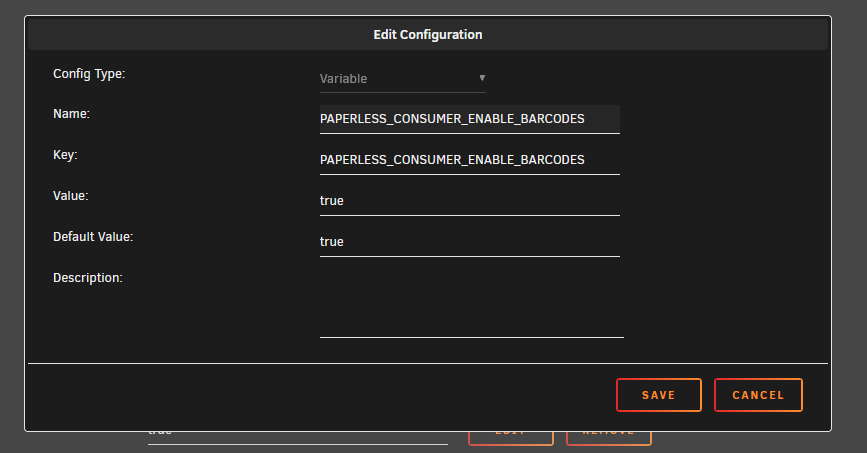
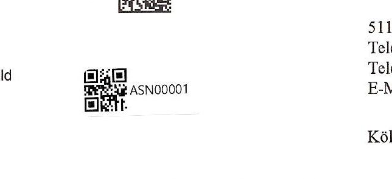
Tried that and unfortunately that does abosutly nothing for me I mean the ASN Barcodes (I am not sure if te website to generate my barcodes uses your script) but i printed a few to test them and so far no luck. i did the following: And no where in the config menu i find anything about barcodes, moreover if i scan a document with an ASN Barcode (they start at ASN00001) i can not even find it when i seach for ASN ( this is how my barcode looks scanned in paperless nxg - i [2024-11-12 18:04:29,951] [DEBUG] [paperless.barcodes] Scanning for barcodes using PYZBAR [2024-11-12 18:04:29,963] [DEBUG] [paperless.barcodes] PDF has 10 pages [2024-11-12 18:04:29,965] [DEBUG] [paperless.barcodes] Processing page 0 [2024-11-12 18:04:30,456] [DEBUG] [paperless.barcodes] Image is at /tmp/paperless/tmpz8trx3m9/barcode0m_vynwe/2f44446c-3a9b-4f2e-81b1-0809a1510240-01.ppm [2024-11-12 18:04:30,816] [DEBUG] [paperless.barcodes] Barcode of type QRCODE found: ASN00001 [2024-11-12 18:04:30,830] [DEBUG] [paperless.barcodes] Processing page 1 [2024-11-12 18:04:31,285] [DEBUG] [paperless.barcodes] Image is at /tmp/paperless/tmpz8trx3m9/barcode0m_vynwe/1398c1de-bf26-4dce-be36-bf9fc772c047-02.ppm [2024-11-12 18:04:31,595] [DEBUG] [paperless.barcodes] Processing page 2 [2024-11-12 18:04:32,070] [DEBUG] [paperless.barcodes] Image is at /tmp/paperless/tmpz8trx3m9/barcode0m_vynwe/fd82ac0b-3138-4916-be55-68c0ca9c7bb5-03.ppm [2024-11-12 18:04:32,378] [DEBUG] [paperless.barcodes] Processing page 3 [2024-11-12 18:04:32,819] [DEBUG] [paperless.barcodes] Image is at /tmp/paperless/tmpz8trx3m9/barcode0m_vynwe/5769e749-7f5a-48f8-b44f-3133f9d09baa-04.ppm [2024-11-12 18:04:33,090] [DEBUG] [paperless.barcodes] Processing page 4 [2024-11-12 18:04:33,553] [DEBUG] [paperless.barcodes] Image is at /tmp/paperless/tmpz8trx3m9/barcode0m_vynwe/85e5a079-dc1a-48ea-b2ff-f3c76c093478-05.ppm [2024-11-12 18:04:33,873] [DEBUG] [paperless.barcodes] Barcode of type QRCODE found: ASN00002 [2024-11-12 18:04:33,888] [DEBUG] [paperless.barcodes] Processing page 5 [2024-11-12 18:04:34,293] [DEBUG] [paperless.barcodes] Image is at /tmp/paperless/tmpz8trx3m9/barcode0m_vynwe/27895f78-b551-401f-b86b-953fcc4bb5c5-06.ppm [2024-11-12 18:04:34,462] [DEBUG] [paperless.barcodes] Processing page 6 [2024-11-12 18:04:34,908] [DEBUG] [paperless.barcodes] Image is at /tmp/paperless/tmpz8trx3m9/barcode0m_vynwe/259827d0-7c72-4699-8bce-b70824ba9adb-07.ppm [2024-11-12 18:04:35,152] [DEBUG] [paperless.barcodes] Processing page 7 [2024-11-12 18:04:35,543] [DEBUG] [paperless.barcodes] Image is at /tmp/paperless/tmpz8trx3m9/barcode0m_vynwe/8cbc9e88-0c00-4fc4-8da9-06aa7c567982-08.ppm [2024-11-12 18:04:35,709] [DEBUG] [paperless.barcodes] Processing page 8 [2024-11-12 18:04:36,143] [DEBUG] [paperless.barcodes] Image is at /tmp/paperless/tmpz8trx3m9/barcode0m_vynwe/e2404032-7dfc-4e36-aab9-655603b45fa4-09.ppm [2024-11-12 18:04:36,391] [DEBUG] [paperless.barcodes] Barcode of type QRCODE found: ASN00003 [2024-11-12 18:04:36,406] [DEBUG] [paperless.barcodes] Processing page 9 [2024-11-12 18:04:36,823] [DEBUG] [paperless.barcodes] Image is at /tmp/paperless/tmpz8trx3m9/barcode0m_vynwe/f357a339-4b03-468b-8bbd-5c923c5c87e3-10.ppm [2024-11-12 18:04:36,995] [INFO] [paperless.tasks] BarcodePlugin completed with no message The weird thing is the logs tell me they have found the barcode..... but have not split the document....why not? <<insert zoidberg.gif>>
-
Big Issue: Last night when I came home I wanted to finally set up paperless nxg (i had the container deploied and running for couple of days now but didn't do much more than Access it and look around) But unfortunately my Server had sever Dockers that just didn't work anymore - i couldn't connect to them. No Web GUI seemed to work as there was no Connection. So i checked the logs (fortunately Dozzle still works): Guacamole: sed: can't create temp file '/config/guacamole/logback.xmlXXXXXX': No space left on device Using existing properties file. Copying MySQL extension. cp: can't create '/config/guacamole/extensions/guacamole-auth-jdbc-mysql-1.5.4.jar': No space left on device cp: can't create '/config/guacamole/lib/mysql-connector-j-8.0.33.jar': No space left on device mkdir: can't create directory '/config/mysql-schema': File exists cp: can't create '/config/mysql-schema/001-create-schema.sql': No space left on device cp: can't create '/config/mysql-schema/002-create-admin-user.sql': No space left on device cp: can't create directory '/config/mysql-schema/upgrade': No space left on device Updating user permissions. Database exists. Database upgrade not needed. 2024-10-25 07:37:20,054 INFO Included extra file "/etc/supervisor/conf.d/supervisord.conf" during parsing 2024-10-25 07:37:20,055 INFO Set uid to user 0 succeeded 2024-10-25 07:37:20,058 INFO supervisord started with pid 28 2024-10-25 07:37:21,061 INFO spawned: 'guacd' with pid 29 2024-10-25 07:37:21,066 INFO spawned: 'mariadb' with pid 30 2024-10-25 07:37:21,071 INFO spawned: 'tomcat' with pid 31 guacd[29]: INFO: Guacamole proxy daemon (guacd) version 1.5.4 started guacd[29]: INFO: Listening on host 0.0.0.0, port 4822 2024-10-25 07:37:22,103 INFO success: guacd entered RUNNING state, process has stayed up for > than 1 seconds (startsecs) 2024-10-25 07:37:22,103 INFO success: mariadb entered RUNNING state, process has stayed up for > than 1 seconds (startsecs) 2024-10-25 07:37:22,104 INFO success: tomcat entered RUNNING state, process has stayed up for > than 1 seconds (startsecs) 2024-10-25 07:37:22,104 WARN exited: mariadb (exit status 1; not expected) 2024-10-25 07:37:23,109 INFO spawned: 'mariadb' with pid 94 2024-10-25 07:37:24,148 INFO success: mariadb entered RUNNING state, process has stayed up for > than 1 seconds (startsecs) 2024-10-25 07:37:24,149 WARN exited: mariadb (exit status 1; not expected) 2024-10-25 07:37:25,152 INFO spawned: 'mariadb' with pid 118 2024-10-25 07:37:26,195 INFO success: mariadb entered RUNNING state, process has stayed up for > than 1 seconds (startsecs) 2024-10-25 07:37:26,196 WARN exited: mariadb (exit status 1; not expected) 2024-10-25 07:37:27,199 INFO spawned: 'mariadb' with pid 120 2024-10-25 07:37:28,237 INFO success: mariadb entered RUNNING state, process has stayed up for > than 1 seconds (startsecs) 2024-10-25 07:37:28,242 WARN exited: mariadb (exit status 1; not expected) 2024-10-25 07:37:29,246 INFO spawned: 'mariadb' with pid 122 2024-10-25 07:37:30,285 INFO success: mariadb entered RUNNING state, process has stayed up for > than 1 seconds (startsecs) 2024-10-25 07:37:30,286 WARN exited: mariadb (exit status 1; not expected) 2024-10-25 07:37:31,293 INFO spawned: 'mariadb' with pid 124 2024-10-25 07:37:32,327 INFO success: mariadb entered RUNNING state, process has stayed up for > than 1 seconds (startsecs) 2024-10-25 07:37:32,327 WARN exited: mariadb (exit status 1; not expected) 2024-10-25 07:37:33,332 INFO spawned: 'mariadb' with pid 126 2024-10-25 07:37:34,367 INFO success: mariadb entered RUNNING state, process has stayed up for > than 1 seconds (startsecs) 2024-10-25 07:37:34,368 WARN exited: mariadb (exit status 1; not expected) 2024-10-25 07:37:35,372 INFO spawned: 'mariadb' with pid 128 2024-10-25 07:37:36,407 INFO success: mariadb entered RUNNING state, process has stayed up for > than 1 seconds (startsecs) 2024-10-25 07:37:36,407 WARN exited: mariadb (exit status 1; not expected) 2024-10-25 07:37:37,411 INFO spawned: 'mariadb' with pid 130 2024-10-25 07:37:38,444 INFO success: mariadb entered RUNNING state, process has stayed up for > than 1 seconds (startsecs) 2024-10-25 07:37:38,444 WARN exited: mariadb (exit status 1; not expected) 2024-10-25 07:37:39,449 INFO spawned: 'mariadb' with pid 132 frigate: 09:39:31 Container started s6-rc: info: service s6rc-fdholder: starting s6-rc: info: service s6rc-oneshot-runner: starting s6-rc: info: service s6rc-oneshot-runner successfully started s6-rc: info: service fix-attrs: starting s6-rc: info: service s6rc-fdholder successfully started s6-rc: info: service fix-attrs successfully started s6-rc: info: service legacy-cont-init: starting s6-rc: info: service legacy-cont-init successfully started s6-rc: info: service log-prepare: starting s6-rc: info: service log-prepare successfully started s6-rc: info: service nginx-log: starting s6-rc: info: service go2rtc-log: starting s6-rc: info: service frigate-log: starting s6-rc: info: service certsync-log: starting s6-rc: info: service nginx-log successfully started s6-rc: info: service frigate-log successfully started s6-rc: info: service go2rtc-log successfully started s6-rc: info: service go2rtc: starting s6-rc: info: service certsync-log successfully started s6-rc: info: service go2rtc successfully started s6-rc: info: service go2rtc-healthcheck: starting s6-rc: info: service frigate: starting s6-rc: info: service go2rtc-healthcheck successfully started s6-rc: info: service frigate successfully started s6-rc: info: service nginx: starting 2024-10-25 09:39:30.564283350 [INFO] Preparing Frigate... 2024-10-25 09:39:30.565502524 [INFO] Starting NGINX... 2024-10-25 09:39:30.572395568 [INFO] Preparing new go2rtc config... 2024-10-25 09:39:30.585011475 [INFO] Starting Frigate... 2024-10-25 09:39:31.021672688 [INFO] Starting go2rtc... 2024-10-25 09:39:31.121223774 09:39:31.121 INF go2rtc platform=linux/amd64 revision=b2399f3 version=1.9.2 2024-10-25 09:39:31.121551964 09:39:31.121 INF config path=/dev/shm/go2rtc.yaml 2024-10-25 09:39:31.121975043 09:39:31.121 INF [rtsp] listen addr=:8554 2024-10-25 09:39:31.121989851 09:39:31.121 INF [api] listen addr=:1984 2024-10-25 09:39:31.122142489 09:39:31.122 INF [webrtc] listen addr=:8555/tcp s6-rc: info: service nginx successfully started s6-rc: info: service certsync: starting s6-rc: info: service certsync successfully started s6-rc: info: service legacy-services: starting 2024-10-25 09:39:31.679263063 [INFO] Starting certsync... s6-rc: info: service legacy-services successfully started 2024-10-25 09:39:32.169381120 [2024-10-25 09:39:32] frigate.app INFO : Starting Frigate (0.14.1-f4f3cfa) 2024-10-25 09:39:32.169696485 [2024-10-25 09:39:32] frigate.util.config INFO : Checking if frigate config needs migration... 2024-10-25 09:39:32.246821047 [2024-10-25 09:39:32] frigate.util.config INFO : frigate config does not need migration... 2024-10-25 09:39:33.462777719 [2024-10-25 09:39:33] frigate.util.services WARNING : Did not detect hwaccel, using a GPU for accelerated video decoding is highly recommended 2024-10-25 09:39:33.508119300 unable to open database file 2024-10-25 09:39:34.851963246 [INFO] Service Frigate exited with code 1 (by signal 0) s6-rc: info: service legacy-services: stopping s6-rc: info: service legacy-services successfully stopped s6-rc: info: service go2rtc-healthcheck: stopping s6-rc: info: service certsync: stopping 2024-10-25 09:39:34.868031075 [INFO] The go2rtc-healthcheck service exited with code 256 (by signal 15) s6-rc: info: service go2rtc-healthcheck successfully stopped 2024-10-25 09:39:34.870489020 [INFO] Service CERTSYNC exited with code 256 (by signal 15) s6-rc: info: service certsync successfully stopped s6-rc: info: service nginx: stopping s6-rc: info: service certsync-log: stopping s6-rc: info: service certsync-log successfully stopped 2024-10-25 09:39:34.933597028 [INFO] Service NGINX exited with code 0 (by signal 0) s6-rc: info: service nginx successfully stopped s6-rc: info: service nginx-log: stopping s6-rc: info: service frigate: stopping s6-rc: info: service frigate successfully stopped s6-rc: info: service go2rtc: stopping s6-rc: info: service frigate-log: stopping s6-rc: info: service nginx-log successfully stopped 2024-10-25 09:39:34.938215384 exit with signal: terminated s6-rc: info: service frigate-log successfully stopped 2024-10-25 09:39:34.945634933 [INFO] The go2rtc service exited with code 0 (by signal 0) s6-rc: info: service go2rtc successfully stopped s6-rc: info: service go2rtc-log: stopping s6-rc: info: service go2rtc-log successfully stopped s6-rc: info: service log-prepare: stopping s6-rc: info: service s6rc-fdholder: stopping s6-rc: info: service log-prepare successfully stopped s6-rc: info: service legacy-cont-init: stopping s6-rc: info: service s6rc-fdholder successfully stopped s6-rc: info: service legacy-cont-init successfully stopped s6-rc: info: service fix-attrs: stopping s6-rc: info: service fix-attrs successfully stopped s6-rc: info: service s6rc-oneshot-runner: stopping s6-rc: info: service s6rc-oneshot-runner successfully stopped MariaDB: 25.10.2024 09:42:06 Container started [migrations] started [migrations] no migrations found usermod: no changes ─────────────────────────────────────── ██╗ ███████╗██╗ ██████╗ ██║ ██╔════╝██║██╔═══██╗ ██║ ███████╗██║██║ ██║ ██║ ╚════██║██║██║ ██║ ███████╗███████║██║╚██████╔╝ ╚══════╝╚══════╝╚═╝ ╚═════╝ Brought to you by linuxserver.io ─────────────────────────────────────── To support LSIO projects visit: https://www.linuxserver.io/donate/ ─────────────────────────────────────── GID/UID ─────────────────────────────────────── User UID: 99 User GID: 100 ─────────────────────────────────────── [custom-init] No custom files found, skipping... 241025 09:42:05 mysqld_safe Logging to '/config/databases/2133f311f16b.err'. 241025 09:42:06 mysqld_safe Starting mariadbd daemon with databases from /config/databases /usr/bin/mariadbd-safe-helper: Can't create/write to file '/config/databases/2133f311f16b.err' (Errcode: 28 "No space left on device") Caught SIGTERM signal! cat: /var/run/mysqld/mysqld.pid: No such file or directory 241025 09:42:07 mysqld_safe Logging to '/config/databases/2133f311f16b.err'. 241025 09:42:07 mysqld_safe Starting mariadbd daemon with databases from /config/databases /usr/bin/mariadbd-safe-helper: Can't create/write to file '/config/databases/2133f311f16b.err' (Errcode: 28 "No space left on device") Caught SIGTERM signal! cat: /var/run/mysqld/mysqld.pid: No such file or directory 241025 09:42:08 mysqld_safe Logging to '/config/databases/2133f311f16b.err'. 241025 09:42:08 mysqld_safe Starting mariadbd daemon with databases from /config/databases /usr/bin/mariadbd-safe-helper: Can't create/write to file '/config/databases/2133f311f16b.err' (Errcode: 28 "No space left on device") Caught SIGTERM signal! cat: /var/run/mysqld/mysqld.pid: No such file or directory 241025 09:42:09 mysqld_safe Logging to '/config/databases/2133f311f16b.err'. 241025 09:42:09 mysqld_safe Starting mariadbd daemon with databases from /config/databases /usr/bin/mariadbd-safe-helper: Can't create/write to file '/config/databases/2133f311f16b.err' (Errcode: 28 "No space left on device") Caught SIGTERM signal! cat: /var/run/mysqld/mysqld.pid: No such file or directory 241025 09:42:10 mysqld_safe Logging to '/config/databases/2133f311f16b.err'. 241025 09:42:10 mysqld_safe Starting mariadbd daemon with databases from /config/databases /usr/bin/mariadbd-safe-helper: Can't create/write to file '/config/databases/2133f311f16b.err' (Errcode: 28 "No space left on device") Caught SIGTERM signal! cat: /var/run/mysqld/mysqld.pid: No such file or directory 241025 09:42:11 mysqld_safe Logging to '/config/databases/2133f311f16b.err'. 241025 09:42:12 mysqld_safe Starting mariadbd daemon with databases from /config/databases Nextcloud: 25.10.2024 09:43:00 Container started [migrations] started [migrations] 01-nginx-site-confs-default: skipped [migrations] 02-default-location: skipped [migrations] done usermod: no changes ─────────────────────────────────────── ██╗ ███████╗██╗ ██████╗ ██║ ██╔════╝██║██╔═══██╗ ██║ ███████╗██║██║ ██║ ██║ ╚════██║██║██║ ██║ ███████╗███████║██║╚██████╔╝ ╚══════╝╚══════╝╚═╝ ╚═════╝ Brought to you by linuxserver.io ─────────────────────────────────────── To support LSIO projects visit: https://www.linuxserver.io/donate/ ─────────────────────────────────────── GID/UID ─────────────────────────────────────── User UID: 99 User GID: 100 ─────────────────────────────────────── Linuxserver.io version: 30.0.1-ls347 Build-date: 2024-10-22T11:52:26+00:00 ─────────────────────────────────────── cp: cannot create regular file '/config/nginx/nginx.conf.sample': No space left on device cp: cannot create regular file '/config/nginx/ssl.conf.sample': No space left on device cp: cannot create regular file '/config/nginx/site-confs/default.conf.sample': No space left on device sed: can't create temp file '/config/nginx/nginx.confXXXXXX': No space left on device using keys found in /config/keys After completing the web-based installer, restart the Nextcloud container to apply default memory caching and transactional file locking configurations. Alternatively, you can apply your own configurations by editing /config/www/nextcloud/config/config.php following the documentation: https://docs.nextcloud.com/server/latest/admin_manual/configuration_server/caching_configuration.html https://docs.nextcloud.com/server/latest/admin_manual/configuration_files/files_locking_transactional.html sed: can't create temp file '/config/www/nextcloud/config/config.phpXXXXXX': No space left on device **** The following site-confs have extensions other than .conf **** **** This may be due to user customization. **** **** You should review the files and rename them to use the .conf extension or remove them. **** **** nginx.conf will only include site-confs with the .conf extension. **** /config/nginx/site-confs/default.conf.bak [custom-init] No custom files found, skipping... [ls.io-init] done. nginx: [warn] the "listen ... http2" directive is deprecated, use the "http2" directive instead in /config/nginx/site-confs/default.conf:13 nginx: [warn] the "listen ... http2" directive is deprecated, use the "http2" directive instead in /config/nginx/site-confs/default.conf:14 Nginx: 25.10.2024 09:45:35 Container started ❯ Configuring npm user ... 0 usermod: no changes ❯ Configuring npm group ... ❯ Checking paths ... ❯ Setting ownership ... ❯ Dynamic resolvers ... ❯ IPv6 ... Enabling IPV6 in hosts in: /etc/nginx/conf.d - /etc/nginx/conf.d/default.conf - /etc/nginx/conf.d/include/assets.conf - /etc/nginx/conf.d/include/block-exploits.conf - /etc/nginx/conf.d/include/force-ssl.conf - /etc/nginx/conf.d/include/ip_ranges.conf - /etc/nginx/conf.d/include/letsencrypt-acme-challenge.conf - /etc/nginx/conf.d/include/log.conf - /etc/nginx/conf.d/include/proxy.conf - /etc/nginx/conf.d/include/ssl-ciphers.conf - /etc/nginx/conf.d/include/resolvers.conf - /etc/nginx/conf.d/production.conf Enabling IPV6 in hosts in: /data/nginx - /data/nginx/default_host/site.conf - /data/nginx/proxy_host/4.conf - /data/nginx/proxy_host/5.conf - /data/nginx/proxy_host/2.conf - /data/nginx/proxy_host/3.conf - /data/nginx/proxy_host/1.conf - /data/nginx/proxy_host/6.conf - /data/nginx/proxy_host/7.conf ❯ Docker secrets ... ------------------------------------- _ _ ____ __ __ | \ | | _ \| \/ | | \| | |_) | |\/| | | |\ | __/| | | | |_| \_|_| |_| |_| ------------------------------------- User: npm PUID:0 ID:0 GROUP:0 Group: npm PGID:0 ID:0 ------------------------------------- ❯ Starting backend ... ❯ Starting nginx ... nginx: [warn] the "listen ... http2" directive is deprecated, use the "http2" directive instead in /data/nginx/proxy_host/2.conf:14 nginx: [warn] the "listen ... http2" directive is deprecated, use the "http2" directive instead in /data/nginx/proxy_host/2.conf:15 nginx: [warn] the "listen ... http2" directive is deprecated, use the "http2" directive instead in /data/nginx/proxy_host/4.conf:14 nginx: [warn] protocol options redefined for 0.0.0.0:443 in /data/nginx/proxy_host/4.conf:14 nginx: [warn] the "listen ... http2" directive is deprecated, use the "http2" directive instead in /data/nginx/proxy_host/4.conf:15 nginx: [warn] protocol options redefined for [::]:443 in /data/nginx/proxy_host/4.conf:15 nginx: [warn] the "listen ... http2" directive is deprecated, use the "http2" directive instead in /data/nginx/proxy_host/5.conf:14 nginx: [warn] the "listen ... http2" directive is deprecated, use the "http2" directive instead in /data/nginx/proxy_host/5.conf:15 nginx: [warn] the "listen ... http2" directive is deprecated, use the "http2" directive instead in /data/nginx/proxy_host/6.conf:19 nginx: [warn] the "listen ... http2" directive is deprecated, use the "http2" directive instead in /data/nginx/proxy_host/6.conf:20 nginx: [warn] protocol options redefined for 0.0.0.0:443 in /data/nginx/proxy_host/7.conf:19 nginx: [warn] protocol options redefined for [::]:443 in /data/nginx/proxy_host/7.conf:20 [10/25/2024] [7:45:35 AM] [Global ] › ℹ info Using Sqlite: /data/database.sqlite [10/25/2024] [7:45:36 AM] [Migrate ] › ℹ info Current database version: none Can't take lock to run migrations: update `migrations_lock` set `is_locked` = 1 where `is_locked` = 0 - SQLITE_CANTOPEN: unable to open database file If you are sure migrations are not running you can release the lock manually by running 'knex migrate:unlock' [10/25/2024] [7:45:36 AM] [Global ] › ✖ error update `migrations_lock` set `is_locked` = 1 where `is_locked` = 0 - SQLITE_CANTOPEN: unable to open database file MigrationLocked: update `migrations_lock` set `is_locked` = 1 where `is_locked` = 0 - SQLITE_CANTOPEN: unable to open database file at /app/node_modules/knex/lib/migrations/migrate/Migrator.js:342:13 at async Migrator._runBatch (/app/node_modules/knex/lib/migrations/migrate/Migrator.js:358:7) [10/25/2024] [7:45:37 AM] [Migrate ] › ℹ info Current database version: none Can't take lock to run migrations: update `migrations_lock` set `is_locked` = 1 where `is_locked` = 0 - SQLITE_CANTOPEN: unable to open database file If you are sure migrations are not running you can release the lock manually by running 'knex migrate:unlock' [10/25/2024] [7:45:37 AM] [Global ] › ✖ error update `migrations_lock` set `is_locked` = 1 where `is_locked` = 0 - SQLITE_CANTOPEN: unable to open database file MigrationLocked: update `migrations_lock` set `is_locked` = 1 where `is_locked` = 0 - SQLITE_CANTOPEN: unable to open database file at /app/node_modules/knex/lib/migrations/migrate/Migrator.js:342:13 at async Migrator._runBatch (/app/node_modules/knex/lib/migrations/migrate/Migrator.js:358:7) \6 Einträge übersprungen [10/25/2024] [7:45:43 AM] [Migrate ] › ℹ info Current database version: none Can't take lock to run migrations: update `migrations_lock` set `is_locked` = 1 where `is_locked` = 0 - SQLITE_CANTOPEN: unable to open database file If you are sure migrations are not running you can release the lock manually by running 'knex migrate:unlock' [10/25/2024] [7:45:43 AM] [Global ] › ✖ error update `migrations_lock` set `is_locked` = 1 where `is_locked` = 0 - SQLITE_CANTOPEN: unable to open database file MigrationLocked: update `migrations_lock` set `is_locked` = 1 where `is_locked` = 0 - SQLITE_CANTOPEN: unable to open database file at /app/node_modules/knex/lib/migrations/migrate/Migrator.js:342:13 at async Migrator._runBatch (/app/node_modules/knex/lib/migrations/migrate/Migrator.js:358:7) [10/25/2024] [7:45:44 AM] [Migrate ] › ℹ info Current database version: none Can't take lock to run migrations: update `migrations_lock` set `is_locked` = 1 where `is_locked` = 0 - SQLITE_CANTOPEN: unable to open database file If you are sure migrations are not running you can release the lock manually by running 'knex migrate:unlock' [10/25/2024] [7:45:44 AM] [Global ] › ✖ error update `migrations_lock` set `is_locked` = 1 where `is_locked` = 0 - SQLITE_CANTOPEN: unable to open database file MigrationLocked: update `migrations_lock` set `is_locked` = 1 where `is_locked` = 0 - SQLITE_CANTOPEN: unable to open database file at /app/node_modules/knex/lib/migrations/migrate/Migrator.js:342:13 at async Migrator._runBatch (/app/node_modules/knex/lib/migrations/migrate/Migrator.js:358:7) Bitwarden: /--------------------------------------------------------------------\ | Starting Vaultwarden | | Version 1.32.2 | |--------------------------------------------------------------------| | This is an *unofficial* Bitwarden implementation, DO NOT use the | | official channels to report bugs/features, regardless of client. | | Send usage/configuration questions or feature requests to: | | https://github.com/dani-garcia/vaultwarden/discussions or | | https://vaultwarden.discourse.group/ | | Report suspected bugs/issues in the software itself at: | | https://github.com/dani-garcia/vaultwarden/issues/new | \--------------------------------------------------------------------/ [INFO] Using saved config from `data/config.json` for configuration. [WARNING] The following environment variables are being overridden by the config.json file. [WARNING] Please use the admin panel to make changes to them: [WARNING] SIGNUPS_ALLOWED, INVITATIONS_ALLOWED, ADMIN_TOKEN [DEPRECATED]: `SMTP_SSL` or `SMTP_EXPLICIT_TLS` is set. Please use `SMTP_SECURITY` instead. [NOTICE] You are using a plain text `ADMIN_TOKEN` which is insecure. Please generate a secure Argon2 PHC string by using `vaultwarden hash` or `argon2`. See: https://github.com/dani-garcia/vaultwarden/wiki/Enabling-admin-page#secure-the-admin_token [2024-10-25 09:46:28.501][panic][ERROR] thread 'main' panicked at 'Failed to turn on WAL: DatabaseError(Unknown, "unable to open database file")': src/db/mod.rs:455 0: vaultwarden::init_logging::{{closure}} 1: std::panicking::rust_panic_with_hook 2: std::panicking::begin_panic_handler::{{closure}} 3: std::sys::backtrace::__rust_end_short_backtrace 4: rust_begin_unwind 5: core::panicking::panic_fmt 6: core::result::unwrap_failed 7: vaultwarden::db::DbPool::from_config 8: vaultwarden::main::{{closure}} 9: vaultwarden::main 10: std::sys::backtrace::__rust_begin_short_backtrace 11: main 12: <unknown> 13: __libc_start_main 14: _start 25.10.2024 09:46:36 Container stopped SO I checked the drives: Filesystem Size Used Avail Use% Mounted on rootfs 63G 2.8G 61G 5% / tmpfs 128M 8.0M 121M 7% /run /dev/sda1 15G 1.7G 13G 12% /boot overlay 63G 2.8G 61G 5% /lib overlay 63G 2.8G 61G 5% /usr devtmpfs 8.0M 0 8.0M 0% /dev tmpfs 63G 0 63G 0% /dev/shm tmpfs 128M 5.5M 123M 5% /var/log tmpfs 1.0M 1.0M 0 100% /mnt/disks tmpfs 1.0M 0 1.0M 0% /mnt/remotes tmpfs 1.0M 0 1.0M 0% /mnt/addons tmpfs 1.0M 0 1.0M 0% /mnt/rootshare /dev/md1p1 9.1T 8.0T 1.2T 88% /mnt/disk1 /dev/md2p1 9.1T 8.0T 1.2T 88% /mnt/disk2 /dev/md3p1 9.1T 8.0T 1.2T 88% /mnt/disk3 /dev/md4p1 9.1T 8.0T 1.2T 88% /mnt/disk4 /dev/md5p1 9.1T 7.8T 1.4T 86% /mnt/disk5 /dev/nvme1n1p1 1.9T 1.8T 105G 95% /mnt/cache /dev/nvme0n1p1 1.9T 215G 1.7T 12% /mnt/speicher shfs 46T 40T 5.9T 88% /mnt/user0 shfs 46T 40T 5.9T 88% /mnt/user /dev/loop2 200G 77G 121G 39% /var/lib/docker tmpfs 1.0M 1.0M 0 100% /mnt/disks concerns me.... but I don't really know what to do about it EDIT.... ok my cache was apparently full... so yeah... that fixed everything
-
@CatDuck Thank you for all your hard work... will there be an update on the teddycloud container as they have just released 0.60? Thank you.
-
That solved it! Thank you. Another thing: When I look at the frigate container in doozle it uses ~150% of the CPU while basically all other containers use less than 10%. Can I reduce the cpu thirst of frigate
-
Ich hab Frigate im Einsatz als Container auf Unraid, aber eigentlich verwertet in Home Assistant (als VM auf Unraid). Nun habe ich aber zufälligerweise etwas festgestellt - Frigate scheint sich alle "freien" Grafikkarten zu schnappen, was zur folge hatte, dass die VMs die nicht automatisch gestartet wurden aber eine dedizierte GPU zugewiesen hatten, den Dienst quttierten da Frigate ihnen die GPU weggeschnappt hat. Ich habe bei den Einstellungen des Frigate Dockers eigentlich nur 1 GPU zugewiesen, tortzdem nimmt er bis zu 3 GPUs in anspruch.
-
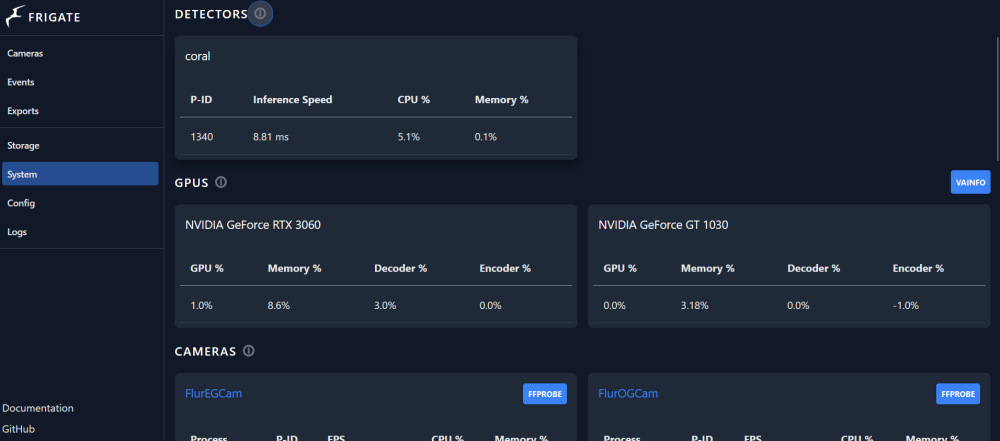
Actually I have a question regarding this as frigate in my case seems to "grab" all GPUs available and this is what i do NOT want. I have some dedicated GPUs for VMs and if frigate uses those GPUs the VMs won't start, therefore I want to limit frigate to just one GPU. But somehow this seems impossible to me: here's my Frigate Docker Config: docker run -d --name='frigate' --net='host' --privileged=true -e TZ="Europe/Berlin" -e HOST_OS="Unraid" -e HOST_HOSTNAME="Server" -e HOST_CONTAINERNAME="frigate" -e 'TCP_PORT_5000'='5000' -e 'TCP_PORT_8554'='8554' -e 'FRIGATE_RTSP_PASSWORD'='***' -e 'NVIDIA_VISIBLE_DEVICES'='GPU-bd161e6e-9b15-d71a-ec49-8c085ea02ad1' -e 'NVIDIA_DRIVER_CAPABILITIES'='compute,utility,video' -e 'TCP_PORT_8555'='8555' -e 'UDP_PORT_8555'='8555' -e 'TCP_PORT_1984'='1984' -l net.unraid.docker.managed=dockerman -l net.unraid.docker.webui='http://[IP]:[PORT:5000]' -l net.unraid.docker.icon='https://raw.githubusercontent.com/yayitazale/unraid-templates/main/frigate.png' -v '/mnt/user/appdata/frigate':'/config':'rw' -v '/mnt/user/Media/frigate':'/media/frigate':'rw' -v '/etc/localtime':'/etc/localtime':'rw' --device='/dev/bus/usb/006/002' --runtime=nvidia --shm-size=256mb --mount type=tmpfs,target=/tmp/cache,tmpfs-size=1000000000 --restart unless-stopped 'ghcr.io/blakeblackshear/frigate:stable' 440515ff723a15052068c74656fef26f189832b762fe93eb1766155f8130e599 The command finished successfully! The only way is to start the VMs before I start frigate - this is not an option for me. With this config and one VM started before frigate, frigate still shows up 2 GPUs: Please how can i remove the rtx 3060? Or in other words how can i limit frigate to the 1030? The 1030 has the GPU id mentioned above in the frigate docker config. Thank you for your advice!
-
sorry i am stupid i did not see the guide
-
Hi, I am trying to install freepbx apps SIP server as VM. Unfortunately I can't get it to have a network device. (None is showing during the install process) My Mainboard has 3 rj45 outlets. So theoretically I could use one just for freepbx. Can someone tell me how to pass that through to the VM? Or is there a simpler solution? Thank you Gesendet von meinem Pixel 6 Pro mit Tapatalk
-
So I have trying to set up this frigate container for some time now and it took me a while to figure out that it apparently keeps restarting within several seconds. (I thought i had a faulty config.yml because i just got the spinning wheel on the web ui and tried to mess around with it) This is the error i get: Traceback (most recent call last): File "/usr/local/go2rtc/create_config.py", line 27, in <module> config: dict[str, any] = yaml.safe_load(raw_config) File "/usr/local/lib/python3.9/dist-packages/yaml/__init__.py", line 125, in safe_load return load(stream, SafeLoader) File "/usr/local/lib/python3.9/dist-packages/yaml/__init__.py", line 81, in load return loader.get_single_data() File "/usr/local/lib/python3.9/dist-packages/yaml/constructor.py", line 49, in get_single_data node = self.get_single_node() File "/usr/local/lib/python3.9/dist-packages/yaml/composer.py", line 36, in get_single_node document = self.compose_document() File "/usr/local/lib/python3.9/dist-packages/yaml/composer.py", line 55, in compose_document node = self.compose_node(None, None) File "/usr/local/lib/python3.9/dist-packages/yaml/composer.py", line 84, in compose_node node = self.compose_mapping_node(anchor) File "/usr/local/lib/python3.9/dist-packages/yaml/composer.py", line 133, in compose_mapping_node item_value = self.compose_node(node, item_key) File "/usr/local/lib/python3.9/dist-packages/yaml/composer.py", line 84, in compose_node node = self.compose_mapping_node(anchor) File "/usr/local/lib/python3.9/dist-packages/yaml/composer.py", line 127, in compose_mapping_node while not self.check_event(MappingEndEvent): File "/usr/local/lib/python3.9/dist-packages/yaml/parser.py", line 98, in check_event self.current_event = self.state() File "/usr/local/lib/python3.9/dist-packages/yaml/parser.py", line 428, in parse_block_mapping_key if self.check_token(KeyToken): File "/usr/local/lib/python3.9/dist-packages/yaml/scanner.py", line 116, in check_token self.fetch_more_tokens() File "/usr/local/lib/python3.9/dist-packages/yaml/scanner.py", line 223, in fetch_more_tokens return self.fetch_value() File "/usr/local/lib/python3.9/dist-packages/yaml/scanner.py", line 577, in fetch_value raise ScannerError(None, None, yaml.scanner.ScannerError: mapping values are not allowed here in "<unicode string>", line 13, column 11: ffmpeg: ^ s6-rc: info: service legacy-services: stopping s6-rc: info: service legacy-services successfully stopped s6-rc: info: service nginx: stopping s6-rc: info: service go2rtc-healthcheck: stopping s6-rc: info: service go2rtc-healthcheck successfully stopped s6-rc: info: service nginx successfully stopped s6-rc: info: service nginx-log: stopping s6-rc: info: service frigate: stopping s6-rc: info: service frigate successfully stopped s6-rc: info: service go2rtc: stopping s6-rc: info: service frigate-log: stopping s6-rc: info: service nginx-log successfully stopped s6-rc: info: service go2rtc successfully stopped s6-rc: info: service go2rtc-log: stopping s6-rc: info: service frigate-log successfully stopped s6-rc: info: service go2rtc-log successfully stopped s6-rc: info: service log-prepare: stopping s6-rc: info: service s6rc-fdholder: stopping s6-rc: info: service log-prepare successfully stopped s6-rc: info: service legacy-cont-init: stopping s6-rc: info: service s6rc-fdholder successfully stopped s6-rc: info: service legacy-cont-init successfully stopped s6-rc: info: service fix-attrs: stopping s6-rc: info: service fix-attrs successfully stopped s6-rc: info: service s6rc-oneshot-runner: stopping s6-rc: info: service s6rc-oneshot-runner successfully stopped 2023-12-24 11:13:28.919764877 File "/usr/local/lib/python3.9/dist-packages/yaml/composer.py", line 133, in compose_mapping_node 2023-12-24 11:13:28.919765669 item_value = self.compose_node(node, item_key) 2023-12-24 11:13:28.919780186 File "/usr/local/lib/python3.9/dist-packages/yaml/composer.py", line 84, in compose_node 2023-12-24 11:13:28.919781148 node = self.compose_mapping_node(anchor) 2023-12-24 11:13:28.919782120 File "/usr/local/lib/python3.9/dist-packages/yaml/composer.py", line 127, in compose_mapping_node 2023-12-24 11:13:28.919783051 while not self.check_event(MappingEndEvent): 2023-12-24 11:13:28.919783933 File "/usr/local/lib/python3.9/dist-packages/yaml/parser.py", line 98, in check_event 2023-12-24 11:13:28.919784684 self.current_event = self.state() 2023-12-24 11:13:28.919785606 File "/usr/local/lib/python3.9/dist-packages/yaml/parser.py", line 428, in parse_block_mapping_key 2023-12-24 11:13:28.919807958 if self.check_token(KeyToken): 2023-12-24 11:13:28.919809081 File "/usr/local/lib/python3.9/dist-packages/yaml/scanner.py", line 116, in check_token 2023-12-24 11:13:28.919809842 self.fetch_more_tokens() 2023-12-24 11:13:28.919810744 File "/usr/local/lib/python3.9/dist-packages/yaml/scanner.py", line 223, in fetch_more_tokens 2023-12-24 11:13:28.919811645 return self.fetch_value() 2023-12-24 11:13:28.919812547 File "/usr/local/lib/python3.9/dist-packages/yaml/scanner.py", line 577, in fetch_value 2023-12-24 11:13:28.919813288 raise ScannerError(None, None, 2023-12-24 11:13:28.919814080 yaml.scanner.ScannerError: mapping values are not allowed here 2023-12-24 11:13:28.919814851 in "<unicode string>", line 13, column 11: 2023-12-24 11:13:28.919815573 ffmpeg: 2023-12-24 11:13:28.919816244 ^ 2023-12-24 11:13:28.919816885 2023-12-24 11:13:28.919817687 ************************************************************* 2023-12-24 11:13:28.919818498 *** End Config Validation Errors *** 2023-12-24 11:13:28.919819310 ************************************************************* 2023-12-24 11:13:29.277951226 [INFO] Preparing go2rtc config... 2023-12-24 11:13:29.535628713 [INFO] The go2rtc service exited with code 1 (by signal 0) 2023-12-24 11:13:30.100706110 [INFO] Service Frigate exited with code 1 (by signal 0) 2023-12-24 11:13:30.111917236 [INFO] The go2rtc-healthcheck service exited with code 256 (by signal 15) 2023-12-24 11:13:30.149506121 [INFO] Service NGINX exited with code 0 (by signal 0) What did i do wrong? EDIT: AHA! The name of the cam is not a mapping this was throwing me off!!
-
Ok this is a general question. Is it possible to use PXE to boot a VM from the server? To clarify: let's say I have a working VM on unraid and I have a pxe capable device, could I use this device to boot the VM on that device? To be more precise: I have a Windows 11 VM all setup and working on unraid. I also have a laptop that supports PXE booting. Is there some way to boot that Windows 11 VM so it runs on the laptop via PXE, or is that just not how PXE works? Thanks for your time. Gesendet von meinem Pixel 6 Pro mit Tapatalk
-
I would suggest tinymediamanager for movies and series (highly customizable) as docker image And musicbrainz Picard for music files also as docker image Gesendet von meinem Pixel 6 Pro mit Tapatalk


