





RichJacot
Members
-
Joined
-
Last visited
-
Ouch! Thank you! I'll skim through the first pages to get an idea but I may just redo everything. It's not a huge setup. Thanks again!
-
Hello, I'm still running on lscr.io/linuxserver/unifi-controller:7.4.156 on by backup unraid server. I installed 11notes/unifi:10-unraid on my primary unraid server. I'm moving my backup unraid server to another home that I have unifi in and need a controller there. I took a backup and shutdown the unifi 7.4 docker on the backup server, installed the new unifi reborn on the primary server, restored the backup, waited and restarted the docker. I had to change the container port from 8080 to 8081, 8080 was already in use by another docker. I ssh'd to my switches and APs and used the set-inform http://<controller-ip>:8081/inform on each. They 'seemed' to adopt after doing the set-infrom. However after a short while, everything went offline. I couldn't get to anything, even on the same vlan. I couldn't ping anything even when I set my desktop to a static IP (same vlan). I had to factory reset the switch both the primary, backup, and desktop were plugged into. After which I shutdown the unifi reborn docker, started the old 7.4 controller. I then went around and factory reset my other devices. They adopted into the old 7.4 and all is well again and has been for a few hours. I'm assuming it's stable. What did I do wrong or what is the best approach to what I'm trying to do? Or a better suggestion(s)?
-
The way you suggested, Thank you for posting BTW, looked like the long way around so I kept look for a shorter path. ;-) I found "https://github.com/uglymagoo/plex-claim-server" in my hunt. I used this and it worked for me. I followed the minimal instructions posted and it worked in my case. I'd like to know why a simple password change causes so much work! Hopefully I'll remember this when it comes up again. Thanks ohmaxx
-
I just did the reset and I'm getting the same as you now. Have you found a solution yet? I don't have the claim variable like you do though. Either way, I'll keep digging and report back if I find something.
-
No, just binhex-sabnzbd. It's been working right along now. 'shrug'
-
I've been watching this thread because I started having issue as well (just about the same time). Pretty much match what you're saying above. A couple days ago, I blew it away and reinstalled, and didn't restore anything for back up either. knock on wood.....it's been running fine since, on the latest.
-
Hello, I'm unsure the order of the steps, maybe even all of the steps involved, to get all my dockers over to spinners before recreating my cache to ZFS. I'd like to use snapshot instead of Backup/Restore Appdata for backups. My Docker settings Default appdata storage location is: /mnt/cache_nvme/appdata/ I have/had plenty of cache_nvme space and wanted the performance of nvme over spinner for some of my dockers. Now if that was where all of my dockers were, it probably wouldn't be an issue and I could follow one of spaceinvader's videos to move everything. The problem is, less important or dockers I didn't feel needed the performance gains being on nvme, I specified in their config to use /mnt/user/appdata/. Does anyone know the best order to get my mess cleaned up? Should I go through all my contains first and change everything that has /mnt/cache_nvme/appdata to /mnt/user/appdata/? Actually, should I just go through EVERY container and everywhere there is /mnt/cache_nvme/*, change it to /mnt/user/* ? Will changing this location in all of the configs automatically move everything from cache to spinners for said container? Then (2nd) shutdown docker, manually mv everything in /mnt/cache_nvme/ to /mnt/user/ ? Then (3rd) change the docker settings Default appdata storage location is: to /mnt/user/appdata/ , then (4th) change all of the shares that use nvme to Array. Start docker back up with my fingers crossed? Once I have everything on spinners and nothing hitting nvme, I can destroy it and recreate with zfs. After which I "think" I should just change the shares to cache_nvme <-- Array. Obviously I'd take a backup with Backup/Restore Appdata before doing any of the above. Not sure I'd know how to get back if I mucked up the above but at least I'd have a backup. cube-diagnostics-20250507.-0857.zip
-
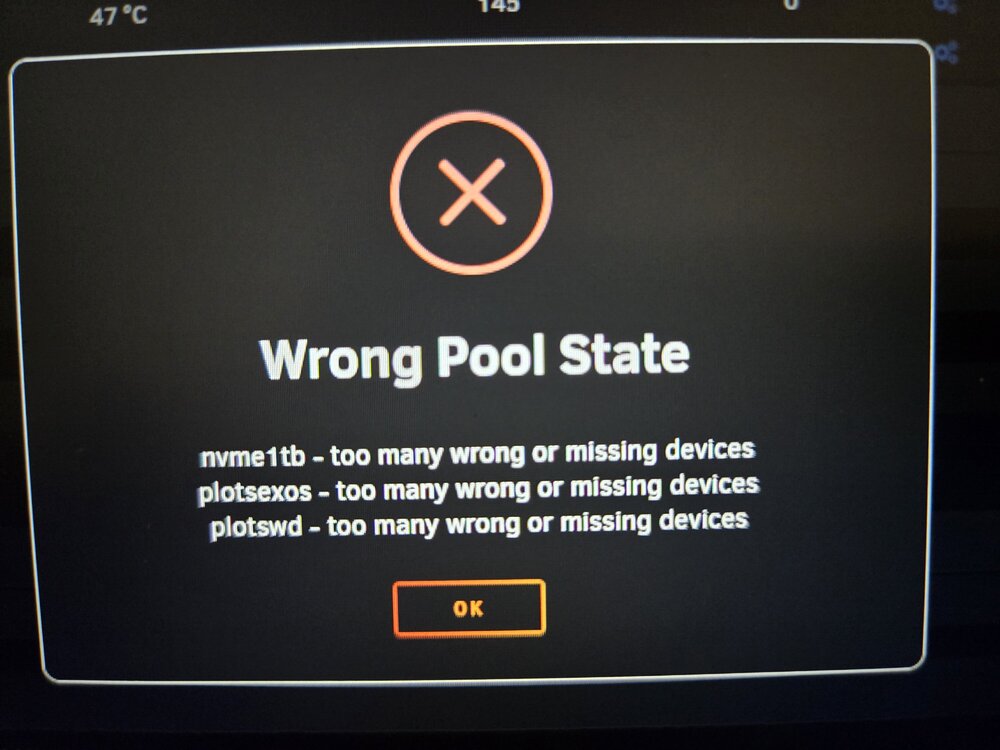
I figured out what the three are and that I don't need them. I just removed the three pools and was able to start the array. Not a fix, but it got me up and running. Thanks
-
Hello, I just upgraded to 7.0 stable and I'm getting something similar. Unless the nvme1tb is part of Cache_nvme, I can lose/drop these three problems. The nmve1tb 'might' be and old 1tb nmve I attached at one time in the past. Any ideas? Thanks! cube-diagnostics-20250110-0746.zip
-
Mine just started working out of the blue, no changes on my end.
-
Any headway on this matter? I'm started having the issue this morning with a couple dockers. I decided to try to use "Check For Updates" at the bottom of the docker screen. Now ALL of my dockers are saying "not available". 😞 Following...
-
Well... Somehow the system changed/thinks the IDs are different than they were. I plugged the drive labeled 47CL back in and unplugged the drive labeled 18CT and it thinks it's 18CT in the main array screen. I selected it and selected the new drive from the dropdown to replace the failed drive 6. It's currently rebuilding from parity. A know for a fact I did NOT peel and move stickers. I have no idea how it got confused.
-
I tried a different connector on the replacement drive and now it thinks the parity drive is one that is no longer in the system. I put stickers on all of the drives when they were installed and booted so I could see the IDs the system assigned, with the last four of their IDs, and 18CT is plugged in. Now even when I unplug the replacement drive it's showing the parity drive as 47CL, which is sitting next to me. I'm at a loss....
-
I had a drive fail in the array. I had a spare so I'm thinking I'll just shut the array down and swap the drive out. BUT whenever I plug a drive in, the same connections as the failed one, and boot the system up, that parity drive drops off/goes missing. I unplug the one I used as a replacement and boot back up and the parity drive is back like normal. I thought there was an issue maybe with the replacement I was using so I ordered another drive, pre zero'd it and it's doing the same thing. Plug the new drive in, boot up, parity disappears. Does anyone have any ideas or suggestions? TIA
-
Following to see what the solutions ends up being. I've used this for over a year now and it's worked fine. I give it a look every few months and it HAD been working fine. I've removed and reinstalled, change the /config some have mentioned and tried the BR0... still no go. Very frustrating to say the least.
