





Zero Cool
Members
-
Joined
-
Will there be a (heavily) discounted price for users who already have a pro license and want to buy a second 'lifetime' license? I'm currently building a second server from secondhand/used ebay parts and just got the shock of my life when I found out about the new pricing model about an hour ago. $249 for a lifetime license?! That's almost as expensive as my soon to be second server. I would happily pay $129 for the 'old' pro license but $249? As for the Unleashed version, I could pay $89 to have I for one year and keep it at that version until I feel the need to have a $36 paid upgrade but I truly resent paid subscriptions (hence why I'm into self-hosting in the first place).
-
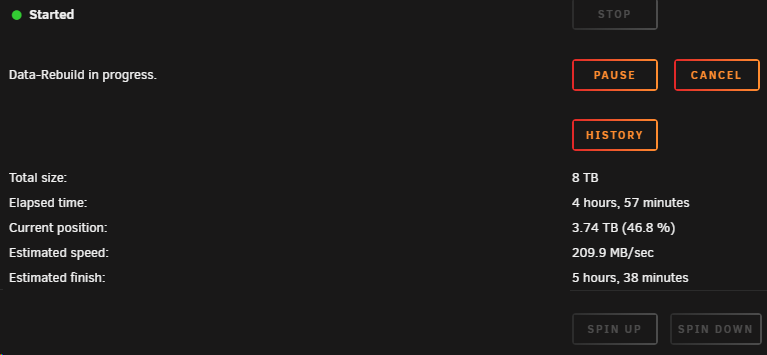
Sorry for the late reply. Happy New Year by the way! 🙂 I did some tests with /mnt/disk1 and /mnt/disk3 (and even /mnt/disk2). The transfer rates did go up to round 100MB/s (thus being higher than 80MB/s) but no where near the 'minimum' transfer rates of what my disks are capable of. For comparison, I’m currently rebuilding disk2 and these are the speeds I’m getting so it can’t be a hard drive issue. Or am I missing something and comparing apples and oranges?

-
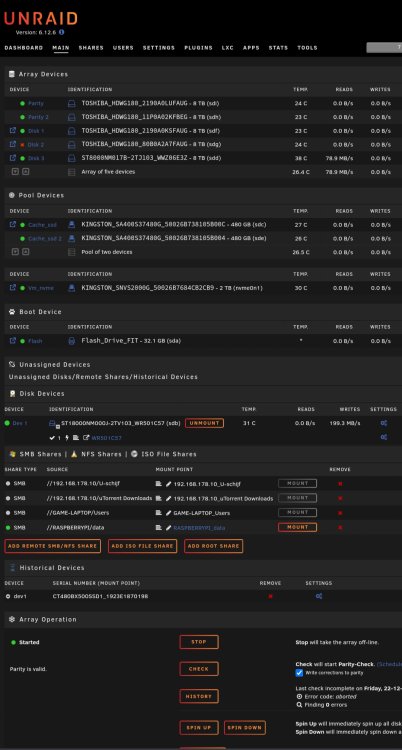
It's mostly mediafiles (between 300MB and 1,5GB in size). And I got the same speed when copying from disk1 and from (emulated) disk2. I've included a screenshot to go with it.
-
Long story short, I'm at the moment copying everything from my array to another harddrive which I'll store elsewhere after which I'll fix my failed drive. All harddrives are capable of read and write speeds in excess of 185MB/s but still the transferspeed is 'stuck' at around 80MB/s. All hard drives are directly connected in the server via SATA so that shouldn't be an issue. Docker and VM services are disabled to prevent anything else on the server from read/writing data to/from the array. The command I'm using for the transfer I saved it as a user script (copy shares) and is running in the background: rsync -ah --info=progress2 --stats /mnt/user/{Backups,Cursus,data,DCIM,isos,roms,software,temp_vm,VMstorage} /mnt/disks/WR501C57/ &> /mnt/user/Cache_ssd/rsynclog_20231230.txt Could someone explain/figure out what the bottleneck is here and maybe hoe this could be solved? System diagnostics are included. Thanks in advance. PS. It's my first time posting something here so if I did something wrong, please guide me. klaroen-diagnostics-20231231-1151.zip
-
Somewhat exactly the same here. Running on 6.9.2 I've passthroughed the NVMe, USB controllers and GTX 1660 gpu. Everything is working flawlessly on 6.9.2. But as soon as I upgrade to 6.10.3 or 6.11, the whole passthrough never works. The NVMe drive fails to even post/boot. Bare metal everything works fine. Even if I nuke the whole vm and create a freshly new one, it doesn't passthrough anything (tried a bunch of settings and still failed). When downgraded to 6.9.2, everything was working flawless again. Like all others here, couldn't find a solution anywhere so I just gave up.


