





Silhouette UK
Members
-
Joined
-
Last visited
Everything posted by Silhouette UK
-
Art of server flashes the cards into IT mode to enable you to use it for Unraid etc. This may not be the case for the Chinese versions, leaving you to try to flash the card yourself! I bought my card from Art of Server and have not had any trouble!
-
I have a HBA installed, I assume it will fit most new motherboards? Which will make the transition easier. Thanks, Mel
-
Hi All, I have an old R710 with SAS drives. I am thinking of building a new desktop server to replace the Dell rack mount and wondered if it’s possible to transfer my data from the old SAS drives to new SATA drives? Thanks for any help, Mel
-
That is my assumption, I have logged a message with the ISP’s help page to see what their response is!
-
thanks for the reply, yes I did, also the 2nd NIC port is set to DHCP as a test that I did before I tried all the other changes. mel
-
Hi Guys, Here's my problem: I have a Dell R710ii server that I set up Unraid on about 5 years ago, at the time I was with a different ISP and used an Asus router. Due to work, moving house and family commitments this has been powered off for several months, during which time I have changed to a different ISP and now use their router. My issue is that the router does not seem to see the server, the cable is fine and I can connect my laptop and use the network etc. but when I connect into the Dell NIC I get lights flashing but no connection to the router! The router default DHCP range is set from 192.168.1.64 to 192.168.1.253 with the router on 192.168.1.254 the lower IP's are for fixed IP's. My server has a fixed IP of 192.168.1.186 gateway of 192.168.1.254 subnet of 255.255.255.0 and would not connect to the router, I thought it was due to the DHCP range, so I altered the DHCP range minimum from .64 to .200, still no connection with the router!! So I reset to factory on the router and altered the server to .40 and still no joy! Can anyone advise further actions? I'm not totally familiar with networks etc but did get it all working originally at my last property! Thanks for any help/pointers, Mel.
-
booted into server now 😃 all sorted! Thank you very much for your assistance, most appreciated 👍 best regards, Mel.
-
So I have to go through the set up on the new drive using the GUI and use the backup feature on the dashboard?
-
yes, it boots on a new drive with the stock install!
-
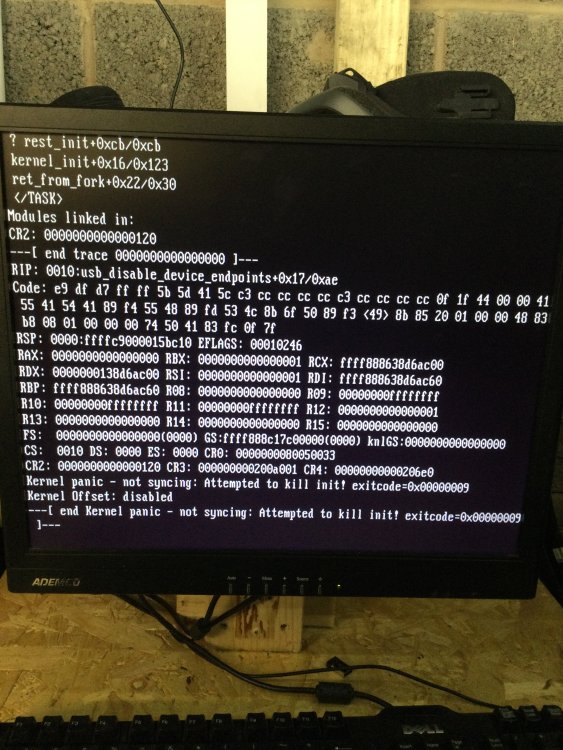
Sorry for the delay I've been away with work! Photo attached of error screen:
-
Hi All, My server stopped responding on the network, I could not access the system at all! I rebooted the server to try to reset it and all I got was "kernel panic - not syncing: Attempted to kill init! exitcode=0x00000009 I have used a backup from my servers to replace the USB drive but the error is still occurring! I am a relative newbie to servers and Unraid so any help would be most appreciated regards, mel.
-
Hi guys, I already have my Unraid server up and running and I’m using it for Plex and Shinobi at the moment. I have just acquired these from EBay:- PowerEdge R410, Intel XEON E5603 1.6 GHz, 8GB RAM, No HDD PowerEdge R710, (x2) Intel XEON E5640 2.66GHz, 48GB RAM, No HDD PowerVault MD3200i, No HDD I will be collecting them Friday and hope to build a better server and storage facility than my current Dell T5810. Has anyone used the MD3200i with unraid? regards, mel.
-
I shall follow Spaceinvaderone videos, as they seem to be mentioned quite a lot in this forum
-
Again, many thanks!
-
I'm in!! thanks for your time and effort!
-
invalid certificate!
-
is it something to do with the SSL cert?
-
when i try to access via the local gui ie local access on my servers i get "safari can't find the server e2234da43d etc .unraid,net" the same if i try to acces with ip or name of server.
-
Yes i get a response from Google.com. my servers can see the server and its online.
-
How do i get to the command line on the console? i have my unraid servers name and a login request. sorry, as i previously advised i'm a total newbie!
-
yes
-
sorry, server is visible on router
-
Thanks for the response! as you can probably tell, i'm a complete novice! it will not connect with IP or name. it was and is now DHCP. yes i now have a monitor and keyboard/mouse connected directly to the server.
-
Hi guys, I'm after some guidance please! I have been trying to set up my server for the past couple of weeks. Unraid was set up and working fine and I was setting up Plex in a Docker (the Plex own) and having a few issues. My Utility company changed my meters this morning and we had power off for a while, on return of power my router was not operating properly or allowing connections! I factory reset the router and it is now ok and working, but now I cannot access my server via my servers won't connect and I get a blank screen with a cursor when I try GUI mode on boot up! So at this moment in time I have a box of electronics that is useless. Any help would be very gratefully received
-
as an aside, would it be better to use a docker that is supported here?


