





Everything posted by CodeThief
-
I had mounted it on my cache drive, but in a share which I'd forgotten was set to migrate over to the array
-
For anyone else suffering this problem, it was because I'd set the container to store the mapped /var/lib/postgresql path on my cache drive, and the Unraid Mover had moved some of the files off to the Array! I've since created another share which lives purely on the cache drive and mapped the container to it. Hopefully that'll sort it!
-
Hi, I can't work out the pattern, but I started running this Postgresql 18 container the other day and it keeps stopping after about 14 hours, and then won't restart again. The logs just say: The files belonging to this database system will be owned by user "postgres". This user must also own the server process. The database cluster will be initialized with locale "en_US.utf8". The default database encoding has accordingly been set to "UTF8". The default text search configuration will be set to "english". Data page checksums are enabled. initdb: error: directory "/var/lib/postgresql/18/docker" exists but is not empty initdb: hint: If you want to create a new database system, either remove or empty the directory "/var/lib/postgresql/18/docker" or run initdb with an argument other than "/var/lib/postgresql/18/docker". The first time this happened I deleted the entire docker folder and then it restarted OK, but obviously I lost my data. I'd like to try and understand why this is happening. Do you have any ideas why this might suddenly have started to happen? Thanks
-
Hi, Is there a log rotation configuration available somewhere, or a way to change the log path for this Urbackup container, please? I've just noticed that my urbackup.log file is 4.4GB in size and when this is backed up every night by the appdata backup plugin it's taking up quite some space in copies! Thanks
-
Just in case anyone else has this problem I worked around it by using the bash shell of the container, downloading the v1.17.7 source of MakeMKV, building it and installing it. Everything works now! Change into a temp folder somewhere inside of the container and run the following: curl https://makemkv.com/download/old/makemkv-bin-1.17.7.tar.gz --output makemkv-bin-1.17.7.tar.gz curl https://makemkv.com/download/old/makemkv-oss-1.17.7.tar.gz --output makemkv-oss-1.17.7.tar.gz Untar these tar xvf makemkv-bin-1.17.7.tar.gz tar xvf makemkv-oss-1.17.7.tar.gz Build and install cd makemkv-oss-1.17.7 ./configure make make install cd .. cd makemkv-bin-1.17.7 make make install Now try ripping a disc again!
-
Has anyone actually managed to use this recently? It seems to be another victim of MakeMKV > 1.17.7 not working
-
I think it's related to the recent MakeMKV versions. I went back to 1.17.7 via the repo tag (1.17.7-4-01) on the container config and it works fine with this old version!
-
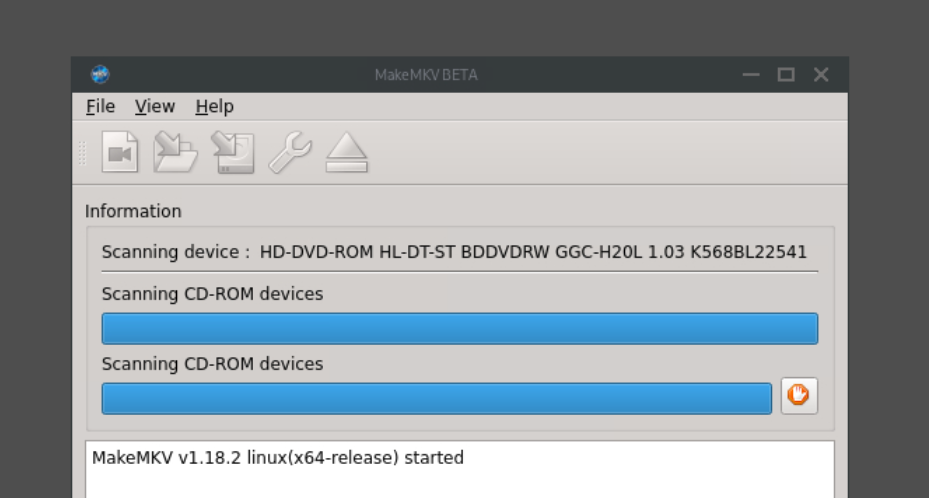
Hi there, I've passed through my device to the container with both device names but it just sits like this after MakeMKV has loaded: Any ideas what might be going on? It's the same with a blu-ray or DVD disc. The drive is in a USB enclosure in case that matters... Thanks!
-
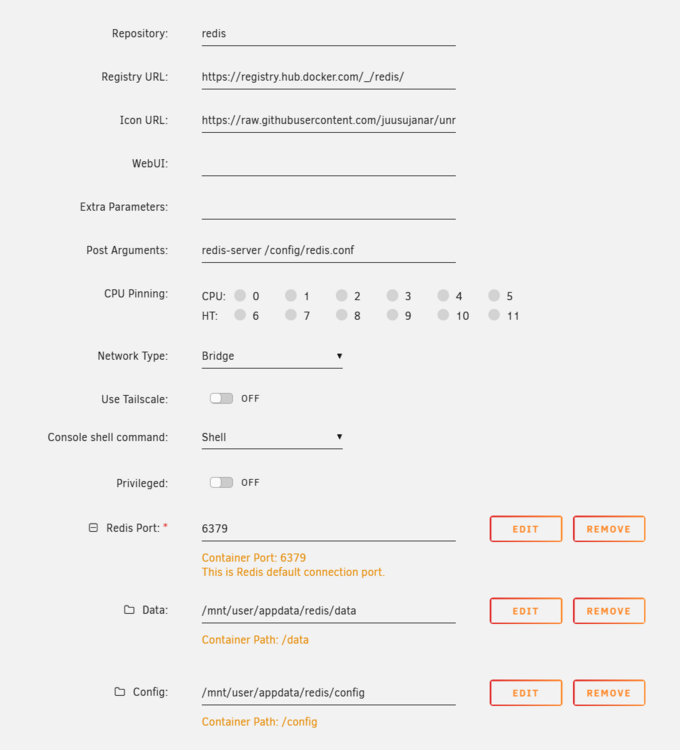
AAARRGGHHH the example redis-full.conf from the website has the following at the top and I didn't notice: include redis.conf loadmodule ./modules/redisbloom/redisbloom.so loadmodule ./modules/redisearch/redisearch.so loadmodule ./modules/redisjson/rejson.so loadmodule ./modules/redistimeseries/redistimeseries.soRemoving that lot fixed the problem!

-
I'm struggling to get this container to start when I specify my config file in the post arguments. It just throws the following in the logs: 1:C 11 Sep 2025 22:16:31.208 # Fatal error, can't open config file 'redis.conf': No such file or directory Here's my container config: I must be doing something silly, but I can't spot it! Anyone got any ideas?
-
Oh my goodness, what an idiot I am! Thanks
-
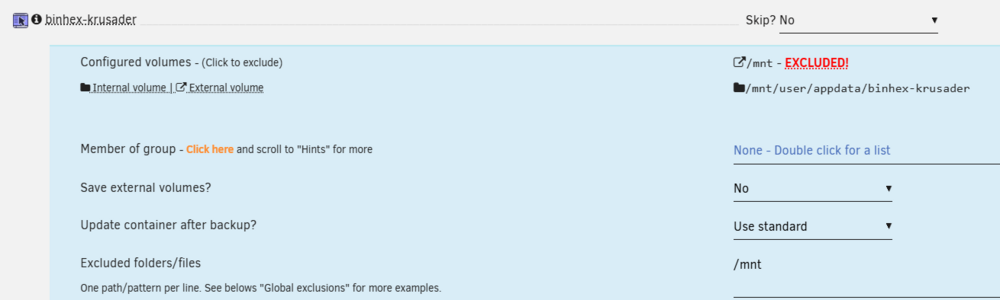
Yes, I've left it set to the default which appears to contain /mnt/user/appdata and /mnt/cache/appdata. Wouldn't this still be excluded though as if an external path is higher up the tree than the internal one, then all of the internal stuff would be excluded? e.g. Wouldn't this configuration mean that /mnt/user/appdata/binhex-krusader would get excluded because /mnt is mapped as an external volume and is excluded in the config?
-
Hi, I'm having problems with backing up containers that have my /mnt/user path mapped into them, as the appdata path that I DO want to back-up is under the external path that I don't want backing up. [02.03.2025 03:02:49][❌][idrive-docker] tar verification failed! Tar said: tar: /mnt/user/appdata/idrive/config: Not found since /mnt/user is mapped to a path in the container and is skipped as external then the /appdata that I want is also skipped... Any ideas? Thanks
-
Sure, I understand. It appears I have the same USB disconnect log messages in v6 with the same device port(?), just without the BTRFS errors. The hid-generic log entry underneath each mentions the model number of my UPS so I guess that's the device that's constantly bouncing on and offline and is probably a red-herring and not the cause of the BTRFS errors: Jan 12 12:11:53 Server kernel: usb 3-4: USB disconnect, device number 70 Jan 12 12:11:56 Server kernel: usb 3-4: new low-speed USB device number 71 using xhci_hcd Jan 12 12:11:56 Server kernel: hid-generic 0003:0764:0501.01BC: hiddev96,hidraw0: USB HID v1.10 Device [CPS VP1600ELCD] on usb-0000:26:00.3-4/input0 Jan 12 12:12:04 Server kernel: usb 3-4: USB disconnect, device number 71 Jan 12 12:12:07 Server kernel: usb 3-4: new low-speed USB device number 72 using xhci_hcd Jan 12 12:12:08 Server kernel: hid-generic 0003:0764:0501.01BD: hiddev96,hidraw0: USB HID v1.10 Device [CPS VP1600ELCD] on usb-0000:26:00.3-4/input0 Jan 12 12:12:16 Server kernel: usb 3-4: USB disconnect, device number 72 Jan 12 12:12:19 Server kernel: usb 3-4: new low-speed USB device number 73 using xhci_hcd Jan 12 12:12:19 Server kernel: hid-generic 0003:0764:0501.01BE: hiddev96,hidraw0: USB HID v1.10 Device [CPS VP1600ELCD] on usb-0000:26:00.3-4/input0 Jan 12 12:12:27 Server kernel: usb 3-4: USB disconnect, device number 73 Jan 12 12:12:30 Server kernel: usb 3-4: new low-speed USB device number 74 using xhci_hcd Jan 12 12:12:30 Server kernel: hid-generic 0003:0764:0501.01BF: hiddev96,hidraw0: USB HID v1.10 Device [CPS VP1600ELCD] on usb-0000:26:00.3-4/input0 Jan 12 12:12:38 Server kernel: usb 3-4: USB disconnect, device number 74 Jan 12 12:12:41 Server kernel: usb 3-4: new low-speed USB device number 75 using xhci_hcd Jan 12 12:12:41 Server kernel: hid-generic 0003:0764:0501.01C0: hiddev96,hidraw0: USB HID v1.10 Device [CPS VP1600ELCD] on usb-0000:26:00.3-4/input0 Jan 12 12:12:49 Server kernel: usb 3-4: USB disconnect, device number 75 Jan 12 12:12:52 Server kernel: usb 3-4: new low-speed USB device number 76 using xhci_hcd Jan 12 12:12:52 Server kernel: hid-generic 0003:0764:0501.01C1: hiddev96,hidraw0: USB HID v1.10 Device [CPS VP1600ELCD] on usb-0000:26:00.3-4/input0 Jan 12 12:13:00 Server kernel: usb 3-4: USB disconnect, device number 76 Jan 12 12:13:03 Server kernel: usb 3-4: new low-speed USB device number 77 using xhci_hcd Jan 12 12:13:04 Server kernel: hid-generic 0003:0764:0501.01C2: hiddev96,hidraw0: USB HID v1.10 Device [CPS VP1600ELCD] on usb-0000:26:00.3-4/input0 Thanks for your help Jorge, but unfortunately I won't be rebooting back into v7 as I have some quite important VMs that I can't afford to have offline for long. I was playing with fire updating the other day I guess I'll leave it for a few months in case any bugs are discovered and fixed in a later version.
-
Here's the output from v6. Unfortunately I won't be going back to v7 in the near future if USB is the problem as I can't connect my cache drive in any other way without a new motherboard /: Bus 04.Port 1: Dev 1, Class=root_hub, Driver=xhci_hcd/4p, 10000M |__ Port 2: Dev 2, If 0, Class=Mass Storage, Driver=usb-storage, 10000M /: Bus 03.Port 1: Dev 1, Class=root_hub, Driver=xhci_hcd/4p, 480M |__ Port 1: Dev 2, If 0, Class=Mass Storage, Driver=usb-storage, 480M |__ Port 4: Dev 78, If 0, Class=Human Interface Device, Driver=usbfs, 1.5M /: Bus 02.Port 1: Dev 1, Class=root_hub, Driver=xhci_hcd/3p, 10000M /: Bus 01.Port 1: Dev 1, Class=root_hub, Driver=xhci_hcd/9p, 480M |__ Port 8: Dev 2, If 0, Class=Vendor Specific Class, Driver=usbfs, 12M Assuming that you were referring to the USB disconnect in the logs then I guess 3-4 is my UNRAID boot flash drive? Thanks for the reply!
-
In the meantime I've downgraded back to 6.12.14 and everything is working perfectly again. Docker and VMs back up and running and no BTRFS errors in the system log. If anyone can see what's gone wrong in my diagnostics I'd still appreciate it as I'd like to upgrade. Thanks!
-
Hi, When I upgraded to UNRAID 7 I had issues with none of my Docker containers working or my VMs starting properly so I assumed there was an issue with my cache drive. It shows up fine in the pool configuration and I can browse the files in the "appdata" share with no problem. My cache drive is in a USB NVME adapter so I tried shutting down and moving it to another USB port. That seemed to work for a couple of hours last night but I've woken up this morning to Docker not starting and my system log is absolutely rammed full of errors like: Jan 12 10:04:24 Server kernel: usb 3-4: USB disconnect, device number 63 Jan 12 10:04:24 Server kernel: blk_print_req_error: 60 callbacks suppressed Jan 12 10:04:24 Server kernel: I/O error, dev sda, sector 271446880 op 0x0:(READ) flags 0x0 phys_seg 1 prio class 2 Jan 12 10:04:24 Server kernel: btrfs_dev_stat_inc_and_print: 60 callbacks suppressed Jan 12 10:04:24 Server kernel: BTRFS error (device sda1: state EA): bdev /dev/sda1 errs: wr 35, rd 249237, flush 0, corrupt 0, gen 0 Jan 12 10:04:24 Server kernel: I/O error, dev loop2, sector 34047328 op 0x0:(READ) flags 0x1000 phys_seg 4 prio class 2 Jan 12 10:04:24 Server kernel: BTRFS error (device loop2: state EA): bdev /dev/loop2 errs: wr 37, rd 185904, flush 1, corrupt 0, gen 0 Jan 12 10:04:24 Server kernel: I/O error, dev sda, sector 271646336 op 0x0:(READ) flags 0x0 phys_seg 1 prio class 2 Jan 12 10:04:24 Server kernel: BTRFS error (device sda1: state EA): bdev /dev/sda1 errs: wr 35, rd 249238, flush 0, corrupt 0, gen 0 Jan 12 10:04:24 Server kernel: I/O error, dev loop2, sector 34571616 op 0x0:(READ) flags 0x1000 phys_seg 4 prio class 2 Jan 12 10:04:24 Server kernel: BTRFS error (device loop2: state EA): bdev /dev/loop2 errs: wr 37, rd 185905, flush 1, corrupt 0, gen 0 Jan 12 10:04:24 Server kernel: I/O error, dev sda, sector 271446880 op 0x0:(READ) flags 0x0 phys_seg 1 prio class 2 Jan 12 10:04:24 Server kernel: BTRFS error (device sda1: state EA): bdev /dev/sda1 errs: wr 35, rd 249239, flush 0, corrupt 0, gen 0 Jan 12 10:04:24 Server kernel: I/O error, dev loop2, sector 34047328 op 0x0:(READ) flags 0x1000 phys_seg 4 prio class 2 Jan 12 10:04:24 Server kernel: BTRFS error (device loop2: state EA): bdev /dev/loop2 errs: wr 37, rd 185906, flush 1, corrupt 0, gen 0 Jan 12 10:04:24 Server kernel: I/O error, dev sda, sector 271646336 op 0x0:(READ) flags 0x0 phys_seg 1 prio class 2 Jan 12 10:04:24 Server kernel: BTRFS error (device sda1: state EA): bdev /dev/sda1 errs: wr 35, rd 249240, flush 0, corrupt 0, gen 0 Jan 12 10:04:24 Server kernel: I/O error, dev loop2, sector 34571616 op 0x0:(READ) flags 0x1000 phys_seg 4 prio class 2 Jan 12 10:04:24 Server kernel: BTRFS error (device loop2: state EA): bdev /dev/loop2 errs: wr 37, rd 185907, flush 1, corrupt 0, gen 0 Jan 12 10:04:25 Server kernel: I/O error, dev sda, sector 271446880 op 0x0:(READ) flags 0x0 phys_seg 1 prio class 2 Jan 12 10:04:25 Server kernel: BTRFS error (device sda1: state EA): bdev /dev/sda1 errs: wr 35, rd 249241, flush 0, corrupt 0, gen 0 Jan 12 10:04:25 Server kernel: I/O error, dev loop2, sector 34047328 op 0x0:(READ) flags 0x1000 phys_seg 4 prio class 2 Jan 12 10:04:25 Server kernel: BTRFS error (device loop2: state EA): bdev /dev/loop2 errs: wr 37, rd 185908, flush 1, corrupt 0, gen 0 There are hundreds of them over and over again. I'm not sure if this is related though as it mentions /dev/loop2, but I'm at a loss. Can anyone assist please? Thanks server-diagnostics-20250112-0941.zip
-
I did read the release notes as I always check for potential issues before upgrading but I guess I missed it or it wasn't obvious to me at least. TL;DR There is a note about the Realtek issue on the release notes hyperlink, but not on the release notes you see on the Unraid GUI which is why I missed it. EDIT: I've just noticed that the release notes aren't the full release notes and I didn't realise that. There's a link on the release notes to the release notes....?!! somewhat confusing. I think it might be a good idea to have this called out in the notes you see on the Unraid server GUI itself to stop others missing it like I did.
-
I updated to 6.12.14 this morning and lost all network connectivity with my server - in and out. I had a different Realtek driver installed apparently (not sure why). Removing the driver appears to have fixed it. This should definitely be added to the upgrade dialog box as a warning!
-
Wow, thanks for the super-quick reply! I guess this is potentially a one-time problem in reality, as I could just CHMOD everything, move the files to the new share and then I won't need to move them again so it's irrelevant what they're permissioned as... Thanks
-
Hi all, can anyone help me with a permissions issue I appear to have for Plex-created Optimised versions? I want to move all of my optimised versions of films out of their individual folders and into a different library to enable easier selection when remotely streaming. The problem I have is that it appears that when Plex creates an optimised version that it permissions the "Plex Versions" folder as 755: This all works just fine inside of Plex, but when I'm trying to move the optimised versions via SMB on my Windows PC I don't have permission to the files to modify them as the users group only has Read and Execute permissions The Docker container is configured to use PUID 99 and PGID 100 which I believe is correct, but there doesn't seem to be an option to specify the UMASK for created files. Is there a permanent fix for this? I know I could just CHMOD all of the folders, but the next time a file is written by Plex it'll be wrong again Thanks!

-
Oh I have that installed already, but just needed to do something quickly with the VM from outside of my network on a machine I don't control; noVNC was the simplest option via a reverse-proxied unraid interface. Thanks for the reply
-
Hi, I'm trying to copy and paste into a noVNC window on my Ubuntu 21.04 VM, but it doesn't seem to be wired up inside of the VM and paste isn't an option. Is there anything I need to do to get paste working from the noVNC clipboard into the X window on my VM? Thanks!
-
OK, false alert, I had a look in the system log of the server and it's the Windows licensing management service that's shutting the machine down, not the VM host!
-
It's just shut down again with no corresponding entry in syslog this time, so must have been a coincidence




