Aeloth
Members
-
Joined
-
Last visited
Everything posted by Aeloth
-
btw I work thanks to the DNS record SRV, without adding a port for the domain, then I connect via mc.domain.eu only.
-
The only way I've found that works for me is: Port mapping on router 25565:25565, and on dns set - A, CNAME, SRV record unfortunately this is outside of nginx but I have docker in a separate proxynet. I strongly recommend making a whitelist in minecraft.


-
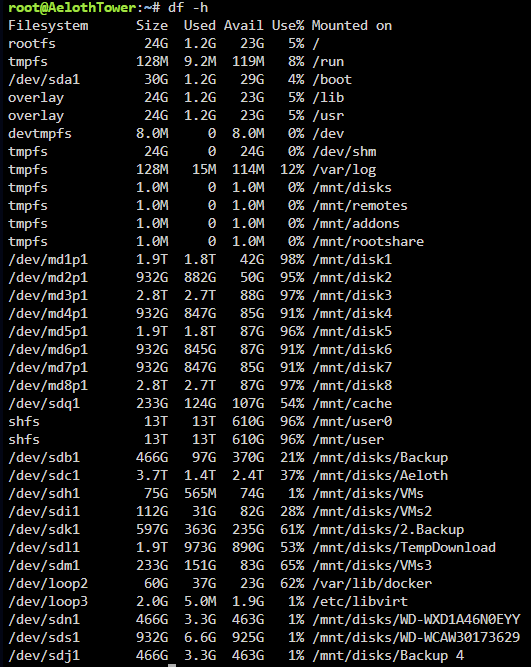
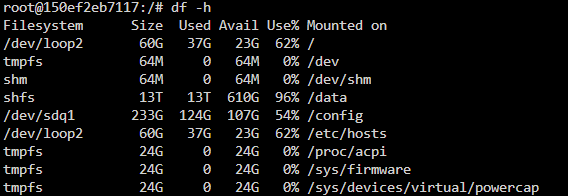
Hi, when installing the container it throws me this error: docker: Error response from daemon: error while creating mount source path '/mnt/user/Nextcloud/BackupData': mkdir /mnt/user/Nextcloud/BackupData: no space left on device. I still have 610GB of free space. Otherwise, I have another Nextcloud and it tells me directly in nextcloud that there is no space and that it cannot write to the log. Any solution? From Unraid: From Nextcloud container: aelothtower-diagnostics-20240510-1616.zip
-
I bought a LSI SAS 9300-16i from aliexpress and I have to say that I have no problem so far. I have 16 drives connected to it. However, I had to mount a fan on the heatsink. I miss the temperature monitoring of that controller. I'll have to look somewhere to see how to do that.
-
Hi, I have a problem with NPM with a combination of Authentik and Sonarr/Radarr .... when I set custom locations it goes offline... LOG NGINX: [3/27/2024] [2:56:04 PM] [Nginx ] › ⬤ debug Deleting file: /data/nginx/proxy_host/47.conf.err [3/27/2024] [2:56:04 PM] [Nginx ] › ⬤ debug Could not delete file: { "errno": -2, "code": "ENOENT", "syscall": "unlink", "path": "/data/nginx/proxy_host/47.conf.err" } [3/27/2024] [2:56:04 PM] [Global ] › ⬤ debug CMD: /usr/sbin/nginx -t -g "error_log off;" [3/27/2024] [2:56:04 PM] [Nginx ] › ℹ info Reloading Nginx [3/27/2024] [2:56:04 PM] [Global ] › ⬤ debug CMD: /usr/sbin/nginx -s reload

-
Hello is it possible to use this kontroller LSI SAS 9300-16i??? I'm lost in this so I'm hoping someone knowledgeable can advise. Thank you very much.
-
And how would I be able to connect 20 disks to this motherboard ? But what can I replace it with? I don't want to buy a new setup, I built this one about a year ago.
-
I checked the cables and eventually replaced the disk, parity stuck at 47% with a full log, I couldn't help but restart the server even canceling parity didn't help. In the log there was a problem with disk 1 which had 8mil. errors on it from parity check. i checked the cables again and found a problem with the molex cable, fixed it had a sync. done and fine and this morning disk 3 disconnected... so i repaired the cables and now i'm counting parity again. The diagnostics file is before the last cable check. aelothtower-diagnostics-20240226-2115.zip
-
Is it possible to use permissions like this in a container?? PUID=99 PGID=100 I don't really understand this yet.
-
This container doesn't have any GUI, if you want to look at it, it's pk1057/veeam12 on DockerHub. I have Root Privileges set, I have strong passwords there too, hopefully that will be enough, the container will only work on a local network in a home environment.
-
The change may have been historical, to me it was a container that is not in Apps but in dockerhub, it is a container that should help with backups using Veeam but I need it to have access to /mnt to be able to backup to unassigned drives. However I was struggling with the container not wanting to mount /mnt, eventually solved by reinstalling the container. But I fixed the permissions on /mnt as they should be and so far no container or plugin has changed it. I hope it's ok now.
-
I don't have the option to run in safe mode at the moment, that won't happen until tomorrow/the day after. However, shouldn't it be a problem to change them now?? chgrp root /mnt && chown root /mnt
-
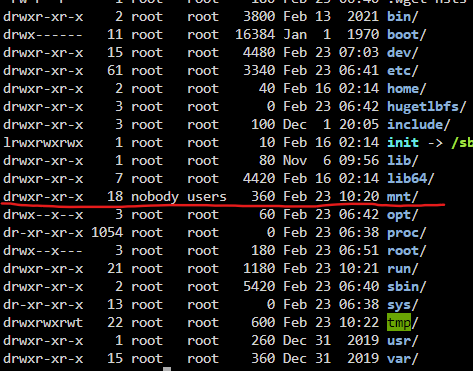
What permissions should the /mnt folder have?? I'm solving one container where I want it to have access to /mnt and I currently have the permissions (see image). And I don't want a security problem.
-
Hello, I would like to ask how to write to syslinux config... meaning the shape of the write. kernel /bzimage append initrd=/bzroot pcie_aspm=off append initrd=/bzroot unraidcgroup2 is this the correct form of notation? or should it be written differently? for example: kernel /bzimage append initrd=/bzroot pcie_aspm=off unraidcgroup2 Thanks for the answers.

-
I had to run unraid in an older version to see for myself, and you're right!, sorry about that. Apparently I got it mixed up with something. 😁
-
What I meant to say is that these two folders are there and were originally visible (in my opinion) in the move/copy dialog of DynamixFileManager. But there is no point in dwelling on that. The main idea @dopeytree understood.
-
According to me it was possible, but the user shares were hidden under the user and user0 directory, if I remember correctly. It is also possible that I am wrong.

-
If you are copying/moving from (Shares), Shares will be displayed, if you are copying/moving from (Main), Disks will be displayed. But yes, user and user0 have disappeared here.
-
I have a problem that one disk in my array failed, with it becoming unsupported fs, unraid offered me to format it so I took it out of the array, formatted it, powered on the array without it and then reassigned it and let it count parity, unfortunately in this case I lost the data on this drive, (if anyone knows how to recover it I would be glad). So I'm looking for another disk and in between something happened and it started throwing a lot of disk errors in my syslog. input output error or something. Can the more experienced ones please help me? aelothtower-diagnostics-20240220-0846.zip
-
 Here I have made a banner and attached the cfg for the theme engine. MatrixTheme.cfg
 -
-
Actually I don't split the cpus pinnings on the server at all, I give everyone the maximum, I don't know if I'm doing it right or not, but I have 51 containers in the docker and 31 of them are running. and 1 VM.. maybe try another minecraft container, i actually have another one... from fithwum but that's also with fabric loader.
-
I have set XMX_SIZE to 4G, XMS_SIZE to 2G and XMN_SIZE to 2G and it works relatively well with 3 players. I wouldn't worry about CPU pinning. I let it decide for itself how many cores to use. I have another 10 mods running on my server. Next, I have set: view-distance=10 Maybe you need more CPU cores. I guess
-
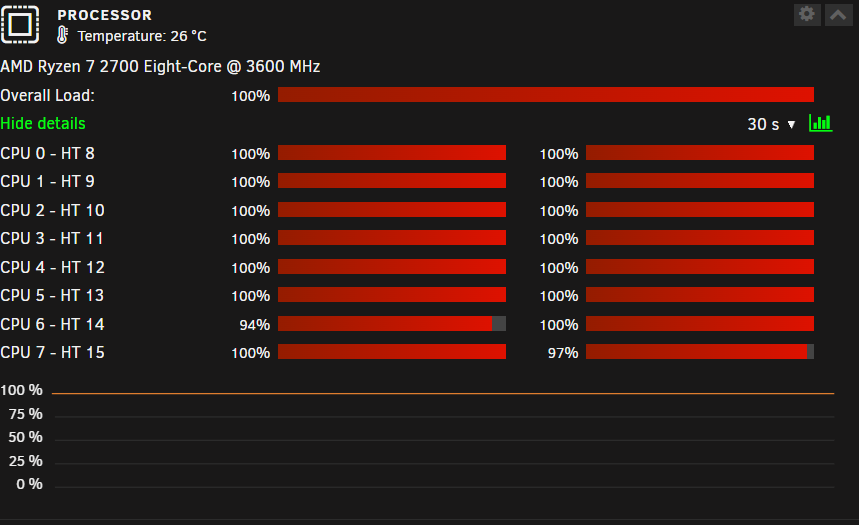
I ran into a problem today, when I looked at the server I saw that my docker wasn't working. So I downloaded the diagnostics and tried to turn the service back on. Without success. So I restarted the whole server. The docker booted up, but after a while the server was unavailable. So i waited and after a while the webui loaded, saying that the cpu was running at 100%. I checked via ssh on htop and found that, dockerd service was using cpu at 600% after a few more minutes the utilization fixed to a few percent so i downloaded the diagnostics again. However, the cpu is running at 100% again. Can you advise me what to do?? Unraid 6.12.5-rc1 can't it be after the Unraid update?? I updated it about 2 days ago. I am attaching both files from the diagnostics, before and after the reboot. aelothtower-diagnostics-20231130-0923.zip aelothtower-diagnostics-20231130-0836.zip EDIT: after updating to STABLE 6.12.5 it looks like it's ok now but I'll keep an eye on it.
-
Looks like the container didn't map the ports. There is no network assigned. I don't know how to fix it. EDIT: I just added a port to container and it works.

-
Hi, I can't connect to the server from the local network (thus not from outside), when I look in the log, I see that the server is running and ready. In minecraft game it says Can't connect to server. I have the port and IP correct.