





Aeloth
Members
-
Joined
-
Last visited
Everything posted by Aeloth
-
In new update i cannot start server, its constantly rewriting eula to false.
-
Or if it's stuck you can try disabling and re-enabling the plugin (or remove and re-install).
-
Try just reboot server, if you can.
-
go to Main - boot (flashdrive) - config - and edit file named editor.cfg my is : txt js php page plg xml old bak log css html sample json ini pem htaccess reg bat yml yaml gcode md srt cnf env REC editorconfig local 1 mmdb properties cfg- sh mp4 toml
-
I meant that I will not turn on the game on the PC, the server would run normally and I want to edit the rules or communicate in chat while the server is running. I suppose I would have to make an adjustment in container, where I would have to remap the port from the container and then connect to it as rcon.
-
Is there a way to connect to minecraft rcon? I would need to make adjustments without starting the game. If will be added a webui for the console it would be great.
-
Thank you for your advice. I really appreciate it.
-
Thank you some bugs have stopped recurring, however I have run into even more bugs if I may ask. Aug 14 22:51:04 AelothTower emhttpd: Unregistered - flash device error (ENOFLASH7) Aug 14 22:51:04 AelothTower emhttpd: Unregistered - flash device error (ENOFLASH7) Aug 14 22:51:05 AelothTower emhttpd: Pro key detected, GUID: 058F-6387-0000-XXX FILE: /boot/config/Pro.key Aug 14 22:51:05 AelothTower emhttpd: Pro key detected, GUID: 058F-6387-0000-XXX FILE: /boot/config/Pro.key Aug 14 22:51:40 AelothTower emhttpd: error: device_read_smart, 9564: Cannot allocate memory (12): device_spinup: stream did not open: sdp Aug 14 22:51:40 AelothTower emhttpd: error: device_read_smart, 9564: Cannot allocate memory (12): device_spinup: stream did not open: sda Aug 14 22:51:40 AelothTower emhttpd: error: device_read_smart, 9564: Cannot allocate memory (12): device_spinup: stream did not open: sdp Aug 14 22:51:40 AelothTower emhttpd: error: device_read_smart, 9564: Cannot allocate memory (12): device_spinup: stream did not open: sda Aug 14 22:51:59 AelothTower emhttpd: Unregistered - flash device error (ENOFLASH7) Aug 14 22:51:59 AelothTower emhttpd: Unregistered - flash device error (ENOFLASH7) Aug 14 22:52:00 AelothTower emhttpd: Pro key detected, GUID: 058F-6387-0000-XXX FILE: /boot/config/Pro.key Aug 14 22:52:00 AelothTower emhttpd: Pro key detected, GUID: 058F-6387-0000-XXX FILE: /boot/config/Pro.key Aug 14 22:52:05 AelothTower emhttpd: Unregistered - flash device error (ENOFLASH7) Aug 14 22:52:05 AelothTower emhttpd: Unregistered - flash device error (ENOFLASH7) Aug 14 22:52:06 AelothTower emhttpd: Pro key detected, GUID: 058F-6387-0000-XXX FILE: /boot/config/Pro.key Aug 14 22:52:06 AelothTower emhttpd: Pro key detected, GUID: 058F-6387-0000-XXX FILE: /boot/config/Pro.key this error is repeated several times here and it looks like it can't open any disk and like the license is dropping out. Aug 15 01:04:38 AelothTower kernel: PMS LoudnessCmd[22654]: segfault at 0 ip 0000151410c7fe40 sp 000015140c5860d8 error 4 in libswresample.so.4[151410c78000+18000] likely on CPU 11 (core 3, socket 0) Aug 15 01:04:38 AelothTower kernel: Code: 01 cf 4c 39 c7 72 e3 c3 cc cc 8d 04 49 48 98 4d 89 c1 49 29 c1 48 63 c2 48 63 c9 49 39 f9 76 75 f2 0f 10 05 22 05 ff ff 66 90 <0f> bf 16 0f 57 c9 f2 0f 2a ca f2 0f 59 c8 f2 0f 11 0f 0f bf 14 06 Aug 15 01:04:38 AelothTower kernel: PMS LoudnessCmd[22654]: segfault at 0 ip 0000151410c7fe40 sp 000015140c5860d8 error 4 in libswresample.so.4[151410c78000+18000] likely on CPU 11 (core 3, socket 0) Aug 15 01:04:38 AelothTower kernel: Code: 01 cf 4c 39 c7 72 e3 c3 cc cc 8d 04 49 48 98 4d 89 c1 49 29 c1 48 63 c2 48 63 c9 49 39 f9 76 75 f2 0f 10 05 22 05 ff ff 66 90 <0f> bf 16 0f 57 c9 f2 0f 2a ca f2 0f 59 c8 f2 0f 11 0f 0f bf 14 06 this error appears here probably due to plex because at 1:00 maintenance starts, somewhere I found that I don't have to deal with it however if someone knows more about it I would be glad for info. Aug 15 03:01:00 AelothTower Docker Auto Update: Stopping nextcloud Aug 15 03:01:00 AelothTower Docker Auto Update: Stopping nextcloud Aug 15 03:01:01 AelothTower crond[1638]: unable to fork (user root /usr/local/emhttp/plugins/dynamix/scripts/monitor &> /dev/null) Aug 15 03:01:01 AelothTower crond[1638]: unable to fork (user root /usr/local/emhttp/plugins/dynamix/scripts/monitor &> /dev/null) Aug 15 03:01:01 AelothTower crond[1638]: unable to fork (user root /usr/local/emhttp/plugins/dynamix.system.stats/scripts/sa1 1 1 &> /dev/null) Aug 15 03:01:01 AelothTower crond[1638]: unable to fork (user root /usr/local/emhttp/plugins/dynamix.system.stats/scripts/sa1 1 1 &> /dev/null) fork... I have no idea what this is about. I'm also attaching a newer diagnostic file. Thank you for any help. aelothtower-diagnostics-20230815-0840.zip
-
Hi, could someone please help me with fixing server errors? I'm attaching the diagnostics. This is one error: Aug 14 06:56:19 AelothTower kernel: ata2.00: failed command: READ FPDMA QUEUED Aug 14 06:56:19 AelothTower kernel: ata2.00: cmd 60/20:98:d8:38:66/00:00:4a:00:00/40 tag 19 ncq dma 16384 in Aug 14 06:56:19 AelothTower kernel: res 40/00:01:00:4f:c2/00:00:00:00:00/00 Emask 0x4 (timeout) Aug 14 06:56:19 AelothTower kernel: ata2.00: status: { DRDY } probably a disk or a cable going out, but what disk? I am getting this error probably due to a VPN connection: Aug 14 09:23:18 AelothTower nginx: 2023/08/14 09:23:18 [error] 9036#9036: *883811 connect() to unix:/var/run/syslog.sock failed (111: Connection refused) while connecting to upstream, client: 10.253.0.2, server: 192-168-1-250.HASH.myunraid.net, request: "GET /webterminal/syslog/ HTTP/2.0", upstream: "http://unix:/var/run/syslog.sock:/", host: "192-168-1-250.HASH.myunraid.net:44366", referrer: "https://192-168-1-250.HASH.myunraid.net:44366/Settings/FixProblems" And then there's this error: Aug 13 06:59:47 AelothTower nginx: 2023/08/13 06:59:47 [error] 9036#9036: nchan: Out of shared memory while allocating message of size 7630. Increase nchan_max_reserved_memory. Aug 13 06:59:47 AelothTower nginx: 2023/08/13 06:59:47 [error] 9036#9036: *657573 nchan: error publishing message (HTTP status code 500), client: unix:, server: , request: "POST /pub/disks?buffer_length=1 HTTP/1.1", host: "localhost" Aug 13 06:59:47 AelothTower nginx: 2023/08/13 06:59:47 [error] 9036#9036: MEMSTORE:00: can't create shared message for channel /disks Aug 13 06:59:47 AelothTower nginx: 2023/08/13 06:59:47 [error] 9036#9036: nchan: Out of shared memory while allocating message of size 7630. Increase nchan_max_reserved_memory. Aug 13 06:59:47 AelothTower nginx: 2023/08/13 06:59:47 [error] 9036#9036: *657573 nchan: error publishing message (HTTP status code 500), client: unix:, server: , request: "POST /pub/disks?buffer_length=1 HTTP/1.1", host: "localhost" Aug 13 06:59:47 AelothTower nginx: 2023/08/13 06:59:47 [error] 9036#9036: MEMSTORE:00: can't create shared message for channel /disks Aug 13 06:59:48 AelothTower nginx: 2023/08/13 06:59:48 [crit] 9036#9036: ngx_slab_alloc() failed: no memory Aug 13 06:59:48 AelothTower nginx: 2023/08/13 06:59:48 [error] 9036#9036: shpool alloc failed Aug 13 06:59:48 AelothTower nginx: 2023/08/13 06:59:48 [crit] 9036#9036: ngx_slab_alloc() failed: no memory Aug 13 06:59:48 AelothTower nginx: 2023/08/13 06:59:48 [error] 9036#9036: shpool alloc failed Probably due to lack of RAM, but what is it and how much RAM does it want. At this time I am running backups through a virtual PC and the server is mostly running on about 90% RAM. Thanks very much in advance for your help. - Daniel aelothtower-diagnostics-20230814-0928.zip
-
No, but disk1 went to silicon heaven. And if parity was invalid I lost data.... I tried to put another disk and tell parity it was valid to try to recalculate it but it only recovered a few MB.
-
It was valid but when I ran the parity check, one disk started to fail so I stopped the parity check, turned off the server, checked the cables and turned it back on, one of the disks didn't load and was shown as missing, and I guess when I aborted the parity check than it showed up as invalid so I ended up with losing data on the 2TB disk, however I had some backups. and the rest were movies and TV shows. You're always learning. So backup, backup, backup. I can't even remember the exact procedure anymore. And in the future, I'm definitely investing in a second parity drive. It's a bit of a shame that a disk can go away when checking parity. but I've gotten errors in the log before that some disk is resetting the link. it's hard to know which one though because the log only says "ata.6" is resetting the link but I don't know what ata.6 is, I even got a command that lists all the disks -> ls -l /sys/block/sd*|grep ata <- and what disk it is like sda etc. However it ended up being a different disk. And I don't have any more errors in my log.
-
Hello, I ran parity correction today and one of my disks started to error a lot. So I stopped parity and shut down the server. But after checking the disk cables, one of the disks didn't load just clicks in it. Parity counted about 50GB. Now I am in invalid parity state and disk is missing and since I have only one parity disk I can't run array. I don't know what to do next. Missing disk tested on pc but not load.. Thank for any help. aelothtower-diagnostics-20230507-1923.zip
-
I'm getting the same error, has anyone solved this?
-
Thank you very much. Both errors seem to be resolved.
-
For the first error, thank you very much for the link, now I will wait until my server reboots. And does anyone know what the second error is?
-
Hi in the community, I need help with errors that throws me a log on the server. The first is this error that keeps repeating there, at first I thought it was the sata controller, so I replaced it but the error is showing up again. Apr 3 08:03:08 AelothTower kernel: pcieport 0000:00:01.3: AER: Corrected error received: 0000:02:07.0 Apr 3 08:03:08 AelothTower kernel: pcieport 0000:02:07.0: PCIe Bus Error: severity=Corrected, type=Physical Layer, (Receiver ID) Apr 3 08:03:08 AelothTower kernel: pcieport 0000:02:07.0: device [1022:43b4] error status/mask=00000001/00002000 Apr 3 08:03:08 AelothTower kernel: pcieport 0000:02:07.0: [ 0] RxErr The second error is probably software: Apr 3 08:09:04 AelothTower nginx: 2023/04/03 08:09:04 [error] 8998#8998: recv() failed (111: Connection refused) while requesting certificate status, responder: r3.o.lencr.org, peer: 10.0.0.1:80, certificate: "/boot/config/ssl/certs/certificate_bundle.pem" Apr 3 08:09:04 AelothTower nginx: 2023/04/03 08:09:04 [error] 8998#8998: OCSP responder prematurely closed connection while requesting certificate status, responder: r3.o.lencr.org, peer: 10.0.0.1:80, certificate: "/boot/config/ssl/certs/certificate_bundle.pem" Thank you in advance for your advice and help. aelothtower-diagnostics-20230403-0805.zip
-
Hi, I have a question about OpenTTD, I installed the game server but how do I set the game settings, server name, map size etc.
-
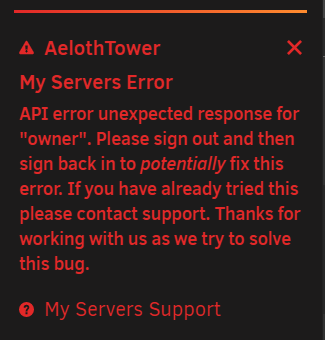
Here is the report, I tried to restart the api afterwards as you can see, but even after restart it won't log in. Are there any other options to fix it? <-----UNRAID-API-REPORT-----> SERVER_NAME: AelothTower ENVIRONMENT: production UNRAID_VERSION: 6.10.3-rc1 UNRAID_API_VERSION: 2.47.1 (running) NODE_VERSION: v14.15.3 API_KEY: invalid MY_SERVERS: signed out RELAY: disconnected MOTHERSHIP: disconnected ONLINE_SERVERS: OFFLINE_SERVERS: ALLOWED_ORIGINS: HAS_CRASH_LOGS: no </----UNRAID-API-REPORT-----> root@AelothTower:~# unraid-api restart Stopping unraid-api process... Process stopped! Starting [email protected] root@AelothTower:~#
-
May I ask what can cause this error? It showed up when the array is stopped at the bottom of the dashboard page. Warning: stream_socket_client(): unable to connect to unix:///var/run/docker.sock (No such file or directory) in /usr/local/emhttp/plugins/dynamix.docker.manager/include/DockerClient.php on line 710 Couldn't create socket: [2] No such file or directory
-
Another thought is if it were possible to create a search engine for files...
-
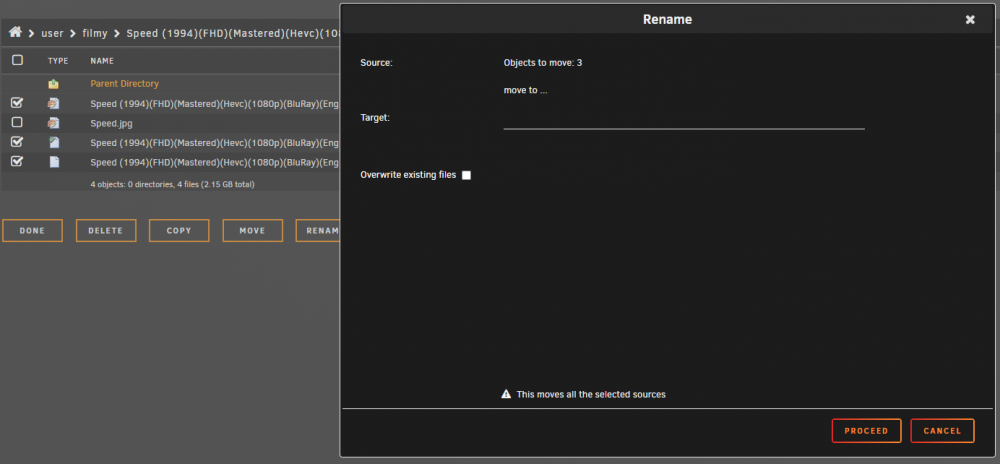
I've probably found a bug. If I want to rename multiple files at once this table will show up for moving files. If I only want to rename one everything is fine.
-
Will there be an update that opens .rar .zip etc.?
-
Thanks, good job.
-
It would be good if it could open files of format .html (it can open .css but not .html) .json .sample (from swag, it's a renamed .conf) .ini .pem etc.
-
I have the config file editor installed, and it can be edited. I looked at my friend's unraid and he can't edit/download in appdata either. It seems to me that it is blocked in appdata. It can't be downloaded. (Download only empty file). Config file editor is not very good for me because I have to remember the path to the file I want to edit.



