HarmonicAnova21
Members
-
Joined
-
Last visited
-
Almost. My system is Modem -- Netgear Wifi Router -- 8-port LAN router -- Unraid server. My wifi router only has on in and one out ethernet port.
-
Apparently it was your words to the Cybergod's ears, because I wanted to try one more time and see what the router logs said happened, and it went right through. I sincerely thank you for your efforts, and I'll put this down as a possible solution: Log into your router when you're trying so that it knows you're watching...
-
That's what I suspected, too, but I can't find anything. I've got a Netgear router, and both the router login and the stupid Nighthawk app show that it's allowed and connected. Any suggestions where to look, or should I just start resetting everything (router, pc, unraid server, dog, cat, etc)?
-
1 - PING 192.168.1.1 (192.168.1.1) 56(84) bytes of data. --- 192.168.1.1 ping statistics --- 21 packets transmitted, 0 received, 100% packet loss, time 20495ms 2 - PING 8.8.8.8 (8.8.8.8) 56(84) bytes of data. --- 8.8.8.8 ping statistics --- 229 packets transmitted, 0 received, 100% packet loss, time 233510ms Both 3 and 4 returned "bash: nslookup: command not found" ... I screwed up on the install somehow, huh?
-
HarmonicAnova21 changed their profile photo
-
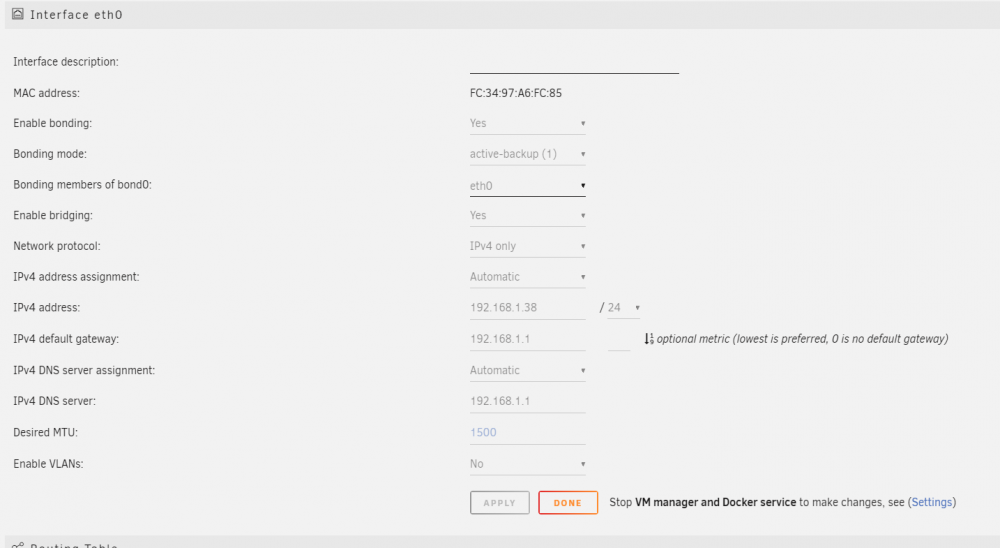
This is my first ever server build. I initially could not install the license key via the web GUI, but I managed to download and install it directly on the thumb drive from my PC. Now, when I attempt to install Community Applications, I get the following: plugin: installing: https://raw.githubusercontent.com/Squidly271/community.applications/master/plugins/community.applications.plg plugin: downloading https://raw.githubusercontent.com/Squidly271/community.applications/master/plugins/community.applications.plg plugin: downloading: https://raw.githubusercontent.com/Squidly271/community.applications/master/plugins/community.applications.plg ... failed (Network failure) plugin: https://raw.githubusercontent.com/Squidly271/community.applications/master/plugins/community.applications.plg download failure (Network failure) Are these linked? Is there an issue with my network that would prevent Unraid from accessing the plugin/network license key? I've attached my diagnostic folder and a screenshot of my network settings. Don't worry, I'm new enough that calling me an idiot won't hurt my feelings. silentlibrary-diagnostics-20210929-1540.zip