





ISwearItIsNotMe
Members
-
Joined
-
Last visited
-
@binhex The latest docker version is giving me these error(s) and I can not access the UI Downgrading to 4.4.5-1-01 resolves the error(s) [info] Script started to assign incoming port 2022-11-05 10:26:53,200 DEBG 'start-script' stdout output: [info] Port forwarding is enabled [info] Checking endpoint 'CENSORED.privacy.network' is port forward enabled... 2022-11-05 10:26:53,204 DEBG 'start-script' stdout output: [warn] PIA VPN info API currently down, skipping endpoint port forward check 2022-11-05 10:26:53,205 DEBG 'start-script' stderr output: egrep: warning: egrep is obsolescent; using grep -E 2022-11-05 10:26:54,209 DEBG 'start-script' stderr output: egrep: warning: egrep is obsolescent; using grep -E 2022-11-05 10:26:54,213 DEBG 'start-script' stderr output: egrep: warning: egrep is obsolescent; using grep -E 2022-11-05 10:26:54,243 DEBG 'start-script' stdout output: [warn] Unable to successfully download PIA json to generate token from URL 'https://www.privateinternetaccess.com/gtoken/generateToken' [info] 12 retries left [info] Retrying in 10 secs... 2022-11-05 10:27:04,273 DEBG 'start-script' stdout output: [warn] Unable to successfully download PIA json to generate token from URL 'https://www.privateinternetaccess.com/gtoken/generateToken' [info] 11 retries left [info] Retrying in 10 secs... 2022-11-05 10:27:14,302 DEBG 'start-script' stdout output: [warn] Unable to successfully download PIA json to generate token from URL 'https://www.privateinternetaccess.com/gtoken/generateToken' [info] 10 retries left [info] Retrying in 10 secs... 2022-11-05 10:27:23,200 DEBG 'start-script' stdout output: [info] Sending 'down' command to WireGuard due to dns failure... 2022-11-05 10:27:23,201 DEBG 'start-script' stdout output: [info] Attempting to bring WireGuard interface 'down'... 2022-11-05 10:27:23,207 DEBG 'start-script' stderr output: Warning: `/config/wireguard/wg0.conf' is world accessible 2022-11-05 10:27:23,210 DEBG 'start-script' stderr output: [#] ip link delete dev wg0 2022-11-05 10:27:23,275 DEBG 'start-script' stderr output: [#] '/root/wireguarddown.sh' 2022-11-05 10:27:23,278 DEBG 'start-script' stderr output: /root/getvpnport.sh: line 1: kill: (1299) - No such process 2022-11-05 10:27:23,278 DEBG 'start-script' stdout output: [info] WireGuard interface 'down' 2022-11-05 10:27:23,281 DEBG 'start-script' stdout output: [info] Attempting to bring WireGuard interface 'up'... 2022-11-05 10:27:23,287 DEBG 'start-script' stderr output: Warning: `/config/wireguard/wg0.conf' is world accessible 2022-11-05 10:27:23,291 DEBG 'start-script' stderr output: [#] ip link add wg0 type wireguard 2022-11-05 10:27:23,292 DEBG 'start-script' stderr output: [#] wg setconf wg0 /dev/fd/63 2022-11-05 10:27:23,294 DEBG 'start-script' stderr output: [#] ip -4 address add 10.25.200.63 dev wg0 2022-11-05 10:27:23,298 DEBG 'start-script' stderr output: [#] ip link set mtu 1420 up dev wg0 2022-11-05 10:27:23,299 DEBG 'start-script' stderr output: sort: error while loading shared libraries: libcrypto.so.1.1: cannot open shared object file: No such file or directory 2022-11-05 10:27:23,300 DEBG 'start-script' stderr output: /usr/sbin/wg-quick: line 338: echo: write error: Broken pipe 2022-11-05 10:27:23,300 DEBG 'start-script' stderr output: [#] '/root/wireguardup.sh' 2022-11-05 10:27:23,303 DEBG 'start-script' stderr output: egrep: warning: egrep is obsolescent; using grep -E 2022-11-05 10:27:24,307 DEBG 'start-script' stderr output: egrep: warning: egrep is obsolescent; using grep -E 2022-11-05 10:27:24,311 DEBG 'start-script' stderr output: egrep: warning: egrep is obsolescent; using grep -E Im using the latest unraid OS (6.11.1) and PIA WG if thats relevant
-
I have this same exact issue. I made some large file changes in the past couple days and one of my docker containers kept on filling up (but that was resolved due to a bad pathway mapping) Here are my logs just incase elias-server-diagnostics-20220801-2019.zip elias-server-syslog-20220802-0014.zip
-
I'm running the latest stable version of unRaid 6.9.2
-
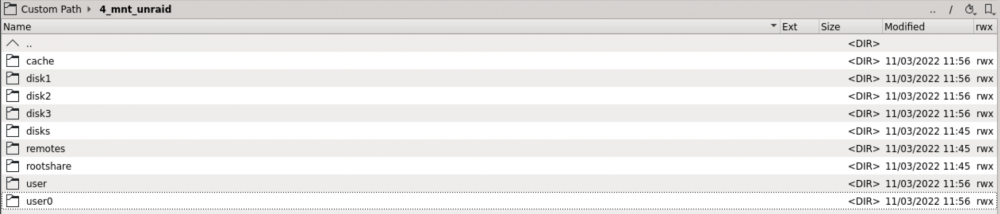
I got the "Invalid folder root share contained within /mnt" error but I don't really know what folder is out of place here. Here is a screenshot of /mnt via krusader. Ive attached my logs as well. Any help would be appreciated because i have no idea what I am doing. Thanks! unraid-server-diagnostics-20220311-1205.zipunraid-server-diagnostics-20220311-1205.zip
-
Yeap! I originally set it up as OpenVPN So my files have been their
-
Running into the same issue too. Keep on getting this in my logs "parse error: Invalid numeric literal at line 2, column 0". Using PIA WireGuard protocol. Switched to OpenVPN and same issue arises. Sounds like it my might be due to a change from PIA's side. Has anyone reached out to PIA ?
-
Can anyone confirm that this works for Rocket Lake CPUs Specifically the i5 11400?

