





tyrindor
Members
-
Joined
-
Last visited
-
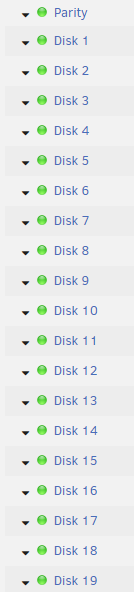
This has never worked for me. I have 20 disks and it always says 16 are spun down even though I have them all spun up. If I manually enable turbo write, it'll disable it because it thinks too many drives are spun down.

-
Its not "slow" as in that slow. I just have gigabit internet and I prefer my usenet client to go 100MB/s, not 10MB/s. First world problems, eh? I'll try his VPN version of qbbittorrent thanks.
-
My VPN is pretty slow and I don't want to slow down the other tasks I use it for. However, I don't want my IP broadcast on my torrent client (qbitorrent) docker. I can't find a way to do this, other than installing a virtual machine and having the virtual machine setup to use my VPN. Not ideal since I don't need a whole virtual machine running and using resources.
-
I am still not seeing any caching taking place. If I disable it and re-enable it, there's no reads on any of my disks. Just going into random directories results in low amount of reads. When cache directories was working, I'd see it go through my disks 1 at a time and produce a fair amount of reads when I started it. Something possibly wrong with my settings?
-
All sorts of issues with this lately (I'm on unRAID 6.6.3). Constant reading all drives even though nothing is being accessed, not starting up on restart (despite the changelog saying that was fixed), and the removal of scanning user shares. Scanning user shares was necessary or I'd get constant spinups on my setup. Tested it many times prior to it being removed since the plugin always claimed it wasn't needed. Please add that feature back. I have tried adding -u but it still seems nothing is being cached despite it "running" and my shares selected. Every time I go into a folder I get reads on the disk. I think it started happening after 6.6.3 update but not positive.
-
Just finished clearing 3x 12TB on 6.5. Everything is fine but the log is filled with warnings. See my post here:
-
Thanks! Took me a bit to figure out, gotta enable advance view in the docker and set -e UMASK_SET=000 under extra parameters.
-
Same... there's no way to set permissions to 0777 in this like sonarr/nzbget/etc. Anything this program downloads I cannot modify via my SMB share. Is there no solution?
-
I'll be running this on 3x 12TB drives later this week. I will report back if there's any issues.
-
I got this up and running and most of the time it's fine. However, every now and then it'll download a file and not give it the correct permissions (need access from nobody). I have umask set to 000 as suggested in the OP. This only affects some downloaded files, majority are fine. Any ideas?
-
I ran it again, and now that I have 2 backups in the same folder I can select which backup. Seems when you only have 1 backup it shows "No backup found", probably just a display issue. Great tool this will save me a lot of time.
-
Backup settings/directory were never changed since I backed up. It should be reading from the same directory it exported too. What do you mean by "tar"? I don't see anything like that in the folder it created.
-
I just started using this and backed up everything (it made a folder called "[email protected]" and inside that a "CA_backup.rar" file). However, if I go to the restore tab under "Select a backup set to restore", it says "No backup sets found". Is this because I only have one backup?
-
Having the same issues as hus2020, the appdata/syncthing folder cannot be access via Windows (Windows 10 Pro x64 in my case) even though permissions are 99/100 (default). I have also tried forcing a umask of 000. The docker itself works fine, unRAID can access everything. If I want to back up the appdata, I must run a permission script on the folder, and then when I relaunch the Syncthing I lose access to that folder again. Edit 1: Just set this up on my friends server, and his has the same problem. I wonder if it has to do with a custom appdata directory? I use a share called "Stationary" which is a cache only share. The share is set to "Secure", with 1 user having read/write. EDIT 2: To clarify, this does not happen with your qBitorrent, Sonarr, and NZBGet dockers.
-
can't get this to work at all, the template is 404'd.
