SerenitysX
Members
-
Joined
-
Last visited
Everything posted by SerenitysX
-
Crashed again today
-
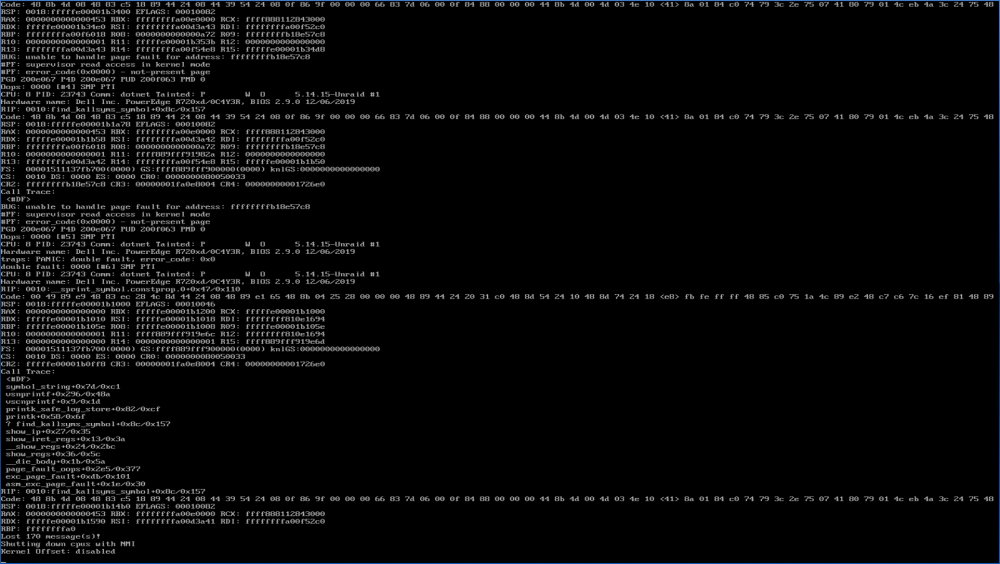
Greetings everyone, my Server keeps crashing at random intervals, may after a few hours, may after a week, longest uptime without tailing was 9 days and 7 hours. with tailing (two putty connections over telnet from other host: 1 tail -f syslog, 2 dmesg -w) 31 days. last crash occured today after nearly 23 hours. attached is the latest screencapture, syslogfile from whats captured by my external syslogserver, diagnostics after reboot. memtest ran 3 passes without issue. Hardware: Server: Dell Poweredge R720xd CPU: 2x E5-2650v2 RAM: 256GB ECC Ram Raidcontroller 1: Dell H310 mini mono flashed to HBA mode Raidcontroller 2: LSI 9208i -> connected to an supermicro expander backplane Network 1: Dell Intel i350-T4 Daughter Card Network 2: Intel X540-T2 GPU: Nvidia Quadro K2000 TV Card: TBS6981 Drives: 13x 8TB SAS Drives, Hitachi Brand 5x 2TB SAS, also Hitachi 2x Samsung 960GB SATA SSDs Flash Drive is an Sandisk Cruzer Force with 16GB Docker: - is using static ips on br0 - ipvlan (mac also crashes) - Host access to custom networks is deactivated as suggested in many Threads - System crashes even with docker deactivated one Debian VM is running with syncthing rolling back to 6.9 doesnt change anything may someone can help me here, i was planning to move an unraid server to an datacenter, but not in unstable state unraid-diagnostics-20220202-0848.zip syslog.txt