





Tunasub96
Members
-
Joined
-
Last visited
-
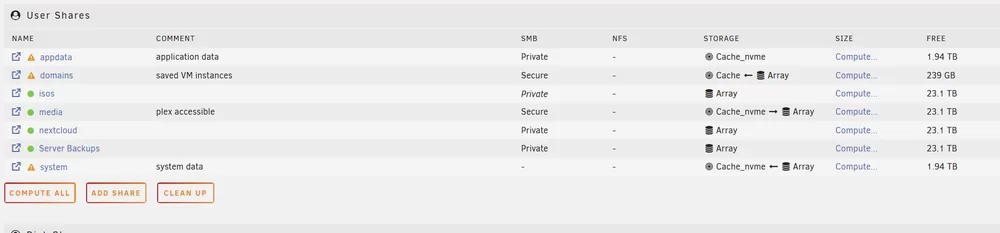
Thank you so much for your reply. Re VMs- Terminal results as follows: /mnt/user/system/libvirt/libvirt.img /mnt/cache_nvme/system/libvirt/libvirt.img On the data loss- any idea how I can find out what happend? Maybe somthing with duplicacy pruning (duplicacy had root acces, to all shares). Should I plug the drives into a pc and search for data, or if its gone its gone? The array data would be the real loss here, since I can recreate docker and VM setups. And if its gone, id rather rebuild than go forward with a system that was nonexistent shares hanging around. How do you suggest moving forward in creating a fresh environment (preclear all disks, then start rebuild dockers, VMs, and libraries)? Additionally, how do I deal with the missing shares? Diagnosis shows the following on shareDisks.txt: appdata shareUseCache="only" # Share exists on cache_nvme C----------------s shareUseCache="yes" # Share does not exist domains shareUseCache="prefer" # Share exists on cache isos shareUseCache="no" # Share exists on disk1 m---a shareUseCache="yes" # Share exists on disk1, disk2, disk3 n-------d shareUseCache="no" # Share exists on disk2, disk3 P------s shareUseCache="yes" # Share does not exist S------------s shareUseCache="no" # Share exists on disk3 system shareUseCache="prefer" # Share exists on cache_nvme u---------p shareUseCache="no" # Share does not exist
-
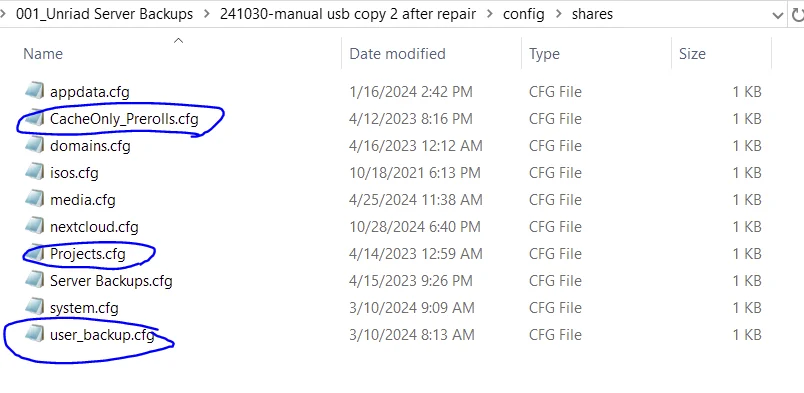
Serve crashed during jellyfin library scan (too many parallel scans, I believe, unrelated) and I could not boot up again, with no boot drive registered in bios. usb backup: Thought it must be usb- removed usb, repaired with windows. Since the usb seemed fine, I copied contents to pc to use instead of a week old backup (had setup nextcloud since then ). Zipped old usb contents, inserted new usb and used Unraid usb creator with that zip. Booted up server. Went through "replace key" process for new usb, logged into unraid and replaced. Noticed I have files missing (15tb), no docker containers, and random missing shares. Appdata is intact on cache_nvme drive. Missing files: All drives show significantly decreased used storage. For all my movie files, the video file is missing, but the images (.jpg, .png art) are still intact. The video files are not shown when browsing with smb form windows or unraid GUI I did not save syslog before rebooting. Missing shares: Seems random, have a recently created nextcloud share, but not other older ones. Missing shares "Projects" for instance are listed in the config folder in my usb backup. Rebooted- no change. Shutdown- and swapped new usb for old usb (did not make any changes to old usb, though unraid key should be invalid, no change. Restored new usb again using proper flashdrive backup- no change. DIagnosis files (attached) show "# Share does not exist" note. buster-diagnostics-20241101-0941.zip

-
Sorry in advance for the noobish question- I have been trying to solve it and cannot figure this out. I changed network type top host, and now I cant access my sever to change docker settings. I'm unable to see it on the network once I start the array and believe it is because Nordvpn docker is set to autostart. Plz help. My general goal is to route plex traffic through nordvpn. I have not been able to figure this out either.


