





PoMpIs
Members
-
Joined
-
Last visited
-
Yeah, yeah... I learned that the hard way, 😆 I didn't think I'd lose the TPM so easily. I just shut down the server to change the CPU, and when I went back to the Unraid GUI and saw the "invalid license" message, I almost had a heart attack. It was something I wasn't expecting at all... Lesson learned, won't happen again. 🙂 Now I have my other license on a USB drive. Just by restoring a backup to that USB and using the linked key, I don't have any more problems. For now, I'm still using the TPM on the server, but as soon as I can, I'll shut it down and boot it with this other USB drive and its license. I'll also copy the key from the TPM on that Asus motherboard to another USB drive, and goodbye to problems with CPU changes, BIOS updates, or even motherboard updates if necessary.
-
Yes, it happened to me too a few weeks ago... I have an Asus x570 pro with one of my licenses linked to TPM. I changed the CPU, and I ran into the problem... unraid said the license didn't match... The biggest problem is that I have OpnSense running on a VM in unraid, and since I couldn't start unraid, I couldn't start OpnSense either, and I couldn't solve the problem; it was a loop. I had to configure a router I had lying around with OpenWRT to solve the problem, but I was down for several hours. I got a big scare... I already transferred one of my licenses to a USB drive again... and I'll transfer the other one soon. Just by removing the CPU from the socket and putting it back in, even if it's just to change the thermal paste, the motherboard says "new CPU installed" when it restarts, something changes, and UnRAID says the license is invalid. And if the router is inside UnRAID in a VM, you'll never be able to fix it offline. I thought the TPM would remain unchanged since it's always the same motherboard, but a CPU change makes you lose the TPM license, at least on AM4 motherboards. Would a BIOS update do the same thing? Shouldn't it? I'd better not try it. 😅
-
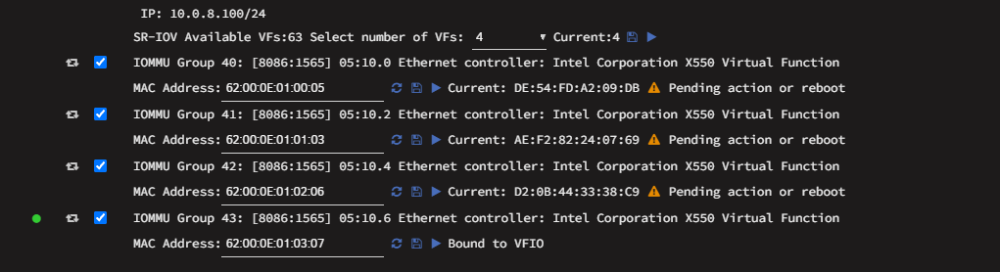
@JorgeB I couldn't resist giving it a try... 😁 I updated to unraid 7.4.0-beta.2 And now the x550 works perfectly, doing everything from the GUI itself. 😃 First, I assigned four VFs to the x550 and reboot, Then, I checked the box to link to VFIO and generated a MAC address, and finally clicked the "save" icon. I did this one by one with all four VFs... restarted Unraid, and voila! Now that's more like it! 😍

-
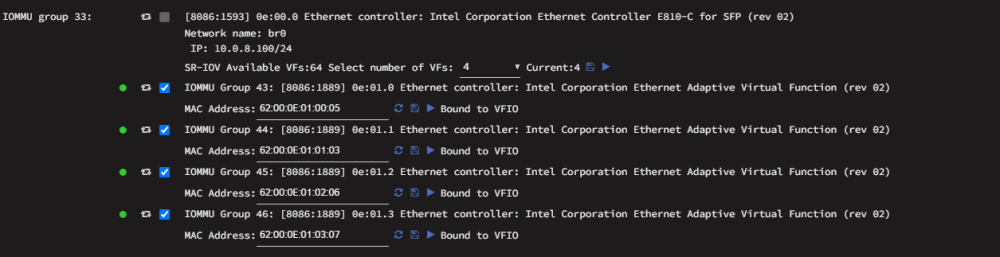
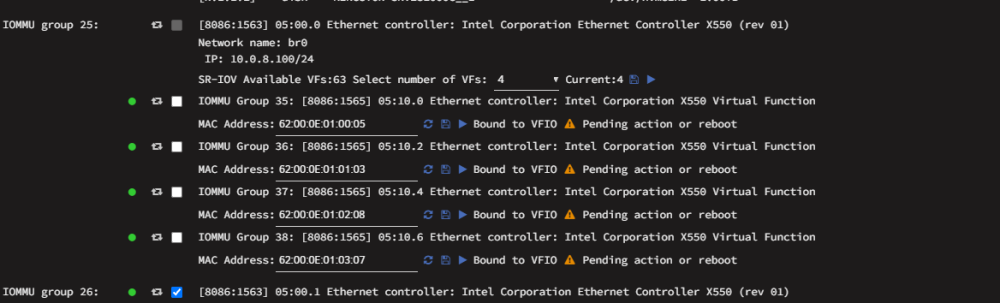
I've already loaded an unraid backup and an OpSense snapshot... I couldn't stay like this any longer with the network off, they were going to get mad at home 😅 With the E810, manually adjusting "sriovvfs" in /boot/config works without problems. sriov.cfg: VFS=0000:0e:00.0|8086:1593|4sriovvfs.cfg: VFSETTINGS=0000:0e:01.0|8086:1889|0x02|1|62:00:0E:01:00:05 0000:0e:01.1|8086:1889|0x02|1|62:00:0E:01:01:03 0000:0e:01.2|8086:1889|0x02|1|62:00:0E:01:02:06 0000:0e:01.3|8086:1889|0x02|1|62:00:0E:01:03:07 I'll try again another day. But I finally got it working with the x550 .. I edited "sriovvfs.cfg" like this: ( But I abandoned the idea because I don't like having to do all this.) VFSETTINGS=0000:05:10.0|8086:1565|0x02|0|62:00:0E:01:00:05 0000:05:10.2|8086:1565|0x02|0|62:00:0E:01:01:03 0000:05:10.4|8086:1565|0x02|0|62:00:0E:01:02:08 0000:05:10.6|8086:1565|0x02|0|62:00:0E:01:03:07With that, sriovvfs didn't put them in VFIO and then I modified "go" like this: #!/bin/bash Arrancar WebGUI /usr/local/sbin/emhttp KSM echo 1 > /sys/kernel/mm/ksm/run sleep 3 VLANs access ip link set dev eth0 vf 0 vlan 5 ip link set dev eth0 vf 1 vlan 3 Esperar un poco antes de VFIO sleep 2 Bind directo a VFIO /usr/local/sbin/vfio-pci-bind.sh 0000:05:10.0 8086:1565 /usr/local/sbin/vfio-pci-bind.sh 0000:05:10.2 8086:1565 /usr/local/sbin/vfio-pci-bind.sh 0000:05:10.4 8086:1565 /usr/local/sbin/vfio-pci-bind.sh 0000:05:10.6 8086:1565 With that modification it worked well 😊 === 05:10.0 === Kernel driver in use: vfio-pci === 05:10.2 === Kernel driver in use: vfio-pci === 05:10.4 === Kernel driver in use: vfio-pci === 05:10.6 === Kernel driver in use: vfio-pci ip link show eth0 | grep -E 'vf 0|vf 1|vf 2|vf 3' vf 0 link/ether 62:00:0e:01:00:05 brd ff:ff:ff:ff:ff:ff, vlan 5, spoof checking on, link-state auto, trust off, query_rss off vf 1 link/ether 62:00:0e:01:01:03 brd ff:ff:ff:ff:ff:ff, vlan 3, spoof checking on, link-state auto, trust off, query_rss off vf 2 link/ether 62:00:0e:01:02:08 brd ff:ff:ff:ff:ff:ff, spoof checking on, link-state auto, trust off, query_rss off vf 3 link/ether 62:00:0e:01:03:07 brd ff:ff:ff:ff:ff:ff, spoof checking on, link-state auto, trust off, query_rss offBut even so, the GUI didn't display it correctly: And I really didn't like having that fake thing in the GUI... I also don't like having to edit GO for this when it's not necessary on other cards. Anyway, if the GUI allows creating VFs and linking them to VFIO, it should work and I shouldn't have to manually edit the sriovvfs.cfg file.
-
Hi 🙂 I think there may be a bug in the SR-IOV VF configuration generated by the GUI in Unraid 7.3.2. I have reproduced the issue with both an Intel E810 and an Intel X550. When I configure SR-IOV VFs from the GUI, the generated VFSETTINGS line looks like this: VFSETTINGS=0000:0e:01.0|8086:1889|1|62:00:0E:01:00:05 0000:0e:01.1|8086:1889|1|62:00:0E:01:01:03 0000:0e:01.2|8086:1889|1|62:00:0E:01:02:06 0000:0e:01.3|8086:1889|1|62:00:0E:01:03:07 With this format, after reboot the VFs are not correctly bound to VFIO and the configured MAC addresses are not applied. If I manually edit the file and add the network class field (0x02), like this: VFSETTINGS=0000:0e:01.0|8086:1889|0x02|1|62:00:0E:01:00:05 0000:0e:01.1|8086:1889|0x02|1|62:00:0E:01:01:03 0000:0e:01.2|8086:1889|0x02|1|62:00:0E:01:02:06 0000:0e:01.3|8086:1889|0x02|1|62:00:0E:01:03:07 Then the E810 works perfectly: VFs bind to vfio-pci after reboot configured MAC addresses are applied no manual action is required So it looks like the current GUI is generating the VFSETTINGS format incorrectly. I am also seeing a second issue with an Intel X550. With the X550, manually correcting VFSETTINGS to the 5-field format makes VFIO binding work correctly, but after reboot only the last VF gets the configured MAC address. The other VFs keep their desired MAC visible in the GUI, but the actual/current MAC is random and the GUI shows: Example after reboot: VF0: configured MAC present, current MAC random VF1: configured MAC present, current MAC random VF2: configured MAC present, current MAC random VF3: configured MAC applied correctly and bound to VFIO If I click the Play / Apply VF Settings icon manually on the affected VFs, the correct MAC is applied immediately and everything works. The kernel log shows this during boot for the X550: ixgbe ... setting MAC 62:00:0e:01:00:05 on VF 0 ixgbe ... Reload the VF driver to make this change effective. ixgbevf ... MAC address not assigned by administrator. ixgbevf ... Assigning random MAC address The same happens VF1 and VF2. Interestingly, VF3 is the only one that ends up with the configured MAC after boot, which makes this look like a timing/race issue during VF initialization. Hardware / software: Unraid: 7.3.2 Kernel: 6.18.38-Unraid Intel E810 SR-IOV Intel X550-T2 SR-IOV SR-IOV itself works extremely well once the VF settings are applied. On the X550 I am using one VF as an OPNsense trunk carrying multiple VLANs, and other VFs as VLAN access interfaces for VMs, with internal VF-to-VF traffic working correctly. So the two issues I am seeing are: The GUI appears to generate VFSETTINGS without the required class_id field (0x02). On the X550, even with the corrected format, only the last VF reliably receives its configured MAC during boot; the others require manually clicking Apply/Play. Is this a known issue in 7.3.2, or is there a recommended way to delay/reapply sriovvfs.cfg after the ixgbevf initialization finishes? Thanks!
-
Well, it's been confirmed... if I remove the TPM on my production server, which has the license transferred to the TPM, I can then transfer it back to a USB drive. So, the message from my unraid account that I'm not allowed to transfer that license is incorrect.

-
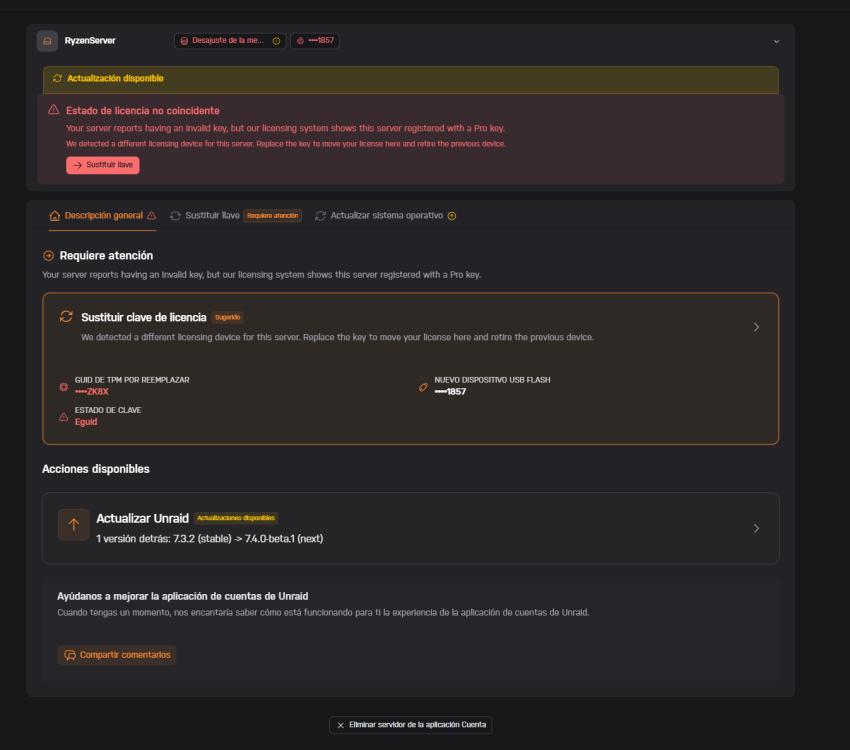
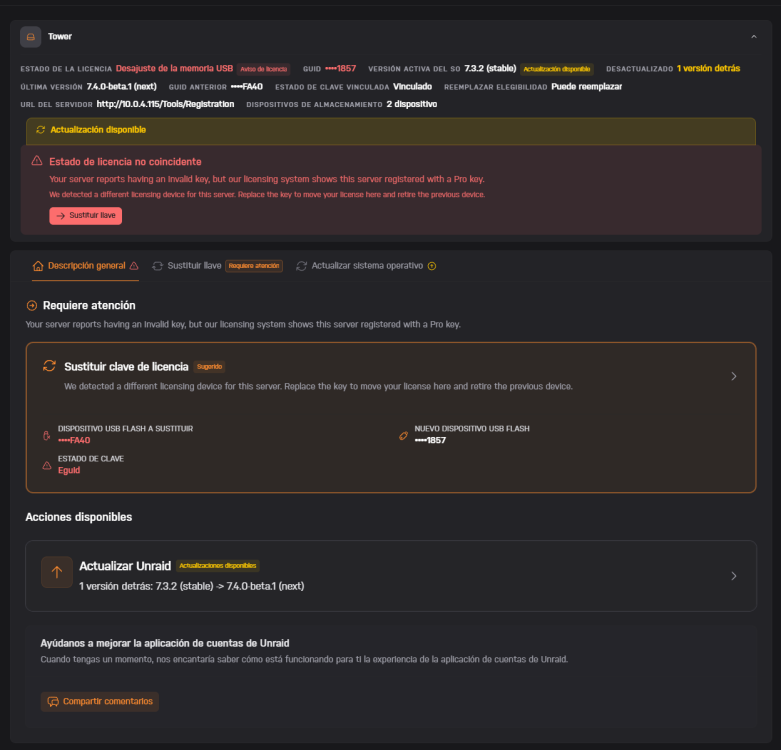
Yes, of course, I have several USB drives, I've tried with several and it's always the same, I never see an option to transfer to another USB drive, only TPM. EDIT: Disabling TPM 2.0 on the motherboard was enough to make the option to switch to USB appear. I don't think this should be necessary. By default, if UnRAID detects TPM as active, it doesn't show any USB devices at all to change the license from one USB drive to another. This has given me an idea... Perhaps if I boot my production server with TPM disabled, it might allow me to switch back from TPM to a USB drive. 🤔 Although I didn't plan on changing the motherboard in the production server for a long time, I almost prefer having it on USB; if the motherboard fails, I just install the spare and it's up and running quickly.
-
I'm picking this up again... Because I wanted to transfer my second unraid PRO license, which I use for testing, to another USB drive. And I can't find a way to do it. Does the system force me to switch to TPM? Is switching to TPM now mandatory?. (I absolutely refuse; this license is constantly being tested with different hardware.) 🤨

-
I'm testing it with a second Unraid license I have for testing, and the interface is much faster; well, everything is more "instantaneous." I like it. 🙂
-
@Lolight Yes, I know how unraid works... but since I already had the case and several SSDs, I tried it out, and seeing that it worked perfectly, I stuck with it. But I don't know how fast unraid loads on one of those USB drives you mentioned, but on the SSD it boots up in just a few seconds, and the updates are insane; you just click on the update and it's almost instantaneous.😄 But now with the x570+5950x, I'm transferring the license from the B450, and going from a 1600AF to a 5950x is spectacular; the difference is amazing, and it should last me for many years. 👌
-
Oh! I didn't know that. Well, I'll try it and see if it allows it. 🙂 Thank you very much. It was a test years ago, and seeing that it worked well, I left it as is. Besides, I thought it was a brilliant idea because the GUID that UnRAID used was the one on the enclosure, so I could swap the SSD for another one without any problems. Everything worked without swapping licenses. I even had UnRAID running for a while with an old 2.5" 500GB mechanical HDD in that same enclosure, and everything worked perfectly. 😀 And apart from that, it was super fast. UnRAID updates were instantaneous, and there were no issues with UnRAID saving the registry on the disk; it doesn't degrade like USB drives because it's a regular SSD that's used in any PC for operating systems. Cheers 🙂

-
Well, that's a shame... 🤨 I didn't want to use the TPM license, but when I updated unraid to the version that allowed internal booting, it wouldn't boot from that USB drive. This is because I use an SSD in a USB 3.0 enclosure as a flash drive, and the new version of unraid doesn't seem to like my SSD + USB enclosure setup after so many years of it working perfectly. Anyway, I have two PRO licenses, one of which is still linked to another USB drive. So, by restoring a backup from the current server to this USB drive and using the second license linked to it, I can continue working on the X570+5950x (I've tested it). But this shouldn't be the case. I don't know how long it takes to transfer the license to the new motherboard, but if I transfer all the drives to the new computer and only have one license, and it takes several days to transfer it, I'll have a problem at home. I'm going to contact support and have them remove the license from the B450 and transfer it to the new motherboard or another compatible USB drive, because I'm going to sell it. Thank you very much.
-
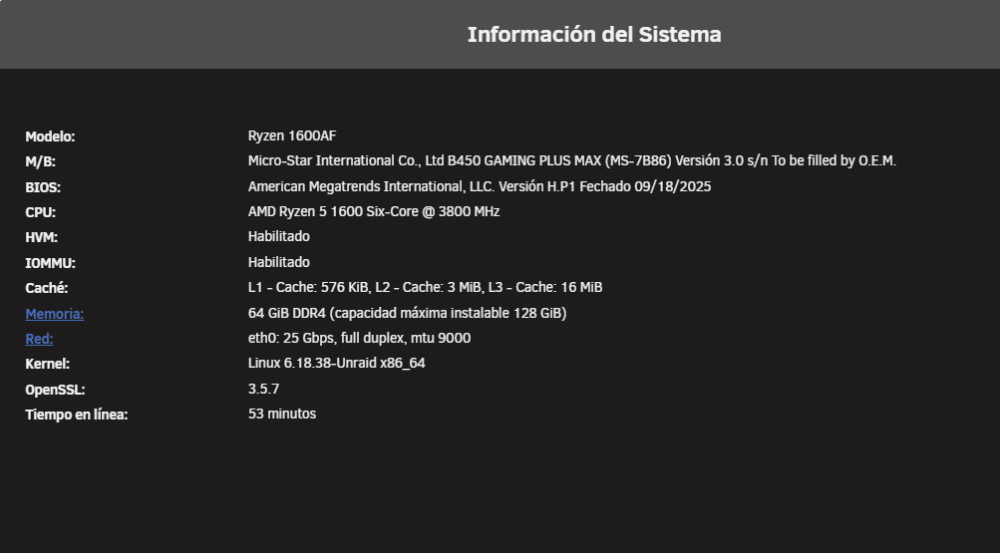
Hi, 🙂 I've been using an unRAID setup for many years on a Ryzen 1600AF, an MSI B450 motherboard, and 64GB of RAM. This server is my network hub and handles everything; it has a lot of things running and is becoming too small for me. But the license is tied to the motherboard. I bought an ASUS X570 and a 5950X so I can continue using my 64GB of RAM, and also because it has more PCIe lanes and, above all, because it's PCIe 4.0. Can I transfer my license to this new motherboard? Is it not possible according to what I've read? Thank you so much
-
My server is updated... it's working great! 👌
-
I had to transfer the license to TPM because 7.3.0 wouldn't load the GUI with the GUID of my USB enclosure containing a 120GB SSD... But once transferred to TPM, I reinstalled UNRAID 7.3.0 in the USB enclosure and it works perfectly now—well, it works with any USB drive I plug in... And if I remove the SSD from the enclosure and plug it into an internal SATA port, it also boots and works. 🤷♂️






