Cicatrix
Members
-
Joined
-
Last visited
-
Hey, i am a bit sad that you don't maintain it anymore, you did a great Job! It is a bit OT, but do you use some other kind of software or is it "just" time related or a similar issue?
-
Ok, the above mentioned problem isn`t the real problem. I checked the log again and there seems to be a problem with myservers.cfg; [2023-12-19T16:13:07.837] [14730] [32m[INFO][39m [32m[app][39m Watch Setup on Config Path: /boot/config/plugins/dynamix.my.servers/myservers.cfg [2023-12-19T16:13:07.843] [14730] [33m[WARN][39m [33m[app][39m Config file is corrupted, recreating config TypeError: Cannot read properties of undefined (reading 'version') at getWriteableConfig (/snapshot/api/dist/unraid-api.cjs:8708:24) at /snapshot/api/dist/unraid-api.cjs:8927:70 [2023-12-19T16:13:07.951] [14730] [36m[DEBUG][39m [36m[app][39m Config File Load Failed - TypeError: Cannot read properties of undefined (reading 'version') at getWriteableConfig (/snapshot/api/dist/unraid-api.cjs:8708:24) at /snapshot/api/dist/unraid-api.cjs:8927:70 { [stack]: "TypeError: Cannot read properties of undefined (reading 'version')\n" + ' at getWriteableConfig (/snapshot/api/dist/unraid-api.cjs:8708:24)\n' + ' at /snapshot/api/dist/unraid-api.cjs:8927:70', [message]: "Cannot read properties of undefined (reading 'version')" This is repeating. I tried: rm /boot/config/plugins/dynamix.my.servers/myservers.cfg unraid-api restart but the log is telling me the same problem with the myservers.cfg. Any suggestions?
-
Ok, it seems like the problem were old data on disk1. Maayybeeee the docker.img (I deleted it accidentally). After checking all data and recreating docker.img it seems to work for now.
-
Hello everyone, while searching solutions for another problem I got, I checked the logs of Connect, because there is a problem with the flash backup. I've seen, that some have errors with the backup, mine is just loading without any error at all ("Wird geladen" = loading): The Connect logs are spammed with the following message every 10 seconds: [2023-12-10T19:17:20.607] [19088] [36m[DEBUG][39m [36m[emhttp][39m Loading state file for disks Seems like this thing is waking my HDDs up. For more infos please see the log attached. Thank you. edit: deleted logs and changed the title

-
Thank you for the reply and sorry for the the late answer. I was sick and had no time. I changed the settings to hass-> array for some shares, for some others cache-> array. Attached the newest diag. AppData seems to be on Cache and on Disk1, I don't know why. My biggest problem is, that for testing I turned VM-Manager and Docker off, but the discs kept spinning up. So there has to be another problem, but I can not find it. tower-diagnostics-20231202-0302.zip
-
-
Hello everyone, I am running Home Assistant as a VM and would like to run it from cache, so my array can spin down. The file activity plugin showed me, that the image is changed all the time, my disks keep spinning up. I set the domain-folder prim to HASS (VM-only cache pool) and sec. to the array, what am I doing wrong? Tank you guys. tower-diagnostics-20231109-1045.zip
-
After another passthrough of the USB it was working. Maybe some problem there, but it is runing now.
-
Hello everyone, yesterday I moved my home assistant from my RasPi to an Unraid VM. After some (some lol) problems with the ConBee II stick it worked with the USB Manager plugin. But now my syslog is spammed with mostly the following problem: ### [PREVIOUS LINE REPEATED 48029 TIMES] ### Nov 4 02:09:56 Tower kernel: eth0: renamed from veth4f13108 Nov 4 02:09:56 Tower kernel: usb 5-1: usbfs: process 29172 (qemu-system-x86) did not claim interface 1 before use ### [PREVIOUS LINE REPEATED 13794 TIMES] ### Nov 4 02:13:53 Tower kernel: veth4f13108: renamed from eth0 Nov 4 02:13:53 Tower kernel: usb 5-1: usbfs: process 29172 (qemu-system-x86) did not claim interface 1 before use ### [PREVIOUS LINE REPEATED 2327 TIMES] ### Nov 4 02:14:34 Tower monitor: Stop running nchan processes Nov 4 02:14:34 Tower kernel: usb 5-1: usbfs: process 29172 (qemu-system-x86) did not claim interface 1 before use Diag attached. You guessed correct, 5-1 is the ConBee-Stick, here the passthrough (port, not device): Has anyone an idea where the problem is? Thank you very much! tower-diagnostics-20231104-1938.zip

-
I get the following Error Message: Bei der Installation von get_content ging etwas schief Post the ENTIRE contents of this message in the Community Applications Support Thread OS: 6.11.5 Browser: Mozilla/5.0 (Linux; Android 13; 2107113SG) AppleWebKit/537.36 (KHTML, like Gecko) Chrome/112.0.0.0 Mobile Safari/537.36 Language: de_DE No data was returned. It is probable that another browser session has rebooted your server. Reloading this browser tab will probably fix this error Seems to be the Same Template problem from September 2023.
-
Changed to nightly (Jellyfin 10.9.0) and HDR is running like a charm. Thank you cery much.
-
Hello there, is there any way to get tone mapping (HDR -> SDR) work on Jellyfin? I am using Linuxserver Jellyfin (10.8.9) with an 5700G. Transcoding is working, but tone mapping won't work. Found this one: https://www.reddit.com/r/unRAID/comments/vwd9ll/jellyfin_tonemapping_using_amd_igpu/ But here it is mentioned, that you need to isntall rocm on the host: https://github.com/linuxserver/docker-mods/pull/544 And I absolutely do not know how to install it on unraid. So did someone found a way to use the tone mapping feature with an AMD iGPU? Thank you very much.
-
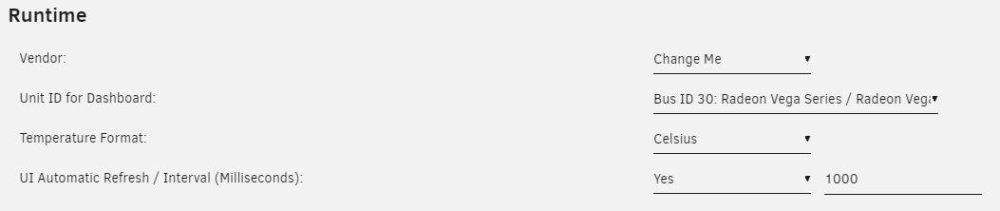
6.11.5 working on my machine, too. Output: root@Tower:~# cat /boot/config/plugins/gpustat/gpustat.cfg VENDOR="" GPUID="" TEMPFORMAT="C" DISPCLOCKS="1" DISPENCDEC="1" DISPPCIUTIL="1" DISPTEMP="1" DISPFAN="1" DISPPWRDRAW="1" DISPPWRSTATE="1" DISPTHROTTLE="1" DISPSESSIONS="1" UIREFRESH="1" UIREFRESHINT="1000" DISPMEMUTIL="1" DISP3DRENDER="1" DISPBLITTER="1" DISPVIDEO="1" DISPVIDENH="1" DISPINTERRUPT="1" DISPEVENT="1" DISPVERTEX="1" DISPTEXTURE="1" DISPSHADEREXP="1" DISPSEQUENCER="1" DISPSHADERINTER="1" DISPSCANCON="1" DISPPRIMASSEM="1" DISPDEPTHBLK="1" DISPCOLORBLK="1" DISPGFXTRANS="1" root@Tower:~# "DISPPWRDRWSEL" seems to be missing?! Saving changes has still no effect.
-
I can change it, but after hitting apply evertything has the value from before hitting apply. Not just for vendor, it is for every value. And CPU usage was pretty high. Deinstalled it for now. Edit: Tried it again, still can't save any changes. After saving every single value jumps back to the standard value (that you've got after installation).
-
What's pretty cool: I can select the controller now. What's not that cool: I can't save any changes. Tried it with a clean install of the test load, but savings won't work.