





rdagitz
Members
-
Joined
-
Last visited
Everything posted by rdagitz
-
I went ahead and ran the fix again. Stopped the array Started in Maintenance Mode Went to Disk 1 Settings > Check File System Removed the -n and put in -L and hit the Check button Below is the output of the Check
-
I did actually run is in the GUI. I just removed the "-n" and replaced it with "-L" while in Maintenance Mode and hit the "Check" button. Is there something incorrect in the command that I ran or should this have resolved the issue so that I wouldn't have to run it again just two weeks later?
-
Two weeks ago I ran the following: xfs_repair -L /dev/md1 This "repaired" the file system but I am back here again. Is this the command that you are suggesting that I run again?
-
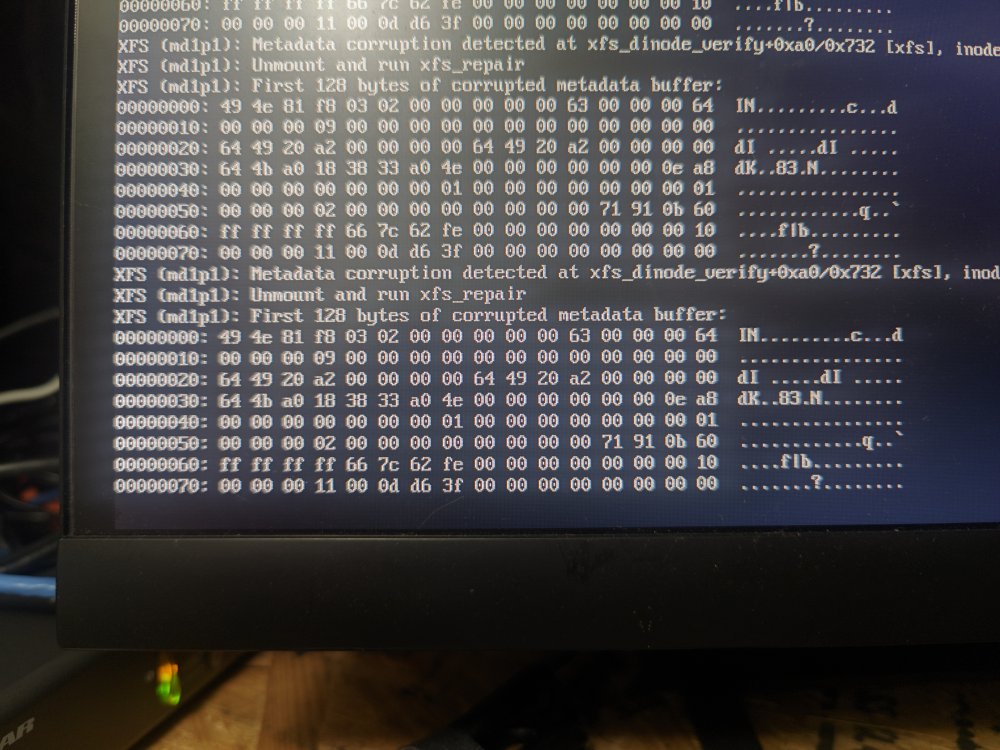
Hello Helpful People, About two weeks ago I looked the the Main tab of the Unraid dashboard and found that Data Disk 1 had no supported file type and we could not write to that disk. The disk has been part of my array for years and had a majority of our data on it. I stopped the array and ran fsx_repair from Disk 1 Settings > File System Check and it repaired the partition. We were up and running. Now two weeks later I am getting some of the same warnings (although the file system is not preventing from writing to the disk at this point.) I don't see any Smart errors but does anyone know any tests or diagnostics I can run to determine if this is a hardware problem with this drive before I "jump down the rabbit hole" too far? Unraid 6.12.6 ciserver-smart-20240122-0853.zip ciserver-diagnostics-20240122-1149.zip
-
I had the same exact behavior as listed in the beginning of this thread. I was able to Stop the array Start the array in Maintenance mode click on the problem disk in the UI and then run the "Check File System" tool from the dashboard. I did have to use the "-L" argument to drop the log and proceed. Fixed the problem. Unraid truly is awesome.
-
Do I need to remove any previous entries in authorized_keys?
-
Persistent SSH is still a no go. I have created ed25519 keys for both servers (Unraid1 & UnraidBackup) Made sure the root users of each server have a copy of the key (I can see the key listed under the root user.) SSHed from Unraid1 to UnraidBackup by terminal and run the command Said "Yes" to add the SSH user to the authoized_users list I removed the entries in the go file that are no longer needed [see above] Each time UnraidBackup is rebooted I am confronted with Am I missing something?
-
I have a Supermicro X8DT3 with a BMC IPMI. I am running Unraid 6.12.6. Since installing the IPMI Tools plugin (new install from scratch), I keep getting constant "Critical Low" or "Critical High" warning until the log file is 100% full. I had to turn off notifications. I am running a fan wall (x3) of Noctua NF-P12 (with PWM) and 2 NF-R8 fans at the back of the case. My son and I have adjusted the IPMI Tools config file to the closest values the X8DT3 will take for the Noctua fans and yet Unraid log is still getting overwhelmed unless I turn off notifications. Thoughts? IPMI Tools Config below:
-
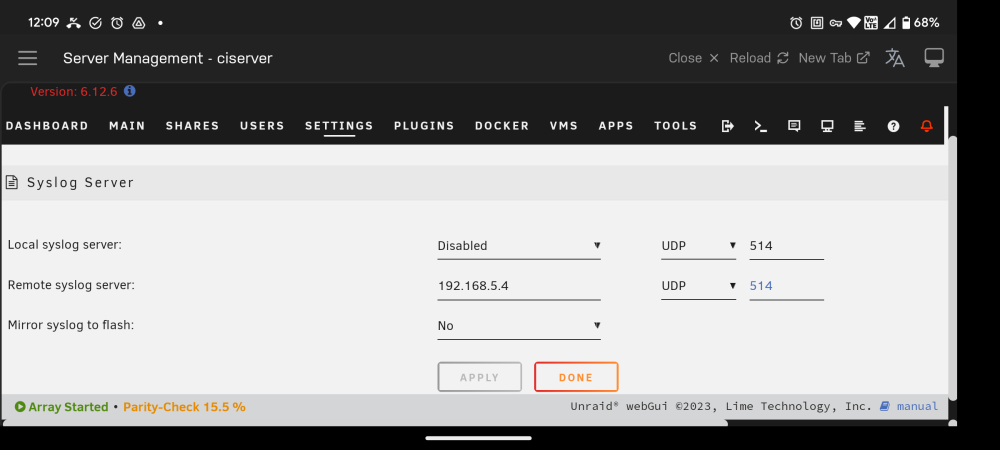
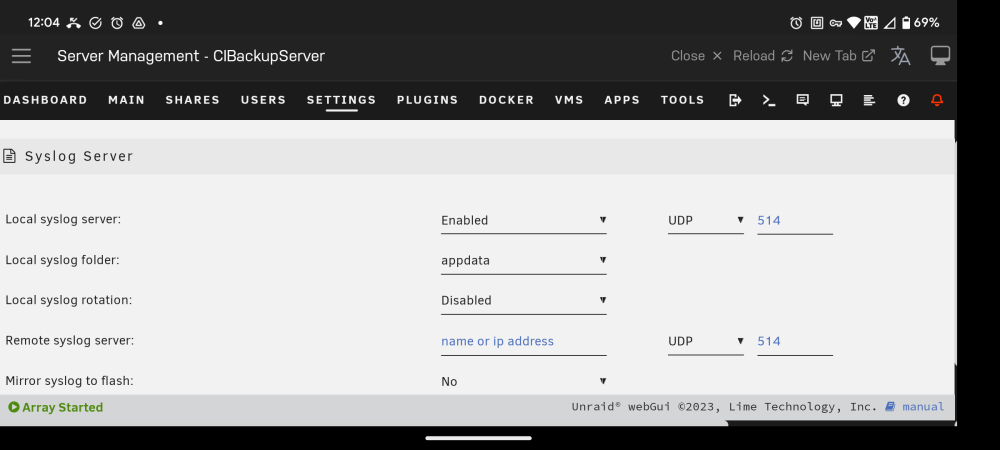
I am still not getting any syslog entries on Uraid2. I here is what I have done. Set Unraid1 "Remote syslog server" to the IP of Unraid2 with UDP 514 Set Unraid2 "Local syslog server" to Enable and set the Local syslog folder to a new share I created called "Logs". (Ignore the entry in the picture above.) This "Logs" share is set to use the cache drive only. I went ahead and port forwarded 514 in Unraid2's network just in case it is needed. Can anyone think of something I am missing?
-
So I have set the above settings on the two servers but when I look on Unraid2 I don't see anything. Am I doing something wrong?
-
Okay, I think I understand but I want to be clear. On Unraid1 I need to set the "Remote syslog server" to the IP address of Unraid2. Then on Unraid2 I need to enable "Local syslog server" and then I can specify the share location. Do I have everything set up correctly?
-
I will look into it but I'm a little unclear. The directions in that link don't say anything about settings needed on the remote server. Am I missing something?
-
I have an Unraid server that is locking up on a weekly basis. I want to set up a persistent syslog on another Unraid server. (Let's say Unraid1 to Unraid2) I looked at the directions but I'm wondering where would I look on the remote server (Unraid2) to find the syslog for Unraid1? Is it possible to specify a location?
-
OK, there is just too much old information on the forums and I am unclear. I am having issues with SSH keys not remaining persistent after reboot. I cannot tell if there are some old entries in the /boot/config/go that need to be removed Here is the go file: #!/bin/bash # Start the Management Utility /usr/local/sbin/emhttp & #Copies all files needed for authorized ssh connections mkdir /root/.ssh cp /boot/config/ssh/* /root/.ssh/ cd /root/.ssh chmod 600 * Are the lines under "#Copies all files needed for authorized ssh connections" no longer needed so I can delete them? I am running Unraid 6.12.4
-
I have one Unraid server on which the Unraid Connect Plugin has a corrupted file or something. When I installed Connect some months ago, the port I chose was blocked for some other reason (I have that problem fixed), but the plugin now does not even show the option to customize the port for Connect. I have disconnected the server from my Unraid.net account and want to install the Connect plugin from scratch. I have uninstalled and reinstalled the plugin but still have this incomplete settings page under Settings > Management Access. Are there some Terminal steps I can take to remove everything and start over?
-
Thank you so much for the update. Any idea what has been causing the issue? (Just curious 😁)
-
Ok, so installing from the "reallibrephotos/singleton" repository brought me to the new sign-in screen and started the rest of the setup process. I am guessing that this repository brought up an even newer version that fixed the issue.
-
Since 6.12 came out I have been following the forum hoping for a solution to 6.12 random shutdowns / freeze-ups and network issues. I tried 6.12, up to 6.12.3 and still had to go back to 6.11.3. I have 7 different Unraid machines and all but 2 are on different hardware. I have tried upgrading my Chenbro 12000U home server and another one built in a Dell T3500. Both have had the same random shutdown / freeze-up issue (likely due to "macvlan call traces found" errors). The most common recommendation has been to switch to ipvlan in docker. The problem with that change is that custom networks are toast unless you add another network adapter. Really?! I have to add new hardware to get around a problem that started with an Unraid upgrade? Can someone please help me to understand what is going on? Macvlan works fine on Unraid 6.11.3. Does anyone know what was changed in Unraid 6.12 that is causing these kinds of issues to a wide range of hardware setups? Is this a bug? Is anyone looking into solving the root issue behind this so that weird workarounds are not necessary? I am freely admitting that I may have missed the posts addressing this. Just point me in the right direction. Thanks.
-
Trying to get LibrePhotos going. Stuck at a login screen but cannot login. Have tried: login with admin/admin Installing from the "reallibrephotos/singleton:2023w20" repository Increasing the docker size (have over 50GB free space No joy. Help!
-
I am in the process of replacing 8 drives, 2 parity and 6 data drives. I have already successfully replaced the parity. Now I am shuffling the data around with unBalance. I am trying to offload all the data off of Data Drive 1, replace it with a 10TB drive and move the data from as many drives I can replace at one time. I don't want to have to rebuild parity after each data disk is removed, but I want some kind of "safety net" in the rebuild process. It would be a lot of data to lose if something goes wrong. My current problem is that unBalance is not moving all of the data, even though the target drives have over 100GB more space available for Data Disk 1's contents. Trying to figure out why.
-
Can someone clarify this item? I have 12 hard drives in my server, 2 parity and 10 data. Let's say I am taking out Data Drive #1. I use unBalance to transfer all of the files off of the drive to other data drives in the array. Enable reconstruct write (aka turbo write): Settings -> Disk Settings -> Tunable (md_write_method) Start array in Maintenance mode Identify which disk you're removing (it's Disk 1 so that's /dev/md1 I am on Unraid 6.11.3 so my command is "dd bs=1M if=/dev/zero of=/dev/md1 status=progress" When the command completes, Stop array, go to Tools -> New Config -> Retain current configuration: All -> Apply (I have a screenshot of my disk layout just in case.) Is step 7 saying that when I create the new config I need to leave the slot for Drive 1 as unassigned in order for the parity to remain valid?
-
And this is why I post my thoughts here. Brilliant! I don't know why it did not occur to me that I could replace multiple data drives at the same time, once I have the space for the data on the first 10TB drive. 2 questions on parity: How do I drop to a single parity drive? Also, If I have the second parity drive on the shelf, can I count on that as "insurance" in case something goes wrong in the rebuild / swap process?
-
My Unraid machine has 12 HDDs ... 2x2TB parity and 10x2TB data. I am upgrading with 8x10TB drives. To do so, I am swapping out parity first. I have no more sata ports so I cannot attach the new drive while an existing drive is attached. Before starting (and after watching and reading online) I just want to make sure that I have the procedure right. Print off my Main window in Uraid to have drive IDs and drive assigements Stop the array Unassign Parity 1 Shut down the server and remove Parity 1 HDD. Replace it with a 10TB drive Boot up the server Assign a 10TB drive as new Parity 1 Start up the array Let parity rebuild Stop the array Unassign Parity 2 Shut down the server and remove Parity 2. Replace it with a 10TB drive Boot up the server Assign a 10TB drive as new Parity 2 Let parity rebuild Use unBALANCE to move all data files off of one data drive (Let's call it Data 1) Stop the array Unassign Data 1 Shut down the server and remove Data 1 and replace it with a new 10TB drive. Boot up the server and start the array Use unBALANCE to move data files off of other 2TB drives (mainly to the new 10TB drive) to prepare them for removal and replacement. Walk through these last 5 steps or so until I have replace 4 more 2TB with 10TB data drives. Am I missing anything? Additional question: I have a Tyan S5512 motherboard with 8 SAS or SATA ports and 4 ports that are only SATA. The drives I ordered are 10TB SAS. I imagine I am going to have to change the ports to which some drives are connected to get this upgrade done. Let's assume that Parity 1 is attached to a SATA only port. To connect my new 10TB drive, I have to move Parity 1 to a SAS or SATA port. Do I assume correctly that Uraid will have no problem with this, since it uses drive ID numbers to assign drive responsibilities?
-
Did these crashes start after upgrading to Unraid 6.12 (or even 6.11.5)?
-
Turns out that my "locking up" problem is something to do with docker vlans and an issue with Unraid 6.12. Downgraded to Unraid 6.11.3 and am waiting on the issue to be resolved.


