





patrickstigler
Members
-
Joined
-
Last visited
-
only broken sectors ... I justed wiped the disk, and recovered from the backup. Took a while, but it seems to work.
-
I ran Memtest, the whole weekend, last week :-D I got 2 broken modules. So the other ones, currently working fine - at leased I'd say so. I tried to scrub it. But there is one Uncorrectable error. So what to do now? UUID: 53b61841-b900-45f6-a9b6-7446d79b46bc Scrub started: Mon Apr 1 16:58:22 2024 Status: aborted Duration: 0:07:20 Total to scrub: 354.71GiB Rate: 795.44MiB/s Error summary: csum=1 Corrected: 0 Uncorrectable: 1 Unverified: 0
-
Welcome :-D Unfortunately I still have some trouble, while I want to convert back to singe drive. root@Server:~# btrfs balance start -f -dconvert=single -mconvert=single /mnt/cache ERROR: error during balancing '/mnt/cache': Input/output error There may be more info in syslog - try dmesg | tail root@Server:~# dmesg | tail [276079.589839] BTRFS info (device nvme0n1p1): relocating block group 4693758574592 flags system|dup [276079.611808] BTRFS info (device nvme0n1p1): found 3 extents, stage: move data extents [276079.624923] BTRFS info (device nvme0n1p1): relocating block group 4692684832768 flags metadata|dup [276084.175103] BTRFS info (device nvme0n1p1): found 25823 extents, stage: move data extents [276086.154762] BTRFS info (device nvme0n1p1): relocating block group 1636480057344 flags data|raid1 [276086.348070] BTRFS warning (device nvme0n1p1): csum failed root -9 ino 922 off 130379776 csum 0x3019a12b expected csum 0x3ed50501 mirror 2 [276086.348083] BTRFS error (device nvme0n1p1): bdev /dev/nvme0n1p1 errs: wr 0, rd 0, flush 0, corrupt 807, gen 0 [276086.357072] BTRFS warning (device nvme0n1p1): csum failed root -9 ino 922 off 130379776 csum 0x3019a12b expected csum 0x3ed50501 mirror 2 [276086.357079] BTRFS error (device nvme0n1p1): bdev /dev/nvme0n1p1 errs: wr 0, rd 0, flush 0, corrupt 808, gen 0 [276086.604873] BTRFS info (device nvme0n1p1): balance: ended with status: -5
-
Thank you so much - again. So enjoy the beer ;-D
-
Label: none uuid: 53b61841-b900-45f6-a9b6-7446d79b46bc Total devices 2 FS bytes used 282.78GiB devid 1 size 465.76GiB used 14.00GiB path /dev/nvme0n1p1 devid 2 size 931.51GiB used 290.06GiB path /dev/nvme1n1p1 looks better I guess?!
-
Created a new DOS disklabel with disk identifier 0x8744012d. Created a new partition 1 of type 'Linux' and of size 931.5 GiB. Partition #1 contains a btrfs signature. Do you want to remove the signature? [Y]es/[N]o:
-
warning, device 2 is missing warning, device 2 is missing ERROR: cannot read chunk root Label: none uuid: 53b61841-b900-45f6-a9b6-7446d79b46bc Total devices 2 FS bytes used 282.78GiB devid 1 size 465.76GiB used 14.00GiB path /dev/nvme0n1p1 *** Some devices missing
-
Ok, wrong order :-( Unfortunately not

-
Hi, I tried to remove the 2nd SSD of my cachepool. It used to be a raid1 - since I wanted to remove one disk, I converted it back to single. Then I removed the 2nd SSD from the config (new config). But I guess I missed a step. Now I can only wipe the data - which I want to avoid. So how do I either finish the conversion or restore it back? btrfs-select-super -s 1 /dev/nvme0n1p1 warning, device 2 is missing warning, device 2 is missing ERROR: cannot read chunk root ERROR: open ctree failed btrfs-select-super -s 1 /dev/nvme1n1 No valid Btrfs found on /dev/nvme1n1 ERROR: open ctree failed
-
No, not yet. But really good hint. Thanks. I started it. Thanks :-D hope the system will be stable now - I keep the thread open for a few days. But it seems that the RAM was the problem. Thank you so much, for the support.
-
For 3 Days stable, but Mar 19 11:13:39 Server kernel: PMS LoudnessCmd[16217]: segfault at 0 ip 000014ce38ac7090 sp 000014ce335d40b8 error 4 in libswresample.so.4[14ce38abf000+18000] likely on CPU 14 (core 6, socket 0) and Mar 19 12:00:02 Server kernel: BTRFS error (device nvme0n1p1): bdev /dev/nvme0n1p1 errs: wr 0, rd 0, flush 0, corrupt 318, gen 0 Mar 19 12:00:02 Server kernel: BTRFS warning (device nvme0n1p1): csum failed root 5 ino 4711988 off 264597504 csum 0x3019a12b expected csum 0x3ed50501 mirror 1 Mar 19 12:00:02 Server kernel: BTRFS error (device nvme0n1p1): bdev /dev/nvme1n1p1 errs: wr 0, rd 0, flush 0, corrupt 308, gen 0 Mar 19 12:00:02 Server kernel: BTRFS warning (device nvme0n1p1): csum failed root 5 ino 4711988 off 264597504 csum 0x3019a12b expected csum 0x3ed50501 mirror 2 Mar 19 12:00:02 Server kernel: BTRFS error (device nvme0n1p1): bdev /dev/nvme0n1p1 errs: wr 0, rd 0, flush 0, corrupt 319, gen 0 Mar 19 12:00:02 Server kernel: BTRFS warning (device nvme0n1p1): csum failed root 5 ino 4711988 off 264597504 csum 0x3019a12b expected csum 0x3ed50501 mirror 1 Maybe the CPU got problems ... well. I will let it run for a while. We will see.
-
After a few hours of testing, and swapping the modules around, it seems that one of the Crucial Ballistix BL2K8G32C16U4B 3200 MHz modules died. It was 24/7 online since 28.11.21 - I guess not a server grade RAM module. Well, the test for the last module is running. And I will also check if that is only in that slot. But thank you for your help - I keep you updated. After another 20ish hours, I must say the Crucial ones are working fine. But the kingston ones are gone. So removed the kingston ram's, and till now it's working. Mar 16 18:00:01 Server kernel: BTRFS error (device nvme0n1p1): bdev /dev/nvme1n1p1 errs: wr 0, rd 0, flush 0, corrupt 201, gen 0 Mar 16 18:00:01 Server kernel: BTRFS warning (device nvme0n1p1): csum failed root 5 ino 4711988 off 264597504 csum 0x3019a12b expected csum 0x3ed50501 mirror 2 Mar 16 18:00:01 Server kernel: BTRFS error (device nvme0n1p1): bdev /dev/nvme0n1p1 errs: wr 0, rd 0, flush 0, corrupt 212, gen 0 Mar 16 18:00:01 Server kernel: BTRFS warning (device nvme0n1p1): csum failed root 5 ino 4711988 off 264597504 csum 0x3019a12b expected csum 0x3ed50501 mirror 1 Mar 16 18:00:01 Server kernel: BTRFS error (device nvme0n1p1): bdev /dev/nvme1n1p1 errs: wr 0, rd 0, flush 0, corrupt 202, gen 0 Mar 16 18:00:01 Server kernel: BTRFS warning (device nvme0n1p1): csum failed root 5 ino 4711988 off 264597504 csum 0x3019a12b expected csum 0x3ed50501 mirror 2 Mar 16 18:00:01 Server kernel: BTRFS error (device nvme0n1p1): bdev /dev/nvme0n1p1 errs: wr 0, rd 0, flush 0, corrupt 213, gen 0 Mar 16 18:00:01 Server kernel: BTRFS warning (device nvme0n1p1): csum failed root 5 ino 4711988 off 264597504 csum 0x3019a12b expected csum 0x3ed50501 mirror 1 Mar 16 18:00:01 Server kernel: BTRFS error (device nvme0n1p1): bdev /dev/nvme1n1p1 errs: wr 0, rd 0, flush 0, corrupt 203, gen 0 Mar 16 18:00:01 Server kernel: BTRFS warning (device nvme0n1p1): csum failed root 5 ino 4711988 off 264597504 csum 0x3019a12b expected csum 0x3ed50501 mirror 2 Mar 16 18:00:01 Server kernel: BTRFS error (device nvme0n1p1): bdev /dev/nvme0n1p1 errs: wr 0, rd 0, flush 0, corrupt 214, gen 0 Mar 16 18:00:01 Server kernel: BTRFS warning (device nvme0n1p1): csum failed root 5 ino 4711988 off 264597504 csum 0x3019a12b expected csum 0x3ed50501 mirror 1 Mar 16 18:00:01 Server kernel: BTRFS error (device nvme0n1p1): bdev /dev/nvme1n1p1 errs: wr 0, rd 0, flush 0, corrupt 204, gen 0 Mar 16 18:00:01 Server kernel: BTRFS warning (device nvme0n1p1): csum failed root 5 ino 4711988 off 264597504 csum 0x3019a12b expected csum 0x3ed50501 mirror 2 Mar 16 18:00:01 Server kernel: BTRFS error (device nvme0n1p1): bdev /dev/nvme0n1p1 errs: wr 0, rd 0, flush 0, corrupt 215, gen 0 Mar 16 18:00:01 Server kernel: BTRFS warning (device nvme0n1p1): csum failed root 5 ino 4711988 off 264597504 csum 0x3019a12b expected csum 0x3ed50501 mirror 1 Mar 16 18:00:01 Server kernel: BTRFS error (device nvme0n1p1): bdev /dev/nvme1n1p1 errs: wr 0, rd 0, flush 0, corrupt 205, gen 0 Mar 16 18:00:01 Server kernel: BTRFS warning (device nvme0n1p1): csum failed root 5 ino 4711988 off 264597504 csum 0x3019a12b expected csum 0x3ed50501 mirror 2 Mar 16 18:00:01 Server kernel: BTRFS error (device nvme0n1p1): bdev /dev/nvme0n1p1 errs: wr 0, rd 0, flush 0, corrupt 216, gen 0 I have a few errors on one of the cache SSD's, but I assume that one is about to die. about 70% health ..
-
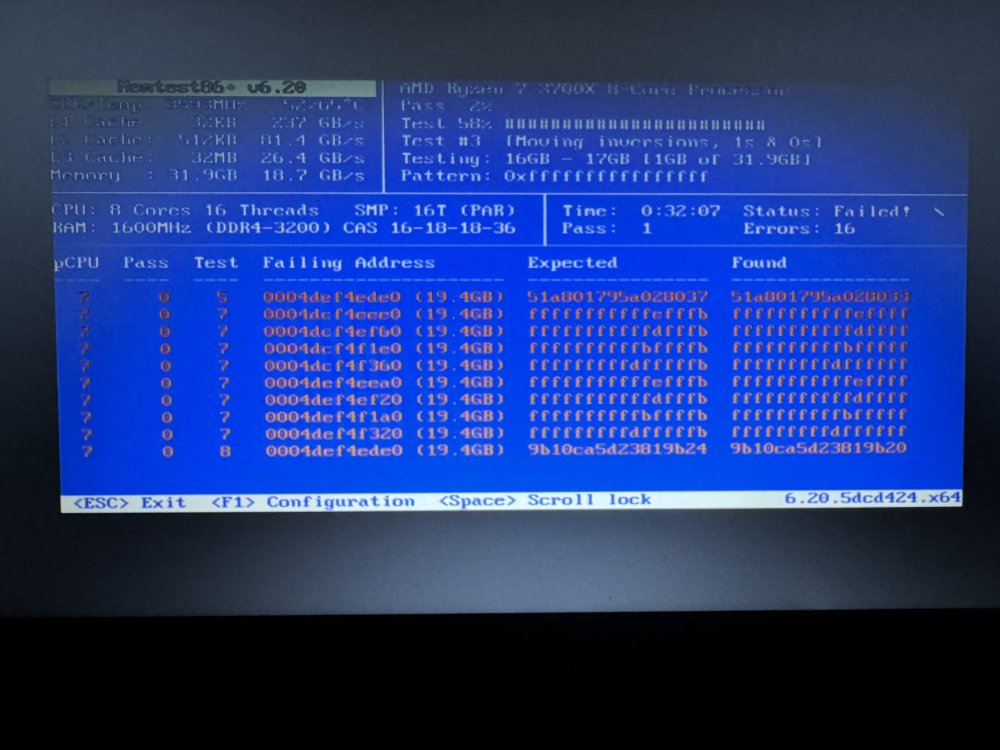
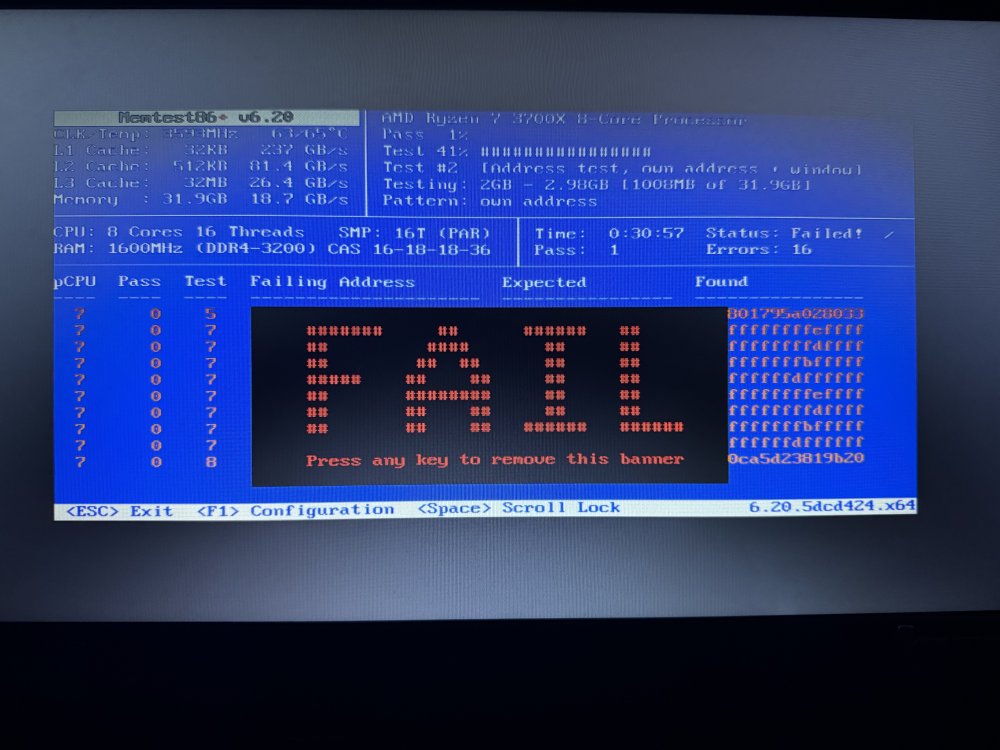
Good guess - I guess :-D Faild after 30min But how do I know which module is broken? edit: So ... does that mean 4 modules 8GB each, my 3rd module is broken? Or do I need to check them separately?
-
Something is wrong.... Mar 13 19:54:39 Server smbd[25669]: INTERNAL ERROR: assert failed: (fh->fd == -1) || (fh->fd == AT_FDCWD) in pid 25669 (4.17.12) Mar 13 19:54:39 Server smbd[25669]: [2024/03/13 19:54:39.999494, 0] ../../lib/util/fault.c:178(smb_panic_log) Mar 13 19:54:39 Server smbd[25669]: If you are running a recent Samba version, and if you think this problem is not yet fixed in the latest versions, please consider reporting this bug, see https://wiki.samba.org/index.php/Bug_Reporting Mar 13 19:54:39 Server smbd[25669]: [2024/03/13 19:54:39.999507, 0] ../../lib/util/fault.c:183(smb_panic_log) Mar 13 19:54:39 Server smbd[25669]: =============================================================== Mar 13 19:54:39 Server smbd[25669]: [2024/03/13 19:54:39.999525, 0] ../../lib/util/fault.c:184(smb_panic_log) Mar 13 19:54:39 Server smbd[25669]: PANIC (pid 25669): assert failed: (fh->fd == -1) || (fh->fd == AT_FDCWD) in 4.17.12 Mar 13 19:54:39 Server smbd[25669]: [2024/03/13 19:54:39.999873, 0] ../../lib/util/fault.c:292(log_stack_trace) Mar 13 19:54:39 Server smbd[25669]: BACKTRACE: 27 stack frames: Mar 13 19:54:39 Server smbd[25669]: #0 /usr/lib64/libgenrand-samba4.so(log_stack_trace+0x2e) [0x14b30c6e064e] Mar 13 19:54:39 Server smbd[25669]: #1 /usr/lib64/libgenrand-samba4.so(smb_panic+0x9) [0x14b30c6e08a9] Mar 13 19:54:39 Server smbd[25669]: #2 /usr/lib64/libsmbd-base-samba4.so(+0x4d0fb) [0x14b30cac20fb] Mar 13 19:54:39 Server smbd[25669]: #3 /usr/lib64/libtalloc.so.2(+0x44df) [0x14b30c68f4df] Mar 13 19:54:39 Server smbd[25669]: #4 /usr/lib64/libsmbd-base-samba4.so(file_free+0xd6) [0x14b30cacf266] Mar 13 19:54:39 Server smbd[25669]: #5 /usr/lib64/libsmbd-base-samba4.so(+0xc0781) [0x14b30cb35781] Mar 13 19:54:39 Server smbd[25669]: #6 /usr/lib64/libsmbd-base-samba4.so(smbd_smb2_request_process_close+0x211) [0x14b30cb35f01] Mar 13 19:54:39 Server smbd[25669]: #7 /usr/lib64/libsmbd-base-samba4.so(smbd_smb2_request_dispatch+0xdfa) [0x14b30cb29bfa] Mar 13 19:54:39 Server smbd[25669]: #8 /usr/lib64/libsmbd-base-samba4.so(+0xb5bc1) [0x14b30cb2abc1] Mar 13 19:54:39 Server smbd[25669]: #9 /usr/lib64/libtevent.so.0(tevent_common_invoke_fd_handler+0x91) [0x14b30c6a28c1] Mar 13 19:54:39 Server smbd[25669]: #10 /usr/lib64/libtevent.so.0(+0xee07) [0x14b30c6a8e07] Mar 13 19:54:39 Server smbd[25669]: #11 /usr/lib64/libtevent.so.0(+0xcef7) [0x14b30c6a6ef7] Mar 13 19:54:39 Server smbd[25669]: #12 /usr/lib64/libtevent.so.0(_tevent_loop_once+0x91) [0x14b30c6a1ba1] Mar 13 19:54:39 Server smbd[25669]: #13 /usr/lib64/libtevent.so.0(tevent_common_loop_wait+0x1b) [0x14b30c6a1e7b] Mar 13 19:54:39 Server smbd[25669]: #14 /usr/lib64/libtevent.so.0(+0xce97) [0x14b30c6a6e97] Mar 13 19:54:39 Server smbd[25669]: #15 /usr/lib64/libsmbd-base-samba4.so(smbd_process+0x817) [0x14b30cb18be7] Mar 13 19:54:39 Server smbd[25669]: #16 /usr/sbin/smbd(+0xb090) [0x55de02472090] Mar 13 19:54:39 Server smbd[25669]: #17 /usr/lib64/libtevent.so.0(tevent_common_invoke_fd_handler+0x91) [0x14b30c6a28c1] Mar 13 19:54:39 Server smbd[25669]: #18 /usr/lib64/libtevent.so.0(+0xee07) [0x14b30c6a8e07] Mar 13 19:54:39 Server smbd[25669]: #19 /usr/lib64/libtevent.so.0(+0xcef7) [0x14b30c6a6ef7] Mar 13 19:54:39 Server smbd[25669]: #20 /usr/lib64/libtevent.so.0(_tevent_loop_once+0x91) [0x14b30c6a1ba1] Mar 13 19:54:39 Server smbd[25669]: #21 /usr/lib64/libtevent.so.0(tevent_common_loop_wait+0x1b) [0x14b30c6a1e7b] Mar 13 19:54:39 Server smbd[25669]: #22 /usr/lib64/libtevent.so.0(+0xce97) [0x14b30c6a6e97] Mar 13 19:54:40 Server smbd[25669]: #23 /usr/sbin/smbd(main+0x1489) [0x55de0246f259] Mar 13 19:54:40 Server smbd[25669]: #24 /lib64/libc.so.6(+0x236b7) [0x14b30c4a96b7] Mar 13 19:54:40 Server smbd[25669]: #25 /lib64/libc.so.6(__libc_start_main+0x85) [0x14b30c4a9775] Mar 13 19:54:40 Server smbd[25669]: #26 /usr/sbin/smbd(_start+0x21) [0x55de0246fb31] Mar 13 19:54:40 Server smbd[25669]: [2024/03/13 19:54:40.000043, 0] ../../source3/lib/dumpcore.c:315(dump_core) Mar 13 19:54:40 Server smbd[25669]: dumping core in /var/log/samba/cores/smbd Mar 13 19:54:40 Server smbd[25669]: Mar 13 19:58:50 Server emhttpd: read SMART /dev/sdh Mar 13 19:59:40 Server emhttpd: spinning down /dev/sdd
-
Mar 13 18:00:01 Server kernel: BTRFS error (device nvme0n1p1): bdev /dev/nvme0n1p1 errs: wr 0, rd 0, flush 0, corrupt 176, gen 0 Mar 13 18:00:01 Server kernel: BTRFS warning (device nvme0n1p1): csum failed root 5 ino 4711988 off 264597504 csum 0x3019a12b expected csum 0x3ed50501 mirror 1 Mar 13 18:00:01 Server kernel: BTRFS error (device nvme0n1p1): bdev /dev/nvme1n1p1 errs: wr 0, rd 0, flush 0, corrupt 165, gen 0 Mar 13 18:00:01 Server kernel: BTRFS warning (device nvme0n1p1): csum failed root 5 ino 4711988 off 264597504 csum 0x3019a12b expected csum 0x3ed50501 mirror 2 Mar 13 18:00:01 Server kernel: BTRFS error (device nvme0n1p1): bdev /dev/nvme0n1p1 errs: wr 0, rd 0, flush 0, corrupt 177, gen 0 Mar 13 18:00:01 Server kernel: BTRFS warning (device nvme0n1p1): csum failed root 5 ino 4711988 off 264597504 csum 0x3019a12b expected csum 0x3ed50501 mirror 1 Mar 13 18:00:01 Server kernel: BTRFS error (device nvme0n1p1): bdev /dev/nvme1n1p1 errs: wr 0, rd 0, flush 0, corrupt 166, gen 0 Mar 13 18:00:01 Server kernel: BTRFS warning (device nvme0n1p1): csum failed root 5 ino 4711988 off 264597504 csum 0x3019a12b expected csum 0x3ed50501 mirror 2 Mar 13 18:00:01 Server kernel: BTRFS error (device nvme0n1p1): bdev /dev/nvme0n1p1 errs: wr 0, rd 0, flush 0, corrupt 178, gen 0 Mar 13 18:00:01 Server kernel: BTRFS warning (device nvme0n1p1): csum failed root 5 ino 4711988 off 264597504 csum 0x3019a12b expected csum 0x3ed50501 mirror 1 Mar 13 18:00:01 Server kernel: BTRFS error (device nvme0n1p1): bdev /dev/nvme1n1p1 errs: wr 0, rd 0, flush 0, corrupt 167, gen 0 I haven't rebooted to safe mode yet, should I do so? But it seems, that my SSD / the lanes to my SSD have some issue ?! (currently 207 GB free on the cache pool)



