






KluthR
Community Developer
-
Joined
-
Last visited
Everything posted by KluthR
-
Need more info. If the db path was included inside the backup, it should be restored correctly and the 1:1 sorce path. You could check the file contents by browsing the backup destination/run folder and open the archive which holds the database. the restore should also create a debug file which you could submit. Just checked - the script does not CREATE the destination at all! One has to create the main destination itself.
-
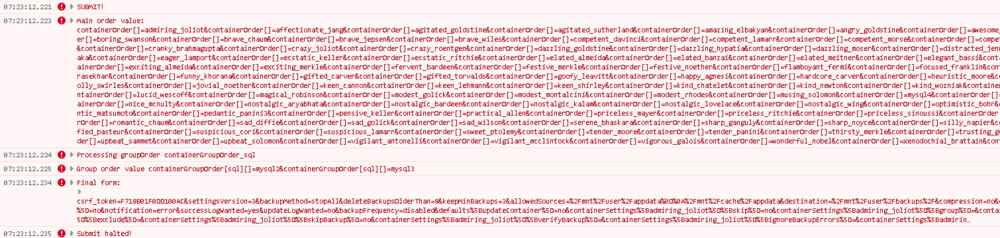
Regarding contaioner order: I created myself ~160 dummy containers. The AppdataBackup page settings is now huge but ordering works as expected. @affected users, could you tell me which browsers you use? Due to a debug logging issue (https://forums.unraid.net/bug-reports/stable-releases/61210-javascript-consoledebug-and-consolelog-disabled-due-to-vue-i18n-r3084/), you have to make another change to display me some information. Could you open the settings.php file once again, scroll to line ~907 (the line reading "$('#abSettingsForm').on('submit', function () {". A few lines later (~922) you should see two lines of " });". The latter of those both matter for the next step: Replace the WHOLE BLOCK with this: $('#abSettingsForm').on('submit', function () { console.error("SUBMIT!"); let mainValue = $('#containerOrderSortable').sortable('serialize', { expression: /(.+?)_(.+)/ }); console.error('Main order value: ', mainValue); $('#containerOrder').val(mainValue); $("input[id^='containerGroupOrder']").each(function (index) { console.error("Processing groupOrder " + $(this).attr('id')); let groupValue = $('#' + $(this).attr('id') + '_Sortable').sortable('serialize', { expression: /(.+?)=(.+)/ }); console.error('Group order value', groupValue); $(this).val(groupValue); }); console.error('Final form:', $(this).serialize()); console.error("Submit halted!"); return false; }); Then save, reload settings page and hit F12 (the developer console). Open the tab called "Console". Hit Submit on the settings page. Nothing will happen, which is fine. But the console will output some red lines. Maybe you can send me a PM with the result? Should look like: To re-enable submission either redo all changes ot just remove the "return false;" line at the last few lines.
-
Hey! As a developer I use console.* very often. I already noticed, that .debug does not work anymore. However, I never checked why. Today I wanted to use it again and it gave me no output. Even console.log did not work. console.error IS working. I did a search and detected, that the Vue (vue-i18n v9.6.5) seems to disable console.debug/.info? => dynamix.my.server/unraid-components.client-cd1b3939.js JS: Line 22, position 65280: The setup function checks for a variable called "VITE_ALLOW_CONSOLE_LOGS" and if not there, the both console functions get cleaned out...? Could someone check this?
-
That makes absolutely no sense. Changing those paths are exclduing the exclusions. Your issue is the missing "appdata/plex" within the paths. Your exclusions should start with "/mnt/user/appdata/plex/"
-
The /mmt/user exclusion could cause this. But this exclusion is being applied in both creation and verification, so not sure why it complains what exclusions for tdarr?
-
All affected users: Please open /usr/local/emhttp/plugins/appdata.backup/src/pages/content/settings.php and scroll to line 23. It should read if($_POST) { Hit enter/add a new line and paste below that: file_put_contents('/tmp/abdebugPOST.txt', print_r($_POST, true)); and save. Open the settings page, reorder and save the settings. Please send me the file located @ /tmp/abdebugPOST.txt via PM. Maybe it gives me an idea whats going wrong. If that doesnt help me, we try something else. Can you create files/folders in the set destination? Example via "mkdir *your_destination/testfile"?
-
Any exclusions set?
-
Is the destination really there? Can you manually create files there? Have a look into the destination and the affected backup. The log is being copied over there.
-
Why? Its perfetcly ordered (for me?). And the date string is also clearly visible. Even the datetime in file browser shows it:

-
@Spiritreader Is this still an issue?
-
I dont find anything about ZFS in https://docs.unraid.net/unraid-os/manual/storage-management/#replacing-disks Maybe the linked manual should be added there as well? Also, the docs page is still missing some ZFS parts. They state "Note: Details will need to be added for ZFS file systems after Unraid 6.12 is release with ZFS support built in."
-
Anything new to that?
-
Add only those paths here which are used inside the docker containers. Usually /mmt/user/appdata and/or /mnt/cache/appdata.
-
Seems like something is wrong with the mentioned .err file. If everything was stopped maybe some corruption happened? Deleting it should be safe is the destination path for the flash backup existing?
-
Simpliness. Long time ago it only saved used ones but I felt like „better safe the whole templates“. Not much more cost
-
These xml, bak and obsolete files come 1:1 from your usersTemplate directory. The plugin simply copies them as they are. If you create a new container and check the template dropdown above, you should see all those old entries. delete them by select them and I believe it appears a „X“ to delete it.
-
Did you recreated the container or stopped it before start the restore? Restore does not touch any of your containers! It restores the data and/or the container template file.
-
What about posting some more details? At least the entered source???
-
Does no one use IPv6 inside Unraids docker? Could someone do a ping test from inside a container to a public server and observe if some "address unreachable" occur? I still need to retest with a native portainer install. Somehow I got a feeling that this is an Unraid thing...
-
No, currently not. But you could place a file with the command „docker start ClamAV“ somewhere and set is as post-run script.
-
The plugin is actually using the delay from the docker page: https://github.com/Commifreak/unraid-appdata.backup/blob/f5bfd73ed69afe0a7fb22707e11881d91708baf1/src/include/ABHelper.php#L263
-
In current .10 release I also see permanent DHCPD6 renew messages, didnt remember the exact term, hold on… dhcpcd[1128]: eth0: requesting DHCPv6 information every ten secs. But maybe its because I habe only Stateful RA enabled router?
-
Same issue here. Unraid does not pick up the latest prefix from RA. This dynamic prefix shit for private customers is a pain...
-
„Group“ field inside container specific settings.
-
It seems that something is messing with the files. Some other „thing“ that would do that? Mover? best way is to share your debug log.