






KluthR
Community Developer
-
Joined
-
Last visited
Everything posted by KluthR
-
Slighty different. @Retribution's issue happened during other states of backup. But I don’t want to rule it out.
-
No, not really at all. I see, that plex backup was running from 11:08:05 to 12:30:57. A "file changed as we read it" occured and the lsof (which file is open within given path) took from 12:30:57 to 12:43:55. While writing I realize, that the cotainer listing (from dockerMan) took from 05:00:05 to 09:55:21. Thats nothing special and loaded during backup initialization. Seems like Unraid had an issue.
-
Interesting. I really dont know what could take this long. If the validation would send any error, it would get posted in the logs.
-
Is that noted in the docs? With any reasons? If its like this, I try switching back to an image.
-
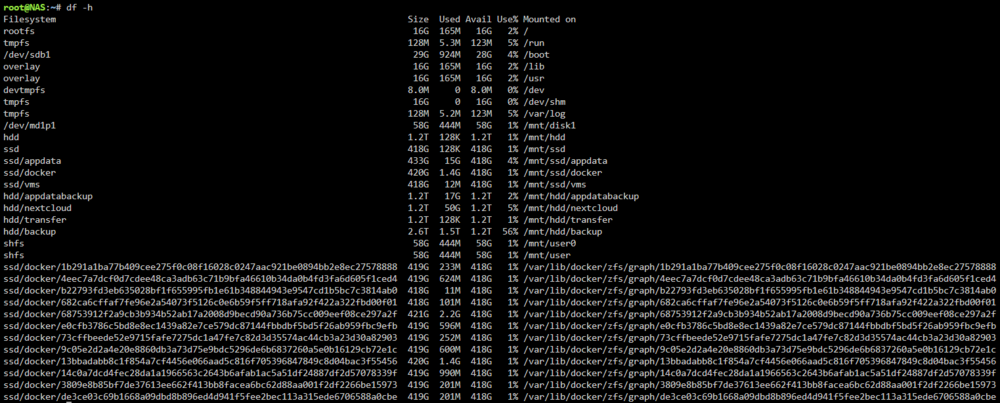
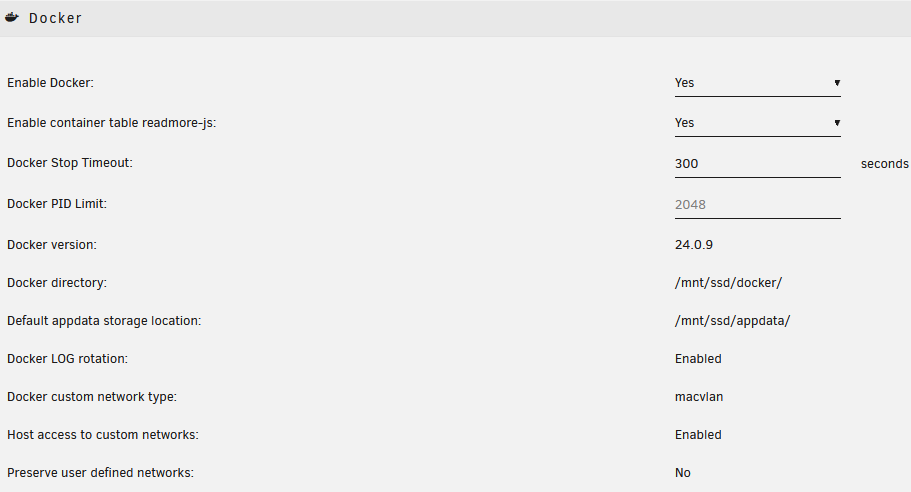
I have the same. Observed this 2 times with some month in between. But something seems not right. I have no image, I have a docker directory set. There IS space available, so no clue what the issue. 6.12.14. docker start urbackup-ncbackup Error response from daemon: failed to create task for container: failed to create shim task: OCI runtime create failed: runc create failed: unable to start container process: unable to apply cgroup configuration: mkdir /sys/fs/cgroup/docker/32089c8491bddd232588f4567a6c0320bc3e88090aa2eab98faf1befc2589331: no space left on device: unknown Error: failed to start containers: urbackup-ncbackup Any ideas? This docker start error is not being logged into the syslog as I see. Dont know why.
-
If its the 1st group, there is nothing to show. If its nit the 1st group: an initial save after defining groups is needed. If still not shown: yes, something is wrong 😅
-
I believe that all of your errors come from empty folders at their original locations. Is the error always the same? I cannot see why photoprism is that big. The log states it only backups the path "/mnt/user/appdata/photoprism" which seems legit. How big is it?
-
No idea tbh. The debug shows the same. could you do a „ls -la /mnt/download“?
-
Not really. Time is the limiting factor. It isnt that much have to change imho. Just create a snapshot and work from there should be enough, I guess. I bring my dev server up to date the next days and try to make some progress.
-
You missed the important log line "[❌][tautulli] tar verification failed! Tar said: tar: Removing leading `/' from member names; mnt/user/appdata/plex/Library/Application Support/Plex Media Server/Logs/Plex Media Server.log: Mod time differs;" Tautulli backup failed because the Plex log is opened in Plex Media Server. Create a group with containers sharing volumes. Currently you backup one by one. When both (and any other using this volume(s)) are in one group, all members getting shut down during backup resulting in a non-conflicting backup.
-
I think all/some of your update-available containers are set to "Skipped? YES". This excludes them from any update action. The initial update-check does not test if a specific container should be skipped, thats the reason its announced but never done. I should change that detail. You could set Skip? To no and enable "Skip backup" (advanced container settings)
-
Could you share a debug log please? TBH: I just had no time yet to test the plugin on Unraid OS 7. I think my PlayTime server is still on some first beta and the basics were working. I cannot guarantee that there was some changes reagrding update API inside webgui scripts. The debug should reveal this. If not, I can check this the next days on my PlayTime server. Should not be a big issue.
-
I think we need a rough backup size estimation/simulation after config change 😅 Just the metadata/cover things. The important things like database should be included.
-
It actually is. But comparing the path „binhex-shared“ (which is a named volume and not a path) matches against the entry in this field, so its being ignored.
-
Please upload a debug log from a faulty backup run.
-
Appdata Backup is not updating plugins at all. It just updates docker containers, if enabled. the above error message comes from Unraids install routine. Never seen it before. Did the update succeeded? I would try another reboot and check the log during boot.
-
Disable multicore and you have tar.gz. zst gets created when multicore compression is enabled. However, check the log, maybe there are some hints. External volume backups? Whats the source paths configured? Share a debug log, that should reveal the issue.
-
But it seems to have trouble to use the select parent folder. Could you share a screenshot with the restore UI and one with the contents of that selected folder? The xmls are container templates and go in boot/config/plugins/dockerMan/templates-user the .baks: not sure when unraid creates them, can probably be discarded.
-
Source really valid? Check help text, point to the folder with the ab_ folders inside. manual mode: use tar to unpack the tar.gz files and restore manually.
-
I dont get how this plugin should be connected to parity check?
-
So I think not affected of the settings-does-not-save issue. the script does not do anything eating ram. Some docker container seems to freak out. No idea why. can you see with the docker command line of that affected process, which source container this is? htop should show some infos for that process.
-
Did you tried putting those in a group?
-
How many containers do you have?
-
Any exclusions set?
-
Nothing is accessing the path. The debug log does not show anything accessing this path. Not clear what tar's issue here is.




