





Ocgineer
Members
-
Joined
-
Last visited
-
Oh it is an AMD Ryzen 7 1800X system so it doesn't have an iGPU, server is build just from replaced parts from other main PC's, but no worries, I'll check what I can do if the older drivers will just cause instability it is just time to upgrade that part. 😂
-
Hmm that is a shame, I had the 780Ti just lying around back then when I made the server and honestly it was just doing some stuff for Jellyfin. Lucky I have my GTX1080 now lying around as I finally upgraded my main PC's GPU few months ago, now if only if I remember where I put the PCIe Power cables.
-
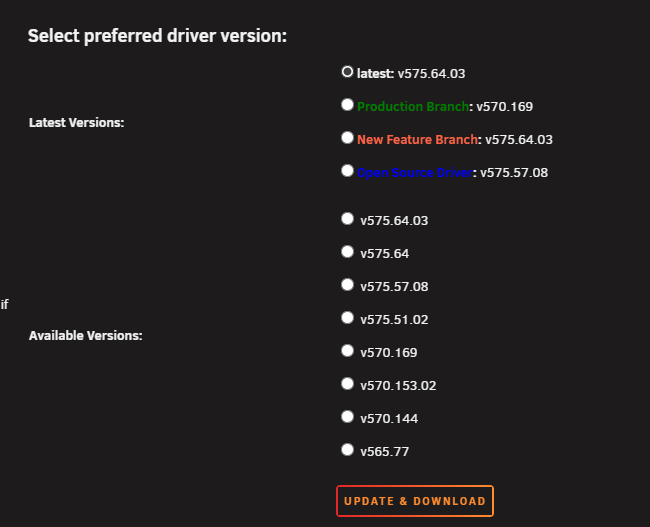
Well I seem to have the same issue as the two above, I do not have the 4xx driver option anymore after updating from 7.1.1 to latest. It seems it defaulted to the latest driver version which won't work on my 780Ti that I still have (for now). edit: removed diagnostics seems it was not needed.
-
Ah yeah, thanks for the reminder. I did swap last month Oct 16 so yup would need to go through support.
-
Yeah it looks like it, though I did not had logs back then with the other drive, the symptoms seemingly were/are the same as before the USB swap so I was thinking maybe else was the root cause. I'll see if I can find a drive somewhere I can use to test with (though I would have to transfer drive UUID again) if no other things appear to be apparent to cause a potential issue.
-
If i remember correctly, I recovered from the USB backup I made before swapping drives, or I copied over everything. I did not only copy a config folder. I do remember that at first boot, Unraid was seeing multiple keys that I had to remove first (like the trial key and normal key).
-
Hey all, Unraid 6.12.13 on a AMD Ryzen 7 1800X system with 64GB RAM. For the last couple of months I have the issue where randomly (as it seems) the Unraid server shows having issues. The symptoms always seem to be the same, namely; - SAMBA is inaccessible - WebUI is inaccessible - Reverse Proxy Docker SWAG is not able to connect to other Docker Containers. - Docker Contains are still working and can be accessed via server-ip:port normally. - Looks like it can be shut down via the power button (though no double beep conformation). - I have to repair the boot USB drive in Windows before I can boot Unraid again. I already swapped the USB drive thinking it was getting old, 'twas over 2 years old, but same issues keep happening. I already tried different USB ports, before and after swapping out the USB drive. I do not have the Unraid WebUI open in a tab in Chrome, I read somewhere that it the standby tab feature causes logs to overfill currently. I eventually had a syslog server running on an old Synology NAS and attached part of it to this post. The start of the errors and then part of the errors that keep repeating a lot so I omitted those to keep the size small. It looks like the USB gets randomly disconnected due to something, and then the shit hits the pan. liliruca-diagnostics-20241127-1929.zip syslog-output-start-of-errors.txt
-
with the updated rcon plugin you'll need to use quotes around the commands that contain spaces. timeout 1 rcon -a 192.168.20.5:25576 -p password "broadcast Saving..." else, AFAIK, it'll see the "Saving..." as a second RCON command.
-
Ok good to know. And yes my shutdown script first announces shutdown in-game and then issues the save command about 10-15 seconds before shutdown if available via RCON so I'm good on that regard 😆 I now can remove any "restart docker $name" from my restart scripts as that is not needed then 😄 I like to use a script to shutdown as I also let it create a fresh backup of the saved folder.
-
Is this for all or most of your game docker containers or only Palworld? I actually have a few scripts to "gracefully" shutdown the server via rcon if the docker container is running, and then the container itself. But if it auto restarts and it is doing stuff again it could maybe cause issues if i then abruptly stop the container? If i needed to restart the game I've always used the docker restart command.
-
You might want to update the description of rcon in the community apps as well, as it still states the old information regarding connecting. If not for the small warning under the change log I wouldn't have noticed the big change as i have plugins to auto update.
-
Oh that is nifty, thought it had to be programmatically implemented but overriding is also a thing then! And yes all I wanted is to have the backups on a safe location, thanks!
-
I have a user script running that check my total available ram every 2 minutes and when it goes below a threshold it initiates a shutdown via rcon ([updated] plugin) to announce in-game, shutdown, save, and then restarts the Docker container. It seems to work on my end for my users. It might not be pretty or can be done better, but I don't really have that much experience with Linux but it might help some people or give ideas 😅 #!/bin/bash freemem=$(free -m | grep Mem | awk '{print $7}'); rconPalworld=$(docker inspect -f '{{range.NetworkSettings.Networks}}{{.IPAddress}}{{end}}' Palworld):25575; adminPassword=ADMINPASSWORD if [ $freemem -le 1200 ] then echo "CRITICAL: $freemem RESTARTING PALWORLD AND THE DOCKER CONTAINER" rcon -a $rconPalworld -p $adminPassword "Broadcast INITIATING_RESTART_IN_5_SECONDS!" sleep 1 rcon -a $rconPalworld -p $adminPassword "Broadcast INITIATING_RESTART_IN_4_SECONDS!" sleep 1 rcon -a $rconPalworld -p $adminPassword "Broadcast INITIATING_RESTART_IN_3_SECONDS!" sleep 1 rcon -a $rconPalworld -p $adminPassword "Broadcast INITIATING_RESTART_IN_2_SECONDS!" sleep 1 rcon -a $rconPalworld -p $adminPassword "Broadcast INITIATING_RESTART_IN_1_SECONDS!" sleep 1 rcon -a $rconPalworld -p $adminPassword "Shutdown 60 SERVER_SHUTDOWN_IN_60_SECONDS!" sleep 30 rcon -a $rconPalworld -p $adminPassword "Broadcast SERVER_SHUTDOWN_IN_30_SECONDS!" sleep 10 rcon -a $rconPalworld -p $adminPassword Save sleep 10 rcon -a $rconPalworld -p $adminPassword "Broadcast SERVER_SHUTDOWN_IN_10_SECONDS!" sleep 20 docker restart Palworld else echo "ALL OK: $freemem" fi
-
For the backup feature on the Palworld Docker Container, is it possible to have the backups placed to another location? E.g. I have the gameservers installed to an unprotected nvme cache drive, where I have currently a user script running on a cron job that makes a backup of SaveGames to my appdata share which is on protected cache. If not, no worries then I'll keep using the user script, just curious if you have thought about these use cases.
-
For those that try to use the KavitaEmail from the community apps there is an issue with the template where the 'key' of each environment variables is not set. So edit each variable and set the Key the same as the Name (e.g. Name: SMTP_HOST, Key: SMTP_HOST). Furthermore, if you are having Kavita and KavitaEmail on the same docker network (e.g. your reverse proxy network), simply set the Email Service Url in the Kavita settings to `http://kavitaemail:5003` (using the docker network domain name).


