





stefan.tomko
Members
-
Joined
-
Last visited
Everything posted by stefan.tomko
-
Thanks @SimonF - I have uninstalled and installed plugin again. File above is created and I restarted to test it out - it works very well. I do remember now that few days after switching to new server, my libvirt image was corrupted and I had to delete it and create from scratch. Maybe that contributed to it. Anyway, would this be an opportunity for improvement in any way?
-
Output here: I have not tried uninstalling and installing USB manager. I will give that a try.
-
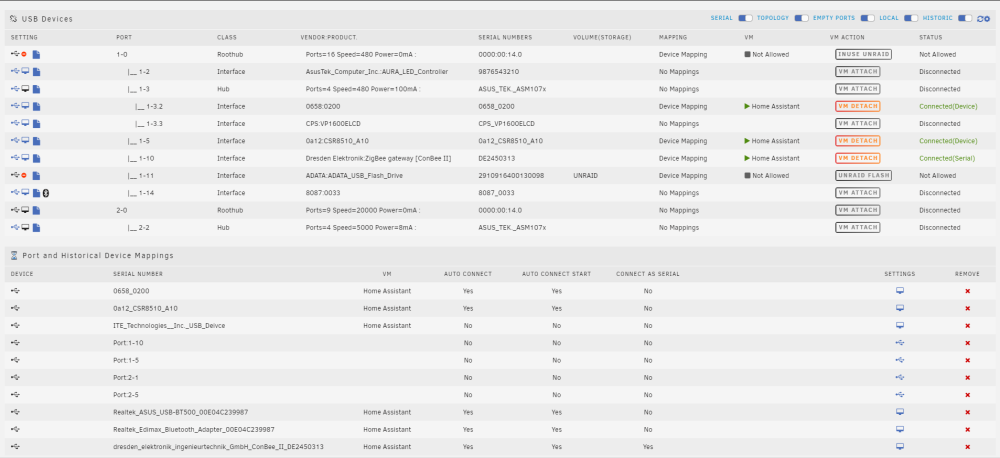
I changed server equipment. However on first boot, I would understand that mappings may change, so on first boot ever after changing motherboard, RAM, etc, I adjusted mappings. But now, every time I reboot server (whether it is planned or unplanned) reboot, it just boots and devices do not get attached. As a result, VM starts without it and Zigbee does not start because of missing adapter, Zwave is started but reporting missing adapter. Ocasionally, bluetooth fails as well until I attach them all. I had 3 reboots since the change, and all have the same symptoms.
-
@SimonFUpdated the post above
-
Ports have not changed, I have only rebooted Unraid. I have observed the same behavior on every reboot of new system.
-
Yeah I figured that out late. Updated post above. I am on 6.11.5
-
It is home assistant OS (VM), unraid 6.11.5
-
I have recently changed server and started to notice issues with auto-connecting USB devices to VM. I pass 3 devices to one of my VMs - Zigbee controller (passed as serial device), Zwave controller (passed as device) and bluetooth. They are all configured to auto connect to my VM, but that is not happening. If I reboot, at least 2 show that they are not attached and I have to click the button to attach it. How can I figure out why is this happening?
-
I have changes to 55 and 60%, seems like it worked
-
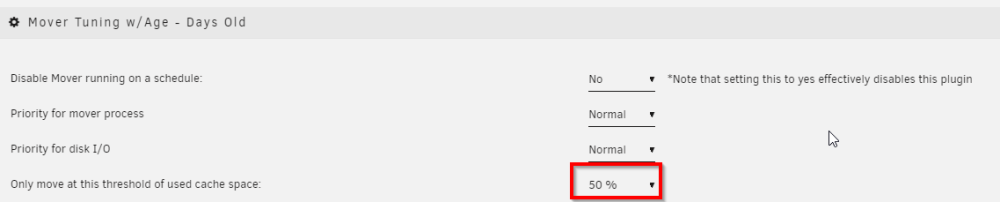
I installed this plugin and basically made only few amendments - I want to move things off of cache when cache is more than 50% utilized. My cache is 19% utilized so I would expect that nothing gets moved. However from logs, I observe following: Why are first logs reporting that threshold is 5%? And obviously moving files...while later for other shares, it is correctly displaying 50% threshold and not taking any action? Only move at this threshold of used cache space: is set to 50% Move All from Cache-yes shares pool percentage: is set to 55% Anyone has any idea?
-
Same happened to me when I was once playing with VM and adapters. But it happened for devices that I passed normally and as serial. At some point, I had 3 "virsh error" messages for 3 adapters. That was already on 6.11.0. Rebooted Unraid, rebooted VM... no luck. After few moments, I did detach and attach devices again, and virsh error was gone.
-
Your issue is with MQTT setup. I responded to you in HA forum.
-
@ljm42 I just did
-
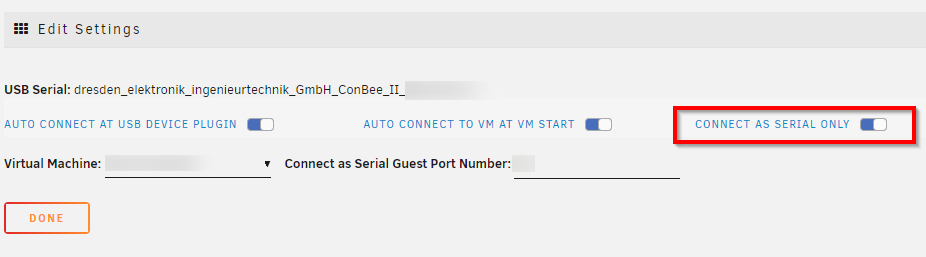
I followed instructions given by SimonF. I use USB manager but did not know that new feature has been added to pass device to VM in serial mode. So instead of modifying XML file, all you need to do is: 1) install USB manager plugin 2) Do not attach any device in the VM properties. Instead go to USB manager menu, locate the device you want to pass to VM, and click on device settings here: 3) Enable "connect as serial only" You can also select auto connect if you want to. Side note - if you did pass the device via USB manager before, then you probably did not use serial only mode. By checking this, mode will change. 4) Shut down your VM and start it again, it should attach device to your selected VM in serial mode: Once that is done, all you need to do is change the path to device. I use Z2M - in Z2M configuration, I just changed path from /dev/serial/by-id/conbeeXYZ to /dev/serial/by-id/qemuXYZ That is it. My Zigbee network works without any additional intervention needed, and I successfully upgraded to 6.10.3 More info can be found here as well: https://community.home-assistant.io/t/solved-conbee-2-fails-to-connect-to-zha-ha-in-unraid-vm/431276/8 One user reported that if you are using ZHA instead of Z2M, you need to change the config (within the VM terminal) to ~/config/.storage/core.config_entries and provide new device path


-
I followed advice given by SimonF and (since I already use USB manager) used serial mode for the device, and changed the path in configuration accordingly. Now things work. I will attempt upgrade to 6.10.3 again soon. I can't say what is needed to fix this. I believe this is impacting only this particular USB device. For the time being, as long as it works and nothing changes, I don't care if the name of the device is A or B Update: I did upgrade to 6.10.3 successfully
-
If you read through the thread, you will find out that it doesn't work. I am using USB manager right now with 6.9.2 without any issues. As soon as you upgrade to 6.10.3, device can no longer be passed to VM that way. there are some "obscure" steps https://community.home-assistant.io/t/solved-conbee-2-fails-to-connect-to-zha-ha-in-unraid-vm/431276/2
-
I am struggling to upgrade to 6.10.3 as I (and others) can no longer pass specific USB device to VM. There are some workarounds mentioned, however they are not really "user friendly"
-
I am having the same issue with 6.10.3. Everything works OK on 6.9.2 I am using plugin "USB devices" and somehow I feel like editing the VM code, while it may fix things, is a workaround only. Is there some action being taken from developers to try to fix this?
-
Thanks. I did run "Fix Common Problems" and it indicated that cache write is disabled for all my drives (cache, disk1 and parity). I enabled that. I also had few shares that were set to "cache only" which I set to "prefer". CPU utilization went down and all seems normal now. My cache drive does not indicate any issues, nor does any other drive. Maybe that is just something that got corrupted after upgrade and then rollback.
-
Hello. I ran into weird issues twice already. I am running 6.9.2 and attempted to upgrade to 6.10.2 last week, but I found out that certain things did not work properly, so I reverted back to 6.9.2. Since then, it happened twice already where all of sudden, my CPU went up, dockers are unresponsive. For instance, when I navigate to dashboard, dockers are not listed, as it could not load the list. I realize this is happening when I start getting all sorts of notifications about dockers not doing their role, etc. Yesterday, when that first happened, I attempted to do graceful reboot, but I did not wait long enough, it seemed that it got stuck at "stopping emhttpd" so I did power it off. When it came back up, all seemed normal. Today, I did graceful reboot, upon restart, behavior continues to be the same. tower-zohor-diagnostics-20220613-1424.zip is taken after reboot tower-zohor-diagnostics-20220613-1409.zip and tower-zohor-diagnostics-20220612-0730.zip were taken at reboot attempts while issue was ongoing. Any idea? Thanks for advice.
-
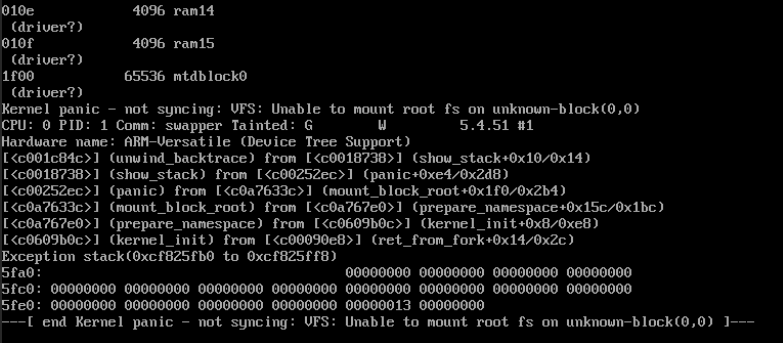
Thanks. I got confused with kernel/dtb files. I fixed that accordingly and now it is booting up. Many thanks!
-
Hello @ghost82 - I was following your template, but I am unable to boot the VM, I always get the following. Any idea why? I used the template you provided, just modified local path to img/kernel/dtb files.
-
With latest rc2 version that supports emulating rpi natively, is anyone able to provide config or a guide, how to set it up in xml? I would appreciate help here.






