





Mrpictureman
Members
-
Joined
-
Last visited
-
I think I have it? It seems that I have open browsers on 2 computers? Does that sound correct? If I am correct would this cause any issues with Unraid or my server beyond the errors?
-
Another problem? I am just about finished a parity rebuild of a bad HD and I am getting this error? What is this? 5/03/14 12:54:39 [error] 10296#10296: *2774753 limiting requests, excess: 20.893 by zone "authlimit", client: 192.168.1.80, server: , request: "PROPFIND rosamund-syslog-20250315-0417.zip
-
I wanted to follow up on this thread even though its been a while. Time flies by! I was all set to do the mem test and went to put the usb in. I wanted to double check the memory stick just to confirm they were completely seated correctly. Of course one was not! DUH!! I went ahead and reseated the stick. Restarted the server and voila! Everything seems fine? If I see anymore errors I will actually run the memtest. I think that fixed it though. Thanks for your help!
-
I have been very busy and still have not run the memtest but it is on my radar. I will update once I am able to complete Thanks
-
I did replace all of my memory. Maybe it has to do with my motherboard? Is that possible?
-
Correct do you mean corrected? I will run another parity check that will take 2 days. What caused all of the errors and what are they telling me? I seem to have about 400+ errors everytime I run the parity check
-
Help, I seem to have errors when I run parity check. Nothing shows on the hard drives as errors? Can someone look at my log and guide me to resolve these? I am not a strong knowledgeable user so please keep that in mind with your response. There were 384 errors Thank you very much for your help syslog.txt
-
Thank you very much!
-
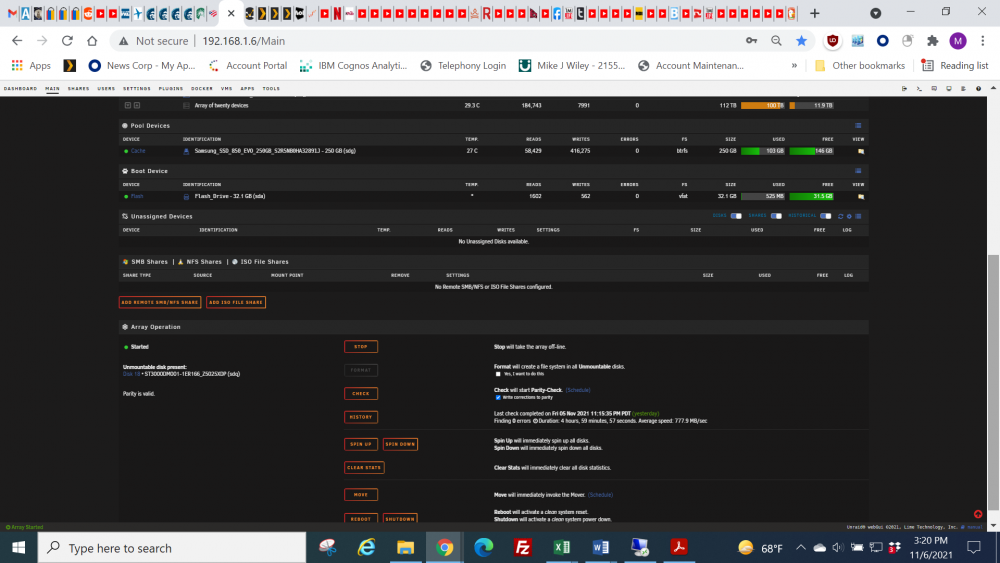
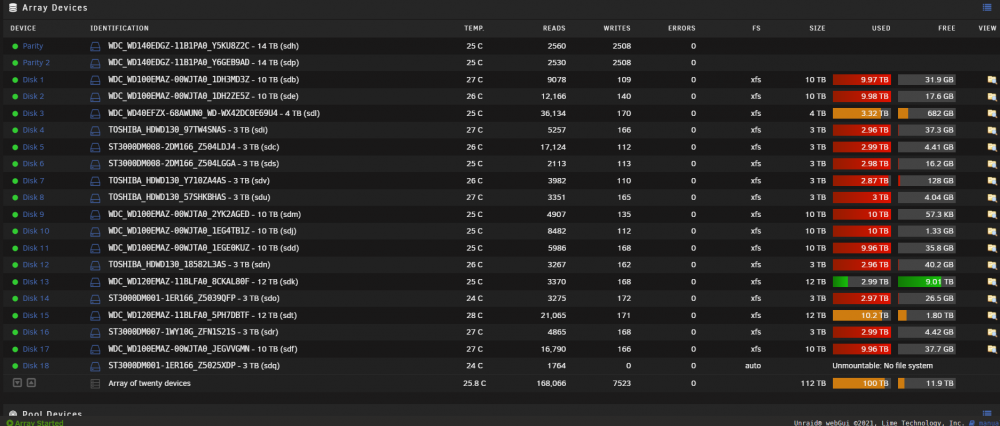
Ah man do I feel stupid DUH! I did a find Format and there it was right there in the second screen grab! I did not expect it there! I am formatting it right now. Thank you very much for your help
-
I don't see it anywhere? I have used it in the past but don't see it in the 2 screen shots above? Can you pinpoint it?
-
you mean the lower portion?
-
Thanks, That's what I thought also however I do not see an option to format the disc? rosamund-diagnostics-20211106-1403.zip It is disc 18 below
-
Mrpictureman joined the community
-
I thought a 3 TB disk went bad so I just replaced it with a bigger drive and parity ran everything ran well. I then realized that the disk that went bad was unplugged. I went ahead and added it to the array and it did an auto clear disk. Once finished it became unmountable no file system. How do I fix that. If there is any data on that disk I do not need it as I believe it was cleared off when it was added to the array. I don't mind posting the diagnostics but need to know which file in the diagnostics I need to post and how? The log seems pretty long if that's it? Isn't there an easy way just to reformat that drive and add it back to the array or something similar?


