MarianKoniuszko
Members
-
Joined
-
Last visited
Everything posted by MarianKoniuszko
-
Ok, I change Frequency to 2133 and set mode energy efficient but still have errors in memtest.
-
Thanks. I stop and look to change. I never do that. Can You tell me it's in Ai Tweaker tab > DRAM Frequency?
-
Thank You I will do that after test.
-
I don't have AMD. I have Asus prime H610 motherboard with Intel i5-12600K CPU and Kingston Fury Beast 2 x 32GB RAM, ddr4. I run that test because I have many times docker service failed.
-
OK, thanks I run that memtest now. It works. It run some test at start and see many errors I have brand new 64GB Kingston Fury. Only way is to return them back to Amazon?
-
Hello, when I try memtest from unRAID grub menu. Nothing happen. I install from link above, flash USB and try to start from grub menu nothing happen also. What can be wrong with my system?
-
Thanks, I make it that way. Now I set docker image size to 30GB. See that have 36,4GB but on dashboard I see there's 60% used. I don't move image to `/mnt/cache/`. I see it is in `/mnt/user/system/docker/`. It will be better to move to cache?
-
Hi, thank You for answer. I'm not docker expert so can You tell me what do You mean recreate docker image? I Format my ssd cache disk and copy there appdata folder. Then go to appstore and previous apps and reinstall my apps. Folder system/docker with docker.img file was on array now not on my cache drive. But still have 107GB. Do I have to delete it?
-
Hello, I noticed my docker service keep fails almost everyday. I see on logs that there was some btrfs errors. I check scrub option on my cache ssd drive and I see 1 uncorrectable error. I format that drive and move previously copied appdata folder there. Another issue was that my docker.img was very big (107GB) It was on cache drive. After format it is not on cache drive but still have 107GB. I reinstall all docker apps and still have that issue. Now when I run scrub test on cache drive I have 6 uncorrectable errors. To make my dockers work I have to reboot unraid server. I start array and I noticed starting apps take very loong. I see some radarr errors at this time. Radarr was only one app that don't work after I reinstall all apps. I have to delete db files and restore from radarr backup It's possible that it make that issue? Aug 28 23:39:06 unRAID kernel: br-79a8b0407e6b: port 1(vethfc5808c) entered disabled state Aug 28 23:39:06 unRAID kernel: veth32a9667: renamed from eth0 Aug 28 23:39:07 unRAID kernel: br-79a8b0407e6b: port 1(vethfc5808c) entered disabled state Aug 28 23:39:07 unRAID kernel: device vethfc5808c left promiscuous mode Aug 28 23:39:07 unRAID kernel: br-79a8b0407e6b: port 1(vethfc5808c) entered disabled state Aug 28 23:39:08 unRAID kernel: br-79a8b0407e6b: port 1(veth945a11a) entered blocking state Aug 28 23:39:08 unRAID kernel: br-79a8b0407e6b: port 1(veth945a11a) entered disabled state Aug 28 23:39:08 unRAID kernel: device veth945a11a entered promiscuous mode Aug 28 23:39:10 unRAID kernel: eth0: renamed from veth6f43dc4 Aug 28 23:39:10 unRAID kernel: IPv6: ADDRCONF(NETDEV_CHANGE): veth945a11a: link becomes ready Aug 28 23:39:10 unRAID kernel: br-79a8b0407e6b: port 1(veth945a11a) entered blocking state Aug 28 23:39:10 unRAID kernel: br-79a8b0407e6b: port 1(veth945a11a) entered forwarding state Aug 28 23:40:16 unRAID kernel: Radarr[12366]: segfault at 0 ip 0000150d08d523ee sp 00007fff02d54db0 error 4 in libcoreclr.so[150d08a75000+2fb000] likely on CPU 4 (core 8, socket 0) Aug 28 23:40:16 unRAID kernel: Code: 83 c0 08 48 89 05 52 6c 3a 00 48 39 3d 23 64 38 00 77 57 48 39 3d 5a 6c 3a 00 73 07 48 89 3d 51 6c 3a 00 48 8b 37 48 83 e6 f8 <8b> 16 8b 46 04 85 d2 78 49 31 f6 48 01 c6 48 01 35 6d 5b 3a 00 f7 Aug 28 23:40:18 unRAID kernel: Radarr[12473]: segfault at 1530528c540c ip 0000152cdeeefb4b sp 00007ffca8995bf0 error 6 in libclrjit.so[152cdee17000+1e2000] likely on CPU 4 (core 8, socket 0) Aug 28 23:40:18 unRAID kernel: Code: 10 1d d9 94 10 00 4c 89 e3 e9 0d 02 00 00 41 8b 4b 28 41 8b b7 20 08 00 00 0f b3 ce ba ff ff ff ff 41 89 b7 20 08 00 00 89 c9 <41> 89 94 8f 24 08 00 00 41 80 fd 04 0f 84 76 01 00 00 41 80 fd 10 Aug 28 23:40:19 unRAID kernel: br-79a8b0407e6b: port 1(veth945a11a) entered disabled state Aug 28 23:40:19 unRAID kernel: veth6f43dc4: renamed from eth0 Aug 28 23:40:19 unRAID kernel: br-79a8b0407e6b: port 1(veth945a11a) entered disabled state Aug 28 23:40:19 unRAID kernel: device veth945a11a left promiscuous mode Aug 28 23:40:19 unRAID kernel: br-79a8b0407e6b: port 1(veth945a11a) entered disabled state Aug 28 23:40:20 unRAID kernel: br-79a8b0407e6b: port 1(veth278f6ca) entered blocking state Aug 28 23:40:20 unRAID kernel: br-79a8b0407e6b: port 1(veth278f6ca) entered disabled state Aug 28 23:40:20 unRAID kernel: device veth278f6ca entered promiscuous mode Aug 28 23:40:22 unRAID kernel: eth0: renamed from vethdd839d2 Aug 28 23:40:22 unRAID kernel: IPv6: ADDRCONF(NETDEV_CHANGE): veth278f6ca: link becomes ready Aug 28 23:40:22 unRAID kernel: br-79a8b0407e6b: port 1(veth278f6ca) entered blocking state Aug 28 23:40:22 unRAID kernel: br-79a8b0407e6b: port 1(veth278f6ca) entered forwarding state Aug 28 23:40:23 unRAID kernel: vethdd839d2: renamed from eth0 Aug 28 23:40:23 unRAID kernel: br-79a8b0407e6b: port 1(veth278f6ca) entered disabled state Aug 28 23:40:23 unRAID kernel: br-79a8b0407e6b: port 1(veth278f6ca) entered disabled state Aug 28 23:40:23 unRAID kernel: device veth278f6ca left promiscuous mode Aug 28 23:40:23 unRAID kernel: br-79a8b0407e6b: port 1(veth278f6ca) entered disabled state Aug 28 23:40:23 unRAID kernel: .NET Finalizer[12843]: segfault at f040 ip 000014e7bbee0b4f sp 000014e721218420 error 6 in libcoreclr.so[14e7bbd71000+1dd000] likely on CPU 4 (core 8, socket 0) Aug 28 23:40:23 unRAID kernel: Code: 48 89 48 08 b8 01 00 00 00 41 87 87 ac 01 00 00 85 c0 75 3c 49 83 bf f8 00 00 00 00 74 1d e8 b8 db 00 00 49 8b 9f f8 00 00 00 <83> 43 40 ff 74 47 e8 66 dc 00 00 eb 19 31 db eb 20 41 83 bf a8 01 Aug 28 23:40:24 unRAID kernel: br-79a8b0407e6b: port 1(vethd74aa22) entered blocking state Aug 28 23:40:24 unRAID kernel: br-79a8b0407e6b: port 1(vethd74aa22) entered disabled state Aug 28 23:40:24 unRAID kernel: device vethd74aa22 entered promiscuous mode Aug 28 23:40:24 unRAID kernel: br-79a8b0407e6b: port 1(vethd74aa22) entered blocking state Aug 28 23:40:24 unRAID kernel: br-79a8b0407e6b: port 1(vethd74aa22) entered forwarding state Aug 28 23:40:24 unRAID kernel: br-79a8b0407e6b: port 1(vethd74aa22) entered disabled state Aug 28 23:40:26 unRAID kernel: eth0: renamed from veth224ce06 Aug 28 23:40:26 unRAID kernel: IPv6: ADDRCONF(NETDEV_CHANGE): vethd74aa22: link becomes ready Aug 28 23:40:26 unRAID kernel: br-79a8b0407e6b: port 1(vethd74aa22) entered blocking state Aug 28 23:40:26 unRAID kernel: br-79a8b0407e6b: port 1(vethd74aa22) entered forwarding state Aug 28 23:40:29 unRAID kernel: traps: immich_microser[13142] trap int3 ip:1e74f12 sp:7fffcc8ab550 error:0 in node[400000+4d68000] Aug 28 23:40:29 unRAID kernel: veth224ce06: renamed from eth0 Aug 28 23:40:29 unRAID kernel: br-79a8b0407e6b: port 1(vethd74aa22) entered disabled state Aug 28 23:40:29 unRAID kernel: br-79a8b0407e6b: port 1(vethd74aa22) entered disabled state Aug 28 23:40:29 unRAID kernel: device vethd74aa22 left promiscuous mode Aug 28 23:40:29 unRAID kernel: br-79a8b0407e6b: port 1(vethd74aa22) entered disabled state Aug 28 23:41:12 unRAID kernel: BTRFS warning (device loop2): csum failed root 575 ino 3617 off 143360 csum 0xfc1b0b5e expected csum 0x8aacc678 mirror 1 Aug 28 23:41:12 unRAID kernel: BTRFS error (device loop2): bdev /dev/loop2 errs: wr 0, rd 0, flush 0, corrupt 7, gen 0 Aug 29 00:00:01 unRAID Plugin Auto Update: Checking for available plugin updates Aug 29 00:00:01 unRAID Docker Auto Update: Community Applications Docker Autoupdate running Aug 29 00:00:01 unRAID Docker Auto Update: Checking for available updates Aug 29 00:00:01 unRAID Docker Auto Update: No updates will be installed unraid-diagnostics-20230829-0809.zip
-
Hi, I remove appdata backup plugin, format cache ssd, copy appdata folder and reinstall all apps. Yesterday at 23:40 I got that issue once again Docker service fail. I make new thread here: if You will be so kind to look at: Regards
-
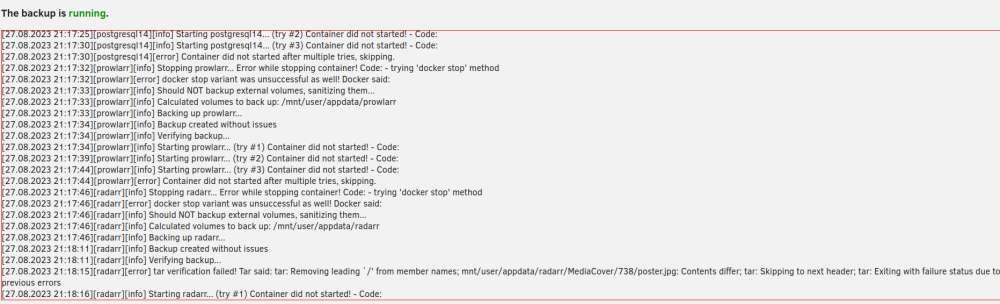
Hello, everytime Appdata Backup plugin do the job my docker service stop working. Some docker apps works like emby and *arrs but other don't work.

-
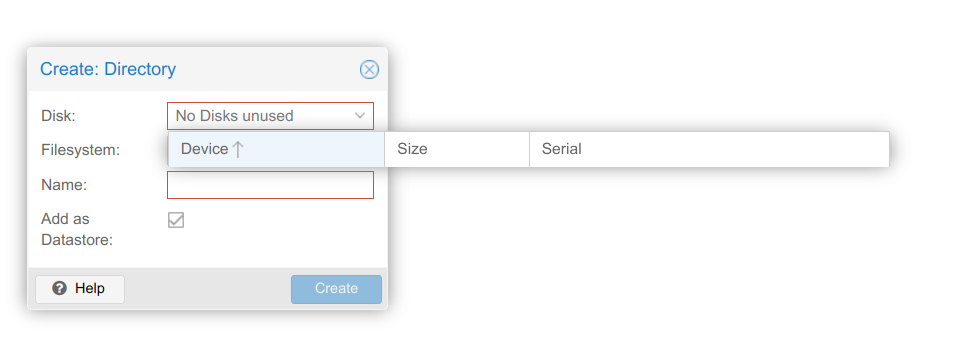
Hello, i install PBS and add new share for it. I cannot see any available drive in dashboard. How to fix that?
-
Thank, You. Reboot helps 😁👍
-
OK, meybe I will try at night because last time it reboot very long time and I have to shutdown and manually start. Regards.
-
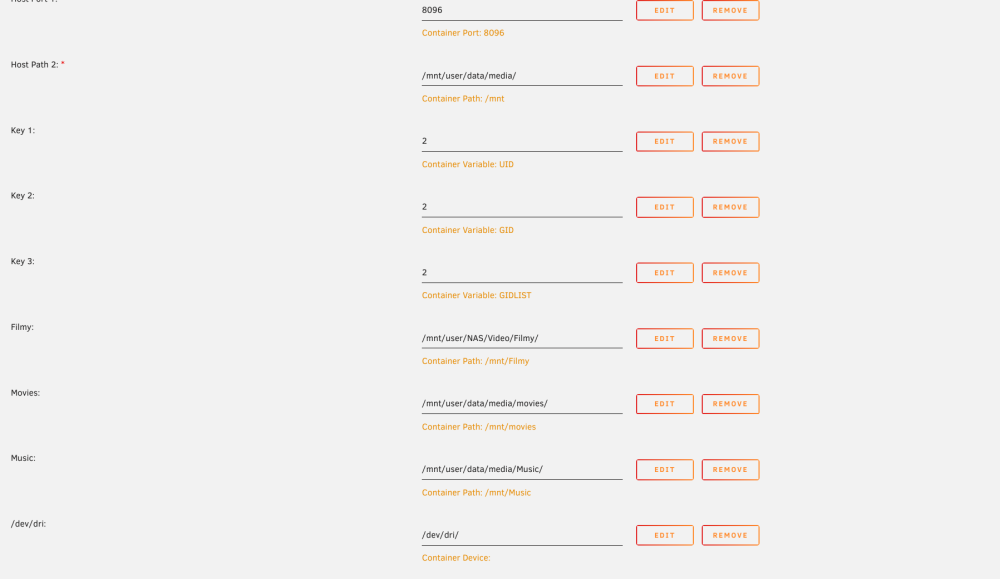
/ # ls -l /dev/dri total 0 crwxrwxrwx 1 root dialout 226, 0 Aug 17 16:56 card0 crwxrwxrwx 1 root dialout 226, 128 Aug 17 16:56 renderD128
-
Thanks for answer. I change but it don't work.
-
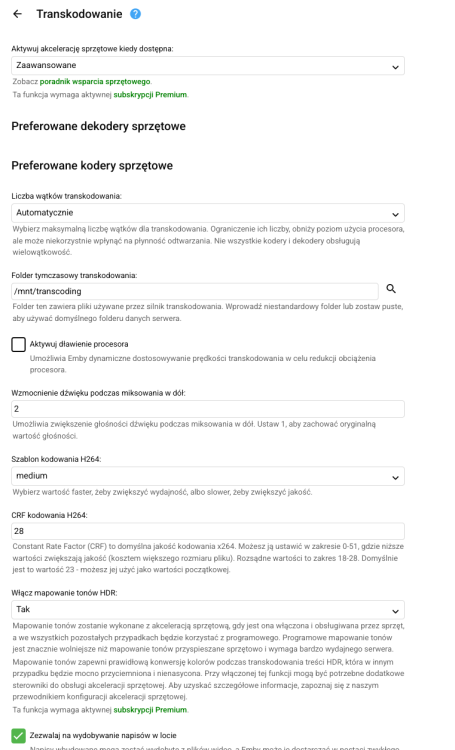
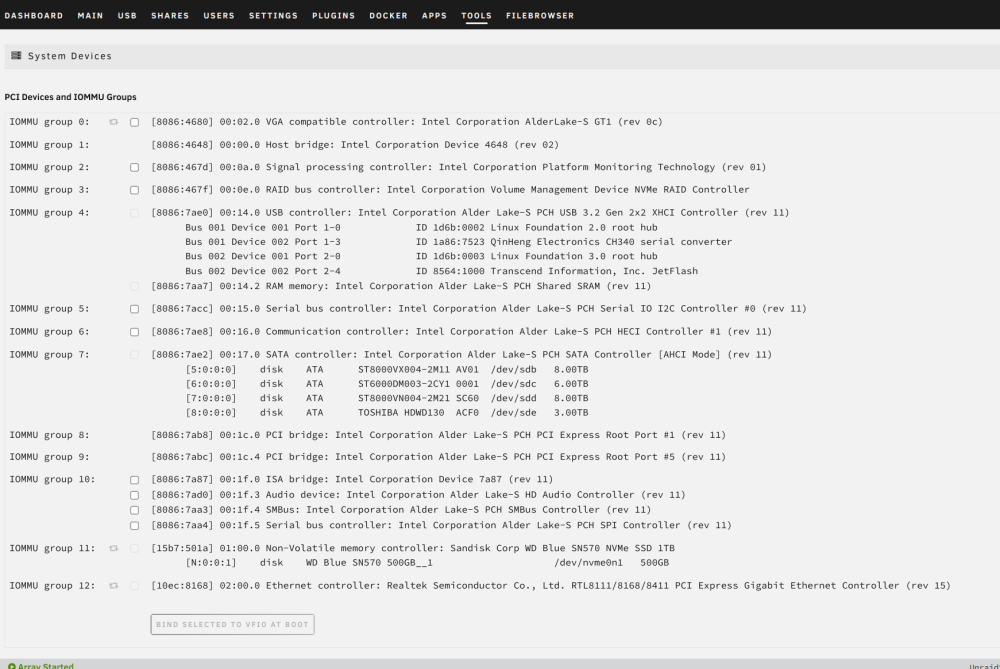
Hello, I install Emby (Emby Repository: emby/embyserver:latest) and there was VAAPI in my Transcoding settings working OK for some time. Then I try some VM's in Unraid and after that I noticed I don't have any option to choose in Emby. I remove VM's and disable it in VM manager. I try other containers from appstore but also have now HW transcoder to choose. I don't have binded GPU to any VM in Tools>System Devices. I have intel i5-12600k with integrated intel 770 UHD GPU. Intel quick-sync is not available in Emby for that GPU yet, but VAAPi works fine. Please help. Regards. unraid-diagnostics-20230817-0735.zip
-
Thanks, there was different container where there was port option. It works great now.
-
Thanks, I add more GB for docker. Regards.
-
Hello, is there any guide how to install Filebrowser on Unraid. I try two versions and have blank page with: "about:blank#blocked" in URL browser field, and log shows me: 2023/08/06 10:39:05 Using config file: /.filebrowser.json 2023/08/06 10:39:05 Listening on [::]:80 Regards.
-
Hello, today I noticed I have 100% full docker image on unraid. I Reboot to see if this will help. Then I change docker image size and now looks ok. All containers start to work but deluge-vpn don't. I see error in log that default.ovpn don't have remote line. I want to check that file and it is empty. How this is possible?
-
Hello, I try to install today but there's error during installation: Error: failed to register layer: ApplyLayer exit status 1 stdout: stderr: write /usr/lib/librephotos/.cache/torch/hub/checkpoints/resnet152-b121ed2d.pth: no space left on device
-
Hello, I have few apps on my unraid server and I try from few days to make my Nginx Proxy Manager to work. First I move my config files from old NPM installation and copy to /mnt/user/appdata. I have many Internal Errors so I try clean install of NPM. I remove /mnt/user/appdata/nginxproxymanager/ folder add some domains and that also don't work. Yesterday I remove NPM and try SWAG. I noticed that every domain I add it shows my my emby server on that domain. I don't know how it's possible because I have emby on old server on no-ip domain and now I add other domains from duckdns. Now I must stop array because I still have my emby exposed on domain that was previously for Heimdall on my old server. I change ports for unraid 80-8088 and 443-44301. I have port forwarding on my router 80-8080 and 443-4443. I don't know what to do. I remove NPM and swag and remove their folders from appdata. It's some kind of magic for me how unraid can do this. Please help. Regards.
-
Hi, I move to new flsh drive. Something happen to that old because I cannot format it. Shows me read only. But now my unraid works great. Regards
-
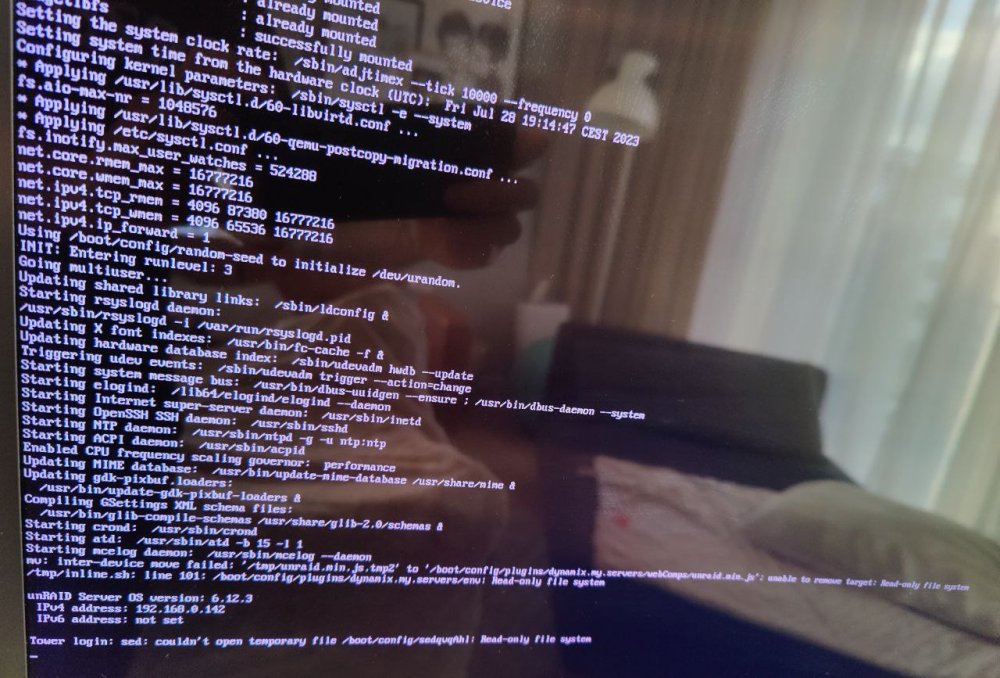
Hello, I use unRAID trial and everything was OK. After I buy basic licence and register I reboot system and get write/read error notification in dashboard. Jul 28 16:07:20 Tower root: Starting Avahi mDNS/DNS-SD Daemon: /usr/sbin/avahi-daemon -D Jul 28 16:07:20 Tower avahi-daemon[5583]: Found user 'avahi' (UID 61) and group 'avahi' (GID 214). Jul 28 16:07:20 Tower avahi-daemon[5583]: Successfully dropped root privileges. Jul 28 16:07:20 Tower avahi-daemon[5583]: avahi-daemon 0.8 starting up. Jul 28 16:07:20 Tower avahi-daemon[5583]: Successfully called chroot(). Jul 28 16:07:20 Tower avahi-daemon[5583]: Successfully dropped remaining capabilities. Jul 28 16:07:20 Tower avahi-daemon[5583]: Loading service file /services/sftp-ssh.service. Jul 28 16:07:20 Tower avahi-daemon[5583]: Loading service file /services/smb.service. Jul 28 16:07:20 Tower avahi-daemon[5583]: Loading service file /services/ssh.service. Jul 28 16:07:20 Tower avahi-daemon[5583]: Joining mDNS multicast group on interface br0.IPv4 with address 192.168.0.142. Jul 28 16:07:20 Tower avahi-daemon[5583]: New relevant interface br0.IPv4 for mDNS. Jul 28 16:07:20 Tower avahi-daemon[5583]: Network interface enumeration completed. Jul 28 16:07:20 Tower avahi-daemon[5583]: Registering new address record for 192.168.0.142 on br0.IPv4. Jul 28 16:07:20 Tower emhttpd: shcmd (190): /etc/rc.d/rc.avahidnsconfd restart Jul 28 16:07:20 Tower root: Stopping Avahi mDNS/DNS-SD DNS Server Configuration Daemon: stopped Jul 28 16:07:20 Tower root: Starting Avahi mDNS/DNS-SD DNS Server Configuration Daemon: /usr/sbin/avahi-dnsconfd -D Jul 28 16:07:20 Tower avahi-dnsconfd[5594]: Successfully connected to Avahi daemon. Jul 28 16:07:20 Tower emhttpd: shcmd (200): /usr/local/sbin/mount_image '/mnt/user/system/docker/docker.img' /var/lib/docker 20 Jul 28 16:07:20 Tower kernel: loop2: detected capacity change from 0 to 41943040 Jul 28 16:07:20 Tower kernel: BTRFS: device fsid 3e62a00c-188a-4a5c-a9f5-076f9fed5f01 devid 1 transid 1986 /dev/loop2 scanned by mount (5628) Jul 28 16:07:20 Tower kernel: BTRFS info (device loop2): using crc32c (crc32c-intel) checksum algorithm Jul 28 16:07:20 Tower kernel: BTRFS info (device loop2): using free space tree Jul 28 16:07:20 Tower kernel: BTRFS info (device loop2): enabling ssd optimizations Jul 28 16:07:20 Tower root: Resize device id 1 (/dev/loop2) from 20.00GiB to max Jul 28 16:07:20 Tower emhttpd: shcmd (202): /etc/rc.d/rc.docker start Jul 28 16:07:20 Tower root: starting dockerd ... Jul 28 16:07:21 Tower avahi-daemon[5583]: Server startup complete. Host name is Tower.local. Local service cookie is 2195979514. Jul 28 16:07:22 Tower kernel: Bridge firewalling registered Jul 28 16:07:22 Tower kernel: Initializing XFRM netlink socket Jul 28 16:07:22 Tower avahi-daemon[5583]: Service "Tower" (/services/ssh.service) successfully established. Jul 28 16:07:22 Tower avahi-daemon[5583]: Service "Tower" (/services/smb.service) successfully established. Jul 28 16:07:22 Tower avahi-daemon[5583]: Service "Tower" (/services/sftp-ssh.service) successfully established. Jul 28 16:07:23 Tower rc.docker: created network br0 with subnets: 192.168.0.0/24; Jul 28 16:07:23 Tower emhttpd: shcmd (216): /usr/local/sbin/mount_image '/mnt/user/system/libvirt/libvirt.img' /etc/libvirt 1 Jul 28 16:07:23 Tower kernel: loop3: detected capacity change from 0 to 2097152 Jul 28 16:07:23 Tower kernel: BTRFS: device fsid 39f2c7f7-011d-4141-8f9c-1baa9fac17e6 devid 1 transid 13 /dev/loop3 scanned by mount (6416) Jul 28 16:07:23 Tower kernel: BTRFS info (device loop3): using crc32c (crc32c-intel) checksum algorithm Jul 28 16:07:23 Tower kernel: BTRFS info (device loop3): using free space tree Jul 28 16:07:23 Tower kernel: BTRFS info (device loop3): enabling ssd optimizations Jul 28 16:07:23 Tower root: Resize device id 1 (/dev/loop3) from 1.00GiB to max Jul 28 16:07:23 Tower emhttpd: shcmd (218): /etc/rc.d/rc.libvirt start Jul 28 16:07:23 Tower root: Starting virtlockd... Jul 28 16:07:23 Tower root: Starting virtlogd... Jul 28 16:07:23 Tower root: Starting libvirtd... Jul 28 16:07:23 Tower kernel: tun: Universal TUN/TAP device driver, 1.6 Jul 28 16:07:23 Tower kernel: mdcmd (36): check correct Jul 28 16:07:23 Tower kernel: md: recovery thread: check P ... Jul 28 16:07:23 Tower kernel: write_file: error 30 opening /boot/config/super.dat Jul 28 16:07:23 Tower kernel: md: could not write superblock file: /boot/config/super.dat Jul 28 16:07:23 Tower dnsmasq[6595]: started, version 2.89 cachesize 150 Jul 28 16:07:23 Tower dnsmasq[6595]: compile time options: IPv6 GNU-getopt DBus no-UBus i18n IDN2 DHCP DHCPv6 no-Lua TFTP conntrack ipset no-nftset auth cryptohash DNSSEC loop-detect inotify dumpfile Jul 28 16:07:23 Tower dnsmasq-dhcp[6595]: DHCP, IP range 192.168.122.2 -- 192.168.122.254, lease time 1h Jul 28 16:07:23 Tower dnsmasq-dhcp[6595]: DHCP, sockets bound exclusively to interface virbr0 Jul 28 16:07:23 Tower dnsmasq[6595]: reading /etc/resolv.conf Jul 28 16:07:23 Tower dnsmasq[6595]: using nameserver 1.1.1.1#53 Jul 28 16:07:23 Tower dnsmasq[6595]: using nameserver 1.0.0.1#53 Jul 28 16:07:23 Tower dnsmasq[6595]: read /etc/hosts - 3 names Jul 28 16:07:23 Tower dnsmasq[6595]: read /var/lib/libvirt/dnsmasq/default.addnhosts - 0 names Jul 28 16:07:23 Tower dnsmasq-dhcp[6595]: read /var/lib/libvirt/dnsmasq/default.hostsfile Jul 28 16:07:25 Tower unassigned.devices: Mounting 'Auto Mount' Remote Shares... Jul 28 16:07:25 Tower unassigned.devices: Using Gateway '192.168.0.1' to Ping Remote Shares. Jul 28 16:07:25 Tower unassigned.devices: Waiting 5 secs before mounting Remote Shares... Jul 28 16:07:28 Tower unassigned.devices: Mounting partition 'sdb1' at mountpoint '/mnt/disks/WSD7QSSD'... Jul 28 16:07:28 Tower unassigned.devices: Mount cmd: /sbin/mount -t 'ext4' -o rw,noatime,nodiratime,nodev,nosuid '/dev/sdb1' '/mnt/disks/WSD7QSSD' Jul 28 16:07:28 Tower kernel: EXT4-fs (sdb1): warning: mounting fs with errors, running e2fsck is recommended Jul 28 16:07:28 Tower kernel: EXT4-fs (sdb1): mounted filesystem with ordered data mode. Quota mode: disabled. Jul 28 16:07:28 Tower unassigned.devices: Successfully mounted 'sdb1' on '/mnt/disks/WSD7QSSD'. Jul 28 16:07:28 Tower unassigned.devices: Device '/dev/sdb1' is not set to be shared. Jul 28 16:08:02 Tower sshd[8196]: Connection from 192.168.0.175 port 45634 on 192.168.0.142 port 22 rdomain "" Jul 28 16:08:02 Tower sshd[8196]: Accepted password for root from 192.168.0.175 port 45634 ssh2 Jul 28 16:08:02 Tower sshd[8196]: pam_unix(sshd:session): session opened for user root(uid=0) by (uid=0) Jul 28 16:08:02 Tower elogind-daemon[1255]: New session c1 of user root. Jul 28 16:08:02 Tower sshd[8196]: Starting session: shell on pts/0 for root from 192.168.0.175 port 45634 id 0 Jul 28 16:12:40 Tower kernel: EXT4-fs (sdb1): error count since last fsck: 11 Jul 28 16:12:40 Tower kernel: EXT4-fs (sdb1): initial error at time 1670594609: ext4_reserve_inode_write:5807 Jul 28 16:12:40 Tower kernel: EXT4-fs (sdb1): last error at time 1670594648: ext4_evict_inode:255 Jul 28 16:15:11 Tower kernel: docker0: port 1(veth663ac52) entered blocking state Jul 28 16:15:11 Tower kernel: docker0: port 1(veth663ac52) entered disabled state Jul 28 16:15:11 Tower kernel: device veth663ac52 entered promiscuous mode Jul 28 16:15:11 Tower kernel: docker0: port 1(veth663ac52) entered blocking state Jul 28 16:15:11 Tower kernel: docker0: port 1(veth663ac52) entered forwarding state Jul 28 16:15:11 Tower kernel: docker0: port 1(veth663ac52) entered disabled state Jul 28 16:15:11 Tower kernel: eth0: renamed from veth2e485eb Jul 28 16:15:11 Tower kernel: IPv6: ADDRCONF(NETDEV_CHANGE): veth663ac52: link becomes ready Jul 28 16:15:11 Tower kernel: docker0: port 1(veth663ac52) entered blocking state Jul 28 16:15:11 Tower kernel: docker0: port 1(veth663ac52) entered forwarding state Jul 28 16:20:32 Tower kernel: mdcmd (37): nocheck pause Jul 28 16:20:32 Tower kernel: write_file: error 30 opening /boot/config/super.dat Jul 28 16:20:32 Tower kernel: md: could not write superblock file: /boot/config/super.dat Jul 28 16:20:32 Tower kernel: md: recovery thread: exit status: -4 I also attach login info after I reboot server and connect to TV. Regards.