



Skip to content
View in the app

A better way to browse. Learn more.

Unraid

A full-screen app on your home screen with push notifications, badges and more.

To install this app on iOS and iPadOS
  1. Tap the Share icon in Safari
  2. Scroll the menu and tap Add to Home Screen.
  3. Tap Add in the top-right corner.
To install this app on Android
  1. Tap the 3-dot menu (⋮) in the top-right corner of the browser.
  2. Tap Add to Home screen or Install app.
  3. Confirm by tapping Install.

KarstenRD

Members
  • Joined

  • Last visited

  1. Kann es sein, dass Wireguard aus den Apps entfernt wurde? Unraid zeigt mir nur einen Client-Docker an 😞
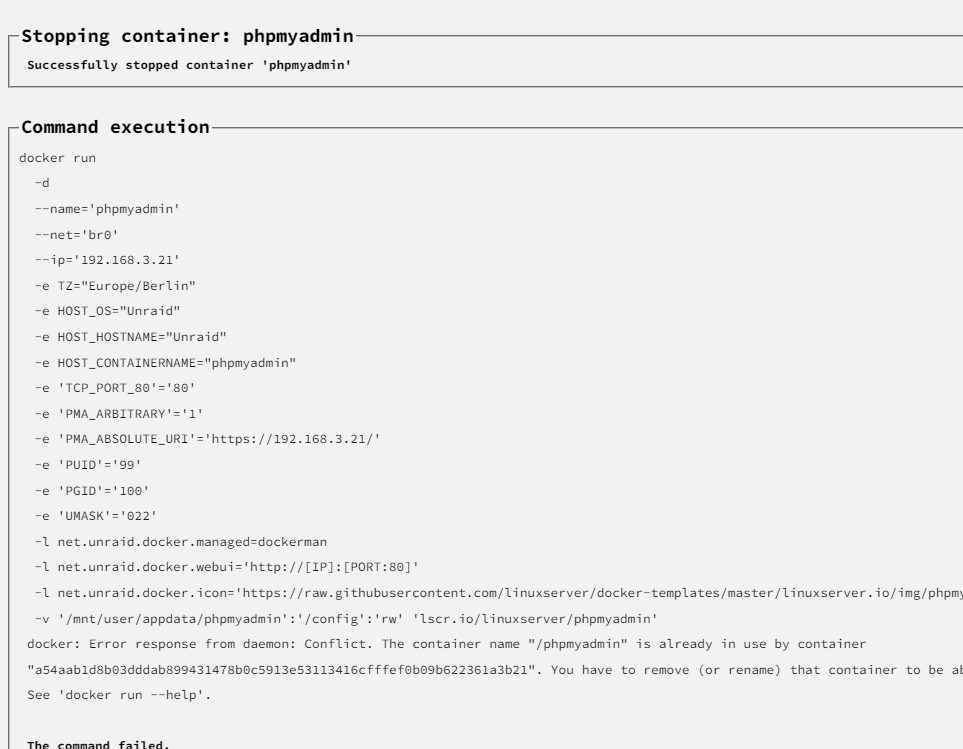
  2. Hallo zusammen. Heute wollte ich ein Update für phpmyadmin durchführen, habe aber beigefügte Fehlermeldung erhalten: Was kann/soll ich machen?
  3. Hi all. I use a proxy and have switched off the use for local addresses. Nevertheless, the dashboard only works partially. If I switch off the proxy use, the dashboard works again. Do you have any tips? Best regards Karsten
Account

Navigation

Search

Search

Configure browser push notifications

Chrome (Android)
  1. Tap the lock icon next to the address bar.
  2. Tap Permissions → Notifications.
  3. Adjust your preference.
Chrome (Desktop)
  1. Click the padlock icon in the address bar.
  2. Select Site settings.
  3. Find Notifications and adjust your preference.