





Vetteman
Members
-
Joined
-
Last visited
Everything posted by Vetteman
-
10.2.250.183 is the ip for my Windows 10 computer which I login to Unraid from. And once I login to Unraid I remain attached and do not logout. I use my Windows 10 computer for my photo editing Photoshop & Lightroom and 3D modeling/rendering (Blender, DAZ Studio, 3D Coat) and digital illustrating (Corel Painter, ArtRage & Rebelle). I remain logged into Unraid so I can keep an eye on disk temperatures and other things. At the end of the day, I shutdown my Windows 10 computer and Unraid as well as my two other computers (Windows 10 and Ubuntu) due to heat issues in the room during summer. And power usage. I've maintained this practise since I first using Unraid which I found as stable as a finely tuned small block Chevy V8. Thanks kindly for the reply.
-
Sys log is attached syslog-10.2.250.180.log
-
I have had syslog server enabled for some time. And thought the diagnostics.zip file included it. So sorry. Will upload syslog now.
-
Since doing the recommended upgrade to Unraid 6.10.3 my server has become unstable, frequently locking up and losing my browser connection to the server. This has happened about 4 times since upgrade. When I connect a monitor & keyboard to the server, the screen is frozen and garbled with blinking text. I am using the onboard intel video as my graphic card and was under the impression version 6.10.3 resolved this issue. Prior to the upgrade Unraid was very stable with no issues. Any ideas or recommendations? kensplace-diagnostics-20220805-1215.zip
-
I do have a replacement drive. It's a brand new WP Red Plus 6 TB. I put the WD Blue 5 TB into my Windows Storage Pool server or into my Ubuntu Samba server and see how it fairs. Many thanks too all for the tips, suggestions and help.
-
Ok, here's my diagnostics. Many thanks for pointing this out to me. I find Unraid so stable I've have very little need to post any issues here. Unraid runs like a Timex watch or a finely tuned Chevrolet smallblock V8. kensplace-diagnostics-20220705-1156.zip
-
I did as suggested and switched the SATA cable with a known good drive. The WD Blue 5 TB has generated another UDMA CRC error. Any other suggestions?
-
Switched cables with another good hard drive. I will report back and many thanks to everyone's tips and info. Appreciate it alot.
-
Good idea. Will try that. I did replace the cable on the failing drive with a new, never used before cable and the errors continued. However I will do what you suggested. Thanks kindly...
-
All the cables look fine to me. And I do not have an issue with any other drives.
-
I replaced the SATA cable with a non latching one and I am still getting udma crc errors. The count is now 44. And the cable is not crossing with any other SATA cables.
-
I have in my hands two SATA cables. A blue one with the metal latches and a red cable with black connectors that does not have the metal connectors. And other than the latches, they look identical. I see the differences between the SATA connectors on the hard drives for latching and non latching. The shroud is in plain sight. But with the cables, the only differences I can see are the latches. I've checked Amazon.ca and Newegg.ca for latches and unlatched sata cables and the only differences are the latches. I will check the connector on the WD Blues 5TB.
-
I know what the locking connectors are but confused by the two statements I've referenced. What am I missing? Many thanks.
-
In this photo it shows the WD hard drive SATA connectors that do not have the shroud and should not use the locking connectors but says for this type of connector "use the SATA cable receptables with internal bumps like the images above". Yet there are NO images above of the SATA cables.

-
I find the WD article very confusing. In this photo it does not show a photo of the sata cable but says the latching cable does not include the internal bumps but points to the WD hard drive connector and not a cable.
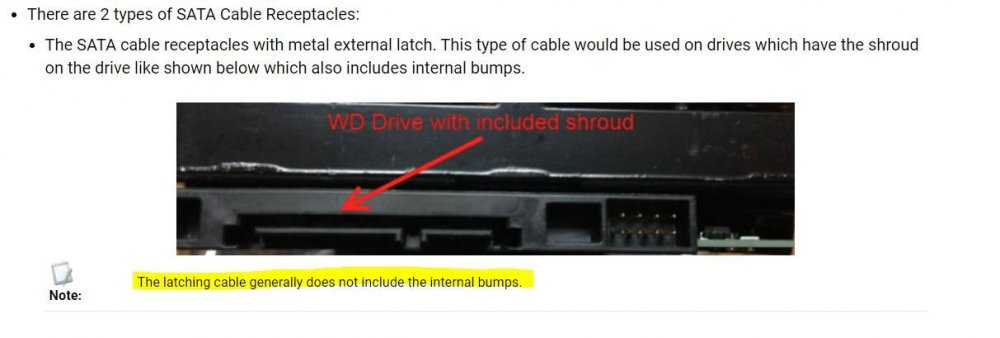
-
Using locking cables.
-
The SMART extended test reports "completed without error". Tried different sata cables, different power connections, different sata ports (mobo, pcie controller), traced cable to ensure it is not crossed with another and it is not. Not sure if my internal sata cables are shielded or not. Too bad esata have a different sata connector as I have a few esata shielded cables I could use. So I am perplexed and very concerned why I am getting the UDMA CRC errors.
-
Thanks kindly for the reply. When I said the errors returned, I mean the number of errors increased. What started out as 1 error is now 40. I did check for crossed cables and made sure the cable for the drive is not touching another sata cable. Presently running a SMART extended test on the drive. Again many thanks...
-
PS: All my drives are new and it is Unraid who broke their virginity. Only the WD 5 TB had a previous life as an WD external USB3 drive which was used to backup my digital photos and 3D renderings.
-
I have a array of two parity drives (2 x WD Red Plus 6 TB) and data five data drives (2 x WD Red Plus 4 TB, 1 x WD Green 4 TB, 1 x Toshiba NAS 4 TB, 1 x WD Blue 5 TB). For 2 months now the WD Blue 5 TB has started to generate UDMA CRC errors. It is now up to 40. When the thumb turns orange I do acknowledge it and the thumb turns green. My scheduled monthly parity checks report everything is fine. I did do as suggested on this forum in other threads. I switched the sata cable with a brand new one. Errors returned. I then moved the sata cable from the motherboard's sata port to a port on my PCIE sata controller. Errors returned. I then removed the drive from a power connector on one of my sata power cables. And plug it into an empty power connector on a different power sata cable. Errors returned. I do have a brand new WD Red Plus 6 TB drive which has not been used yet. Before I swap the failing WD Blue 5 TB with the new WD Red Plus 6 TB is there anything else I could try? Since the WD Diag Tools are for Windows I can not run these from the Slackware OS. I did install the DiskSpeed docker and the failing drive's performance appears to be fine via DiskSpeed. Sorry to bring up a topic that appears to be thrashed to death, but I'd rather ask here then blindly proceed. I recently upgraded to Unraid 6.10.3 but these errors were being reported with 6.10.2 as well. Thank you for your time.
-
Wow, the upgrade process for Unraid sure is simple. Upgraded on Saturday and everything is smooth and as stable as a vintage small block Chevy V8!!!! Excellent work guys. Quite impressed with Unraid.
-
Thanks very much for the post and tip. Much appreciated....
-
Today it's a very windy day in Nova Scotia and we are getting power flucuations. Lights blinking, etc. My Unraid server has been shutting down each time I get a power flucuation however my Windows and Zorin computers have been fine. However in the past I had the same issue with them and had to lower my sensitivity settings for my APC UPSes. Each computer has their own UPS. Is there a way to lower the UPS settings in Unraid? Thanks very much...
-
It appears it may have been a certificate issue with the Adobe server as I had well over a dozens instances of Adobe want me to update a certificate for my Adobe subscription for Lightoom and Photoshop during the same time period. Make sense?
-
Feb 2 16:15:40 KENSPLACE nginx: 2022/02/02 16:15:40 [error] 9486#9486: *66354 limiting requests, excess: 20.630 by zone "authlimit", client: 10.2.250.183, server: , request: "PROPFIND /login HTTP/1.1", host: "kensplace" Searching the forum for the message I got above and found this thread. I have well over 30 lines of the same message in my log. It the first time I've seen this. The client ip is for my Windows 10 PC. Any ideas? Thanks kindly...

