





Alchemist Zim
Members
-
Joined
-
Last visited
-
bad stick of ram, pulled from system, working on sourcing new ram kernel errors caused by broken docker image deleted and rebuilt corrupted docker image, all appears stable will monitor and report back
-
the single stick passed, but im still getting kernel errors
-
swapped slots, isolated stick, removed stick still getting trap kernel errors
-
consistent failures at 11.8GB of RAM im going to reseat RAM, and rerun
-
Upgraded rom a ASUS Maximus IX Hero \ 7700k \ 32GB RAM to a ASUS Prime Z590-A \ 11700K \ 16GB RAM Now unRAID is unstable After a BIOS update my log is now filling with kernel errors Jan 6 09:32:17 TESSERACT kernel: traps: node[82893] trap int3 ip:55d406f5aae2 sp:7fffab736890 error:0 in node[95aae2,55d406b6c000+1aa0000]Attached is diagnostics pre and post BIOS update Any help is appreciated tesseract-diagnostics-20260106-0901.zip tesseract-diagnostics-20260106-0934.zip
-
userprefs.cfg is showing the correct order im guessing you can't do the same for the containers themselves, and not just the folders?
-
unRAID: 6.12.2 I'm having the same issue, I can't rearrange the containers within the folders. Additionally I can rearrange the folders, but when i go to lock the page or refresh the page the order resets
-
NICE!!!...Thank You!!!
-
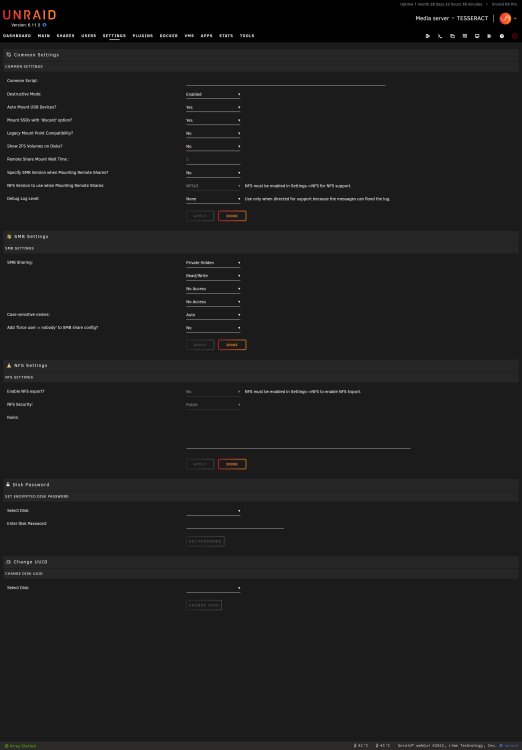
check the UD settings page, under SMB settings I had to enable SMB Sharing, and set permissions for my user the path is not going to be "rootshare" its going to be whatever name you gave it ex...share named homebase \\SERVER\homebase - should work \\SERVER\rootshare - doesn't work
-
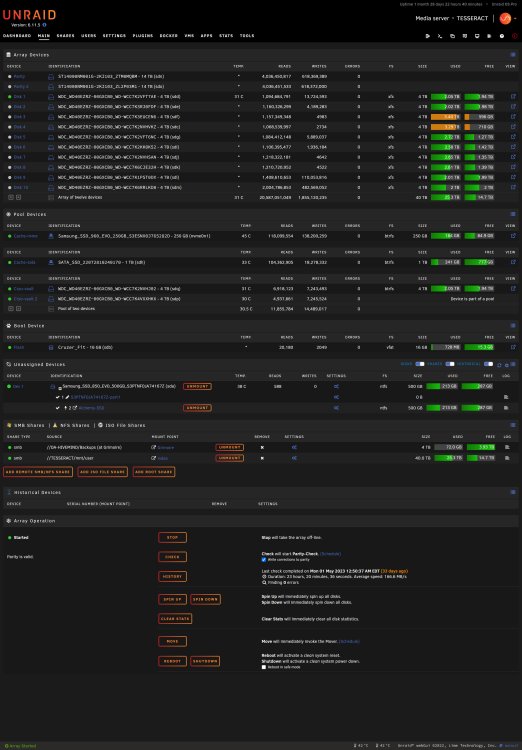
Wasn't sure if you meant the UD Settings or the main tab...so here is both
-
removed rootshare from smb-extra.conf, and added via UD rootshare... i see the network drops on that day, but none for today or any other time i have the drive mounted could it be that the drive has some internal power off function that is not controllable, which is causing this error. it seems to happen every 10 minutes It's a WD My Book 25EE Jun 2 18:10:31 TESSERACT kernel: CIFS: VFS: \\DA-HIVEMIND\Backups (at Grimoire) error -9 on ioctl to get interface list Jun 2 18:20:54 TESSERACT kernel: CIFS: VFS: \\DA-HIVEMIND\Backups (at Grimoire) error -9 on ioctl to get interface list Jun 2 18:29:54 TESSERACT emhttpd: spinning down /dev/sda Jun 2 18:31:16 TESSERACT kernel: CIFS: VFS: \\DA-HIVEMIND\Backups (at Grimoire) error -9 on ioctl to get interface list Jun 2 18:39:36 TESSERACT emhttpd: spinning down /dev/sdq Jun 2 18:39:36 TESSERACT emhttpd: spinning down /dev/sdp Jun 2 18:40:53 TESSERACT emhttpd: spinning down /dev/sdd Jun 2 18:40:55 TESSERACT emhttpd: spinning down /dev/sde Jun 2 18:40:55 TESSERACT emhttpd: spinning down /dev/sdf Jun 2 18:40:55 TESSERACT emhttpd: spinning down /dev/sdc Jun 2 18:40:57 TESSERACT emhttpd: spinning down /dev/sdm Jun 2 18:40:57 TESSERACT emhttpd: spinning down /dev/sdk Jun 2 18:40:57 TESSERACT emhttpd: spinning down /dev/sdg Jun 2 18:40:57 TESSERACT emhttpd: spinning down /dev/sdn Jun 2 18:40:57 TESSERACT emhttpd: spinning down /dev/sdo Jun 2 18:40:57 TESSERACT emhttpd: spinning down /dev/sdl Jun 2 18:40:57 TESSERACT emhttpd: spinning down /dev/sdi Jun 2 18:41:39 TESSERACT kernel: CIFS: VFS: \\DA-HIVEMIND\Backups (at Grimoire) error -9 on ioctl to get interface list Jun 2 18:51:53 TESSERACT emhttpd: spinning down /dev/sdj Jun 2 18:52:01 TESSERACT kernel: CIFS: VFS: \\DA-HIVEMIND\Backups (at Grimoire) error -9 on ioctl to get interface list Jun 2 19:00:07 TESSERACT emhttpd: read SMART /dev/sda Jun 2 19:02:24 TESSERACT kernel: CIFS: VFS: \\DA-HIVEMIND\Backups (at Grimoire) error -9 on ioctl to get interface list Jun 2 19:12:47 TESSERACT kernel: CIFS: VFS: \\DA-HIVEMIND\Backups (at Grimoire) error -9 on ioctl to get interface list Jun 2 19:23:09 TESSERACT kernel: CIFS: VFS: \\DA-HIVEMIND\Backups (at Grimoire) error -9 on ioctl to get interface list Jun 2 19:26:50 TESSERACT emhttpd: read SMART /dev/sdq Jun 2 19:27:03 TESSERACT emhttpd: read SMART /dev/sdp Jun 2 19:30:08 TESSERACT emhttpd: spinning down /dev/sda Jun 2 19:33:32 TESSERACT kernel: CIFS: VFS: \\DA-HIVEMIND\Backups (at Grimoire) error -9 on ioctl to get interface list Jun 2 19:35:07 TESSERACT emhttpd: read SMART /dev/sda Jun 2 19:43:54 TESSERACT kernel: CIFS: VFS: \\DA-HIVEMIND\Backups (at Grimoire) error -9 on ioctl to get interface list Jun 2 19:51:42 TESSERACT emhttpd: read SMART /dev/sdj Jun 2 19:51:50 TESSERACT emhttpd: read SMART /dev/sdm Jun 2 19:52:03 TESSERACT emhttpd: read SMART /dev/sdd Jun 2 19:52:03 TESSERACT emhttpd: read SMART /dev/sdn Jun 2 19:52:03 TESSERACT emhttpd: read SMART /dev/sdo Jun 2 19:52:20 TESSERACT emhttpd: read SMART /dev/sdf Jun 2 19:52:27 TESSERACT emhttpd: read SMART /dev/sdg Jun 2 19:54:17 TESSERACT kernel: CIFS: VFS: \\DA-HIVEMIND\Backups (at Grimoire) error -9 on ioctl to get interface list Jun 2 20:04:40 TESSERACT kernel: CIFS: VFS: \\DA-HIVEMIND\Backups (at Grimoire) error -9 on ioctl to get interface list Jun 2 20:05:08 TESSERACT emhttpd: spinning down /dev/sda
-
Diag Added tesseract-diagnostics-20230602-1308.zip
-
I have a 4TB HDD connected to my router (RT-AC86U) as "BACKUP" i have it mapped in unRAID so that when CA AppData Backup runs it will put it on their instead of keeping it in unRAID ive started noticing 'kernel: CIFS: VFS: \\<<PATH>>\<<FOLDER> error -9 on ioctl to get interface list' in the syslog roughly every 10 minutes looking for help as to why this is happening, and how to prevent it from clogging syslog
-
Didn't even think to post UD...thanks
-
I have a 4TB HDD connected to my router (RT-AC86U) as "BACKUP" i have it mapped in unRAID so that when CA AppData Backup runs it will put it on their instead of keeping it in unRAID ive started noticing 'kernel: CIFS: VFS: \\<<PATH>>\<<FOLDER> error -9 on ioctl to get interface list' in the syslog roughly every 10 minutes looking for help as to why this is happening, and how to prevent it from clogging syslog


