





CameraRick
Members
-
Joined
-
Last visited
Everything posted by CameraRick
-
Forgot to mention: I found it because of your suggestion to see which Docker was started seconds ago. I had a look at the syslog now, the spam stopped 19:33h. At around 19:39h, I can see the messages for "unapply autotweak settings" when I uninstalled it, where all CPU settings went back to "performance", which huts a little :) not sure what I did in the minutes between those events, but my last post was from 19:40h, so it checks out I understand. I don't have the powertop --auto-tune as part of my go-file, so it's currently not active. But I rarely had crashes during high system usage, mostly in idle. I also have ASPM helper installed, for the NVMe and NIC if I recall correctly. Is that also something I shouldn't be doing? I will wait for the parity check to be over (will take ~1½ days) till I can see how this affects the power consumption. I also had a look at my syslinux config: kernel /bzimage acpi_enforce_resources=lax append initrd=/bzroot usb-storage.quirks=059f:105e:u The usb-storage entry is for two Backup-HDD-cases, which have a hard time mounting under UAS; this forces them into the legacy USB mode. The acpi-enforce is for reading out systemps (but I don't recall when I put that in, could be there for some time and may not be even needed anymore, not sure). Could those be issues? Also, I am still on unRAID 7.2.6, I am not that fast with updating. Maybe I should. Best, Rick
-
I found the rogue Docker, it's Homebox. The Log crashes when I try to open it. I closed it down, looked at the Logs, some kernel panic because of the API Key or so. Will investigate this later, would suck if it's broken, that's my whole DIY inventory :( anyway, this is at least settled! Ah well, this time it took roughly 3 Weeks till it crashed, that's not really an option I am afraid :( I am not sure why I installed Autotweak, I guess to play with the power profile; I removed it now. Powertop I use for the mentioned power saving, or at least the attempt to do so. It's recommended a lot in this forum, didn't know it could lead to instabilities :( Best, Rick
-
Hi there, I thought I'd be done with this, but hey. Another crash, after a long history of crashes. hard data: today, 13:54h, I got an automatic notification from Tautulli that Plex is offline. This means, the Plex container stopped before Tautulli (if Tautulli stopped at all) from the log of my Tasmota plug (attached below; time is -2h for whatever reason) I can see that power-consumption rose around 13:50h, rather quickly to ~130W, staying around that value an externally recorded syslog (also attached below) stops at 13:56h, reading SMART data the syslog is also spammed with a reoccurring message regarding "docker0", but did this since early in the morning; however, those stopped around 13:49h; coincidence? WebUI completely unresponsive, SSH as well. I had the same form of crashes before (server starting to run wild with power consumption, being unresponsive); I am not at home, and won't be for hours, so I can't tell if pushing the power button would have shut it down safely I hard-cut its power and switched the Tasmota back on, server boots normally (unclean shutdown lead to Parity check of course) that docker0 still spams the log after reboot I attached logs and diagnositics, but something tells me it's as obscure as it was in the past :( Things I tried since all those earlier crashes this year: switched RAM (passed memtest 5 times) switched CPU (to rule out 13th gen issues) recently, I switched the whole mainboard, newest BIOS installed (to get more SATA ports/throw out extenders) threw out all SATA extenders, all disks now attach natively to the board (as I thought it could've been the ASM cards) generally removed disks, and replaced SATA SSD cache with NVMe The mainboard was switched some weeks ago, and on July 4th the Server went back to its designated place and ran there well till now. There were no crashes in this config before. Before the mainboard switch, I deactivated all ASPM/C-State stuff inside the BIOS; it crashed less, but still did. I also tweaked C-States/ASPM with this new Mainboard, to be able to save some power again (got great help in the german part of the forum) Messages in syslog nearly always related to reading SMART data. I am not sure how accurate all timestamps are, the SMART-readings came a bit after it "went wild" on the power consumption (I never know if it's the disks or the CPU; during the Parity check now it uses 95-99W so I kinda assume both, to a degree). The disk that gets SMART-read last is never the same as the last crash. After I changed and switched so much, I really don't know what else to try :( lunas-diagnostics-20260720-1432.zip 260720_tasmotaHistory.csv 260720_lunas_syslog.log
-
Juti. Ich habe mir nochmal den BIOS Dump angeschaut, da gibt es auch die Settings PS_ON Enable(" Enable or disable PS_ON ()support a new C10 state from the CPU on desktop SKUs that enables a lower power target that will be required by the California Energy Commission (CEC).") und C10 Dynamic threshold adjustment ("Enable/Disable C10 dynamic threshold adjustment"), auch zwei so unsichtbare Settings. Die habe ich mal testweise angemacht, aber nichts. Das BIOS lädt zwar nicht die XMP Settings, aber setzt den RAM auf 1,35V - manuell auf 1,2V ändert sich aber auch nichts. Du hast natürlich recht, dass man das im Idealfall vorher nackt macht. Eine andere Config ist nur (im Moment) einfach nicht drin. Ich will die ASM raus haben, und habe keine andere NVMe für den Cache. Da es eine OEM ist (lange Geschichte) glaube ich langsam, es liegt wirklich an der NVMe; ich habe es nun nicht getestet, weil alle Shares umstellen und im Zweifel auch die NVMe leer machen ist mir gerade ein wenig zu viel ☹️ Ich werde die Augen nach einer besser geeigneten 2TB Ausschau halten, falls sich mal ein Schnapper ergibt. Es ist und bleibt eben ein Produktivsystem, was auch genutzt werden will, und ehrlich gesagt ist <20W ("nackt", ohne Lüfter und Docker) auch kein schlechter Wert. Ich hab nun mal den Service und die Standard-Docker wieder angemacht (kein Plex, die Meute ist nicht kontrollierbar). Jetzt hat sich mir nicht erschlossen wieso so viele Disks hochspinnen, und nach minimaler Investigation stelle ich fest, dass der Clouds-Share den Cache nicht nutzt; vermutlich aus der Zeit wo ich annahm dass ich "wichtige" Daten grundlegen nicht eine Sekunde ohne Parity haben sollte, sprich bevor ich auch nur einen Gedanken an Strom verschwendet habe; lange her. Na gut, das zu korrigieren wird auf kurz und lang eine Menge Strom sparen 😅 vielleicht sollte ich auch mal Paperless auf eine HDD begrenzen, damit bei der nächsten Steuererklärung auch nicht alles hochspinnen muss, weil ich zwei Zahlen in einem PDF nachschauen will. Nach ein paar Minuten stecken wir bei ~24W, mit Docker aber ohne Lüfter. Das ist doch erstmal okay. Dann starte ich ihn nun ein letztes Mal für heute neu, um die Lüfter wieder anzuschließen, und sobald der Ersatz für den Exhaust da ist, wird er wieder "dicht" gemacht. ich bedanke mich herzlichst bei Dir @_alo_ , von ganzem Herzen, für die tolle Unterstützung! Beste Grüße
-
Hm, verstehe. Bei den aktuellen Preisen will ich natürlich tendenziell keine neue SSD kaufen. Ich meine, der Verbrauch ist ja absolut im Rahmen, nur die C-States sind "merkwürdig". Und kostenlose 3W weniger nimmt man ja auch mit :) Aber vielleicht einfach mal testen um zu evaluieren, ob es daran liegt, ist vermutlich nicht so blöd. Dann weiß man es für die Zukunft, wenn sich ein Umbau ergibt. Kann ich denn die Cache SSD, wenn die auch gerade als solches genutzt wird, einfach mal raus nehmen und ins System booten, ohne dass es mucken macht, wenn ich sie später wieder rein schiebe? Beste Grüße
-
Als jüngerer Mensch war ich zwar kein Übertakter, aber ich habe viele Magazine gelesen, und meine mich zu erinnern dass mit der Einführung der K-Modelle im Grunde nur den offenen Multiplikator mitbringen, wodurch sich dann erschlossen wurde, dass es vermutlich "die besseren Chips der gleichen Wafer" seien. Ob da jemals was dran war, wer weiss. Der RAM ist so ein peinliches Gaming-Kit, was auf der Arbeit übrigen geblieben ist. Hat natürlich so XMP 2.0 Zeug, aber ich habe das im BIOS nicht wissentlich aktiviert. Vielleicht sollte ich nochmal schauen, ob da irgendwas als Default gesetzt wurde, was nicht sollte. Der Server stand nun gute zwei Stunden rum "wie er war", weil ich spontan raus bin. Messgerät ist noch immer bei den ~20W, und C6 der geringste State. Werde nochmal einen Blick ins BIOS werfen 🙂 Beste Grüße
-
das Nachwort zum Start: jetzt hab ich diesen Post runter getippert und will in aller Deutlichkeit festhalten, wie dankbar ich für Deinen tollen Support an diesem sehr heißen Tag bin! In Deinem ersten Post hier gab es die angepassten BIOS Settings, da stand nichts von C10 (von den Gigabyte vorher kenne ich das aber auch so). Dem Post nach hattest Du danach nur noch mit SCEWIN das Setting angepasst, und dann ging es in C10 (Du sagst ja auch, dass dieses angepasste Setting ein "unsichtbares" ist, was man nicht im BIOS sieht; zumindest habe ich da auch nichts anderes in Richtung C States gesehen). Ich bin nochmal durch den Thread und habe explizit nach BIOS und C10 gesucht, ein Nutzer erwähnte er habe noch was im BIOS anpassen müssen, aber da ging es um Windows (SR-IOV, das scheint mit VMs zu tun zu haben, die aktuell ja nicht mal aktiviert habe). Ein anderer schrieb noch was davon dass "TurboBoot" deaktivieren helfen könne, aber das habe er nur anderswo gelesen, wurde im Thread nie weiter behandelt. Hier wird gesagt, dass nach der Treiberinstallation C10 dann ging. Ich habe keinerlei Treiber installiert, aber "Intel GPU TOP" (das ist das einzige iGPU bezogene Plugin, weiß nichtmal wofür ich das habe, haha) Ich hab mal testweise HDMI Kabel (Bildschirm war vorher aus) und Tastatur-Dongle abgezogen, und auch die vier USB Kabel fürs Backup (Backup HDDs sind jeweils hinter zwei Tasmota Relais, beide die ganze Zeit aus). Bleibt bei C6 für Pkg(HW) Da haste nen Punkt, dachte mehr Platten=mehr Strom, aber die sind ja auch mit Helium gelagert usw... ich stecke auch nicht im Thema, war einfach eine Milchmädchenrechnung von mir. Sehr faire Frage! Ich hatte mit Abstürzen zu kämpfen, was auch der Grund fürs neue Setup ist. Vorher der i5-13500. Hier im Forum (englischer Teil) hatte ich (glaube mit JorgeB) erörtert, dass diese Core-Degradation, woran die 13te Gen leidet/gelitten hatte (das fixende BIOS Update kam einen Monat nach dem Aufbau, das hatte ich nicht mitbekommen), eine Ursache sein könnte; meine CPU stand nicht auf "der Liste", aber dennoch. Also habe ich den auf Garantie zurück geschickt. Dann nach Alternativen geschaut. Naheliegend war natürlich der 12500, aber das Ganze war Januar 2026, und die Preise waren verrückt. Der 12600K war einfach die günstigste Option (habe meine Notizen gefunden: 12400 war 5€ günstiger aber auch deutlich schwächer, der 12600 non-K ~35€ teurer, der 12500 20€ teurer; die günstigen F gingen nicht, weil ich die iGPU brauche). Der K hat natürlich die höhere TDP, aber ein paar anderen Threads (u.a. auf Reddit) nach mache er beim Stromsparen keine schlechtere Figur, daher hab ich den gewählt. Ein Unterschied zum alten System fiel mir jetzt noch ein: damals war ein ein einziger DDR4 Riegel, 32GB. Heute sind es 4x DDR4 16GB Riegel. Wird einen kleinen Unterschied machen, aber vermutlich auch nur so 3-5W? beste Grüße
-
Hehe, als ich es kaufte kannte ich Dich noch nicht, aber die Empfehlung kam selbstredend aus diesem Forum, im Kontext des Stromsparens! Ich glaube die Empfehlung kam damals von @hYtas . Die NVMe ist eine Samsung 970 Evo Plus 1TB. VMs fahre ich aktuell nicht mehr (mein HA ist auf einen Thinclient umgezogen, und die Windows war seit Monaten nicht an, daher Service deaktiviert). Ich messe mit einem zumindest bislang halbwegs zuverlässigen, aber generischen Strommesser den man so zwischen steckt, mit Display; eigentlich hängt der Server an einer Tasmota, aber die ist am "Endstandort" verbaut wo ich nicht ohne weiteres ran komme; aktuell steht er seit dem Umbau auf dem Esstisch, haha 🙂 ich hab mir auch nochmal meine ganzen Werte vom letzten System angeschaut, da sind die neuen hier dann etwas ernüchternd (damals neuere, vermutlich effizientere CPU (hatte vermutlich die Core-Degradation, deswegen getauscht), eine dumme Lüftersteuerung, die ggf sogar aus war (die neue kann nur minimal 25%, was an Tagen wie heute aber vermutlich auch zu wenig ist, haha), aber eben auch viel mehr HDDs und die zwei ASM; Lüfter und PSU identisch). Ich hab den Server, ohne Docker und VMs, jetzt schon so 30-45min laufen lassen (WebUI aus und Powertop via SSH gecheckt), da hatte sich nicht viel getan. Ein LLM (Schande auf mein Haupt) behauptet, C6 minimum sei realistisch bei angesteckten HDDs, aber das glaube ich nur bedingt. HDDs sind ein bunter Haufen: 22TB (Parity), 2x 12TB, 1x 10TB, 1x 8TB, 3x 6TB (falls das relevant ist, weil Größer = mehr Verbrauch auch im Spindown, oder so) Ich fahre derzeit noch unRAID 7.2.6, könnte ich vermutlich auch mal updaten. Ich war gerade im Begriff die HDDs im Case neu zu sortieren (die sind mitunter noch auf den Positionen aus den 12-HDD-Zeiten, die... sagen wir mal, nicht ganz konventionell sind), aber habe ihn jetzt nochmal ohne Lüftersteuerung gestartet (vermutlich sollte ich einen externen Ventilator aufs Case knallen, haha). Setup wieder mit disabled Docker und VM Service, Array gestartet, aber alle Spindown, --auto-tune ausgeführt (ist noch nicht wieder im Go-File, weil es beim alten System Probleme gab) => ~20-21W Damit war meine Schätzung von 4,5-7W immerhin nicht komplett am Leben vorbei 🙂 Die Lüfter sind in meinen Augen so notwendiges Übel. Die Max-Lüfter haben ja schon ihre Daseinsberechtigung, die habe ich explizit für den Sommer angeschafft. Es ist jetzt in etwa 20 Jahre her, aber mir ist in einem heißen Sommer tatsächlich mal eine 300GB HDD (das war damals recht viel und teuer) im Sommer durchgeflackt, natürlich war das ein anderes Kühlkonzept im Case (=gar keins), und der Raum war Holzvertäfelt mit Fenstern Richtung Westen, aber dennoch: war ein Lehrmoment 😅 Beim aktuellen Wetter sind die Max auch wirklich nicht die schlechteste Idee, zumindest im Betrieb später. Also, ohne Lüfter und Docker ~20W, das wirkt dann ja fair, auch wenn ich nicht unter C6 komme. Wäre natürlich die Frage ob man mit echo powersupersave > /sys/module/pcie_aspm/parameters/policy oder pcie_aspm=force (in der Syslinux Config) noch was erreichen könnte, oder ob ich Vollidiot was im BIOS übersehen habe. Oder die verwendete SCELNX64 Methode doch nicht korrekt war. Beste Grüße //edit kleine Korrektur: ich sehe gerade, dass der Exhhaust-Lüfter (Fractal Design Silent 140er) nicht an der PWM-Lüftersteuerung hängt, sondern an der Case-Internen Lüftersteuerung. Ist nur DC und kein PWM. Das Case ist ein Fractal Design R5, die Lüftersteuerung ist ja nur ein primitiver Schiebregler der 5, 7 und 12V durchschaltet und wird wenig Eigebverbauch haben; ich will die jetzt im laufenden nicht abklemmen, aber habe mal den Lüfter abgezogen, jetzt schwankt das Messgerät zwischen 19,5 und 20,5W. Nicht viel, aber immerhin. Werde den Lüfter gegen einen PWM ersetzen (nicht wegen des Verbrauchs, aber dann ists ordentlich und ein etwas stärkerer wäre auch nicht verkehr)
-
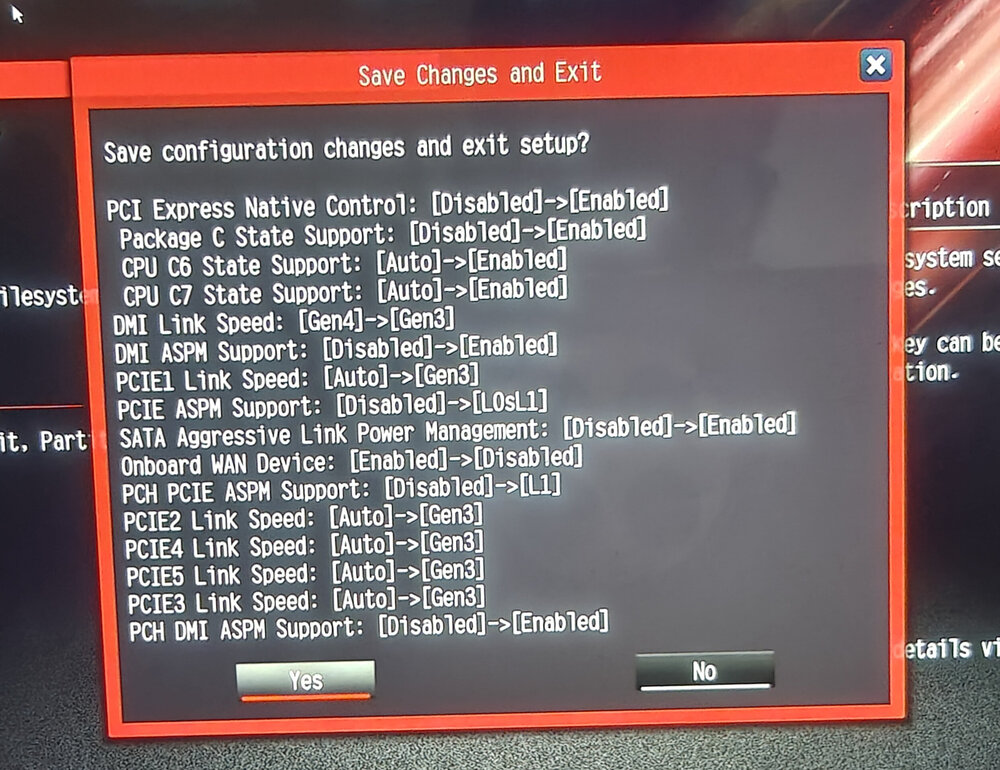
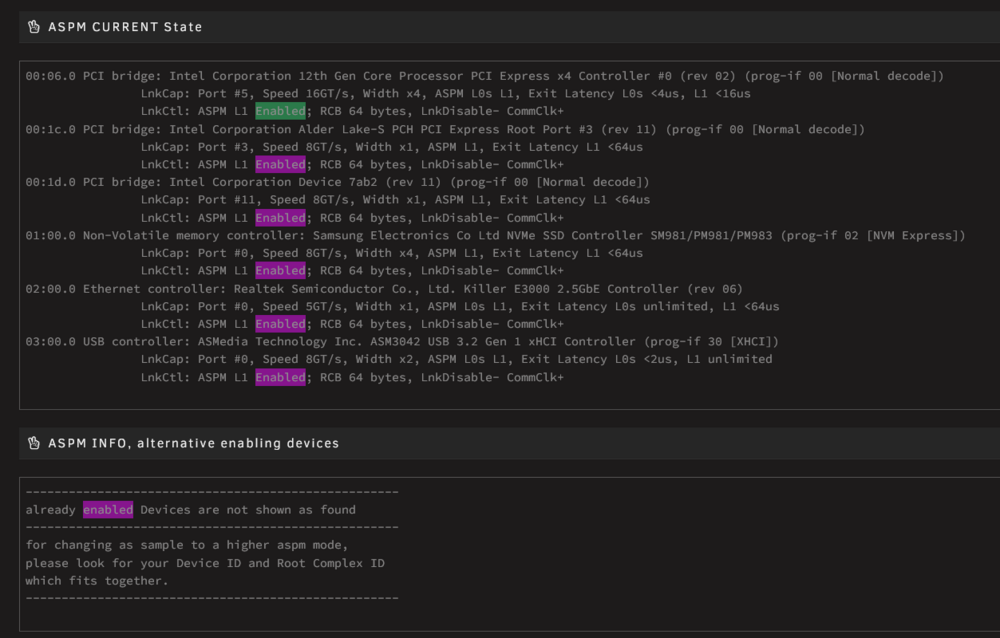
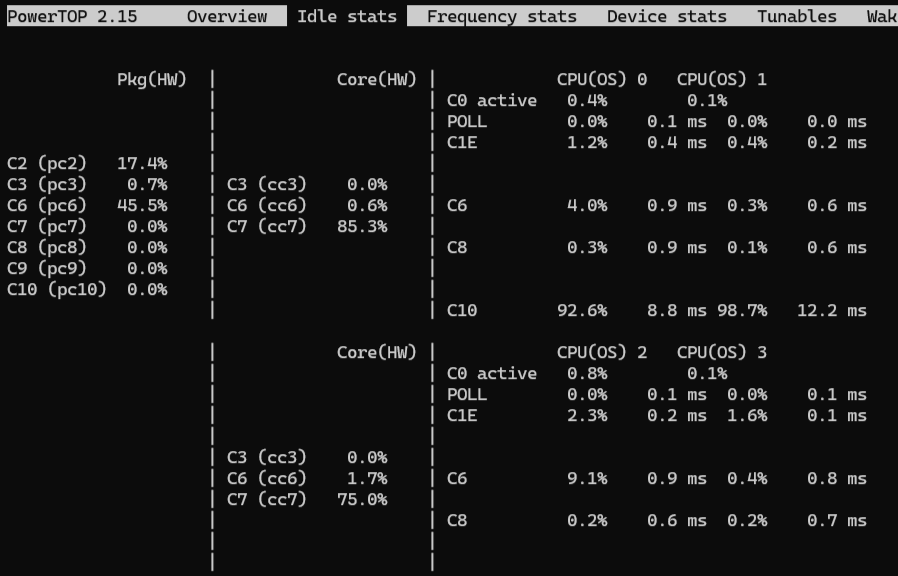
Ich bin mal so frech und buddel diesen alten Thread aus, weils ja auch genau das Thema ist (und ich mich immer schäme, drei Threads zum selben Problem aufzumachen) @_alo_ hatte mich hier über die Besonderheit mit den ASRock Boards nochmal aufgeklärt. Das ist drei Wochen her - während dieser drei Wochen ist das ASRock Board hier angekommen, ich habe den Server auf dieses umgebaut, und ich habe "ein paar" Tage mit unbalanced mein Array neu sortiert. Das Setup ist denkbar simpel: keine Zusatzhardware (PCI Express oder USB Geräte), nur 1x NVMe und 8x SATA Disks; dazu der unRAID-Stick (hängt im Gehäuse an einem USB2-Header-zu-USB-A Adapter), der Dongle meiner Tastatur (für BIOS Einstellugen, ist nur temporär dran). Am USB3-Header hängt eine 2x USB3 Erweiterung (PCI Slotblech, quasi Front-USB für hinten). 4x DDR4 16GB DIMM, i5 12600K, be quiet PurePower 12M 550W (kommt bei unter 10% Last immerhin noch auf >80% Effizienz) Am Netzteil (aber nicht am System selbst) hängt eine Lüftersteuerung, die aktuell bei 25% PWM insg fünf Lüfter bedient (zwei "silent" Modelle, 120 und 140, dann 2x Arctic P14 Max und 1x Arctic P8 Max; wie gesagt nur 25%, aber die saugen ja generell gern was mehr). Dazu noch zwei Lüfter am CPU Kühler, die hängen am Board (nach UI ~850 rpm) - BIOS hatte ich direkt beim Umbau auf das aktuelle, Oktober 2025, aktualisiert. - ich habe den BIOS "Mod" via SCELNX64 gestern gemacht (aber eine andere Methode als in Post1 beschrieben, wo man die .txt ausgibt, dann ändert, und wieder einspeist; nach erneutem dump ist die Änderung auch noch drin). - dann habe ich alle BIOS Settings aus Post1 übernommen (hatte im Verlauf keine aktuelleren gefunden), siehe Screenshot; einziger Unterschied ist Onboard-Audio, was ich schon beim Umbau deaktiviert hatte. - keine separaten Realtek Treiber installiert, aber via ASPM-Helper die beiden Problemkinder rein gemacht, das geht auch durch (siehe Screenshot). - powertop --auto-tune ist ausgeführt, und alle Tunables stehen auf "good" - in powertop hänge ich bei minimal C6. Bei den CPU Einträgen hält sich die Waage zwischen C7 und C6. - aktuell sind Docker und VM Service deaktiviert, sprich nichts läuft, Array komplett im Spindown. => ich messe einen Verbrauch von etwa 24W (schwankt ab und an hoch) Nun weiß ich natürlich das Platten auch im Spindown noch so 0,5-1W verbrauchen, und die Lüfter (auch bei 25%) in dem Rahmen sind; die Lüftersteuerung schätze ich mal auf 2W insg. Also sprechen wir von einer "blinden Belastung" von etwa 8,5 bis 13W, rechnet man das raus läge man bei 11 bis 15,5W Gesamtverbrauch. Das man das so nicht 1:1 rechnen kann ist mir bewusst, mir geht es eher um den "Ballpark". Langer Rede kurzer Sinn, bzw meine Frage: Ist das, in diesem Setup, ein tragbarer Wert? Ist es normal, dass ich mit angeschlossenen Disks nicht unter C6 komme? Es ist klar, dass die Beurteilung der C-States/des Verbrauchs im Idealfall mit einem nackten System gemacht werden, mein Punkt ist aber der, dass ich kein nacktes System benutze 🫣 Also, wenn ich C10 problemlos ohne Disks erreiche ist das für mein Nutzungsszenario nicht so relevant Gefühlt sind ~25W bei 8 Disks und NVMe (auch wenn Docker nicht laufen) akzeptabel, oder sehe ich das falsch? Beste Grüße
-
Ah, so the missing disks will just be ignored? The current disk 1, 2, 4, and 5 will be removed. I don't care too much if the new order is in size or as before. I actually prefer old disks in the beginning, makes the search easier :) Thanks Jorge!
-
Hi there, sorry for spamming the forum again, my last topic on the matter is already solved. I just want to make sure I do everything correctly :( The status quo: 4 drives are emptied (almost, last one is currently moving files), but NOT nulled. These I want to remove from the Array. I bought a new drive to replace the Parity disk as well. Now I don't see a lot of sense in writing zeros to all drives to keep the current one valid when removing the four disks; it's just unnecessary stress for all disks? As I will have no slots left (and don't want to put the old Parity into the Array just yet), I wouldn't do the Parity-Swap-Option to copy the old to the new. So a complete rebuild for the new Parity seems reasonable? This is what I have in mind: - empty all four drives completely - refresh my backup to current status - switch off the Server - remove four disks - remove Parity disk - add new Parity disk - switch on the server - do "New Config" - assign new disk to Parity - assign remaining Array disks - start the Array, rebuild Parity - have it accessible (but slow) at this stage Do I muss something, or did I put a wrong order? Best Regards, Rick
-
Thanks for the great explanations yet again! :) The two methods of removing an array drive are also in the video (but presented in a way that fits dummies like me a bit better, haha). I linked it because of the Parity2 removal (which was, again, not properly worded by me), which is is now also clear to me; in other videos/forum posts, I also learned about the "copy" method to replace a Parity while simultaneously adding the old Parity disk to the array; cool technique, don't know if I had the guts, haha :) Either way, I am now rather confident with how to tackle all of this. For now, I will not buy a new drive, but just remove Parity 2. Then add it to the array; after it's in, scatter four* old disks to the remaining ones, and remove those. Because zero'ing four drives will probably take some time, I will likely just remove them and rebuild Parity (I still have backups if a drive suddenly fails). * I "need" to strip down to 8drives total, and the earlier plan with three was just a temporary one; with this new game-plan, I can do better, but need to remove one more; I will still get a new Parity later, but postpone that till I get my tax-returns, haha Best, Rick
-
Appare I did the same, but apparently you don't need to do this, according to this thread (again with great explanations from @trurl , I see a pattern) Will do this later, then I can start with copying the files real soon :)
-
Thanks for the headsup, that indeed sounds good! For HDDs-got-really-expensive reasons, I think about not directly buying a new Parity bisk, but going down to just one - and put the 2nd one into the Array, and then fishing the three old disks out. The Documentation makes me believe that I can just unassign one of them, and not rebuild Parity? I probably misread this, right? Best, Rick
-
I now wanted to google where my misconception may have come from, only to find a great explanation in a post from you, haha :) okay, I somehow thought this would either stress Parity or take the array offline, so I won't bother with that. Thanks for clearing that up (two times even, haha) Best, Rick
-
Ah, I wasn't precise enough: currently, I have two Parity drives. I want to switch to just one Parity. The new Parity is going to be larger than the current ones :) Your idea with adding a new one first and and then emptying the old ones is clever! I have to see how I could possibly do that though, as my case can't physically hold any more drives (but of course, the slot of Parity#2 would be free) In that case, the removal of the old disks would probably be method 2 from the Video, so I would not have to rebuild the Parity again. Regarding the pre-clear: as far as I remember, the auto-clear from the system is basically a pre-clear, but during this operation the Parity is under heavy stress as well? Currently, I have enough free space to remove the three disks (with ~3-4TB buffer). But the more I think about your approach, the more I understand that it would potentially mean less downtime as well, which is pretty dope Best, Rick
-
Hi there! I want to re-structure my array a bit: - remove 3-4 old HDDs - remove the current two Parity disks - add one new, bigger Parity drive - (optional) add one BIGGER drive back in And I want to do that with as little stress on the disks as possible, as you can imagine. I saw the great Spaceinvader One video on array shrinking the Array and figured: if I go with method 1, could I probably do this in a "single" step? Because I need to rebuild Parity anyway? The plan would be: - do a full Array backup(!) - use unBALANCE to free the disks I want to remove - shutdown, remove the disks from the server, add in the new Parity, restart - (optional) put that one bigger drive inside as well - do the re-structuring-thing - assign the disks to the Array - let the Parity rebuild - (optional) run unBALANCE again to relieve the filling of the old disks to the new one (probably the new disk shouldn't be added to the Array right away, but pre-cleared when parity is rebuild, and then added) At least it feels like this could be a viable way, only difference to the video is that I'd remove more drives at once, which shouldn't matter when they're empty and the Parity is rebuild anyway? Best Regards, Rick
-
Also war es doch kein Quatsch, spannend! Ich hab mir das so notiert (neben vielen, vielen anderen Infos): Das Tool heißt AMISCE (AMI Setup Control Environment), die ausführbare Datei meist SCEWIN_64.exe. Da es ein internes Entwickler-Tool von AMI ist, gibt es keinen offiziellen ASRock-Download. Hat also quasi gestimmt :) Danke für die Links! Ich schau das mal durch, und schaue dann wie ich es mache. Auf jeden Fall vielen, vielen Dank!
-
Google den eBay Händler mal, der hats im eigenen Onlineshop für 175€ drin (das ist nach Preisticker immernoch teurer als vor einem Jahr, aber immerhin auf dem Niveau von September '25; da ich sicher keinen DDR5 RAM kaufen will, für mich auch die einzige Möglichkeit). Ich hab es jetzt einfach mal bestellt bevor es ganz weg ist; hast ein paar Tips für den Start? Ich hab irgendwo gelesen man müsse in Windows ein Toll, "AMISCE", laufen lassen damit es BIOS Optionen (für tiefe C-States) frei schaltet; so ganz sicher ob das nicht quatsch war bin ich aber nicht, haha Das ist spannend. ich bin nur auf die Problematiken der 13er Generation gestoßen, wo die CPUs "irgendwann" anfangen, zu spinnen. Und der Tausch der CPU hat auch zumindest kurzfristig was gebracht, aber war vermutlich einfach Zufall. Auf verbogene Pins habe ich nun nicht gesondert geschaut, aber bilde mir natürlich ein, dass ich da immer sorgfältig bin, haha. Was "dagegen" spricht ist natürlich, dass es irgendwann einfach angefangen hat, die verbiegen ja nicht im Betrieb - aber vielleicht war es auch erst die kaputte CPU und danach die Pins, mit gleichem Fehlerbild. So oder so: auch das wäre mit dem Riptide ja gegessen, hoffentlich. Erklärt aber auch, warum der besagte eBay Händler explizit erwähnt, dass alle Sockel(pins) vor verschicken geprüft werden. Danke für Deinen Input, ist auf jeden Fall eine Beobachtung wert! Zu den Plattenpreisen: wie gesagt ist er historisch gewachsen, und daher einige Platten auch was älter; ich habe original immer nur Platten rein gesteckt, nie welche raus geholt, seit Ende '21 ist der im Einsatz. Bin damals mit der mittel-großen Lizenz gestartet und dann bei einem Sale auf die Pro gewechselt, eben um mehr Platten rein stecken zu können, was damals eine sinnvollere Idee als heute war (und durch die deutlich günstigeren Lizenzen auch günstig). Inkl der zwei SATA SSDs sinds aber jetzt 14 SATA Geräte, also ist vermutlich verständlich, wieso der Gedanke auf 8 zu reduzieren dann vielleicht auch verständlicher wird :) tatsächlich habe ich auf Empfehlung von @DataCollector damals die Recertified angeschafft (nochmal Danke dafür!), der hatte mir damals gut in den Hintern getreten um Backups anzulegen. Kann es aktuell nicht mehr 100% nachvollziehen, aber ich meine das waren 2x 18TB und 1x 12 oder 16TB, glaub dafür habe ich damals knapp 500€ gezahlt, hach... na ja, genug geschwafelt! Jedenfalls, bevor da drei der betagten Kameraden auf einmal die Grätsche machen, will ich lieber die Ältesten auch mal raus ziehen. Ich habe für viele der Platten nichts bezahlt (waren auf der Arbeit übrig), daher täte der Preis der Platten jetzt auch nicht ganz so doll weh :) der Strompreis ist dabei auch immer ein Faktor, denn seitdem ich die C-States etc beschnitten habe geht der Verbrauch schon spürbar hoch. Aber ist nicht die treibende Kraft; im Mai lag ich bei ~18€ (ich habe im HA einen Tracker laufen, der die Tasmota protokolliert), das ist deutlich mehr als ich will aber im Vergleich zu gesparten Kosten für Clouddienste und dem persönlichen Bastelspaß eine vertretbare Ausgabe für ein Hobby :)
-
Hm, das habe ich schon befürchtet. Ich habe noch ein Angebot für ~20,45€/TB gefunden, das ist schon mal deutlich attraktiver, aber aber eben auch nur Komparativ, haha :) // es gab wohl einen Preisfehler - 20€/TB sind für Recertified, die Refurbished (denen ich tendenziell weniger traue) sind sogar bei 18,86€/TB. Ist jetzt nicht super unattraktiv, aber eben "nur" refurbished Ich habs nochmal durchgerechnet; ich wollte ein ASRock Z690 PG Riptide anschaffen (das einzige Board mit 8 SATA und DDR4), dann beide Cache SATA SSD gegen eine NVMe tauschen, zwei Parity raus und nur eine rein; wenn ich nun die alten Parity Disks ins System stecke, kann ich noch drei bis vier kleinere Disks raus werfen. Dann bräuchte ich nur eine neue Parity Disk, dann komme ich auf 7-8 SATA Stecker, das würde also gehen. Vielleicht ist das die Übergangslösung :/ Das ist eine sehr gute Frage, und ich weiß es nicht mal richtig. Ich hab hier im Forum zum Anfang des Jahres diverse Posts zum Thema Abstürze gemacht, und so richtig rum kam niemals was. Sogar CPU und RAM habe ich getauscht. Es fing irgendwann im letzten Sommer an, wurde dann immer schlimmer. Manchmal ist die Kiste alle zwei Tage abgeraucht. Hab einen externen syslog Server aufgesetzt um zu sehen was passiert wenn er Abstürzt, und es ist nahezu immer eine SMART-Abfrage, aber auch immer bei verschiedenen Platten. Es passiert nie unter Volllast wenn HDDs laufen, immer nur in nahezu-idle. Machmal stürzt er auch nicht ab im Sinne von ausgehen, sondern "freezed", ballert die CPU auf 100% und verharrt so Stunden bis man ihn hart ausschaltet. Er registriert via SSH zwar dass man runterfahren will, kann den Befehl aber nicht ausführen. Ich habe dann nach und nach alles ausgemacht - powertop tune, native ASPM im BIOS, die ASPM Settings in unRAID, C-States hochgeschraubt, usw usf. Letzte Woche ist er zwar wieder random abgestürzt, aber davor war er (quasi ohne irgendwelche Tweaks) über Wochen stabil. Meine Vermutung ist, dass irgendwas beim Aufwecken der HDDs ein Problem verursacht; und ich kann es freilich nicht beschreien oder beweisen dass es wirklich die ASM sind, aber dadurch dass es mit Abschalten der Energiesparoptionen messbar weniger Probleme gibt und im Log immer nur "alberne" Abfragen stehen, fühlt es sich für mich am wahrscheinlichsten an. Aber: ich bin da auch einfach extrem frustriert und weiß nicht mehr weiter. Die ständigen Abstürze zehren an mein mir, wie sie durch die Belastung durch ständige Parity-Checks an den HDDs zehren, haha
-
Hallo ihr Lieben, mein unRAID ist mit der Zeit gewachsen und hat daher einige "Altlasten", wie zB viel zu viele einzelne, kleine HDDs. Leider machen die ASM1166 auch mit Silverstone Firmware ein paar ungünstig Probleme für mich, daher würde ich gern ein neues Mainboard mit mehr SATA Ports anschaffen und ein paar der kleinen HDDs durch wenige, größere ersetzen. Meine aktuellen Parity Disks sind 14+12TB, die würde ich beide raus werfen und auf eine einzelne große gehen. Ich brauche "für den Anfang" mindestens eine Parity, und eine zum Ersetzen von Array Disks, und peile so 18-22TB für beide an. Im Idealfall aber eher zwei fürs Array, das wird dann eben die Kostenfrage, die ich hier stellen will. Dez24/Jan25 wurden mir hier im Forum fürs Backup die Recertified Seagate von Mindfactory empfohlen; die habe ich auch dafür im Einsatz, läuft super. Da (Mindfactory) ist der Einstiegspreis für Seagate (ohne Addendum) 539€ für 24TB (22,46€/TB) Bei Datablocks gibts Seagate Exos Recertified, 18|20|26TB für 460|500|570€ (25,56|25,00|21,92€/TB) Amazon Marketplace hat Seagate Exos 22|24TB für 509|549€ (23,14|22,88€/TB) Das sind alles Recertified - und obwohl ich gute Erfahrunen damit gemacht habe, sind es eben auch nur Backups, die eben nur ein- bis zweimal die Woche fürs Backup laufen, also nicht so oft spinnen, wie im Serverbetrieb. Shucken war vor ein paar Jahren der letzte Schrei, habe ich noch nie gemacht, und scheint auch heute mehr als sonst eine Lotterie zu sein, weil es da schnell SMR Platten gäbe, was man wegen der schlechten Performance nicht wolle, Ich benutze den Server hauptsächlich als NAS, aber auch als Mediaserver, da wäre es dann auch gerne mal schlecht wenn zB bei parallelen Zugriffen die Performance komplett wegbricht. Oder übertreibe ich hier? //kleiner Edit: ich sollte vielleicht anfügen. Wenn der saure Apfel der einzige ist den es gibt, dann werde ich ihn essen müssen. Idealerweise würde ich für 3 Platten gerne unter 1k bleiben, aber wenn ich immerhin mit zweien unter 1k bleibe wäre das ja schon mal was. Ob die Preise sich auch mal wieder entspannen ist ja nicht absehbar (aber vermutlich auch eher unwarscheinlich, haha :( ) Wie macht ihr das heutzutage? Beste Grüße, Rick
-
Ah well. It ran stable, till it didn't 😀 2026-01-27T14:08:25+01:00 LuNAS emhttpd: spinning down /dev/sde 2026-01-27T14:09:40+01:00 LuNAS emhttpd: spinning down /dev/sdc 2026-01-27T14:23:24+01:00 LuNAS emhttpd: spinning down /dev/sdd That's the last three lines in the log. It's not even always the same disk, that would at least give a hint for a broken one or something :/ I think I was on the server remotely when it happened. I clicked on "archive" in the message center, then it had the loading circle for some time unusual long time. Didn't think much, and then received an error from my DAVx backup which is usually a sign the server is down. Went back to the unRAID tab, still loading, and after F5 it was (of course) not loading at all. So, I relaced the C-States, I didn't do powertop --auto-tune, and I didn't had the Docker fetch data with smartutil. I am really out of ideas, except it being some hardware defect I am incapable of finding :/
-
the Docker reads the SMART data through smartutil, but it doesn't wake up drives. Maybe reading the data could also cause issues? Mind you, it reads this data multiple times a minute. For now, I will only read from disks.ini I'm just reaching for straws I guess :(
-
Spindown is one aspect, but reading SMART data another. I noticed that disks don't wake up when you read temp through smartutil, but maybe that does something? I noticed these crashes mainly in times of "idle", so it somehow feels connected. I just don't know how :( For now I will relax the C-States again, but it feels like there is some hardware issue that will be expensive to fix 🙈
-
Okay, I was too early with this. Man I look dumb doing a triple post now, ha sorry I had to unsolve it, Jorge :( As I mentioned, I restarted the machine with more "aggressive" C-State politics and powertop --auto-tune. Two days ago, the machine crashed again. I restartet, same BIOS settings, but no --auto-tune enabled; parity check went through, and a few mins ago it crashed again. I do believe the CPU had some play in this, so having it switched is not a waste, but something dawned for me yesterday. The logs don't show any obvious errors, but almost all Logs show something similar in the last few lines: 13th of December Dec 13 15:40:03 LuNAS emhttpd: spinning down /dev/sdh Dec 13 15:40:55 LuNAS emhttpd: read SMART /dev/sdh 2nd of January Jan 2 22:45:51 LuNAS emhttpd: spinning down /dev/sdg 18th of January 2026-01-18T16:29:50+01:00 LuNAS emhttpd: read SMART /dev/sdj 2026-01-18T16:30:06+01:00 LuNAS emhttpd: spinning down /dev/sdk 2026-01-18T16:30:06+01:00 LuNAS emhttpd: spinning down /dev/sde today, 20th of January 2026-01-20T14:39:59+01:00 LuNAS emhttpd: spinning down /dev/sdc 2026-01-20T14:40:50+01:00 LuNAS emhttpd: spinning down /dev/sdo 2026-01-20T14:42:16+01:00 LuNAS emhttpd: read SMART /dev/sdi There were more crashes, but I didn't archive them properly and now I have trouble finding out the exact time stamps to look through it. In any case, I recall they always looked like this. Which is not suspicious... but maybe it is? It's always when spinning down disks, or reading SMART data. So could this, somehow, cause the crashes? Does this interfere with e.g. C-States so much? Since late december, I developed a Docker for a fan controller. At some point (can't exactly recall when, but probably already new years) I set it up to read SMART data directly, because the disks.ini seems to have cached data that is not updated often. This could match some of the crashes (that I don't have Log data for listed above). Else, the ASM1166 cards could probably be a culprit?



