





12_purple_giraffes
Members
-
Joined
-
Last visited
-
spinningtop-diagnostics-20261016-2140.zip As you can see, this is a bit of an odd build. I put it together to help rip a large number of discs, but I've run into a speed problem. Each MakeMKV Docker container only seems to write at around 10 MB/s. If I write to the drive from my PC, I get around 110 MB/s over a 1 Gbit connection, so that side of things seems to be working fine. I know the hardware is a bit of a mixed bag. Just don't ask how long I've had the cache SSD With five MakeMKV Docker containers ripping simultaneously, I get a combined write speed of around 60 MB/s, which is a lot slower than I would have expected, even given the hardware. Does anyone have any idea what the problem might be?
-
So I stopped the array to add a new drive. The drive was already in the system. When I stopped the array, several disks were missing, but just reloading the page made them show back up. Odd, but everything looked good, so I added Disk 9, started the array, and two disks are offline. Two diagnostics One from when I had the array down and it showed missing disks, and one from just after I started the array. Today, I have been moving hardware around and it had only been up for a few hours before I wanted to add Disk 9. carbonblack-diagnostics-20260821-2126.zipcarbonblack-diagnostics-20260821-2123.zip
-
So I’m looking to replace my Antec 1200. I now have: 11 × 3.5" drives 2 × 2.5" drives One optical drive ATX motherboard ATX PSU One GPU (Quadro M2000 — planning to put my RTX 3080 Ti in there when it gets retired from the gaming rig to run some local LLMs) LSI SAS3416 The problem is that the case is getting full, and access to the back of the drives is a mess, with nowhere to really route cables. The RTX 3080 Ti is not going to fit either, so it’s time I stepped up the case. I would prefer a tower, as I don’t have any other kit that needs a rack, but I’ve not been able to find one. After looking around at my options in the UK, I settled on a Codegen 4U Rackmount 635mm. This fits all my needs except for the optical drive — I will just 3D print something to hold it. The Codegen 4U Rackmount 635mm is around £150. Add a 6U open rack and new fans, and I’m still well inside my budget. My main reservation with this case is that it looks to be using those cheap 3 × 5.25" to 5 × 3.5" adapters, and there’s no vibration isolation at all. Is anyone using one? What are your thoughts? Anyone got a better suggestion for ~£400? Now that I’ve sat here writing this, I’m wondering if I should just get an old DVD duplicator, use that for all my HDDs and SSDs, and put the rest in a more standard PC case.
-
carbonblack-diagnostics-20260801-1144.zip Disk 3 had a lot read error and got disabled at the start of parity check started. So is the desk dead ChatGPT say yes
-
Ok, I will have a look when I get home from work. Should I follow the steps in Re-enabling a disabled disk (rebuilding onto itself). Can I do both desks at the same time? Replacing disks in array | Unraid DocsYou may need to replace disks in your array for two main reasons:
-
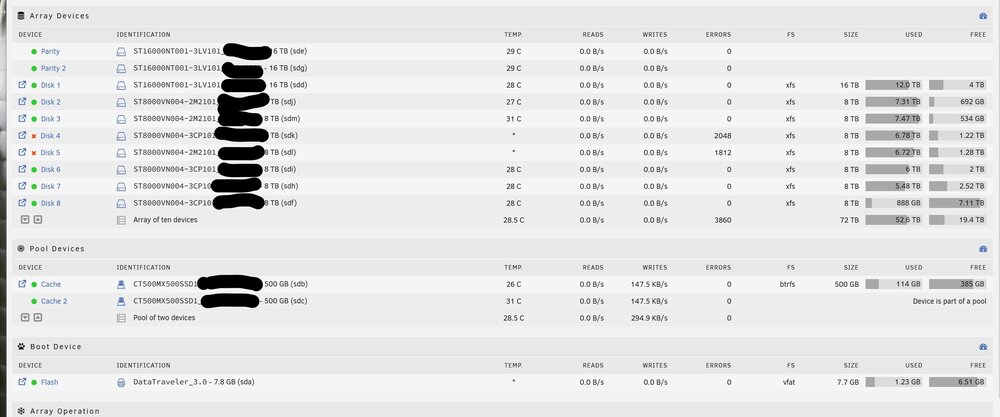
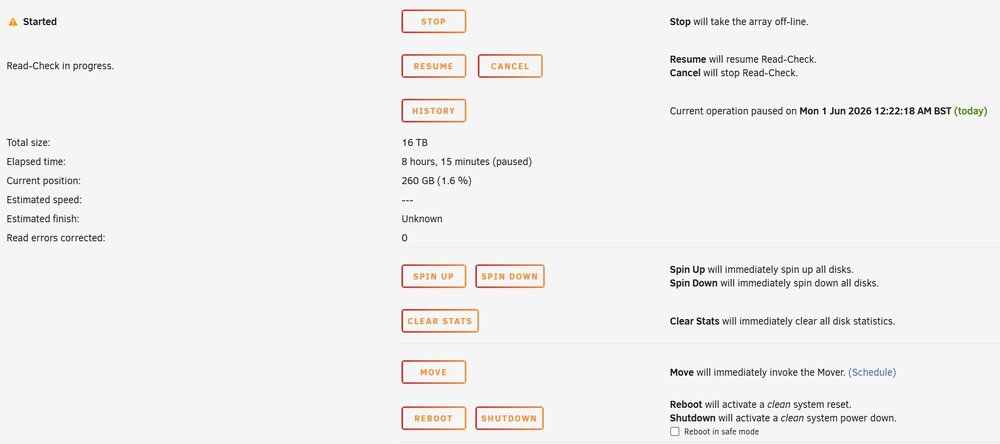
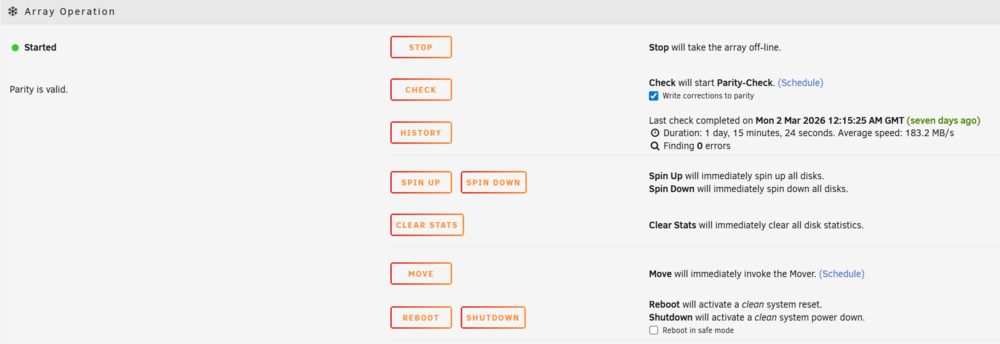
So do i have two bad drives of is somthing eles going on. Diagnostics attachned. I did have a different disk with a read error the other month. carbonblack-diagnostics-20260601-0808.zip
-
Sorry
-
I had one read error a few weeks ago on disk 3. Passed short and long self-tests. See the attached diagnostics. Is there a problem? carbonblack-diagnostics-20260309-1932.zipThis site help me lot when looking for a GPU for plex transcoding. https://www.elpamsoft.com/?p=Plex-Hardware-Transcoding I eneded up with a NVIDIA Quadro M2000 it dose what i need and its cheap, only uses slot power and singel slot.Thank you for the quick simple reply. Im going to do them one at a time no point in risking the data.So im replacing both parity drives and one data drive with bigger drives to get some more space. All the current drives a good today and working. What is the correct why to do this I was thinking replace parity drive one and replace parity drive two then my oldest data drive. I can see a process replacing a data drive https://docs.unraid.net/legacy/FAQ/replacing-a-data-drive/ I don’t see a process replacing a parity driveI must be missing something why would I what to add one 16TB drive. My 2 parity drive are 8TB so im not able to add the 16TB as data. So it would be a parity drive giving mixed size parity drives (That I think world work?) and give me one old parity drive to move to data. So this is like a middle ground its chapter today then doing both parity drives but at some time I would still need to buy 2 16TB drives in a year or two to upgrade the one 8TB parity drive and one 8TB data. I would maybe save a small bit doing this way.So I currently have 9 8TB drive 2 parity and 7 data. And 2 SSD for cash. Im on a plus license so can only add one more drive on that license. My oldest drives are from Dac 2021. What do I do I cannot make my mind up. The cheapest thing to do would be to add a new 8 TB drive that will keep me going for a year or two. Then I would need to upgrade pro license and to add any more drives. I could get 2 16TB drive and replaces parity drives. And move one of the old parity drives as data drive that would give me 8TB of new data space. When as I need more space I swap out the old 8TB for new 16TB drive. I have space in the case for 7 more 3.5 inch drives and I have a 16 part HBA. What stopping me for just being cheap and add more and more drives its more points of failure more power and more heat. What should i do.I did start a similer thread the other week but i have narrowed down problem to just my st8000vn004-2m2101 drives So upgrated to 6.12.13 ther other week (its been 2 maybe 3 years seen i updated) and 5 of 9 array drive will not spin down clicking the spin down button doesn't work and i have the drive set to spin down arfter 45 mints. I have two types of speeing drives st8000vn004-2m2101 These will not spin down ST8000VN004-3CP101 Work find I am running running two different ASM1166 controllers but i dont think that is the problme as some of the 2m2101 drives are on both controllers. Restarting the system did fix it for about a week but this problme is back. I have not made any change to the system so not shore where to start. Im thinking of picking up a SAS 3 HBA as i know the SAS 2 some have problmes with the Seagate IronWolf st8000vn004 drives. Any idea the diagnostic is attached. Edit May 2025 So the problme is related to me using spin up i did pick up a LSI 9400-16i but i got the same problme if i use spin up. If i dont use spin up everything works as intended. carbonblack-diagnostics-20241207-1923.zip


