





wambo
Members
-
Joined
-
Last visited
Everything posted by wambo
-
Well that didn't particularly work. Disabled Docker and VM in the settings, the mover moved through, but I still have appdata on disk2 (and appstorage on disk3 but I think that is set to yes not prefer) I'll run the mover without the sheduler plugin filters now, to see whether that was the issue... My syslog just disappeared and now I only have entries of the past 4 minutes... I'm majorly confused... only thing I did was update docker /plugins, disable docker / vm and then run the mover o_O
-
I think I noticed that, I dont know how I can change that though. Those shares are set to "prefer" one of the caches, and the mover shouldve run a few times already. Should I disable all Docker/VMs and run the mover again maybe?
-
Just a few (2 or 3) weeks ago (when I added an SSD). It has dust filters on front and bottom, which I clean regularly - So I'm quite certain this is not the issue. Sadly the front panel is not really removable (front panel connectors are wired up, as is the fan control at the bottom)... not even the door is built to be removed I have (an unused) DVD Drive in one of the 5-1/4" and the other one is still "blocked" by the piece of metal that can be "broken out". I guess I can flip the bottom fan, but I think I'm gonna try to somehow have the back fans a bit lower (low setting of case control) and the front fans at around 7V (or as high as I get them from BIOS/ hardware controller, without them sounding too loud.) I'll have ot look into the BIOS, but maybe I can connect the front ones to the MB headers and set them to like 80% Or I'll go with some additional hardware like this: Sth like this could do the trick... https://www.ebay.de/itm/171764551926 Or this with some extensions needed... https://www.ebay.de/itm/403571993139 I'm willing to spend a bit more money than this if someone has like a brand model working
-
The picture above is just a similar setup. But I can assure that the all fans are directed front to back. I did not find time to open the case (its in a bit of a hard to access place XD but it can get enough air). I switched the fan control to full power tonight and started a backup job (which crashed after some 4hrs...) but I got 0 warnings today... So another option might be add some active fan control. I'll try redirecting fans a bit during the weekend. But after that right now what I'd prefer is 5,25" drive bay converter, or fan control... Edit: I was wondering which voltage the low setting on the case's fan control puts onto the fans (In theory it could be 3.3, 5, 7, 8.7 - leaving out 12V because that is probably the max and 1.7V cause its probably not enough to get all fans spinning). So maybe it would already be enough if I find a way to actually get all fans onto the 7-8.7 V range? Would need additional cables but I feel it could be the "cleanest" option still... Sth like this could do the trick... https://www.ebay.de/itm/171764551926 Or this with some extensions needed... https://www.ebay.de/itm/403571993139 I'm willing to spend a bit more money than this if someone has like a brand model working
-
That is a good thought, one fan is sitting exactly in front of the (stack of ) drives, but one if also quite on top of it, I could try to redirect that one more. I added a bottom fan to provide air to the other components (not my picture/machine, but it showcases the problem). Lower bay is completely filled with 3,5" drives, upper bay with SSDs 2,5" is quite empty.... So I'd try to shroud the upper front fan to the bottom as well... it would cause turbulence though I guess, its quite steep. I also thought about moving disks up to the 5,25" bays with some kind of adapter... But before I open it up again, I wanna see whether they're unusually active XD
-
Thank you. I felt they wouldnt be of much help since I'm not looking for an error, but for "activity"... but then again, I'm just another Jon Snow nas-mhmx-diagnostics-20220518-2149.zip
-
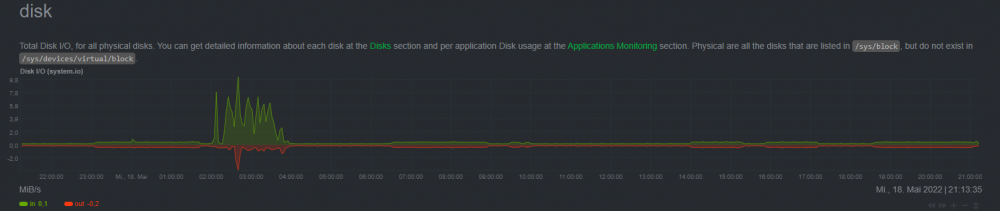
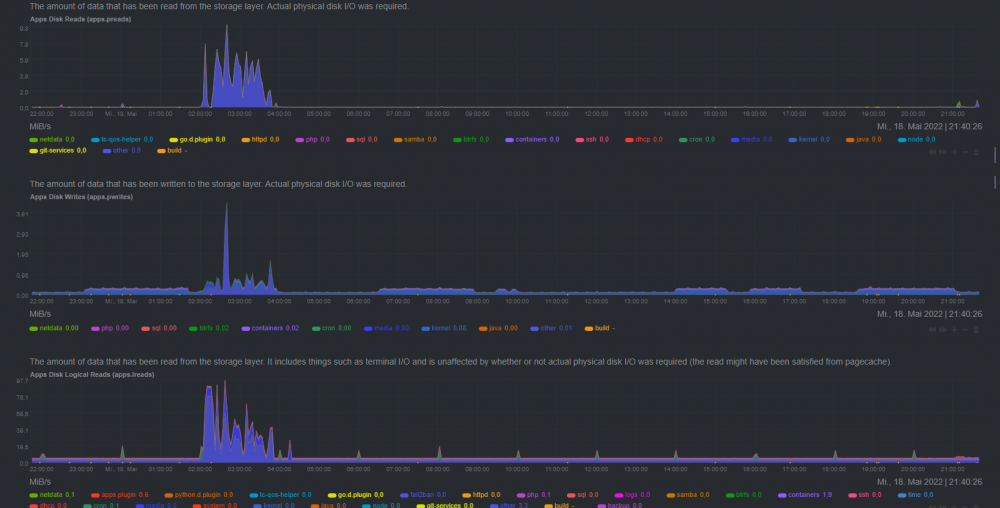
Hello there, I get warnings about my hdds going hot (regularly over 50° I think I saw 57°C a few times, even 59°C). I have added fans to each mounting point (so I'm now running 4 (2 front intake, one bottom intake 1 back out) - they're on *low setting* (Case has a manual fan control, but I really can't sleep with all fans on 12V, and I could not find out which voltage low means, but probably 5V) These are the parts (missing 2 fans, I think arctic f12/f14, or preinstalled): https://geizhals.de/?cat=WL-2202699 I can see a 5,25 fan control as a possibility, but before I try more for hardware, I wanna see whether I can reduce the source of the heat. I'm mostly wondering why the disks run hot, when I'm not actually using the machine. What is keeping the disks from spinning down? I'd like to look into that and find out. - Mover is set to every 2 hrs (my 120GB cache was running full fast, but now I added a 1TB SSD, I can probably go higher) - but since I have no downloads or stuff active, that shouldnt result in a lot of movement? (scheduler plugin btw.) - BackUp jobs are running manually mostly... (My desktop was a few days ago and my laptops shouldnt have backupped off the grid...) - No Downloads / Conversions / ... running.... Netdata is showing me when the disks are in use. There is a lot of activity between 2-3 (not exactly sure what that is), and some activity from ~6:30-9 and 14-15:30, 16-17:15 and 19-21 (that last could be me looking into things) Disk by application is resulting in "others" on read with physical IO Write also has some "media" but still more "others" with pyhsical IO I'm guessing others is mostly docker containers ? How can I check which one of them is causing writes? Can I check better which share? is keeping which disk active? Where else should I look ?
-
When I try to update / install a docker / community app (with docker), the (install/ipdate) process starts normally, but before finishing I get a lot of (thousands) of lines that either come from inside the container, or belong to the docker plugin maybe. Update or install fails, and the image is left orphaned. For the update I have glimpsed the downloading and extracting of layers, and somewhere around the removal of the old image the mayhem starts. Here I tried to install netdata again: root@localhost:# /usr/local/emhttp/plugins/dynamix.docker.manager/scripts/docker run -d --name='netdata' --net='host' -e TZ="Europe/Berlin" -e HOST_OS="Unraid" -e 'PGID'='281' -e 'DO_NOT_TRACK'='0' -v '/proc':'/host/proc':'ro' -v '/sys':'/host/sys':'ro' -v '/var/run/docker.sock':'/var/run/docker.sock':'ro' --cap-add SYS_PTRACE --security-opt apparmor=unconfined --log-opt max-size=200m --log-opt max-file=1 'netdata/netdata' Please wait function symbol table not sorted by program counter: 0x97d9bf0 github.com/docker/cli/vendor/k8s.io/api/policy/v1beta1.(*RunAsUserStrategyOptions).Size > 0x17d9d20 github.com/docker/cli/vendor/k8s.io/api/policy/v1beta1.(*RuntimeClassStrategyOptions).Size 0x401000 internal/cpu.Initialize 0x401050 internal/cpu.processOptions 0x401720 internal/cpu.indexByte 0x401760 internal/cpu.doinit 0x401b50 internal/cpu.cpuid 0x401b70 internal/cpu.xgetbv 0x401b90 type..hash.internal/cpu.CacheLinePad 0x401ba0 type..eq.internal/cpu.CacheLinePad 0x401bb0 type..hash.internal/cpu.arm64 0x401c10 type..eq.internal/cpu.arm64 0x401c70 type..hash.internal/cpu.option 0x401cf0 type..eq.internal/cpu.option 0x401da0 type..hash.internal/cpu.s390x 0x401e00 type..eq.internal/cpu.s390x 0x401e60 type..hash.internal/cpu.x86 0x401ec0 type..eq.internal/cpu.x86 0x401f20 type..hash.[15]internal/cpu.option 0x401f90 type..eq.[15]internal/cpu.option 0x402020 runtime/internal/atomic.Cas64 And this goes on for loong, whenever I try to scroll or do something a few more lines appear (might not be related). here I tried to install openspeed docker: Pulling image: openspeedtest/latest:latest IMAGE ID [38125275]: Pulling from openspeedtest/latest. IMAGE ID [97518928ae5f]: Pulling fs layer. Downloading 100% of 3 MB. Verifying Checksum. Download complete. Extracting. Pull complete. IMAGE ID [d61383a18cbc]: Pulling fs layer. Downloading 100% of 7 MB. Verifying Checksum. Download complete. Extracting. Pull complete. IMAGE ID [691cc14c5437]: Pulling fs layer. Downloading 100% of 3 KB. Verifying Checksum. Download complete. Extracting. Pull complete. IMAGE ID [052722e881c1]: Pulling fs layer. Downloading 100% of 602 B. Verifying Checksum. Download complete. Extracting. Pull complete. IMAGE ID [15b060c51243]: Pulling fs layer. Downloading 100% of 899 B. Verifying Checksum. Download complete. Extracting. Pull complete. IMAGE ID [913152e2c694]: Pulling fs layer. Downloading 100% of 672 B. Verifying Checksum. Download complete. Extracting. Pull complete. IMAGE ID [ec9c71cb0523]: Pulling fs layer. Downloading 100% of 1 KB. Download complete. Extracting. Pull complete. IMAGE ID [ec7fd5495fa5]: Pulling fs layer. Downloading 100% of 2 KB. Download complete. Extracting. Pull complete. IMAGE ID [ee6d65285712]: Pulling fs layer. Downloading 100% of 171 B. Verifying Checksum. Download complete. Extracting. Pull complete. IMAGE ID [fbc4881aa6ff]: Pulling fs layer. Downloading 100% of 940 B. Download complete. Extracting. Pull complete. IMAGE ID [4249cca95423]: Pulling fs layer. Downloading 100% of 30 MB. Verifying Checksum. Download complete. Extracting. Pull complete. IMAGE ID [6f6cff834a66]: Pulling fs layer. Downloading 100% of 981 B. Download complete. Extracting. Pull complete. IMAGE ID [64a00ea1bd70]: Pulling fs layer. Downloading 100% of 1 KB. Verifying Checksum. Download complete. Extracting. Pull complete. IMAGE ID [b4c8880d3885]: Pulling fs layer. Downloading 100% of 30 MB. Verifying Checksum. Download complete. Extracting. Pull complete. IMAGE ID [c6078adf07fd]: Pulling fs layer. Downloading 100% of 45 KB. Download complete. Extracting. Pull complete. IMAGE ID [10466dfde476]: Pulling fs layer. Downloading 100% of 120 KB. Download complete. Extracting. Pull complete. Status: Downloaded newer image for openspeedtest/latest:latest TOTAL DATA PULLED: 70 MB Command: root@localhost:# /usr/local/emhttp/plugins/dynamix.docker.manager/scripts/docker run -d --name='OpenSpeedTest-Server-For-LAN-WiFI-HTML5-Network-Speed-Test' --net='bridge' -e TZ="Europe/Berlin" -e HOST_OS="Unraid" 'openspeedtest/latest' Please wait function symbol table not sorted by program counter: 0x97d9bf0 github.com/docker/cli/vendor/k8s.io/api/policy/v1beta1.(*RunAsUserStrategyOptions).Size > 0x17d9d20 github.com/docker/cli/vendor/k8s.io/api/policy/v1beta1.(*RuntimeClassStrategyOptions).Size 0x401000 internal/cpu.Initialize 0x401050 internal/cpu.processOptions Only things I've really done is: - shutdown the machine (I heard it at night and thought a fan mightve started to scrape or sth, so I logged in, shut down the array and then shut off the machine), should not effect it ? - Updated the Plugins (this week when they came up) <-- my suspicion? - Enabled VMs and created a Windows VM, but even with VMs switched off the behaviour does not stop Additional thing I've noticed is that I cannot access my containers via VNC anymore (they dont seem to map to a port on host), but that could also be unrelated... Edit: Just noticed this part of the support guideline" If you're using ANY plugins on your system, please reboot in Safe Mode and see if the issue you're having still exists. If so, post a report, but if not, try adding plugins back one by one until the issue occurs again. Then report the issue in the relevant plugin thread." Gonna go do that now. -> In Safe mode I obviously couldnt install Apps from Community Apps, but I could update without issue. Gonna reboot into "normal mode" and try again. -> In "nonsafe" mode its running fine again, I haven't activated VMs yet, gonna try that tomorrow
-
It looks like some entries in the unraid template are not properly processed I did a fresh (after removal) install of the mariadb container, and named the database nextcloud (cause thats the first I wanted to use there) When I checked the container with adminer, there was no database "nextcloud", just one USER_DB_NAME, I suppose the appdata folder that is used in the removed install, just gets reused and not overwritten. I don't think that is expected behaviour? I also think there's more problems... the users I create aren't found by the nextcloud container...
-
Hi there, I am administrating my and my parents local networks (different cities), and have setup backups for the laptops / desktops on each end on a NAS (unraid here, synology there), that are synced over VPN so we have an off-site backup. Atm I am using veeam on my parents computers and on my end I had EaseUs Todo Backup running already. Both support incremental or differential backups, which is obviously great, cause after each backup, I just have to sync (rsync / Luckybackup) these new files. The problem starts when I make new Full Backups, or create new Full Backups from the last Differential or the Incrementals. Rsync obviously cannot understand how this file is made, so its a new giant file, that needs a long time (days... weeks) to be synced again. Is there an elegant solution to this? Maybe the Veeam B&R Suite allows for synced "melding" of backups on each side?
-
OK! I think I misunderstood the previous comment about rsync deamon. It does everything I want it to then Thanks a lot for your patient answers
-
With the password file it does work! (Assigning the module name as destination) I looked through the rsync manual for a few more options: Is there any other way I can limit the bandwith ? (In this case I can limit up and down for rsync on the synology)
-
I managed to run an rsync command from unraid host onto a module ( with the :: ) with the rsync user and password. (So a different password but same username as "normal" user / the user I use for ssh... *security feature* -.-) But I thought that wouldnt be an option, cause LuckyBackup doesnt have the password field (accessible) ? Also can LuckyBackup handle the module thingies, what I got, that is talking to the rsync deamon (might need other options / commands? not sure tbh)
-
I've done some digging, and managed to run a rsync command for the daemon on the diskstation. This documentation states that "If you perform rsync backup from a non-Synology NAS client, you have to create rsync accounts on the destination Synology NAS so that the rsync users can back up data to your Synology NAS."; "DSM users for encrypted rsync, or rsync accounts for unencrypted rsync" - but I can't really assign a publickey to the rsync accounts. So yeah, I might be stuck with smb. That also means no compression? (And other features?) I asked in the synology forums, how others handle it.
-
I think I didn't get the 22 connection refused again. Will try on another port again --> yeah, I'm on "permission denied" always now (when I type the right port, mustve hit 22 for testing and postet the wrong error, although I think the other 2 lines never changed)😕 Sadly my diskstation doesnt support containers (by default), and to hack docker for ARM on it, I'd like to evade. I've seen other ppl with issues on DSM 7 and rsync. Maybe Synology will tweak that a bit more. Will also post in their forums. I really wanted to run all my "mirroring" from one central point, but I might have to set it up on the other side... or stay with smb mount. 😕
-
The destination is working (used that keypair before). I even just testet as "luckybackup" user from the docker terminal and I could get in with the key and port specified. (its not root, synology admin group though, because synology limits ssh to admin users, but I restricted access via visudo and DSM) Its definitely not mistrust, I just already "had it in place" on the destination before I found that there were keys in luckybackup, and I have disabled password login for that user already, so it was easier to move the private key into the container for me. Its just how I organize myself, I have like 1 key pair for work related things, 1 for private network things. I ran into some issues with having too many private keys.. but I guess many authorized_keys wouldnt turn into an issue... Restarted the container (after quitting the GUI to save) - same thing. When I dont do a dry run I can find logs, but its no new information. I tried removing my custom commands (bwlimit and append)... Gonna try with one of the container-made keys now .... Edit: I just switched the SSH port on destination to default (22), switched it in luckybackup, restarted, same result. I can still open the docker console, 'su luckybackup' and 'ssh -i <keyfile> user@host' and that works. So it must be something about "grabbing the selected identityFile / private key". Maybe a permissions thing (but why can I use it after 'su luckybackup' then?) I created the ssh user config, and by now the command 'ssh <user>@<host>' works without any additional options, but executing it via luckybackup gets me a "permission denied, please try again" (the first line is varying it seems) I also manually copied the command that luckybackup gives to verify and typed it into the console, but I do receive the same error. Edit2: Okay, so I've tried to rsync from Unraid root manually, and i get the same error, I believe its a problem on the destination, I thought ssh access would be enough if I dont use modules - although I did activate rsync tried every access related to it that i could find mention of 😕 Damn synology... what are they doing?
-
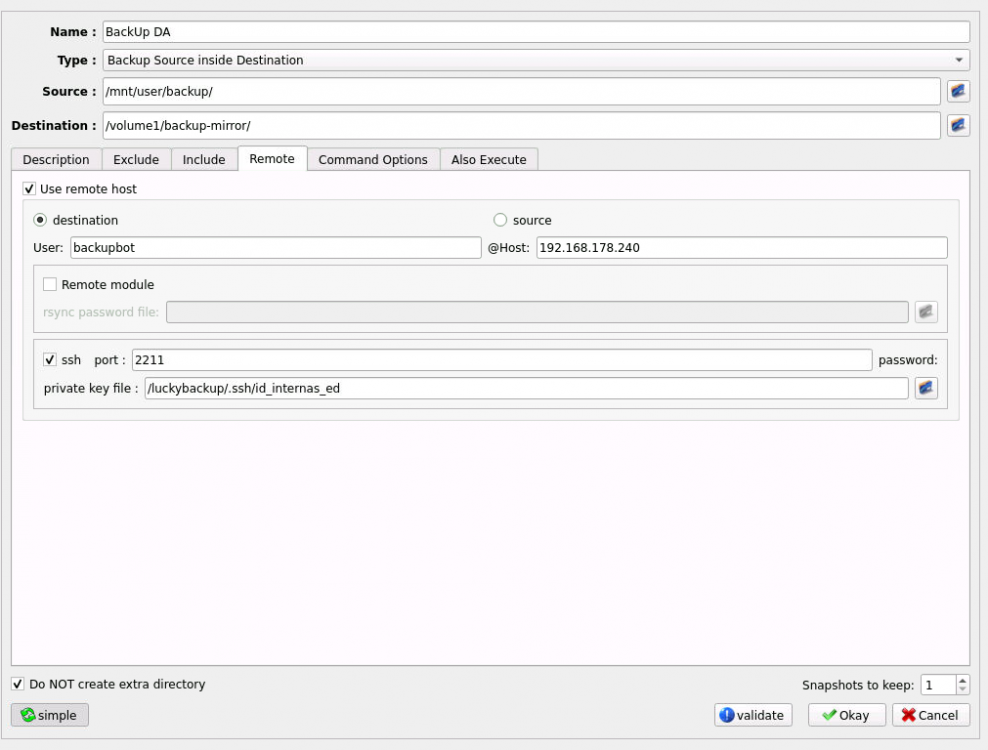
Not root. But now I think I'm understanding. I wouldve sworn I tried the -a but of course, I must've mistyped or sth 😕 A bit embarrassing. Its probably not necessary, but I tend to run a .ssh/config where I point specific Hosts or Users to corresponding key files. I wanted to try this, since I couldn't point the GUI to the root's key (which I don't need to, as I understood now) I should be able to just assign a different private key in the GUI then, because I already placed the public key on the destination. But even though I'm not getting the fingerprint window anymore, I still do get the error: I can use the command: ssh -v -p 2211 -i '~/.ssh/id_internas_ed [email protected]' from host and it works So I dont know where the error lies 😕

-
Hi there, I've managed to get LuckyBackup going with my destination mounted as smb share with UD via VPN. I wanted to skip the mounting, and use rsync via ssh on destination, but I've run into some issues: I copied a (ed25519) key I made for this connection into the appdata of luckybackup, so I could select it there. (The public one got to the destination via ssh-copy-id) But something seems to be going wrong when I start a dry-run. I get asked to verify the fingerprint (the message says yes/no/[fingerprint]) I choose OK (or cancel, doesnt matter)- and it fails. It also asks me every time for the fingerprint. Host key verification failed. rsync connection unexpectedly closed (0 bytes by receiver [...]) rsync error: unexplained error (code 255) at io.c(288) I went into the terminal, and ssh'd into the destination and verified the fingerprint there, but the GUI still asks me. I tried to follow this guide: https://unraid.net/blog/unraid-server-backups-with-luckybackup But in that terminal, I run into some things that confuse me: - ls /root doesnt show the .ssh directory, I can cd into it, but it again doesnt list the files - similar thing with ls /luckybackup - its empty In the guide, they chose the private key from /root/.ssh in the GUI, but the GUI doesnt show anything in /root/, not the files I cannot list in the terminal, nor the files I can list in the terminal (cause I grabbed them via scp from the host) I'm also trying to create a config file in the .ssh, but I'm really confused where it needs to go 😕
-
I saw the changelog today but I can't see any difference. Also tried the tabbed view, but there I just cannot access the blue help text at all. (Even if I open the one from previous tab) Maybe I have another plugin interfering?
-
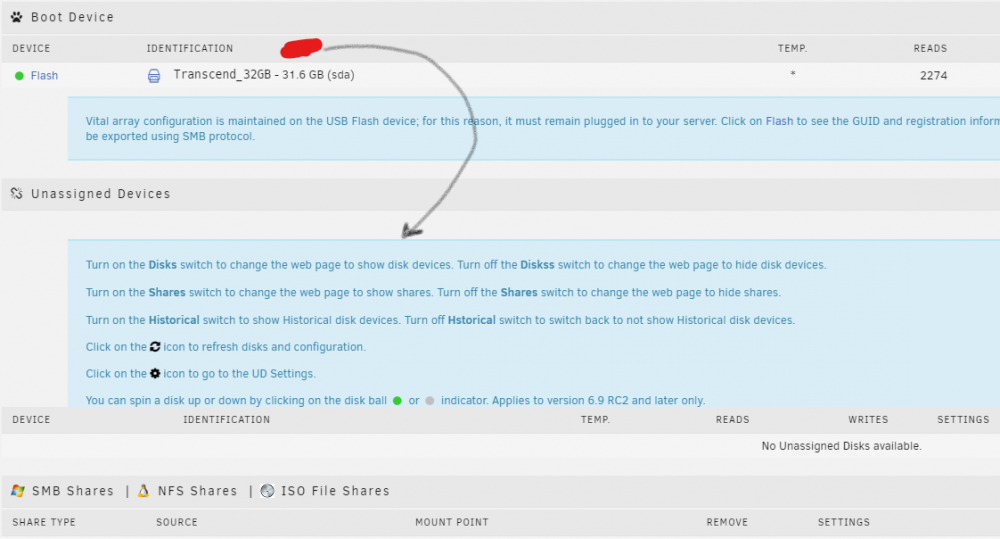
I think I found out why I did not find it earlier: The help for UD / SMB / Shares and such opens from the Click on Boot Device I'm not sure whether the entry Boot device was present before I installed UD (I guess it was), but its a bit counter intuitive to check there. (Click red to open both blue (and the following blue as well, not on screenshot)
-
I really dont understand myself sometimes. I just found that big blue section that literally explains what I wanted to know... I was unsure about the alias disk name (google really didnt bring something fitting in the first hits)... but in the blue box it just uses the SOURCE which I can look up.
-
Can I check somewhere what exact command the Plugin runs when I click mount? In a specific log file maybe (aber I clicked it) I have a share I dont want to keep mounted, because it might keep the USB HDD spinning all the time (the Host is no real server), so I want to add the mount command to the (LuckyBackup) sheduled task (and unmount after) - if possible.
-
Edit: sry I dont know where the message went. I think I was saying that this would stop the current running job, but then again it had already stopped when I (or the other site) had the 24hr reconnect. Is there any tweaking that could be added to the command that would make it retry and continue after a few minutes?
-
I kind of hate that I can't search through this thread, someone probably asked this already. I'm planning to mirror the local Backups (Veeam mostly) for my family off-site (backUps from location A to B and vice versa) but I didnt want to script myself, and I found LuckyBackup. Site A is Unraid Site B is a Synology NAS, connected via VPN. Possibly gonna add a third location where only an ext. USB Drive on a Router that provides it as samba share exists. (Might enable the router to handle rsync at some point though). Is there any way to limit the bandwith LuckyBackUp is using while doing its job? I know rsync can do it, but I couldnt find an option in LuckyBackup. Alternatively is there a clever way to split the job up in junks so it can run for a few hours each night and complete the full job during the week? Edit: Under Advanced -> Command Options -> User defined (Need to doubleclick to open) I could add --bwlimit=850 (KByte/s ~ 60% of 11 MBit/s available there) Another question: I hit "minimize to tray" in noVNC... and now I can't get it back XD what do I do?
-
I'm planning to sync my local backups via rsync over ssh between 2 servers (1 unraid, 1 synology) - the UnRAID install is quite fresh, so it shouldnt be a plugin update issue. If I got it correctly, this plugin should allow me to set up additional users (apart from root) with SSH access. I can find the Settings - SSH subtab, but that doesnt seem to actually allow any user specific changes (even though I can select 1 or multiple users) The standard Users page did not change at all though, and I cannot access the server via any other user than root. If the ssh options only apply to Users created AFTER the plugin is installed this should be mentioned. But I also cannot login with a user created after the plugin installation, so what I see is, the UnRAID Users page does not do anything for the ssh access? (btw) The manual mentions how to create a user via cmdline, and that is needs an appropriate UID, but it doesn't mention how to assign the UID upon creation or change it afterwards: # usermod -u <UID> <username> Further down (create key pair section) its described again: So I stopped the service on SSH page, and then selected 2 users and hit apply (the selected options should fit, allow root, password enabled, and so on) But I still cannot use those users for ssh access.... What am I missing?




