SP67
Members
-
Joined
-
Last visited
-
Thanks JorgeB. All has been stable for the last week.
-
Ok, I've re-created the VM with the same qcow file and it's again working fine!
-
Hello again, One of my VM won’t start. Here’s the xml file. The only thing I did was to change the network type to virtIO-net as I said… Thanks! <?xml version='1.0' encoding='UTF-8'?> <domain type='kvm'> <name>Home Assistant</name> <uuid>950bf7bc-b0ee-0fde-2ca3-22f921ce8069</uuid> <description>VM for Home Assistant</description> <metadata> <vmtemplate xmlns="unraid" name="Linux" icon="default.png" os="linux"/> </metadata> <memory unit='KiB'>2097152</memory> <currentMemory unit='KiB'>2097152</currentMemory> <memoryBacking> <nosharepages/> </memoryBacking> <vcpu placement='static'>2</vcpu> <cputune> <vcpupin vcpu='0' cpuset='0'/> <vcpupin vcpu='1' cpuset='2'/> </cputune> <os> <type arch='x86_64' machine='pc-q35-6.2'>hvm</type> <loader readonly='yes' type='pflash'>/usr/share/qemu/ovmf-x64/OVMF_CODE-pure-efi.fd</loader> <nvram>/etc/libvirt/qemu/nvram/950bf7bc-b0ee-0fde-2ca3-22f921ce8069_VARS-pure-efi.fd</nvram> </os> <features> <acpi/> <apic/> </features> <cpu mode='host-passthrough' check='none' migratable='on'> <topology sockets='1' dies='1' cores='1' threads='2'/> <cache mode='passthrough'/> </cpu> <clock offset='utc'> <timer name='rtc' tickpolicy='catchup'/> <timer name='pit' tickpolicy='delay'/> <timer name='hpet' present='no'/> </clock> <on_poweroff>destroy</on_poweroff> <on_reboot>restart</on_reboot> <on_crash>restart</on_crash> <devices> <emulator>/usr/local/sbin/qemu</emulator> <disk type='file' device='disk'> <driver name='qemu' type='qcow2' cache='writeback'/> <source file='/mnt/user/domains/home_assistant/haos_ova-9.0.qcow2'/> <target dev='hdc' bus='virtio'/> <boot order='1'/> <address type='pci' domain='0x0000' bus='0x04' slot='0x00' function='0x0'/> </disk> <controller type='pci' index='0' model='pcie-root'/> <controller type='pci' index='1' model='pcie-root-port'> <model name='pcie-root-port'/> <target chassis='1' port='0x8'/> <address type='pci' domain='0x0000' bus='0x00' slot='0x01' function='0x0' multifunction='on'/> </controller> <controller type='pci' index='2' model='pcie-root-port'> <model name='pcie-root-port'/> <target chassis='2' port='0x9'/> <address type='pci' domain='0x0000' bus='0x00' slot='0x01' function='0x1'/> </controller> <controller type='pci' index='3' model='pcie-root-port'> <model name='pcie-root-port'/> <target chassis='3' port='0xa'/> <address type='pci' domain='0x0000' bus='0x00' slot='0x01' function='0x2'/> </controller> <controller type='pci' index='4' model='pcie-root-port'> <model name='pcie-root-port'/> <target chassis='4' port='0x13'/> <address type='pci' domain='0x0000' bus='0x00' slot='0x02' function='0x3'/> </controller> <controller type='virtio-serial' index='0'> <address type='pci' domain='0x0000' bus='0x02' slot='0x00' function='0x0'/> </controller> <controller type='sata' index='0'> <address type='pci' domain='0x0000' bus='0x00' slot='0x1f' function='0x2'/> </controller> <controller type='usb' index='0' model='ich9-ehci1'> <address type='pci' domain='0x0000' bus='0x00' slot='0x07' function='0x7'/> </controller> <controller type='usb' index='0' model='ich9-uhci1'> <master startport='0'/> <address type='pci' domain='0x0000' bus='0x00' slot='0x07' function='0x0' multifunction='on'/> </controller> <controller type='usb' index='0' model='ich9-uhci2'> <master startport='2'/> <address type='pci' domain='0x0000' bus='0x00' slot='0x07' function='0x1'/> </controller> <controller type='usb' index='0' model='ich9-uhci3'> <master startport='4'/> <address type='pci' domain='0x0000' bus='0x00' slot='0x07' function='0x2'/> </controller> <interface type='bridge'> <mac address='52:54:00:d2:23:76'/> <source bridge='br0'/> <model type='virtio-net'/> <address type='pci' domain='0x0000' bus='0x01' slot='0x00' function='0x0'/> </interface> <serial type='pty'> <target type='isa-serial' port='0'> <model name='isa-serial'/> </target> </serial> <console type='pty'> <target type='serial' port='0'/> </console> <channel type='unix'> <target type='virtio' name='org.qemu.guest_agent.0'/> <address type='virtio-serial' controller='0' bus='0' port='1'/> </channel> <input type='tablet' bus='usb'> <address type='usb' bus='0' port='1'/> </input> <input type='mouse' bus='ps2'/> <input type='keyboard' bus='ps2'/> <graphics type='vnc' port='-1' autoport='yes' websocket='-1' listen='0.0.0.0' keymap='es'> <listen type='address' address='0.0.0.0'/> </graphics> <audio id='1' type='none'/> <video> <model type='qxl' ram='65536' vram='65536' vgamem='16384' heads='1' primary='yes'/> <address type='pci' domain='0x0000' bus='0x00' slot='0x1e' function='0x0'/> </video> <hostdev mode='subsystem' type='usb' managed='no'> <source> <vendor id='0x10c4'/> <product id='0xea60'/> </source> <address type='usb' bus='0' port='2'/> </hostdev> <memballoon model='virtio'> <address type='pci' domain='0x0000' bus='0x03' slot='0x00' function='0x0'/> </memballoon> </devices> </domain>
-
Ok, I've just did that. Do I need to do the ethtool -K ethX tso off every time I restart the server? EDIT: I've seen that I can add the command to the go file in /boot/config/go so that I runs automatically at start-up. Regards!
-
Hi again, I have restarted the system again and run the command to accomplish what you said: ethtool -K ethX tso off I've also changed the network type of my Home Assistant VM from VirtIO to VirtIO-Net as I've read it might cause instabilities. I'm currently running the parity check but I'm seeing some warnings in the logs related to ata7.00: Regards,
-
Thanks, I'll try that when I'm back home.
-
Dear forum, Since two days ago, my server has been randomly crashing. When it happens, the only thing I can do is press the physical power button on the case and wait for the graceful shutdown timeout (90 seconds, if I recall correctly) to power off the machine. After restarting, it boots normally but eventually crashes again at unpredictable intervals. I've been on version 6.12.15 since its release, and the server had been perfectly stable for months until this started. During one of the restarts, I saw error messages related to /dev/sda1, so I took the following steps: - Replaced the USB drive with a new one. - Plugged the USB into a different port on the back panel, in case the original motherboard connector was faulty. However, the server crashed again this morning. Any ideas on what to troubleshoot next? I’m inclined to think it’s a hardware fault, but I’m not sure where to begin. I'm attaching the diagnostics file for reference. The server is a 4770K with a Gigabyte UDH3 and 16 GB DDR3 RAM. The power supply is a Be Quiet Pure Power 12 550-650W with max 3 years. No hardware changes at least in the past year. Thanks in advance, nas-diagnostics-20250410-2241.zip
-
Important notice I read on the update notes:
-
Hi there, I’ve been struggling with presumable hardware stability issues. I want to try removing/adding some hardware but everything the system freezes I have to do a hard shutdown, risking data integrity and having to re-check parity. How would you advise me to do the test? I’ve thought about not starting the array but without docker containers and some load I don’t think the system will fail as often. thanks!
-
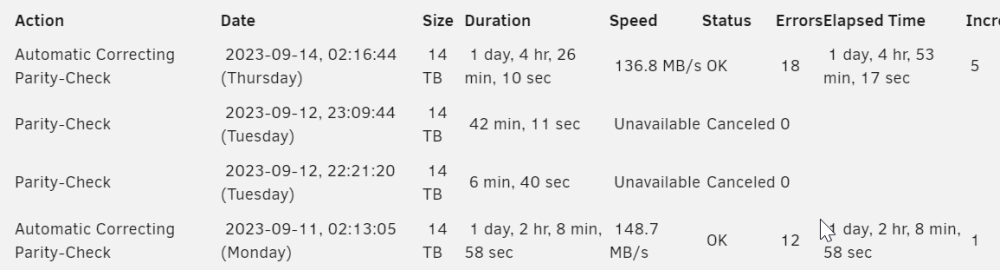
So lets say I want to try some tweaks I've found online (updating the BIOS to a beta version that some people say improves stability, playing with the DRAM voltage and timmings, etc.). What would you guys recommend me so that I don't force my system to go through several parity checks if/when the system crashes?
-
It might be worth to look again then. For reference the board is a Gigabyte Z87-UDH3. I'll write back if I find anything. Thanks! Wow, it does seem like its a really common issue with Gigabyte motherboards and 4 RAM modules when you enable XMP: Fix for gigabyte 4 dimm memory instability | Page 3 | tonymacx86.com Gigabyte Z87 mobos freeze when using 4 healthy sticks of RAM | tonymacx86.com Z87 When will Gigabyte fix the 4 DIMM memory issue? (giga-byte.co.uk)
-
So it does seem that despite the RAM passing MemTest correctly, if I remove 2 sticks and leave the system with 2x8GB instead than 4x8GB everything runs smoothly. Thanks
-
Solved: VM's on br0 cannot access the internet after 6.12.0 - VM Engine (KVM) - Unraid
-
Had the same situation. Really appreciate you took the time to come back and describe how to solve it. Also, crear the cache or use private mode if vnc is still not working after this change.
-
I see. So in this case I guess that the errors are corrected and are generated again when the server crashes.