




Skip to content
View in the app

A better way to browse. Learn more.

Unraid

A full-screen app on your home screen with push notifications, badges and more.

To install this app on iOS and iPadOS
  1. Tap the Share icon in Safari
  2. Scroll the menu and tap Add to Home Screen.
  3. Tap Add in the top-right corner.
To install this app on Android
  1. Tap the 3-dot menu (⋮) in the top-right corner of the browser.
  2. Tap Add to Home screen or Install app.
  3. Confirm by tapping Install.

clu91

Members
  • Joined

  • Last visited

  1. Thank you for these manuals, but i would like to solve the BTRFS error first, because it seems to be the major issue. regards
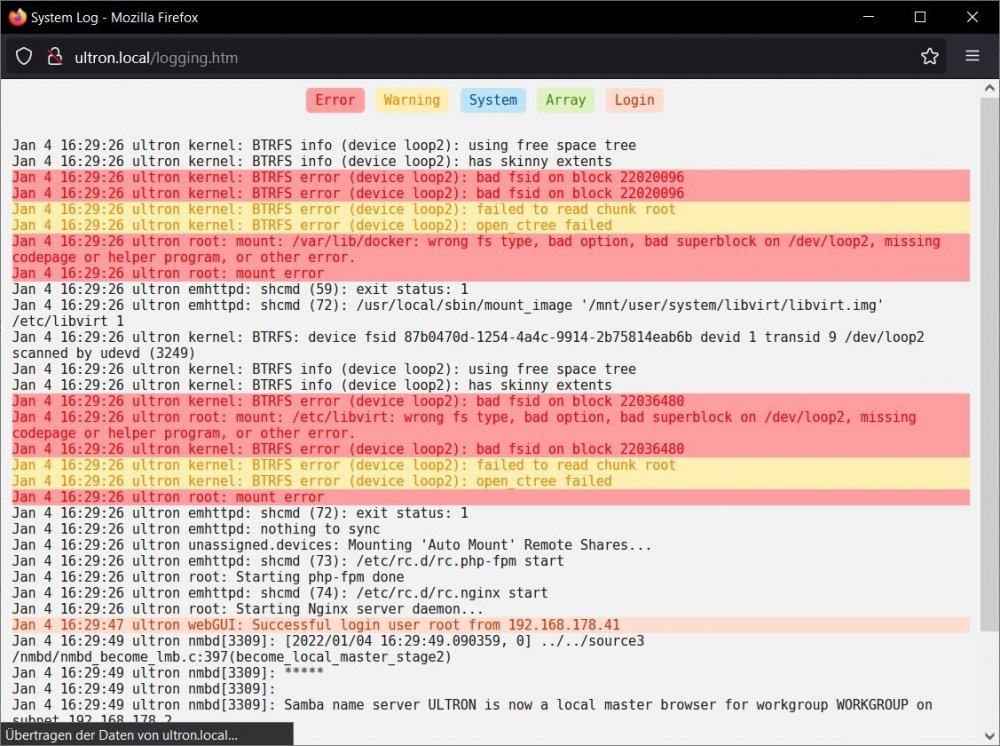
  2. Hello there, im quite new to Unraid and all its features. The server was running for quite some time without any issues. Honestly it doesn't have a lot of tasks at the moment except running a Bitwarden Docker Container on it. Today i realized that the Docker Service and the VM Service are not running anymore. I suppose the error is somewhere deeper, but i cant figure it out. I attached the screenshot of the log and the diagnose files as well. Can anyone help here? 2 hours of google search didn't bring anything to light. regards Patrick ultron-diagnostics-20220104-1633.zip
Account

Navigation

Search

Search

Configure browser push notifications

Chrome (Android)
  1. Tap the lock icon next to the address bar.
  2. Tap Permissions → Notifications.
  3. Adjust your preference.
Chrome (Desktop)
  1. Click the padlock icon in the address bar.
  2. Select Site settings.
  3. Find Notifications and adjust your preference.