





dataslayer
Members
-
Joined
-
Last visited
-
I understand how backups work - but what's the point of the setting "snapshots to keep"? if it keeps all snapshots from the start, then its not doing any roll up, which is what i expected when it says "snapshots to keep". In most backup software, it does a roll up of the oldest snap into the next oldest - thereby still keeping exactly what you tell it to keep.
-
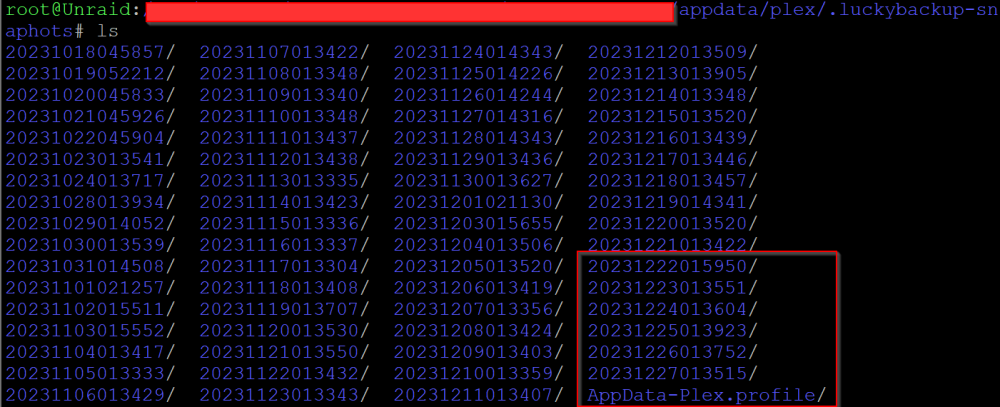
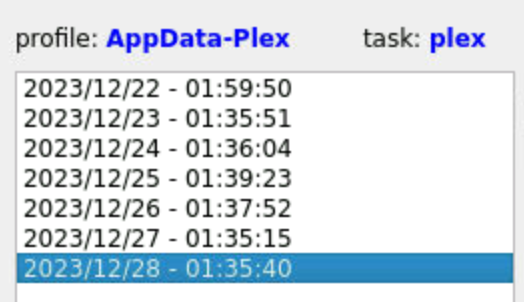
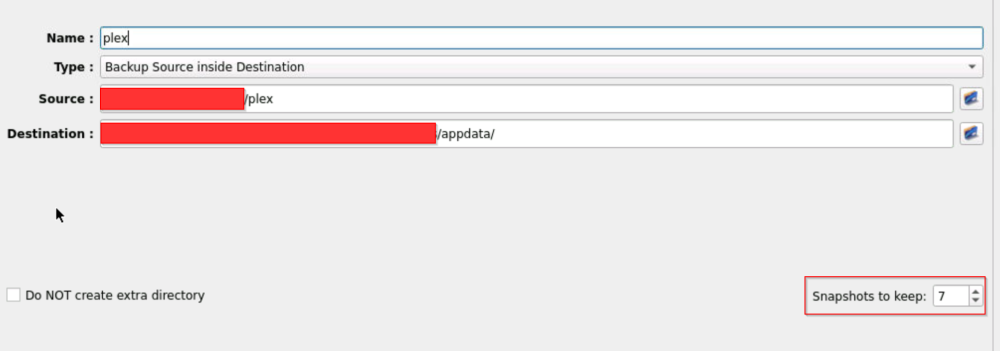
I was recently looking through the backups I have, and on the destination directory, i have a .luckybackup-snaphots directory. First, why is it called snaphots and not shapshots? doesn't matter, more semantics. Second - I have my profiles only keep 7 days worth of entries, but when I look at the .luckybackup-snaphots folder, i see months worth of data. Why isn't the cleanup process being done? Schedule.png shows the current schedule with retention, History.png shows that lucky sees only those 7, but Folder.png shows WAY more than just the 7 highlighted folders.
-
I’m confused - the log said Nov 7 08:00:46 Unraid Parity Check Tuning: Send notification: mover no longer running: (type=normal link=/Settings/Scheduler) “No Longer Running” And then Nov 7 08:00:46 Unraid Parity Check Tuning: Array operation not resumed - outside increment window: Scheduled Non-Correcting Parity-Check (25.3% completed) ”not resumed - outside increment window” that tells me that the mover was not the issue, but the cron was because it saw it was outside the window i specified, but the window was Monday - Friday, 8AM - 11 AM. Anyway, I did try to remove the idea of a cron tab for now and changed the setting to be not custom but daily 8 - 11. Only problem with that is that it might run on the weekends, which his what i don’t want. But this is a start to the test. It did run again this morning and continued properly: Nov 9 08:00:45 Unraid Parity Check Tuning: Send notification: mover no longer running: (type=normal link=/Settings/Scheduler) Nov 9 08:00:50 Unraid kernel: mdcmd (46): check resume Nov 9 08:00:50 Unraid kernel: Nov 9 08:00:50 Unraid kernel: md: recovery thread: check P Q ... Nov 9 08:00:50 Unraid Parity Check Tuning: Resumed: Scheduled Non-Correcting Parity-Check (25.3% completed) so maybe it was the custom cron tab. But it has worked in the past. Was working flawlessly for several months until recently.
-
Well I'll be damned. I hadn't considered that, and after converting, its spot on. Thanks for the help!
-
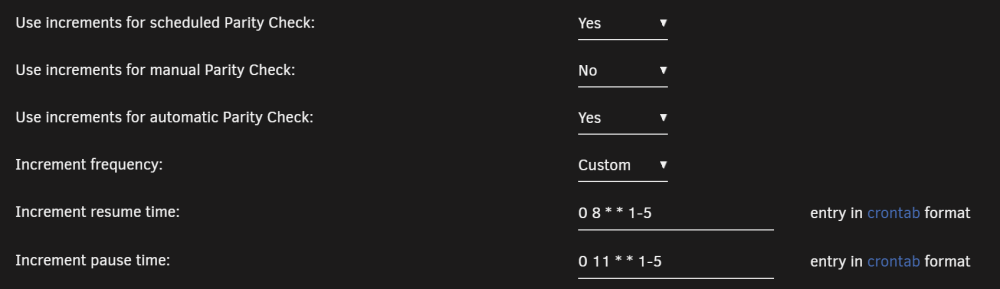
I'm not quite sure when this started, but my incremental parity checks don't continue to run after the first pause. When looking at syslogs, it says: Nov 7 08:00:46 Unraid Parity Check Tuning: Send notification: mover no longer running: (type=normal link=/Settings/Scheduler) Nov 7 08:00:46 Unraid Parity Check Tuning: Array operation not resumed - outside increment window: Scheduled Non-Correcting Parity-Check (25.3% completed) But my custom cron job looks like: It looks like the Parity Check last updated on 10-28. Has something changed within the last release or two to have the crontab not work right?
-
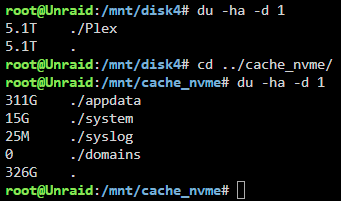
Two of my disks are showing that their usage is over the threshold of for the warning of disk usage. I did a 'du -ha -d 1' command on the /mnt/<disk> in question, and its showing me a total size used that is less than what the GUI is showing. Since DU -h reports in Bytes, and the GUI is showing in Bytes, why is there a difference?


-
That bit was the trick to flush out the configs. I had mistakenly thought that a remove of the app would remove the appdata. Now that I have completely removed it, it now starts up and I can get to the VNC version. I also had a backup from the day I posted this note, which all i cared about was the profiles, logs and snaps so that everything was as it was from the last "good" backup. I think I'm back in business. The key was the appdata folder removal too. Thanks ich777!
-
I did try to uninstall and reinstall. But let me make sure I did it right: I first go to the docker tab and click uninstall. I made sure that the check box was checked to fully remove. After the uninstall, I go back to the Apps tab and install the app again. If those are the right steps and there isn’t any clean up that needs to happen, then I did it correctly. Even after doing that, I’m getting that error.
-
I’m up to date - 6.12.4
-
I recently started seeing this error in LuckyBackup: WebSocket server settings: - Listen on :8080 - Web server. Web root: /usr/share/novnc - No SSL/TLS support (no cert file) - Backgrounding (daemon) No protocol specified qt.qpa.xcb: could not connect to display :0 qt.qpa.plugin: Could not load the Qt platform plugin "xcb" in "" even though it was found. This application failed to start because no Qt platform plugin could be initialized. Reinstalling the application may fix this problem. Available platform plugins are: eglfs, linuxfb, minimal, minimalegl, offscreen, vnc, xcb. /opt/scripts/start-server.sh: line 86: 116 Aborted /usr/bin/luckybackup The GUI doesn't come up but the software still seems to run. What can I do to fix this?
-
I have been using the dynamic fan controller app
-
I’m not sure if this started with 6.11 or 6.11.1, hence the title. I have two issues. My first issue is with my Windows VM. My Windows gaming VM has been acting terribly slow for accessing my shared folder I created for the game files. To the point that the game loads would take minutes and every cutscene would stutter. Before 6.11, I was able to play top tier games without issue. There has been no change to my hardware. I have a Ryzen 7 2700, 64GB RAM, nVidia RTX 2070 passthrough for gaming, a nVidia Quattro for Plex, 2x 4TB parity disks, 6x 4TB + 2x 2TB drives for data, 2 NVME - one for VMs and one for dockers, 4x 1.2TB drives for cache (two for next cloud two for all other cache). The windows VM has 8 cores (4-7 and 12-15), 24GB RAM, i440fx (I had a lower version and just updated it to 7.1) and a few other settings I can confirm if asked. The second issue is that the fan controller has not been working. Before the upgrade to 6.11, I would never get any overheating notice. Now I get them on the regular. I’m going to get more fans to add to better circulation, which should help. But the issue is that the fans themselves are not being controlled by the fan controller app. I did the command line sensor and sensor-detect and it came back with a sensor that has no driver (don’t remember specific name but it’s been documented before). But I could swear that it was all working before the upgrade. furthermore, even without the fan controller app running, the fans should run based on what my bios settings say to do. But they don’t seem to be doing that as right now my fans are running slow right now and the motherboard is 145F and cpu 165F. Those both seem hot for not running any load and the fans not running much. I’ve seen the fans also outright stop moving. The only correlation to both the windows issue and fans is the upgrade. Thoughts?


