NaGaSiS
Members
-
Joined
-
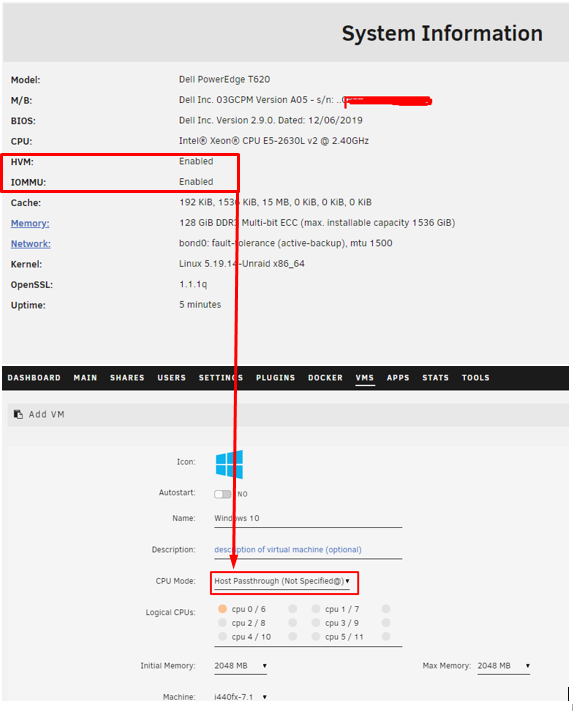
My machine only had one CPU. When installing the second CPU, passthrough info cpu already appears Solved, if you have two CPUs, both must be present or it doesn't work properly
-
This is my docker.log for diagnostics time="2022-10-20T01:22:02+02:00" level=warning msg="containerd config version `1` has been deprecated and will be removed in containerd v2.0, please switch to version `2`, see https://github.com/containerd/containerd/blob/main/docs/PLUGINS.md#version-header" time="2022-10-20T01:22:04.460315762+02:00" level=info msg="loading plugin \"io.containerd.event.v1.publisher\"..." runtime=io.containerd.runc.v2 type=io.containerd.event.v1 time="2022-10-20T01:22:04.460393725+02:00" level=info msg="loading plugin \"io.containerd.internal.v1.shutdown\"..." runtime=io.containerd.runc.v2 type=io.containerd.internal.v1 time="2022-10-20T01:22:04.460411389+02:00" level=info msg="loading plugin \"io.containerd.ttrpc.v1.task\"..." runtime=io.containerd.runc.v2 type=io.containerd.ttrpc.v1 time="2022-10-20T01:22:04.460621329+02:00" level=info msg="starting signal loop" namespace=moby path=/run/docker/containerd/daemon/io.containerd.runtime.v2.task/moby/f6f36d008c635715eda25e8d5021f7888eca111cf1b4040cb53a9cad22f86115 pid=10184 runtime=io.containerd.runc.v2 My unique container is duckdns ¿How to changed containerd config version to v2?
-
Host Passthrough (Not Specified@) The Xeon 2630Lv2 does not detect me, I do not know what the reason is, everything is activated. The server is a Dell PowerEdge T620 with a single cpu unraid-casa-diagnostics-20221014-1651.zip