





HardwareHarry
Members
-
Joined
-
Last visited
-
I dug into this specific problem yesterday and installed the SSD individually in a spare PC, actually burned a CD as it is hard to get the specific Evo Plus firmware ISO working from a USB stick. (works with ventoy starting the iso in memdisk mode if someone wants to experiment with that) It still did not update one of my 970 Evo Plus. Then I found out that There are 2 revisions of the 970 Evo Plus with two different controllers on it. The Firmware update site or the product site does not consider that. (2020 chip shortage issue For me that means my 2nd Evo Plus is a different one with a differernt controller and no firmwareupdate above "2B.." (same version as the EVO (not Plus) on the Samsung website) My other Evo Plus has a different controller and a newer Firmware starting with "4B..." For the one with "2B.." this is not even revognized as compatible drive by the firmware update tool, no matter what you do. Trust this might help others
-
Did you find a solution? I have the exact same SSDs in the exact same configuration and exact same firmware issues with the exact same firmware version for drive 1 and 2
-
Updated my Backup Server from 7.1.4 to 7.2 2 days ago (No docker, no VM) I found no issues Updated my main Server a few minutes ago from 7.0.1 to 7.2 ( 2 VM, several dockers) no issues found so far.
-
Updated my Backup Server from 7.0.1. to 7.1.4 without problems...however my backup server is a very uncomplicated setup. No Dockers, No VM, etc.
-
Hi folks, I can no longer find the Update Assistant. on two Servers. Already removed and reinstalled fix common problems. Did I miss something? Ist that feature deprecated? Or ist it just moved somwhere I no longer find it. P.s.: Yes I searched a lot before I asked that question and read through this thread but I did not find any hint
-
A little bit of everything (no Gaming) but the main points are -NAS -Windows VM -Docker
-
@landS The 32GB Version doing their work in 2 Servers. Only issue I had: It needed manual FAT32 formatting and manuall install with the "make bootable" batch file. Since 2022 no issues at all
-
Downgraded to 6.12.10 again as the networking seems somehow broken
-
Updated from 6.12.10 to 6.12.13. I have a VM with W10 installed Filezilla Server installed and working. IP, Port Forwading, Firewall everything seem OK an most important everything worked find until the upgrade. After the Upgrade even FTP connects from the internal network slowed down close to 10 to 0 kbps. Downgraded to 6.12.10 and everything is working smoothly again with several MB/s nasng-diagnostics-20240827_0017.zip
-
But I'd also assume most from existing customers Exactly my point as this in my opinion is this is the big part of the base which is then no longer buying
-
In my understanding that is not what the sytem is designed for. Just use an old PC and throw in the disks you have. ANd there are not thousands of high end youtuber buying unraid- (most of then are not even high end ) They could also use OMV or Truenas or Proxmox with different systems etc. I don't see that new customer base for unraid. First rule of the fight club sales: Know your customer base
-
I also hope that never happens, but given the structure of the members of this Community (= Customer base structure) I somehow doubt there will be many new users and I somehow doubt many of the current user would actually have choose this system as new users (including myself and a buddy of mine to whom I recommended Unraid (and who has 2 Plus licenses now).) When I was thinking about it some time ago my limit was something about the psychological "199 USD " limit and even that would be hard to swallow for me. But 250USD ....would not be an option for me. For my server and backup server thats 500 USD !!! Even the 2 Pro Licenses I have bought is a lot of money but 500USD for 2 Lifetime. Yes I could do one lifetime one unleashed and updatd the backup only from time to time and so on but would I want to fiddle with something like that? No. Given that I would predict LT will struggle with that model
-
OK under the new System I would not have chosen Unraid as Lifetime would be to much for me as a private person in many cases and I'd rather buy an additional HDD and use e.g. OMV . Any Licenses I would have to update regularely, I just personally don't ike that.....OK user can strech it for some time but this is all a little sketchy. Business users...i somehow doubt there are many for Unraid who don't really care about 250 bucks. Basically I doubt this is a sustainable model,.....however time will tell. My suspicion would be that this leads to the rise of OMV and Truenas and Unraid might beginn to struggle in 2-4 years but who am I to say
-
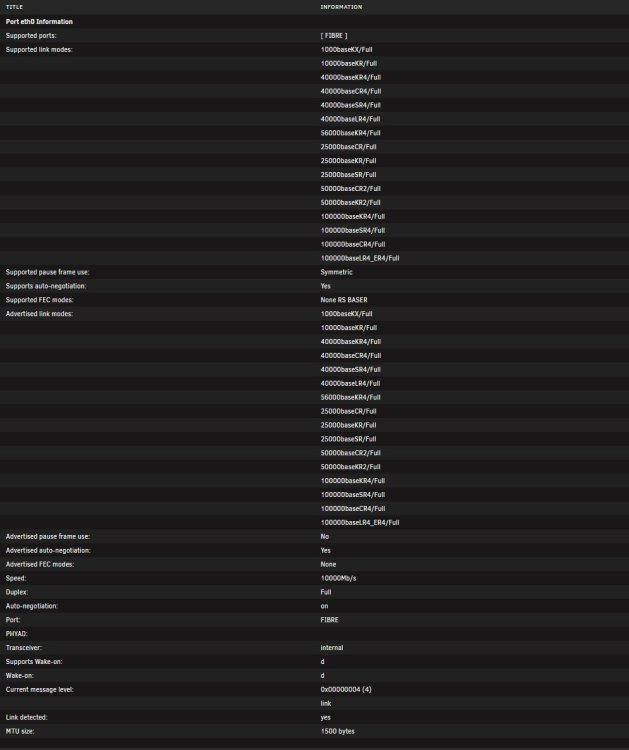
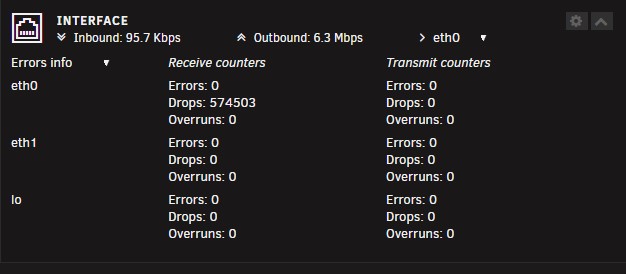
Same problem here. IPVLAN is not an option since I have a Fritzbox. Problem is existing on my Server AND my backup Server Switch is a unmanaged switch Using 10G SR Tranceiver and LC-LC Om5 cable Disable/anable NIC Flow Control does not change anything Out of curiosity I played with rx/tx buffer sizes which also has no effect eth1 is not connected nasng-diagnostics-20240221-1632.zip
-
I have 2 Servers and none of them had that happen. Also just showing the DOT Files does not mean the sever deletes files. Do you have some sort of mirroring backup?


