momsz
Members
-
Joined
-
Last visited
-
Booting in UEFI q35 I enambled 4G Decoding and it not solved the problem so i order rtx 3050 and i sold the rx 5500
-
https://pastebin.com/w2wZz1te i got this
-
ErrorWarningSystemArrayLogin Feb 16 19:24:00 Lelopo-Maxi kernel: FS: 0000151957d98640(0000) GS:ffff88887fc80000(0000) knlGS:0000000000000000 Feb 16 19:24:00 Lelopo-Maxi kernel: CS: 0010 DS: 0000 ES: 0000 CR0: 0000000080050033 Feb 16 19:24:00 Lelopo-Maxi kernel: CR2: ffffc90030c89000 CR3: 00000001981c4002 CR4: 00000000001726e0 Feb 16 19:24:00 Lelopo-Maxi kernel: Call Trace: Feb 16 19:24:00 Lelopo-Maxi kernel: amdgpu_device_fini_sw+0xee/0x25b [amdgpu] Feb 16 19:24:00 Lelopo-Maxi kernel: amdgpu_driver_release_kms+0x12/0x23 [amdgpu] Feb 16 19:24:00 Lelopo-Maxi kernel: drm_dev_put+0x31/0x5a [drm] Feb 16 19:24:00 Lelopo-Maxi kernel: release_nodes+0x3d/0x58 Feb 16 19:24:00 Lelopo-Maxi kernel: devres_release_all+0x95/0xbb Feb 16 19:24:00 Lelopo-Maxi kernel: device_release_driver_internal+0x102/0x199 Feb 16 19:24:00 Lelopo-Maxi kernel: unbind_store+0x56/0x74 Feb 16 19:24:00 Lelopo-Maxi kernel: kernfs_fop_write_iter+0x123/0x152 Feb 16 19:24:00 Lelopo-Maxi kernel: new_sync_write+0x7c/0xb7 Feb 16 19:24:00 Lelopo-Maxi kernel: vfs_write+0xd9/0x124 Feb 16 19:24:00 Lelopo-Maxi kernel: ksys_write+0x76/0xbe Feb 16 19:24:00 Lelopo-Maxi kernel: do_syscall_64+0x80/0xa5 Feb 16 19:24:00 Lelopo-Maxi kernel: entry_SYSCALL_64_after_hwframe+0x44/0xae Feb 16 19:24:00 Lelopo-Maxi kernel: RIP: 0033:0x1519593294af Feb 16 19:24:00 Lelopo-Maxi kernel: Code: 89 54 24 18 48 89 74 24 10 89 7c 24 08 e8 89 b8 f8 ff 48 8b 54 24 18 48 8b 74 24 10 41 89 c0 8b 7c 24 08 b8 01 00 00 00 0f 05 <48> 3d 00 f0 ff ff 77 31 44 89 c7 48 89 44 24 08 e8 dc b8 f8 ff 48 Feb 16 19:24:00 Lelopo-Maxi kernel: RSP: 002b:0000151957d97400 EFLAGS: 00000293 ORIG_RAX: 0000000000000001 Feb 16 19:24:00 Lelopo-Maxi kernel: RAX: ffffffffffffffda RBX: 000000000000000c RCX: 00001519593294af Feb 16 19:24:00 Lelopo-Maxi kernel: RDX: 000000000000000c RSI: 000015195004a4f0 RDI: 0000000000000024 Feb 16 19:24:00 Lelopo-Maxi kernel: RBP: 000015195004a4f0 R08: 0000000000000000 R09: 0000151950049230 Feb 16 19:24:00 Lelopo-Maxi kernel: R10: 0000000000000000 R11: 0000000000000293 R12: 0000000000000024 Feb 16 19:24:00 Lelopo-Maxi kernel: R13: 0000000000000024 R14: 0000000000000000 R15: 000015195007c230 Feb 16 19:24:00 Lelopo-Maxi kernel: Modules linked in: veth nvidia_modeset(PO) nvidia_uvm(PO) xt_CHECKSUM ipt_REJECT nf_reject_ipv4 ip6table_mangle ip6table_nat iptable_mangle vhost_net tun vhost vhost_iotlb tap xt_nat xt_tcpudp macvlan xt_conntrack xt_MASQUERADE nf_conntrack_netlink nfnetlink xt_addrtype iptable_nat nf_nat nf_conntrack nf_defrag_ipv6 nf_defrag_ipv4 br_netfilter md_mod nvidia(PO) nct6775 hwmon_vid vendor_reset(O) efivarfs ip6table_filter ip6_tables iptable_filter ip_tables x_tables bonding mxm_wmi intel_wmi_thunderbolt amdgpu x86_pkg_temp_thermal intel_powerclamp coretemp gpu_sched kvm_intel i2c_algo_bit drm_ttm_helper ttm kvm crct10dif_pclmul crc32_pclmul drm_kms_helper crc32c_intel ghash_clmulni_intel aesni_intel btusb crypto_simd cryptd btrtl btbcm btintel rapl drm bluetooth intel_cstate nvme backlight i2c_i801 intel_uncore agpgart i2c_smbus syscopyarea sysfillrect ecdh_generic sysimgblt ecc e1000e fb_sys_fops i2c_core nvme_core ahci libahci wmi button Feb 16 19:24:00 Lelopo-Maxi kernel: CR2: ffffc90030c89000 Feb 16 19:24:00 Lelopo-Maxi kernel: ---[ end trace 488568fef88066ab ]--- Feb 16 19:24:00 Lelopo-Maxi kernel: RIP: 0010:vcn_v2_0_sw_fini+0x10/0x32 [amdgpu] Feb 16 19:24:00 Lelopo-Maxi kernel: Code: 60 48 85 c0 74 0d 41 b8 10 00 00 00 31 c9 ff e0 0f 1f 00 31 c9 e9 86 b0 f2 ff 0f 1f 44 00 00 55 48 8b 87 00 17 01 00 48 89 fd <c7> 00 00 00 00 00 e8 1b 97 f5 ff 48 89 ef e8 a8 6d ff ff 85 c0 75 Feb 16 19:24:00 Lelopo-Maxi kernel: RSP: 0018:ffffc90000df3cd0 EFLAGS: 00010206 Feb 16 19:24:00 Lelopo-Maxi kernel: RAX: ffffc90030c89000 RBX: ffff888106300000 RCX: 0000000000000000 Feb 16 19:24:00 Lelopo-Maxi kernel: RDX: 000000000000000f RSI: 0000000000210d00 RDI: ffff888106300000 Feb 16 19:24:00 Lelopo-Maxi kernel: RBP: ffff888106300000 R08: 0000000000000001 R09: ffffffffa063ee69 Feb 16 19:24:00 Lelopo-Maxi kernel: R10: ffff888105886800 R11: 0000000000000000 R12: 0000000000000008 Feb 16 19:24:00 Lelopo-Maxi kernel: R13: ffff8881063163b8 R14: ffff888102397368 R15: ffff888102397364 Feb 16 19:24:00 Lelopo-Maxi kernel: FS: 0000151957d98640(0000) GS:ffff88887fc80000(0000) knlGS:0000000000000000 Feb 16 19:24:00 Lelopo-Maxi kernel: CS: 0010 DS: 0000 ES: 0000 CR0: 0000000080050033 Feb 16 19:24:00 Lelopo-Maxi kernel: CR2: ffffc90030c89000 CR3: 00000001981c4002 CR4: 00000000001726e0 Feb 16 19:25:03 Lelopo-Maxi nginx: 2022/02/16 19:25:03 [error] 8542#8542: *826 open() "/usr/local/emhttp/announce" failed (2: No such file or directory), client: 127.0.0.1, server: , request: "GET /announce?info_hash=eZ%a9R%18%3a%91%1f%18%caI%d6%f6Y4%b2%ef%c0%f7X&peer_id=-TR3000-rc6qtmp1wdf8&port=51413&uploaded=0&downloaded=0&left=0&numwant=80&key=451cbce3&compact=1&supportcrypto=1&event=started HTTP/1.1", host: "pow7.com" Feb 16 19:25:23 Lelopo-Maxi nginx: 2022/02/16 19:25:23 [error] 8542#8542: *938 open() "/usr/local/emhttp/announce" failed (2: No such file or directory), client: 127.0.0.1, server: , request: "GET /announce?info_hash=eZ%a9R%18%3a%91%1f%18%caI%d6%f6Y4%b2%ef%c0%f7X&peer_id=-TR3000-rc6qtmp1wdf8&port=51413&uploaded=0&downloaded=0&left=0&numwant=80&key=451cbce3&compact=1&supportcrypto=1&event=started HTTP/1.1", host: "pow7.com" I put the primery and i got this
-
1. Yes it happen every reboot 2. i dont tried in the primmary jut in the secundery becouse in bios i cant change primery card
-
When i want to restart my win 10 vm is crtashing in booting, and afterr few sec crash docker and web gui crash and the host not respons. i need to push the resset button. some time i got this before crash
-
hy i have problem whit AMD_NAVI14 i installed Vendor Reset driver to 6.10-rc2 lelopo-maxi-diagnostics-20220216-1242.zip
-
Feb 16 15:24:36 Lelopo-Maxi kernel: vfio-pci 0000:04:00.0: AMD_NAVI14: version 1.1 Feb 16 15:24:36 Lelopo-Maxi kernel: vfio-pci 0000:04:00.0: AMD_NAVI14: performing pre-reset Feb 16 15:24:36 Lelopo-Maxi kernel: vfio-pci 0000:04:00.0: AMD_NAVI14: performing reset Feb 16 15:24:36 Lelopo-Maxi kernel: ATOM BIOS: xxx-xxx-xxx Feb 16 15:24:36 Lelopo-Maxi kernel: vendor-reset-drm: atomfirmware: bios_scratch_reg_offset initialized to 4c Feb 16 15:24:36 Lelopo-Maxi kernel: vfio-pci 0000:04:00.0: AMD_NAVI14: bus reset disabled? yes Feb 16 15:24:36 Lelopo-Maxi kernel: vfio-pci 0000:04:00.0: AMD_NAVI14: SMU response reg: 0, sol reg: 0, mp1 intr enabled? no, bl ready? yes Feb 16 15:24:36 Lelopo-Maxi kernel: vfio-pci 0000:04:00.0: AMD_NAVI14: performing post-reset Feb 16 15:24:36 Lelopo-Maxi kernel: vfio-pci 0000:04:00.0: AMD_NAVI14: reset result = 0 Feb 16 15:24:36 Lelopo-Maxi kernel: vfio-pci 0000:04:00.0: vfio_ecap_init: hiding ecap 0x19@0x270 Feb 16 15:24:36 Lelopo-Maxi kernel: vfio-pci 0000:04:00.0: vfio_ecap_init: hiding ecap 0x1b@0x2d0 Feb 16 15:24:36 Lelopo-Maxi kernel: vfio-pci 0000:04:00.0: vfio_ecap_init: hiding ecap 0x25@0x400 Feb 16 15:24:36 Lelopo-Maxi kernel: vfio-pci 0000:04:00.0: vfio_ecap_init: hiding ecap 0x26@0x410 Feb 16 15:24:36 Lelopo-Maxi kernel: vfio-pci 0000:04:00.0: vfio_ecap_init: hiding ecap 0x27@0x440 Feb 16 15:24:40 Lelopo-Maxi kernel: vfio-pci 0000:00:1b.0: enabling device (0000 -> 0002) Feb 16 15:24:43 Lelopo-Maxi kernel: vfio-pci 0000:04:00.0: AMD_NAVI14: version 1.1 Feb 16 15:24:43 Lelopo-Maxi kernel: vfio-pci 0000:04:00.0: AMD_NAVI14: performing pre-reset Feb 16 15:24:43 Lelopo-Maxi kernel: vfio-pci 0000:04:00.0: AMD_NAVI14: performing reset Feb 16 15:24:43 Lelopo-Maxi kernel: ATOM BIOS: xxx-xxx-xxx Feb 16 15:24:43 Lelopo-Maxi kernel: vendor-reset-drm: atomfirmware: bios_scratch_reg_offset initialized to 4c Feb 16 15:24:43 Lelopo-Maxi kernel: vfio-pci 0000:04:00.0: AMD_NAVI14: bus reset disabled? yes Feb 16 15:24:43 Lelopo-Maxi kernel: vfio-pci 0000:04:00.0: AMD_NAVI14: SMU response reg: 0, sol reg: 0, mp1 intr enabled? no, bl ready? yes Feb 16 15:24:43 Lelopo-Maxi kernel: vfio-pci 0000:04:00.0: AMD_NAVI14: performing post-reset Feb 16 15:24:43 Lelopo-Maxi kernel: vfio-pci 0000:04:00.0: AMD_NAVI14: reset result = 0
-
i find this in may log
-
i bound my rx5500 gpu and sound card and x99 sound card and usb 3 hub wgit vfio and itt start. But when i resart the vm is it crashed and crashed the host to. i need to push resetbutton to restart becouse no gui and ssh and not response keyboard to. This is my log before crash https://pastebin.com/3pibiVAW
-
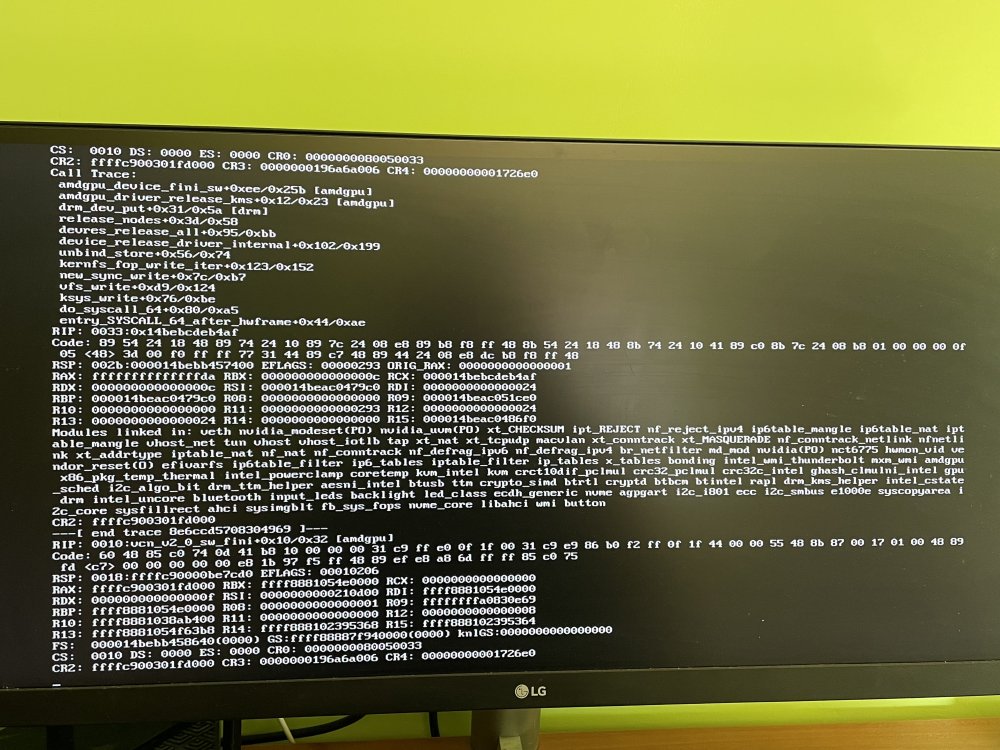
I update to 6.10 and instaled the vendore driver and i got this after instarted vm
-
I need to update 6.10-rc2 ?
-
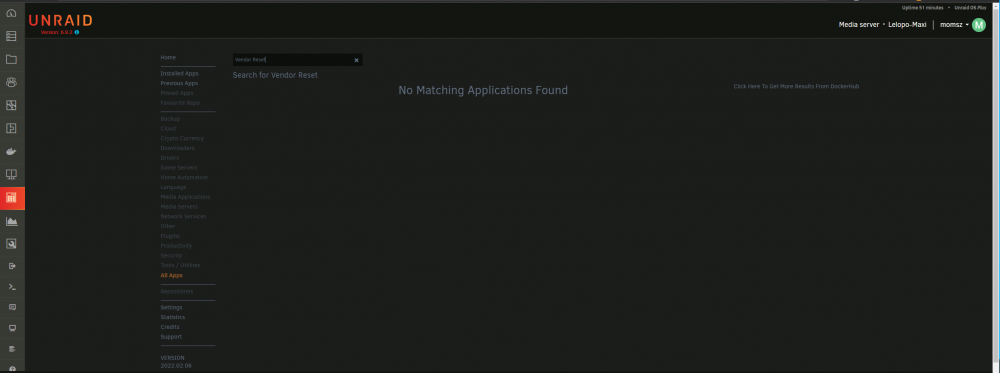
I don't find it
-
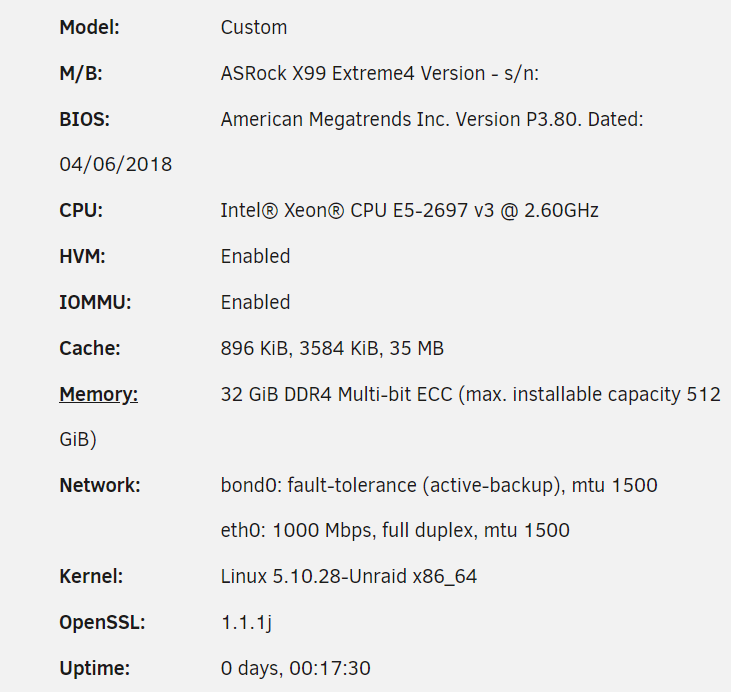
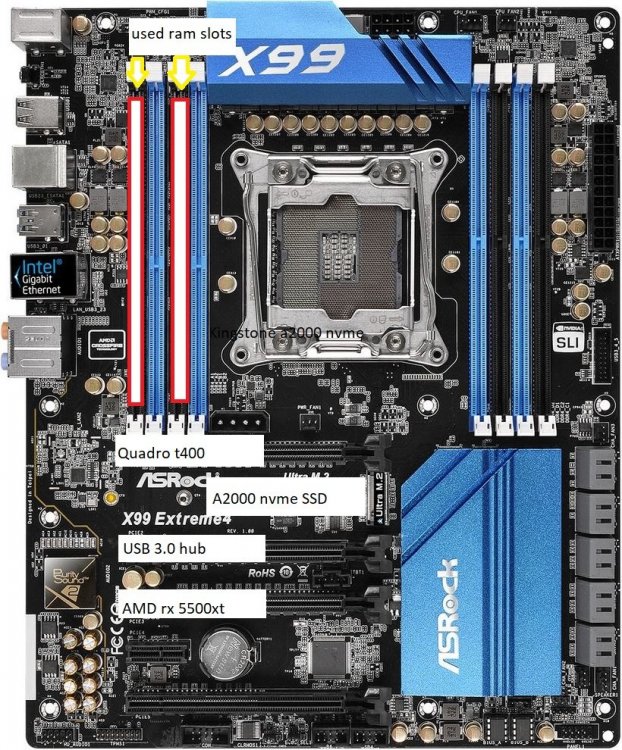
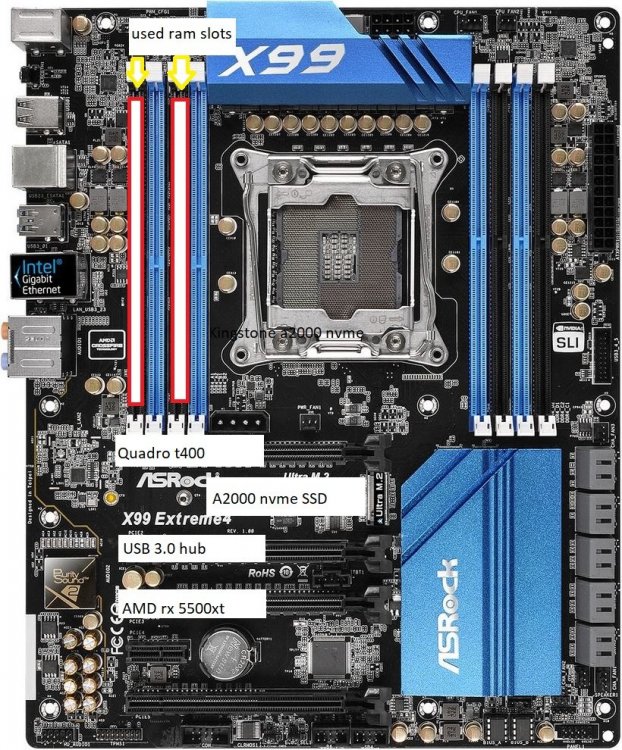
Hi i upgradeed my server to asrock x99 extrema 4(3.80 bios version) and 2697 v3 whit 32 gb ddr4 rdimm 2333 mhz and a have lot off crash when i want start win 10 vm 2th time since the host start. (1. vm start OK -> i stop vm OK no error log -> 2. vm start vm crash and the host unreachabel i need restart.) After crash the host server i need to enable vm in setting. i got this error simtimes And today i found this. I repleced pendrive and cmos battery see if it solves the problem. I have quadro t400 for h265 coding, and i have amd rx 5500 xt for win10 vm. I make coustom kernel with Unraid-Kernel-Helper for gnif Vendor-Reset Patch. I make 24h memtest86 but nothing I added pcie_aspm=off fleg to flesh config and aspm is turn off from bios. lelopo-maxi-diagnostics-20220216-1242.zip