





Eksistenze
Members
-
Joined
-
Last visited
Everything posted by Eksistenze
-
I'm still not sure exactly what you are trying to do, but there is a PuTTY app on the Community Apps. I mirror @bmartino1 . I hate cramming more things into a docker container than I need. Like'em LEEEEEAN. Also, ssh has this functionality built in with ProxyCommand and ProxyJump. I'm not sure how that would work with Tailscale (or in general) but you could look into that.
-
You want an SSH client inside the docker container so you can access another physical device on your network? If that is what you are getting at, you are way outside the scope of this. This is just a template for the mpgirro/docker-pihole-unbound container. If you would like them to add that, I suggest opening an issue on the github repository. Alternatively, you can fork it and add it yourself. My personal view is that there are better ways of accomplishing what you are trying to do.
-
Docker does not support using DHCP to request network settings. br0 sets a fixed IP address but that IP address just exists inside your Unraid box and there is always a possibility that your router will assign that address to something else. It is recommended that you assign a static address on the router side. I have no idea what TP Link might be doing. Perhaps it detected the Pi Hole address coming from your Unraid network MAC and figured that the IP address should change. You may want to look into the MACVLAN network driver for Unraid and see if there is something there. Regardless, this is obviously not desired behavior but there is nothing you can do with the container itself to change or fix it. The problem lies outside.
-
@AnHero Very odd. The fact that you are able to log in on mobile implies that there is something going on with your computer. What I would do is clear your cookies and cache data and try it again. You browser may be holding on to old information so it's looking for something from that ip that it's not getting. Maybe also try from a different browser in private mode. Other than that, I got nothing.
-
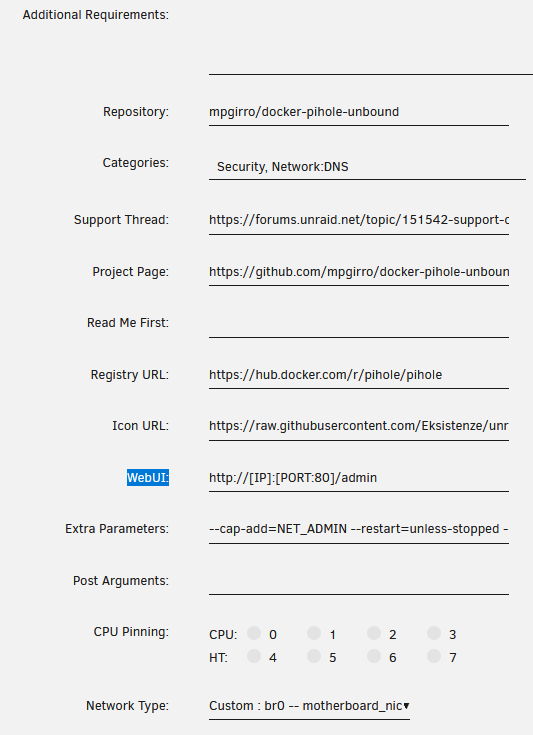
@AnHero I have no idea. At this point, I would verify that your pihole webserver is actually running inside the container but that's outside the scope of this template. Also, just to clarify, the WebUI: setting should be http://[IP]:[PORT:80]/admin and your HTTP: setting should be 80. Also, ensure you are going to /admin. Pihole does not offer a website on JUST the ip address. The /admin at the end is required. Example http://192.168.0.18/admin would work if that is still your address. http://192.168.0.18 would not and would give you a 403 access denied. Without knowing more about your settings or what error message you are actually getting, I don't know how to help you. @pmacdonald See this post for a breakdown on making sure your containers receive an IPV6 address. However, this is just the Unraid side. Your router would have to be properly setup as well.
-
@AnHero Two things. If you go to the top and toggle the advanced view switch, you'll see more options. Then go to WebUI: Here you'll be able to change the link for the WebUI, which you have set to 88. Second thing, why did you do that? The whole point of the way pihole is setup is that it gets its own IP address. Which means every port is available. Which means you don't need to change those from the default.
-
First, no need to apologize. We all started our journey somewhere. It is supposed to be 127.0.0.11. Again, just to be clear that extra 1 is correct. That file is generated by Docker and that nameserver is used by docker itself to resolve container names. @lordmilky I also had that error a few times when installing pihole on various setups. I believe it might be a corruption of the database when it is first loaded. I just deleted everything and reinstalled and it fixed itself. All the red gravitydb stuff on the bottom indicates that the database that it's trying to use to store the blocklist is messed up. All the other errors are normal. @skumse Yeah, I actually stopped using this solution as well for the exact same reason. I run a pihole on a nano and I have a container on my router itself as a backup. I just wanted to make this for anyone else that is using it and wanted the latest version.
-
Yes, the check mark is to tell Unraid to create the custom docker network when Docker is started. The Gateway is provided by your DHCP server, probably your router, and is normally the IP of the router itself. The DHCP pool is if you want Docker to only use a certain range of IPs. You can manually assign an IP to a container or you can allow Docker to do it and it will assign one in this range. This is normally accompanied by some setup on your router so that it does not give out those IPs to anything else. Your DHCP server will not assign an address to the Docker containers as Docker has its own DHCP. IMHO this is a much needed feature for Docker but it's just not how they have built it and I have yet to find any way of accomplishing this.
-
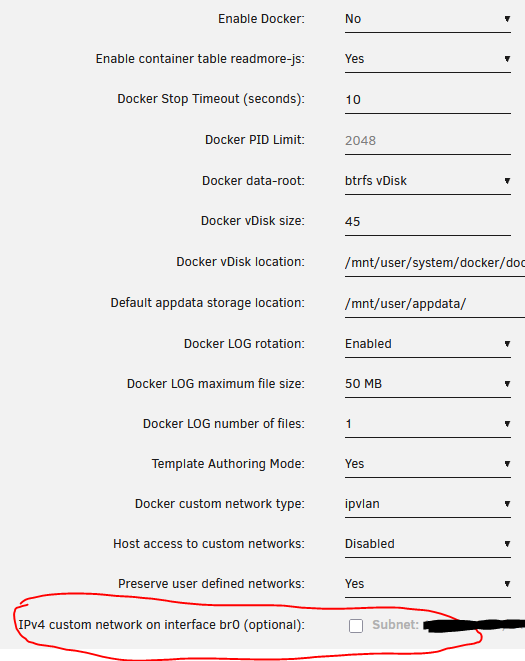
Ahhhhh! Okay, I just replicated your settings and, if that option is not enabled, it doesn't show up with your docker service running. Set "Enable docker: No" and hit apply. The setting should then be available. You can then check that box and br0(since you have bridging enabled in your Network Settings) will be available(once you have started Docker again). If you are wondering what happens under the hood, since this is all just a GUI for the command line interface, these are just variables that the rc.docker script is looking for. The first thing it looks for is that box for the custom network creation. If that box isn't checked, it doesn't create a custom docker network at all, regardless of the type you have selected. It probably could be organized or documented better.
-
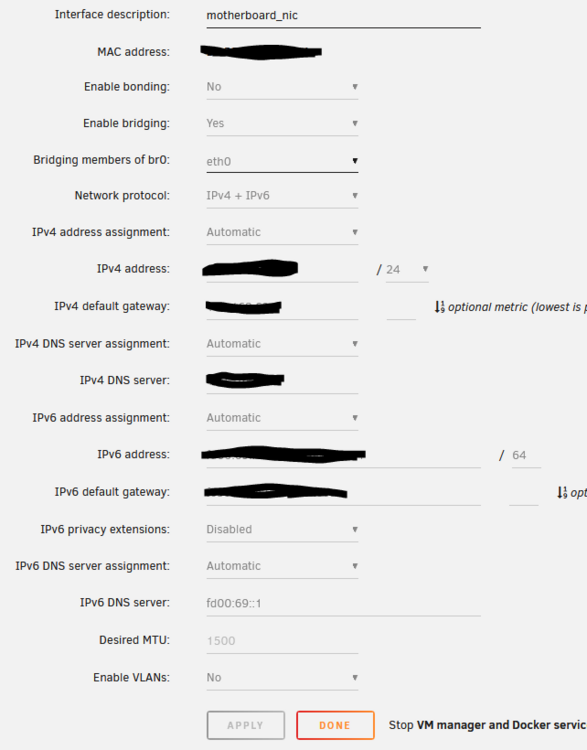
br0 is not related to macvlan or ipvlan. In the Network Settings: You can have eth0 (Enable bonding: No AND Enable bridging: No) You can have bond0 (Enable bonding: Yes) You can have br0 (Enable bonding: No AND Enable bridging: Yes) In the Docker settings: You can have a Docker custom network type of ipvlan or macvlan. This changes what type of network is created on eth0, br0 or bond0. THIS DOES NOT CHANGE THE DEFAULT NETWORK TYPE WHEN USING docker network create lan You CAN create your own custom docker networks using ipvlan or macvlan and subnets and whatever. But, under the hood, unraid does this for you. Assuming you used the above command to create a network, it used the default bridge network driver. Bridged docker networks do not give containers their own IPs that are exposed to your network, which you will need for the pihole container. So, in your Docker settings, make sure you have "IPv4 custom network on interface eth0 (optional):" checked. And in the pihole container, select "Custom : eth0"

-
Okay, Based on reading and my own experimentation, creating a custom docker network is just so that docker container(within the same docker network) can communicate with each other directly, as docker handles it internally, container to container. My example: bridge network subnet: 172.17.0.0/16 custom docker network subnet: 172.18.0.0/16 So all of my docker containers can talk to one another inside the unraid machine without hitting my router at all. When they DO need to enter/exit the unraid machine, they still do so using my unraid IP address assigned by whatever DHCP server I'm using. So if dnsmasq is using port 53 on your unraid machine, neither of these will work. I'm not sure how you have your network settings in Unraid. I will give a picture of mine. But Unraid itself will generate a custom network that allows you to set your own IP addresses within your network subnet. For me, this is br0. Then I can manually assign an IP for my pihole container. This is a separate IP address than my unraid machine and(hopefully) anything else on my network, which means all ports are available. This also means that any containers needing to communicate with pihole will exit my unraid machine, go through my router, and then back into my unraid machine to the pihole container. Additionally, you will probably need to do something in your router so that it does not assign your custom IP address. Without knowing what your setup is, I have no idea what that might be. I assigned the IP address to the MAC of the container as I am running a MACVLAN network. ***TLDR*** Use br0 or bond0 or eth0(depending on your unraid network settings and what it generates) and assign a Fixed IP address to your pihole container.
-
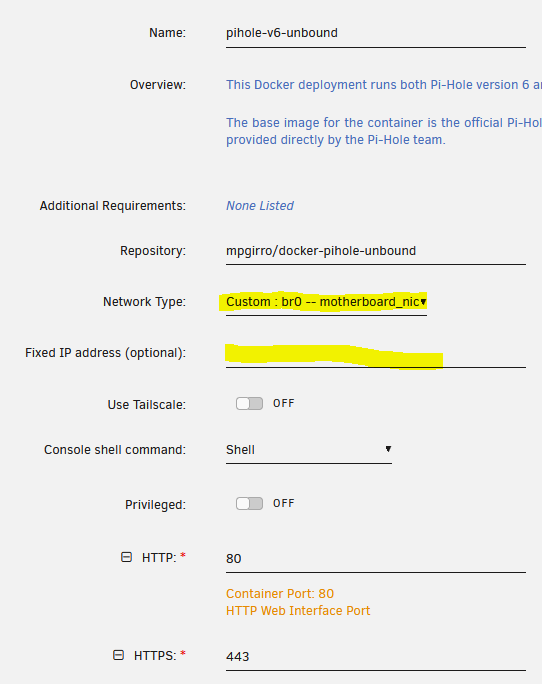
You are correct, the default Bridge network does use the host IP address and you assign ports to different docker containers. There are problems with assigning port 53 in Unraid. I'm not sure of your particular setup but it seems to be related to VMs and Libvirt running dnsmasq on that port. What I do (and what I have in the template) is run the container on network br0. This will allow you to assign a "Fixed IP address (optional):" right below the network type. As for getting a dhcp assigned address, I have worked LONG and HARD trying to get that working for Docker containers. And I am positive there is a solution out there but I couldn't find it. Docker doesn't work like that out of the box. You would need to install a custom docker network driver and I broke my unraid setup trying to get this to work. Lemme know if that doesn't work for you.
-
Hello! I'm just trying to get a hold of @Squid since 18 March to approved my CA template. Anyone know how I can do that?
-
Hello and welcome to the support thread for the Pihole-V6-Unbound Community Application. It is a straight pull of the docker Pi-hole container with some flavoring to add unbound as a recursive DNS resolver. This is a template for the fantastic work of mpgirro, which is a fork of the original from chriscrowe. What is Pi-hole? Pi-hole is an open-source, self hosted DNS sinkhole, which can block advertisements based on curated URL ad lists and optionally serves as a DHCP server. Basically, you setup Pi-hole on your network and direct all your DNS queries to it and it against the blocklist and, if allowed, forwards the request to the configured upstream name server and provides the resolution back. Why use Pi-hole? The internet is not as safe and care free as it once was. The main use of pi-hole is blocking ads by ensuring that requests to URLs that host them go unanswered. THIS IS NOT A FOOLPROOF AD SOLUTION. Advertisements like the ones you see on youtube videos are provided by the same domain as the videos themselves. Look into something like uBlock Origin for a browser based ad solution. Additionally, Pi-hole can be used to route custom DNS traffic. What is unbound? Unbound is a recursive DNS resolver. Instead of asking a public name server what ip address corresponds to pi-hole.net, unbound asks the DNS root servers "Who handles '.net'?", it will ask a '.net' TLD server "Who handles 'pi-hole.net'?", and finally it will ask the authoritative name server "What is the IP for 'pi-hole.net'?" Why would you use unbound instead of Quad9, Google or Cloudflare or my ISP? Public DNS name servers are basically just copies of what the authoritative name servers have told them. They do have incentive to be secure and accurate but they are not the source. Additionally, when you send DNS queries to these name servers, you are telling them that you are going to these sites. Running unbound is more secure. Running this app should be self explanatory. If you have questions about the template, please leave a reply. If you have a problem with the container itself, Pi-hole or unbound, please reach out to those developers for support.
-
I don't think TeddyTux is around. He hasn't done anything on Github or here for awhile. I'm working on an updated docker-pihole-unbound template now and I'll message the CA mods to get it added when I'm done. Probably tomorrow.
-
Did you ever figure this out? I'm going through the same problem right now.
-
I can change it back. Since I posted about this, I changed the docker custom network type to macvlan since I saw that they fixed it. That changed my network to bond0. But I didn't get an IP assigned regardless. I'm now switching back.
-
Ahh, I'm sorry that I did not make that clear. That was already filled out. I am able to reach my pihole through that IP. But neither my pihole or my swag container are getting IP leases from my router. I even added the lease using the container MAC but nothing.

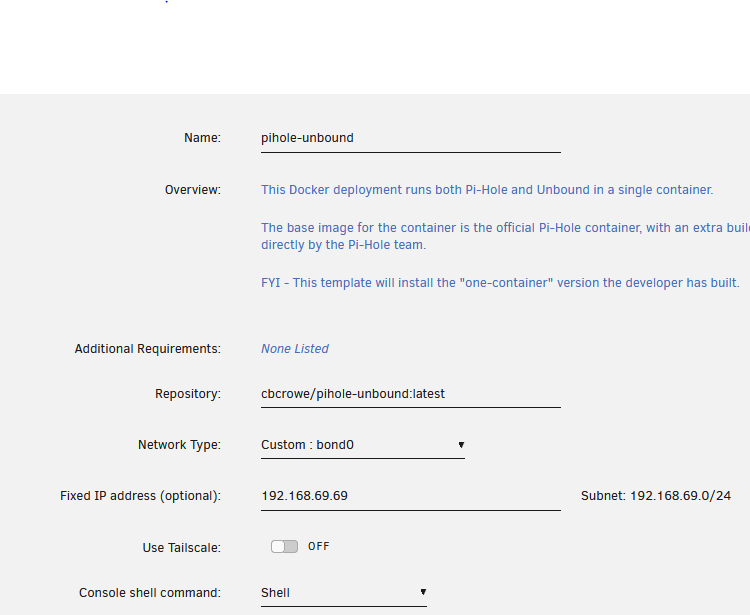
-
Here are my diagnostics if this helps. I checked out ifconfig but did not see anything listed for the ip address that shows in the Docker tab for my container. tower-diagnostics-20250115-2142.zip
-
I have searched the internet and no one seems to have the same issue. I hope I'm wrong and someone can steer me to where others have gone before. My docker containers that are on the custom br0 network do not get assigned an IP from my router. These are the ONLY things on my network that are not automatically assigned. Unraid gets an IP just fine. I have Home Assistant running in a VM - it gets an ip. I have SWAG and PiHole setup on br0. Neither gets an IP assigned from my router. Both are reachable by ping through their IP addresses set in the container themselves. Docker settings: Docker custom network type: ipvlan Host access to custom networks: Enabled Network settings: Enable Bridging: Yes


