





Varroa
Members
-
Joined
-
Last visited
-
Well I know it is not plex because I looked at the plex logs and there was nobody streaming from the plex server during the last time this happened. The only other 2 things I have running is crashplan which is only backing up my data to the cloud and pihole on a VM. I managed to kill pihole yesterday so I have disabled that VM for now so that only leaves crashplan and plex running. I will see if I can figure this out.
-
So after some more forum reads I have maybe come across something similar. I may have originally had some of my dockers set to run off the aray and when I moved them to "Prefer: cache" I did not stop the dockers before doing it. I have stopped all my dockers and VMs and I am running the mover now to make sure everything is in the correct location.
-
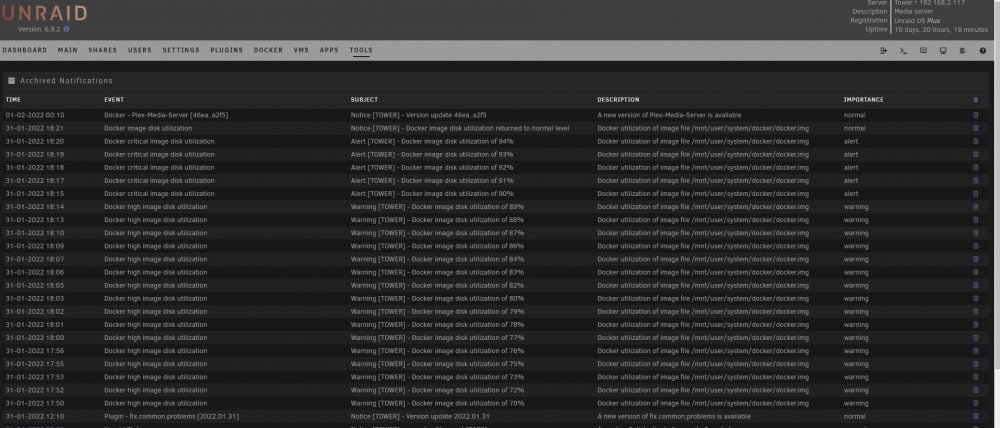
They appear in my notification popups when I log in and they are archived under tools>archived notifications. I get them constantly but I just double checked my plex logs and the errors do not line up with plex streaming so I am at a loss.
-
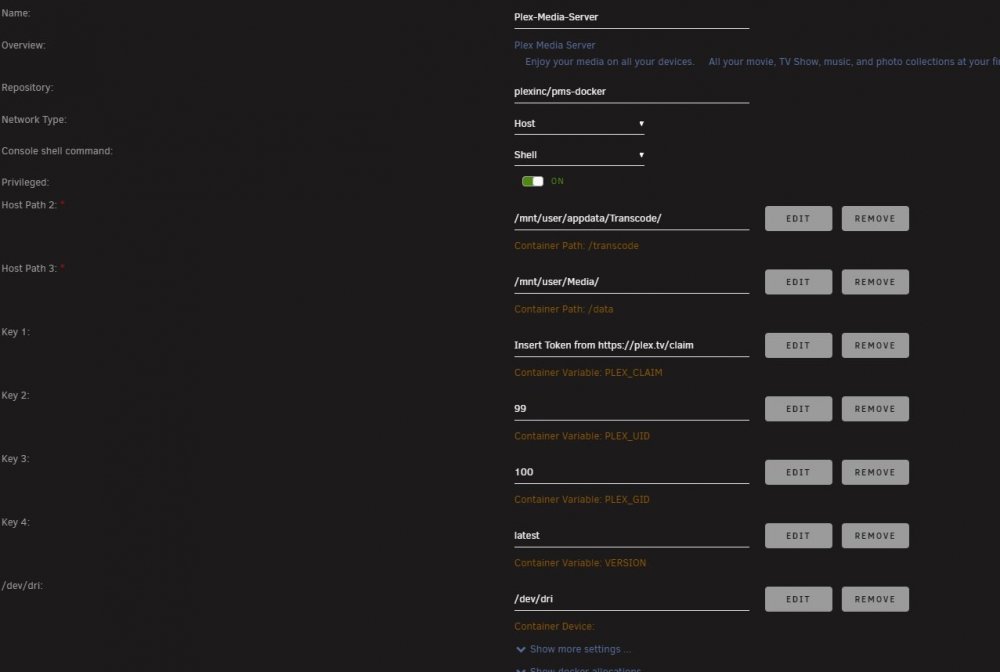
Sorry about this, I forgot this time. Here is also my docker layout for plex: tower-diagnostics-20220202-0901.zip
-
Hi Guys, I am having a reoccuring docker issues that I believe has to do with Plex. I have read several articles about but I can't seem to figure out what is wrong but my use errors and not 100% the same. Is this my plex server? 31-01-2022 18:21 Docker image disk utilization Notice [TOWER] - Docker image disk utilization returned to normal level Docker utilization of image file /mnt/user/system/docker/docker.img normal 31-01-2022 18:20 Docker critical image disk utilization Alert [TOWER] - Docker image disk utilization of 94% Docker utilization of image file /mnt/user/system/docker/docker.img alert 31-01-2022 18:19 Docker critical image disk utilization Alert [TOWER] - Docker image disk utilization of 93% Docker utilization of image file /mnt/user/system/docker/docker.img alert 31-01-2022 18:18 Docker critical image disk utilization Alert [TOWER] - Docker image disk utilization of 92% Docker utilization of image file /mnt/user/system/docker/docker.img alert 31-01-2022 18:17 Docker critical image disk utilization Alert [TOWER] - Docker image disk utilization of 91% Docker utilization of image file /mnt/user/system/docker/docker.img alert 31-01-2022 18:15 Docker critical image disk utilization Alert [TOWER] - Docker image disk utilization of 90% Docker utilization of image file /mnt/user/system/docker/docker.img alert 31-01-2022 18:14 Docker high image disk utilization Warning [TOWER] - Docker image disk utilization of 89% Docker utilization of image file /mnt/user/system/docker/docker.img warning 31-01-2022 18:13 Docker high image disk utilization Warning [TOWER] - Docker image disk utilization of 88% Docker utilization of image file /mnt/user/system/docker/docker.img warning 31-01-2022 18:10 Docker high image disk utilization Warning [TOWER] - Docker image disk utilization of 87% Docker utilization of image file /mnt/user/system/docker/docker.img warning 31-01-2022 18:09 Docker high image disk utilization Warning [TOWER] - Docker image disk utilization of 86% Docker utilization of image file /mnt/user/system/docker/docker.img warning
-
I am going to mark this as solved. I just checked the other windows PC which is still connected via the SFP+ to ethernet adapter and it is still getting slow reads so it is the SFP+ adapters for sure. Thanks for the help! EDIT: One more update for those following this. Even switching to a different brand SFP+ adapter still gives me slow read speeds so there is some sort of issue with running 2.5Gbe speeds on these 10Gbe ports. Second Edit: For those interest, I have discovered that the 10 Gbe SFP+ ports on my QNAP QSW-308-1C 10GbE are not backwards compatible with 1/2.5/5Gbe speeds. So, the ports had no problem receiving data from a 2.5Gbe client computer (hence why my write speeds were fine) but the ports can only output 10Gbe (which was causing issues with the 2.5Gbe client computers) and hence why my read speeds were so slow. QNAP has change the description of their switch since I bought it to list those ports as only 10Gbe ports now (previously they were listed as backwards compatible).
-
Ok, this makes no sense but I think I found the issue already. I am using SFP+ to ethernet adapters on the Qnap switch for 2 ports (the ones the Windows PCs are using) and I am using the built in ethernet 10Gbe port for the unraid server. When I switch the server and Windows PC (so the server is now using one of the SFP+ adapters and Windows PC is now using the dedicated ethernet port) I get full speeds. So my guess is there is some sort of incompatibility of those SFP+ adapters. Server listening on 5201 ----------------------------------------------------------- Accepted connection from 192.168.2.117, port 46228 [ 5] local 192.168.2.140 port 5201 connected to 192.168.2.117 port 46230 [ ID] Interval Transfer Bandwidth [ 5] 0.00-1.00 sec 276 MBytes 2.32 Gbits/sec [ 5] 1.00-2.00 sec 275 MBytes 2.31 Gbits/sec [ 5] 2.00-3.00 sec 276 MBytes 2.32 Gbits/sec [ 5] 3.00-4.00 sec 276 MBytes 2.32 Gbits/sec [ 5] 4.00-5.00 sec 276 MBytes 2.31 Gbits/sec [ 5] 5.00-6.00 sec 276 MBytes 2.31 Gbits/sec [ 5] 6.00-7.00 sec 275 MBytes 2.31 Gbits/sec [ 5] 7.00-8.00 sec 276 MBytes 2.31 Gbits/sec [ 5] 8.00-9.00 sec 276 MBytes 2.32 Gbits/sec [ 5] 9.00-10.00 sec 276 MBytes 2.31 Gbits/sec [ 5] 10.00-10.00 sec 0.00 Bytes 0.00 bits/sec - - - - - - - - - - - - - - - - - - - - - - - - - [ ID] Interval Transfer Bandwidth [ 5] 0.00-10.00 sec 0.00 Bytes 0.00 bits/sec sender [ 5] 0.00-10.00 sec 2.69 GBytes 2.31 Gbits/sec receiver
-
Looks like I have some testing to do on my network it would seem. I will update once I know more. Thanks
-
Network issue on which end? On both windows PCs or on the unraid server end? Excuse my confusion but how can the write speeds be at full speed if there was a bad network cable somewhere? Both windows PCs use different brand network cards (one is an onboard NIC while the other is an add on) and they are both running on different cables, etc all the way to the main QNAP switch (which then has a 10Gbe port directly to the unraid server). The server is running a intel 10 Gbe card and it is using the drivers that are built into the kernel.
-
Here is the Windows PC as the server and the Unraid as the client C:\iperf3>iperf3.exe -s ----------------------------------------------------------- Server listening on 5201 ----------------------------------------------------------- Accepted connection from 192.168.2.117, port 45822 [ 5] local 192.168.2.140 port 5201 connected to 192.168.2.117 port 45824 [ ID] Interval Transfer Bandwidth [ 5] 0.00-1.00 sec 40.1 MBytes 336 Mbits/sec [ 5] 1.00-2.00 sec 18.5 MBytes 156 Mbits/sec [ 5] 2.00-3.00 sec 18.6 MBytes 156 Mbits/sec [ 5] 3.00-4.00 sec 19.2 MBytes 161 Mbits/sec [ 5] 4.00-5.00 sec 19.1 MBytes 160 Mbits/sec [ 5] 5.00-6.00 sec 18.2 MBytes 153 Mbits/sec [ 5] 6.00-7.00 sec 18.1 MBytes 152 Mbits/sec [ 5] 7.00-8.00 sec 18.4 MBytes 155 Mbits/sec [ 5] 8.00-9.00 sec 18.3 MBytes 154 Mbits/sec [ 5] 9.00-10.00 sec 19.2 MBytes 161 Mbits/sec - - - - - - - - - - - - - - - - - - - - - - - - - [ ID] Interval Transfer Bandwidth [ 5] 0.00-10.00 sec 0.00 Bytes 0.00 bits/sec sender [ 5] 0.00-10.00 sec 208 MBytes 174 Mbits/sec receiver
-
From one of my windows PCs with the 2.5Gbe nic I get this: Server listening on 5201 ----------------------------------------------------------- Accepted connection from 192.168.2.140, port 51536 [ 5] local 192.168.2.117 port 5201 connected to 192.168.2.140 port 51537 [ ID] Interval Transfer Bitrate [ 5] 0.00-1.00 sec 282 MBytes 2.36 Gbits/sec [ 5] 1.00-2.00 sec 295 MBytes 2.47 Gbits/sec [ 5] 2.00-3.00 sec 295 MBytes 2.47 Gbits/sec [ 5] 3.00-4.00 sec 295 MBytes 2.47 Gbits/sec [ 5] 4.00-5.00 sec 295 MBytes 2.47 Gbits/sec [ 5] 5.00-6.00 sec 295 MBytes 2.47 Gbits/sec [ 5] 6.00-7.00 sec 295 MBytes 2.47 Gbits/sec [ 5] 7.00-8.00 sec 295 MBytes 2.47 Gbits/sec [ 5] 8.00-9.00 sec 295 MBytes 2.47 Gbits/sec [ 5] 9.00-10.00 sec 294 MBytes 2.47 Gbits/sec [ 5] 10.00-10.05 sec 13.4 MBytes 2.46 Gbits/sec - - - - - - - - - - - - - - - - - - - - - - - - - [ ID] Interval Transfer Bitrate [ 5] 0.00-10.05 sec 2.88 GBytes 2.46 Gbits/sec receiver ----------------------------------------------------------- Server listening on 5201
-
Hi, not sure what happened but my account is gone so this is a new account (I am not a newbie to the forums). I noticed recently that my read speeds from my array are super slow (20MB/s) but my write speeds are still normal (~300MB/s). I can replicate this on two different PCs (each running windows 10) which are connected using a 2.5Gbe network card (and both PCs are running SSDs). My unraid server has a 10Gbe Intel nic and is connected to my home network via a 10Gbe connection. Any suggestions? tower-diagnostics-20220124-0753.zip


