





TDD
Members
-
Joined
-
Last visited
Everything posted by TDD
-
Could we see a modification...any move/copy would immediately delete the successul source file(s) "rsync --remove-source-files"? A live transfer between two disks without this can show two instances of files under fuse which confuses containers that expect one (Sonarr...). I know it is best practice to have things shut down but...sometimes that is not practical. I didn't really dig and could...does Unbalanced follow the typical behavior of destination file being a .filename.XXXXX then the immediate rename upon successful transfer? TY. Kev.
-
I am really looking to neuter dockerman. I actually just use the plugin (TY BTW!) for controlled autostarts of my stacks. Futher management of everything falls to Dockhand. Dockhand is the only container that dockerman starts. All stacks are placed on my /appdata in a folder when both the plugin and Dockhand can see them, so there is no contention or compose files out of sync. Just this startup thing... End of the day it is not a big stretch to make Dockhand the orchestrator. I believe the next version of it will support autostart compose. Kev.
-
...I do see the beta branch is addressing this...let's wait and see...
-
Has anyone noticed that the comfigured stacks are NOT auto starting when docker is done settling? All my stacks are set to do so. I see no attempt in the logs to bring them up. Aside...I had to remove 'unraid-autostart' in /var/lib/docker as a nice legacy from dockerman. I am really trying to neuter dockerman in lieu of compose. I really hope, like others, we end up a docker solution for simple setups AND a purely compose setup for advanced users. Limetech....this shouldn't be hard to implement with a switch :-) TY. Kev.
-
VG! Off to tweak once again. TY. Kev.
-
Hi all. Phasing out my unassigned devices single drive (formatted BTRFS) and moving it into a new pool with one drive to start. I would like some confirmation...when I assign it to a slot in my new pool, it WON'T format it and it will just mount it as is? I did a quick test with another spare drive and it took to the pool fine. 🙂 I just need confirmation as I would rather not have to copy over 4TB of data as the alternative... TY! Kev.
-
I will add the GUI/scripts do not present the bond0/eth0 custom option it seems under some circumstances...for me, it was due to the presence of my custom ipvlan network. That is expected behavior, but upon deleteion of the custom network, they should show with all the network/docker settings set appropriately. They however do not. I'm investigating...
-
I reverted my custom ipvlan network back to macvlan and adjusted each container appropriately...I wish the UI would *always* remember the IP address that I end up typing in over and over when I change the network types... I'll be watching this to see what the conflict is with ipvlan. I have an idea what it is but I didn't dig too deep. Kev.
-
Is there a way...nicely...to kill the slim session and revert back to the command prompt?
-
Yea - I can do the disk <-> disk level transfer, but then I have to see which disk will accommodate the transfer. Not a big deal, but likely my out. I really try to keep my work under /mnt/user and let the system do the allocations, but in this edge case, of course not. Kev.
-
TY for this - I somehow glossed over that part of the docs - despite using the sysytem for years 🙂 I will rethink how that particular pool drive is set and whether I disassociate it via UD or make it loosely attached to the array. I only really brought it in as a pool drive as it is BTRFS and I like the nifty GUI tools that support the file system. Kev.
-
As I thought with mover - good to confirm. I can't actually manually move the files onto the array as the system fuses the newly created TV share as part of the physical array share. And I don't want the mover to move them. It would seem that my only escape is to make the Storage device an unassigned one to detach it from any attemps to meld shares... Kev.
-
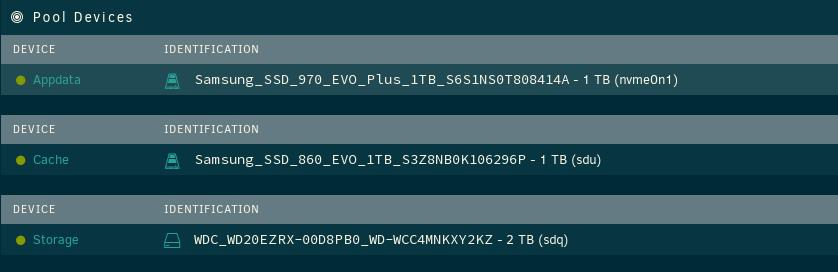
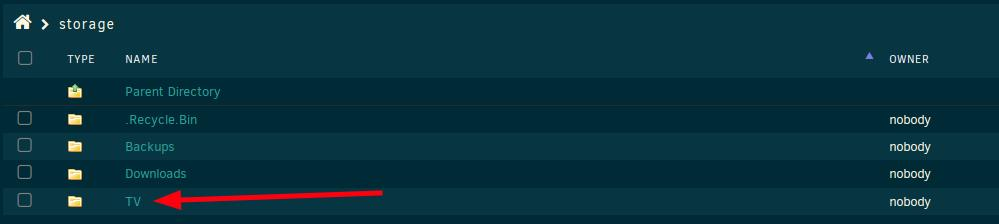
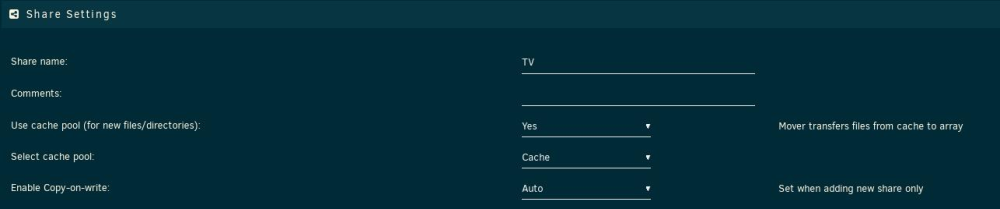
Hi all. Let's see if we can make this clear. 1) I have three pools. My 'storage' pool is my scratch disk where I do many intermediate things with files. It used to be set up under unassigned devices but for future data protection, it is pooled now in case I want the system to move its contents onto the array. 2) Within 'storage', I have a 'Downloads' folder, and many folders in that. In this case, I am focused on '@Converted'. It is where my manual transcoding of video files end up rather than overwriting originals. 3) Any files in @Converted that I choose to move onto the array via Midnight Commander (via SSH shell...) from '/mnt/user/Downloads/@Converted' (the contents of 'Storage' of course get exposed as shares) to '/mnt/user/TV/xxx' (my intended destination) end up as a new share on 'Storage' rather than on the array (or very least, the cache) 4) This is unexpected behavior since the TV share is set to 'cache' pool. I would expect the copy to /mnt/user/TV from 'Storage' to arrive at 'cache' for mover transfer later. Should I be expecting that all pool devices just maintain a 1:1 relationship with the array according to any share's particular pool settings? Will the mover move, according to these settings (it should) data to/from the array into the relevant pools as needed? Maybe I am just stuck on old thinking that the cache pool itself was special and now we have just broadened it all out. Kev.


-
No knock to tar or the plug-in, but with my archive approaching extremely large sizes, the streaming storage method of tar makes for very long access to its internals via MC and the the like. I've ended up moving my backups to restic. While the initial backup (with new built in compression!) took about 14 hours, subsequent backups now take minutes. I can also now opt to run backup scrips to segment backups, so I perform a Plex /appdata backup separately from all the other /appdata contents (which run an hour later). Restic (and Borg) are pretty awesome and perhaps I will fork the existing plug-in to use restic if all parties are good with it. Kev.
-
Hi All. I've noticed that my backups since updating Unraid have almost doubled in time to make. While I diagnose, I am just throwing this out there in case something external has changed that I am not aware of. Has anyone else seen this behavior? I'll do some manual 'tar' stuff to further see what is up... TY. Kev.
-
I have never had an error post-fix. It is entirely possible that Seagate is making changes to the firmware hence these variances we are seeing...? Kev.
-
I apologize if this has been cited, but more often than not it is necessary to completely power down and ensure the drives have zero power then start up. Just like updating your motherboard BIOS. Other than that, AFAIK the issue is only with the mentioned models. The fix has held for me since day one of application. Kev.
-
Roger that. I'm considering moving my dockers to their own IPs across the board rather than all bridged to the UnRaid IP and ports. It should be as simple as moving each to br0 then manually specifying an IP that is not taken anywhere else in my lan. This works for Plex which I have moved. For those dockers that like inter-docker chatter like Sonarr, I cannot get it to see any of its targets like qBittorrent, Jackett, etc., even if they are on the same br0 and their own IPs (and Sonarr correctly set to point to the new dedicated IPs). I have docker set to allow 'host access to custom networks' just in case. Of note is these targets are dockers with internal VPNs which is blocking things I suspect. What is magical about the bridge mode by default in docker (which works) against a custom ip and the br0? Do I need to make another custom bridge (br1) in my subnet and have all the dockers ride that? Docker settings show the subnet as 192.168.0.0/16 and my correct gateway for my lan (192.168.1.1 on my 192.168.1.x). Ensure the routing table reflects br1 on the 192.168.1.x? This seems like an adventure. Kev.
-
Has this been fixed? I have the same issue as I move dockers to their own IPs. Legacy forwards still show. I've moved Sonarr to port 80 internally but cannot purge this display. Note that a 'docker ps' shows it clear as it should. Kev.


-
It may - or it may not. Depends on firmware specific to each model. The good thing is the SeaChest modifications are applicable and should be able to handle any quirks. Kev.
-
The full tweak allows spin downs gracefully so you give up nothing. Might even save a watt or two :-). Kev.
-
I want to add that my solo 8TB drive, my parity, does spin down and up as needed and does not always spin. This fix does not affect any requests to go idle. Kev.
-
My 8TB Ironwolf was the sole Seagate and it was the parity that errored out. It all comes down to strictly how idle the drive is and spin-ups past that. Kev.
-
There very well could be edge cases with other Ironwolf drives but assuredly it is an issue with the ST8000VN004. I would not bet on a timely, if ever, firmware update for the drive itself. The two changes make the drive more aggressive with its spinup and readyness to compensate for the driver timing out while waiting for its ready state. You have nothing to lose by making these changes as they are reversible; the amount of power saving is negligible IMHO and the benefits of a upgraded UnRAID are worth it. Try and see! Kev.
-
I only know of the exact 8TB unit in question that requires this tweak. I presented Seagate all the info on the issue but got meaningless responses back. Was hoping to chat with the hardware/firmware guys. We can only hope the intel makes it to where it needs to be. For note, my testing was done on both my LSI controllers and the same outcome was found prior to the fix: [1000:0064]01:00.0 Serial Attached SCSI controller: Broadcom / LSI SAS2116 PCI-Express Fusion-MPT SAS-2 [Meteor] (rev 02) [1000:0072]02:00.0 Serial Attached SCSI controller: Broadcom / LSI SAS2008 PCI-Express Fusion-MPT SAS-2 [Falcon] (rev 03) Kev.





