





UnraidVirgin
Members
-
Joined
-
Last visited
-
It worked!!!!! Thank you
-
I just looked it up on youtube and it MUST be that! I will try first thing tomorrow with a piece of electrical tape over the 3rd pin!
-
i have tried every port on the motherboard and on the sas expander and it simply does not see it - I even plug out one of the drives in the array and replace it with the new drive and it does not see it - when i plug the same drive into a USB enclosure and connect to my Mac it sees it straight away! What on earth is going on?
-
I added some further drives to my Unraid server taking the total up to 14 Sata HDDs (88TB) - connected via LSI card and Sas expander and onboard SATA ports however when I try to connect the 14th drive via sas expander or onboard sata port the bios and neither Unraid sees it. Ive used the same power cable running my other drives to see if that was the problem but still nothing so I changed the sata cable to one Im using and still no joy - ANY HELP on what could be the reason drive 14 is not being seen by the BIOS / Unraid? Motherboard ROG MAXIMUS X HERO (WI-FI AC) - with i7 8700k and 16GB DDR4
-
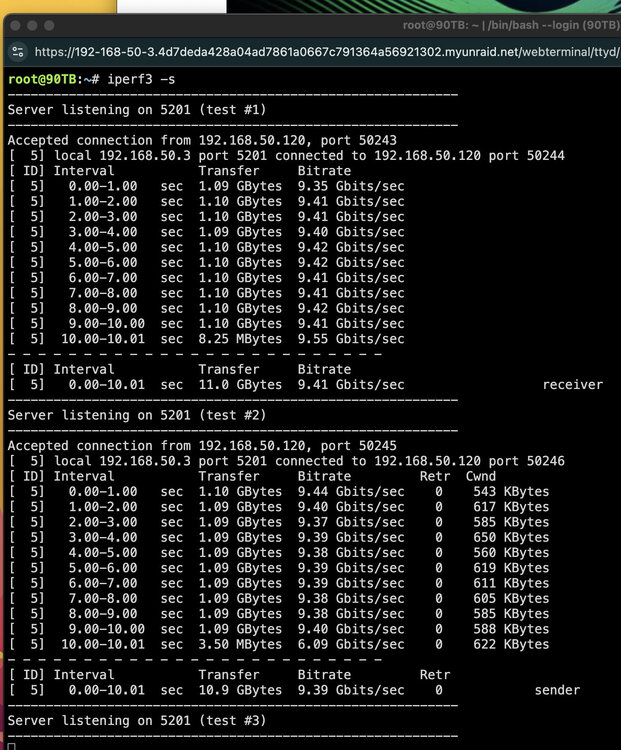
Yep turned out to be a transceiver module now running 10g - thank you
-
what on earth could it be? Its going straight to a switch on a 10G port and out on a 10g port to Unraid server
-
is the interface ip address the same as the servers IP address?
-
here you go Uploading Attachment...
-
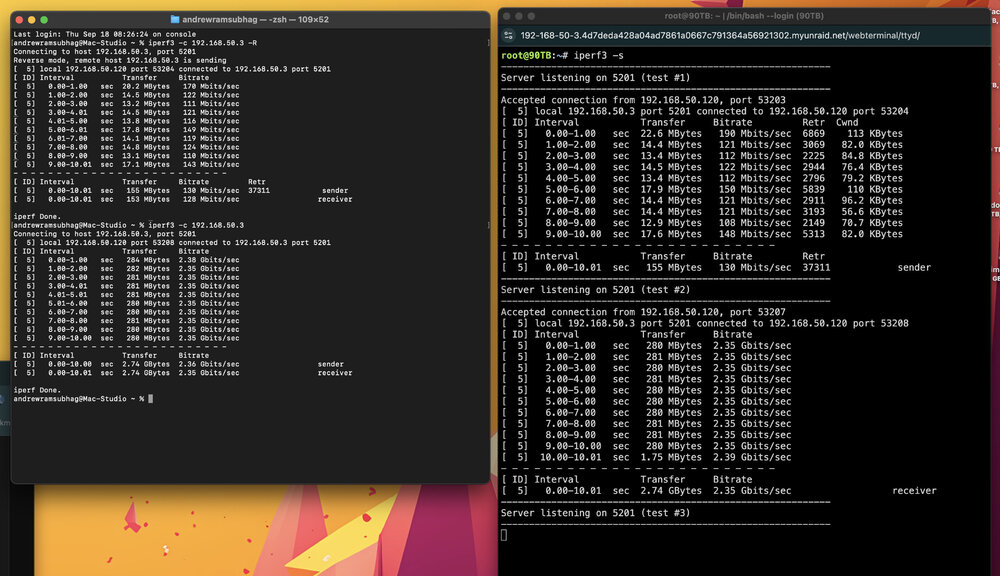
when I do speedtest between mac and mac mini on the network I have full saturation writing and reading however when I try it with the Unraid server I only get 15-19 MB on the read. Cache pool has now been upgraded to ZFS but no difference in the read speeds.....I can not figure out why???
-
No just on the write
-
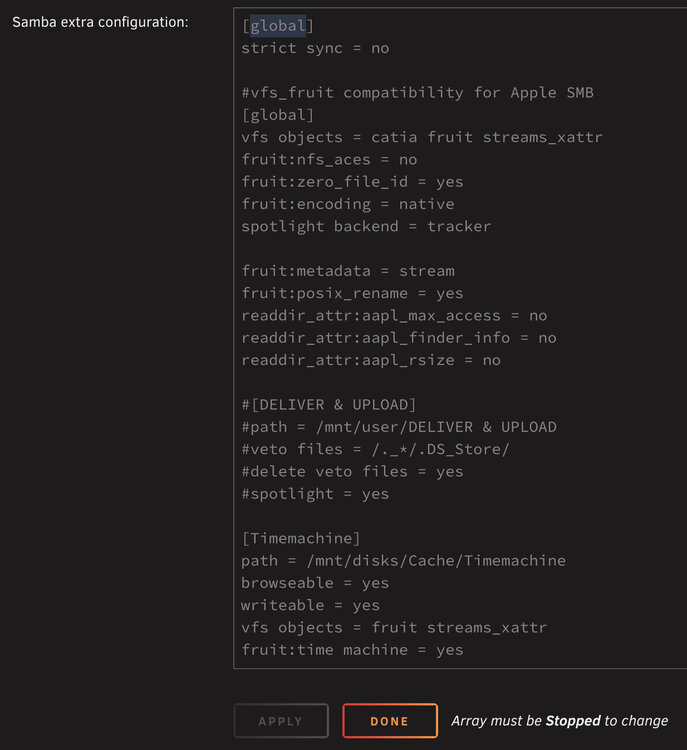
I have a 2.5Gbps connection from Mac to Unraid - Iperf shows full saturation of network bandwith on writing to Cache pool using BlackMagic Disk speed test but I cant get above 19MB on the read speeds???? What am I doing wrong? Here is my SMB Extra config:
-
I've got an r720 with 8 drives and an r520 with 8 drives....I'm looking at ways of powersaving by just running 1 system...at the moment both servers idle about 400watts combined that's including my r210ii pfsense router and 4 unifi pieces of equipment. My thinking is to repurpose a ryzen 5 3600 old pc and connect it to 2 x MD1200 daisy chained..total 24 bays of storage using my old drive caddies from the Dell servers. I've got a cheap external lsi card but will that connect to my pc and connect via sas cables to the MD1200? Also will I lose my data if I transferred the drives to the MD1200s...atv the moment only one server the r720 has data. Would a pc and 2 x MD1200 be less power that my 2 dell servers at the moment?
-
Server 1 - with 2 port 10G NIC port 1 = 192.168.50.3 to switch and on to the Internet and other devices 2nd port on the 10gbe NIC - 192.168.70.1 Server 2 - with 2 port 10G NIC port 1 = 192.168.70.2 I'm using a 1Gb on board port to the switch My aim is to use the 2nd server to create remote shares via the 10g connection so that server 1 plex library can access the ever expanding TBs of my media library as well as using it to save 4k video footage which I will access via my pc with a 10g NIC. How do I get the 2 servers to see each other and create the remote shares making sure the data only uses the 10G connections?
-
can anyone help - My ISP ip address is not being masked despite having setup my unraid server as an exit node and using my windows PC as a client running tailscale I chose the Unraid server as the exit node but when I check my IP at 'whatsmyip' its still the same showing my location?
-
UnraidVirgin changed their profile photo
-
yes I want the downloads to only download to the cache until Radarr or Sonarr physically moves it to a specified disk share on the array? Will choosing ONLY work this way?




