





BAZOOKAPANDA
Members
-
Joined
-
Last visited
-
Not sure if this has been requested yet, if it has, apologies. I don't mean to be pushy😂 Anyway as the title says, I would love to be able to configure ZFS pools I know there is a ZFS plugin my it just makes me nervous, and there is a lot of fiddling. On TrueNAS Core/Scale it is so easy just a few clicks. Additionally, I have been running TrueNAS Scale as a work around but the network configuration gets a little complicated (For example), I have a Windows PC with two network ports (1GBe + 2.5GBe), My Unraid server has the same (2 10GBe ports) I have the 2.5 and a 10 connected together but taking advantage of this for my TrueNAS VM is not so straight forward and considering especially because ZFS can use ram as a write cache it feels like a missed opportunity I really think this would be a useful feature for many people, it seems like it would just complete Unraid as a server operating system and I would greatly appreciate it. Thank you
-
Hey not sure if this is the right place for this but hey. I am having trouble connecting to plex reliably. Every now and again (every few days or so) I am just no longer able to connect to plex form other devices or through the web UI, it just says problem loading page. It is set to host and my understanding is that in this configuration it is normal for there to not be a port (in docker allocations there is "???", this is what I saw on a thread). I have tried setting to bridge and than a web UI tab won't even open and using either one of my network adapters (one is DHCP one is static) it will just say config failed and I have to install from previous versions. This usually happens after my server is turned off (in my country we have something called load shedding so everything in my house getting turned off is unavoidable). The only fix for this is a complete reinstall of plex which means I have to reconnect all my libraies and rebuild all of my playlists. In the logs all I get is "Failed to load preferences at /config/Plex Media Server/Preferences.xml". I have searched this multiple times and I am decent at getting the results that are useful but nothing has helped me. My other containers seem to work including Emby witch I would honestly swap to if I liked the UI as much as Plex's but I don't. Does anyone have any ideas as to what I can do? Thank you
-
Cool I will read that info. Oh and some extra info the server I am backing up to is a TrueNAS scale server.
-
Thanks ill look into this
-
So I can backup my "plugins" directory by backing up my flash drive. I think I remember seeing a guide for that, some button build into the web GUI Can you elaborate on the plugin for backing up my appdata directory? Thank you
-
Could I get some help please?....Hope this is the right place. I would like to make two scrips 1) copy my appdata "share" 2) copy my "plugins folder" I am doing the following respectively 1) "cp -r /mnt/user/appdata /mnt/user/Documents/8.Server/Unriad appdata" 2) "cp -r /usr/local/emhttp/plugins /mnt/user/Documents/8.Server/Unriad plugins" In both cases the scrip says the the folder "appdata" and "plugins" does not exist This must be a permissions issue correct? I don't want to mess around with commands like chmod 777 for instance and break things I know there are other methods to back up but I just feel more comfortable doing this as apposed to messing around with random applications. (a bit of background, I have a script that copies my "Documents" folder to another server) (I connected to this server (smb share) using unassigned devices, did a test and it works.....yay) Hope that gives some insight as to what I am trying to achieve. I would appreciate and ideas to get this working, thank you
-
BAZOOKAPANDA changed their profile photo
-
I am running Unraid on bare metal, AsRock ROMED8-2T, AMD EPYC 7302P 16-Core @ 3000 MHz, 64 GiB DDR4 Multi-bit ECC I tried to create a TrueNAS VM in order to have access to ZFS and easier iSCSi It is well known that it is better to pass through a host controller as apposed to devices (be it USB, SATA, etc.) I tried TrueNAS core and TrueNAS scale (FreeBSD and Debian respectively) How ever I could not get the VM to start even to install the OS, this would also cause my whole server to crash requiring a hard reset. when I detached the SATA controller it would post I saw that someone running Proxmox had this same issue: https://forum.proxmox.com/threads/passthrough-of-onboard-sata-controller-locks-up-system.115569/ https://forum.proxmox.com/threads/amd-epyc-pcie-passthrough-flr-error.106070/#post-456481 I used their work around as a fix I unfortunately don't have a log, searched everywhere but found nothing that alluded to my issue (maybe I missed something) Furthermore I documented my experience in more detail in the forum thread I created (linked below) https://forums.unraid.net/topic/132560-passing-through-onboard-sata-controller-to-trunas-scale-vm-causes-unriad-host-to-crashlockup/ Please also note that I am not smart enough to understand why this is or was happening or why the fix worked (punching this into my Unriad terminal: "echo bus >'/sys/bus/pci/devices/0000:47:00.0/reset_method'") Nor do I know if this will happen with any VM or any onboard sata controller But it does with a TrueNAS VM and with the the "AMD FCH SATA" controller. I tried to follow the guidelines best I could, no logs but I can say that I deleted and recreated multiple different TrueNAS vm's and everyone failed to post without the command that I mentioned above I followed Spaceinvader One's guide: ZFS on Unraid - Setting up a TrueNAS VM - PT1: https://youtu.be/lEupiLZIgpE ZFS on Unraid - Setting up a TrueNAS VM - PT2: If I am mistaken in my discovery, this was an isolated event or the crashing was of my own doing feel free to delete this post. (just not my other thread pls, it might help someone) Thank you
-
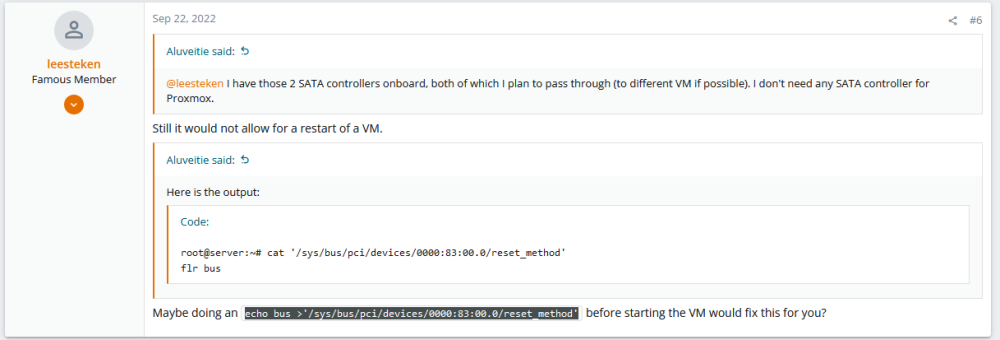
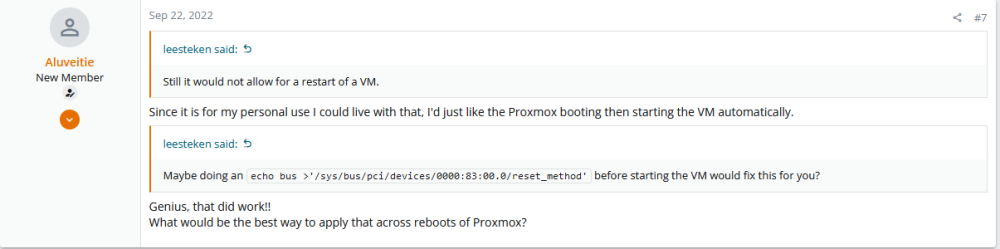
I have news! So I found this on the Proxmox forums. https://forum.proxmox.com/threads/passthrough-of-onboard-sata-controller-locks-up-system.115569/ https://forum.proxmox.com/threads/amd-epyc-pcie-passthrough-flr-error.106070/#post-456481 I punched this line of code into the Unriad terminal echo bus >'/sys/bus/pci/devices/0000:83:00.0/reset_method' Except I substituted their IOMMU group with my own, like so echo bus >'/sys/bus/pci/devices/0000:47:00.0/reset_method' Anyway the VM started and I seem my two 4TB drives in TrueNAS To be honest I'm not really sure what any of this means but I do know that my TrueNAS Scale VM would not start and would crash Unraid if I had the sata controller passed trough Is the command the same as the function level reset I see in the vfio menu? Because I clicked that and nothing appeared to happen, I don't think it is a interactive button Do people know about this because I saw two threads on the Proxmox forums discussing this? Will there be a patch? Must I like the GIGA-chads below write a script to do this everytime before starting my VM? Would love some insight from people who actually know what any of this means Thank you

-
I believe that would basically be the same as ticking the little box in the vfio menu in settings > system devices
-
I have also read about this "stub"ing which I think involves doing something with the syslinux.cfg file (where you set your default boot mode) maybe I will try that not really sure how to go about it but I'm sure I can figure it out.
-
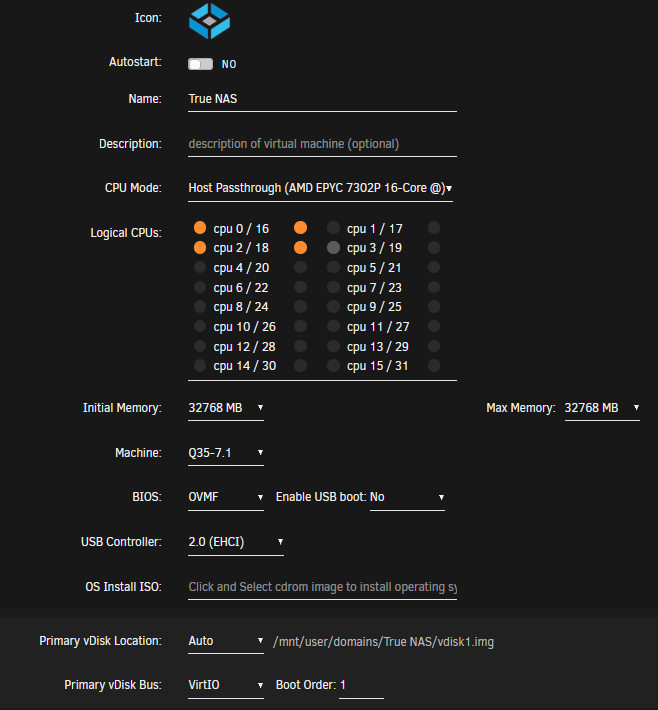
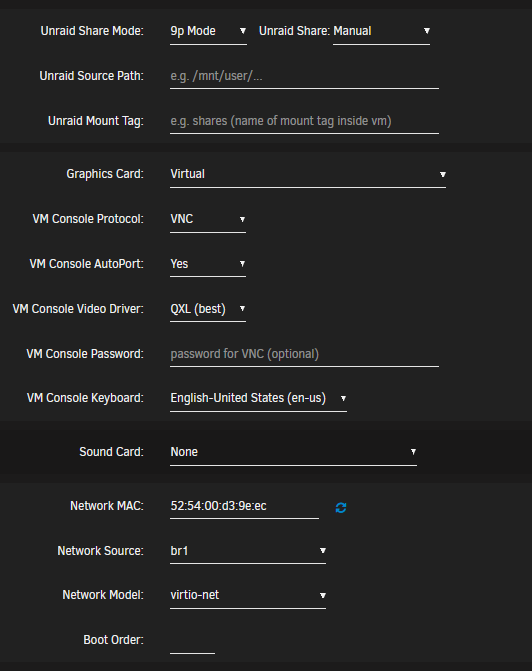
So I am trying to setup a TrueNAS Scale VM. I have it all setup and can remote into it but if I pass through a sata controller Unriad locks up and I need to reboot Does anyone have expereince passing through onboard controllers. (in other words not pcie cards) I have an AsRock ROMED8-2T, this baord has 2x mini sas HD connectors and came with 2X mini SAS HD to x4 sata connectors. in my iommu groups. I have group 59 this is where I see the 5TB drive that unriad uses (im owrking in getting a drive for parity so lets put that aside) At group 58 I have two 4TB drives that I want TrueNAS to use I will attatch a screen grab (I unbound the controller from vfio so you can see the devices) I believe one m.2 also falls into this IOMMU group I have tried booting the VM with the sata controller passed through both with and without the drives connected to it and no change Still crashes But as soon as I start the VM with no sata controller its fine Is it worth swapping the drives and their controllers with each other to see if the other controller behaves the same? Has anyone tried to pass a onboard sata controller to a VM? And because it is a hard freeze there is no log There is a pick of my TrueNAS VM setup attached, it depicts the sata controller I wish to pass through Any insight would be greatly appreciated.

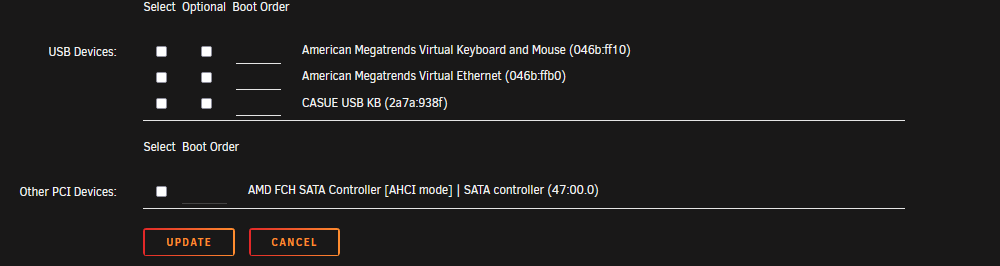
-
Not really. As it stands I have clean docker install from scratch but I was hoping to get to the sign in page so that I could use my old account because if i try create a new account I get an error about that email already being in use, which is a minor wrinkle. This seems to no longer be true however and I am using an email address I think I previously registered but hey gift horse and all that.
-
I found a work around. So what I did was 1. I booted in safe mode so that the array does not auto start 2. Go to settings and disable the VM manager 3. start the array (to get access to shares) 4. Go to shares > domains (or where ever your problem VM is) 5. Rename the folder that the vdisk for your problematic vm is (the vm will no longer start on boot) 6. Re-enable VM manager restart to normal mode and disable auto start for the vm and change the name back to what it was before. Please note you might need the Dynamix File Manager plugin in order to rename the folder that houses the vdisk (the plugin can be installed by being in a state where VM manager is disable and the array is running)
-
I have this issue right now. What did you do to fix it?
-
Can I ask, what setup process did you follow, i.e. the setting and config? I am trying to recreate this but for some reason Unraid just becomes unresponsive after clicking create (I try Q35-5.1 and Q35-7.1 but no luck (with sata as the host bus)). As it happens I have a usb drive with TruNAS already installed on it but my brain has not put together the logic to take that data and get it on a vdisk. Anyone else experience a system hang?


