





Sveeny
Members
-
Joined
-
Last visited
-
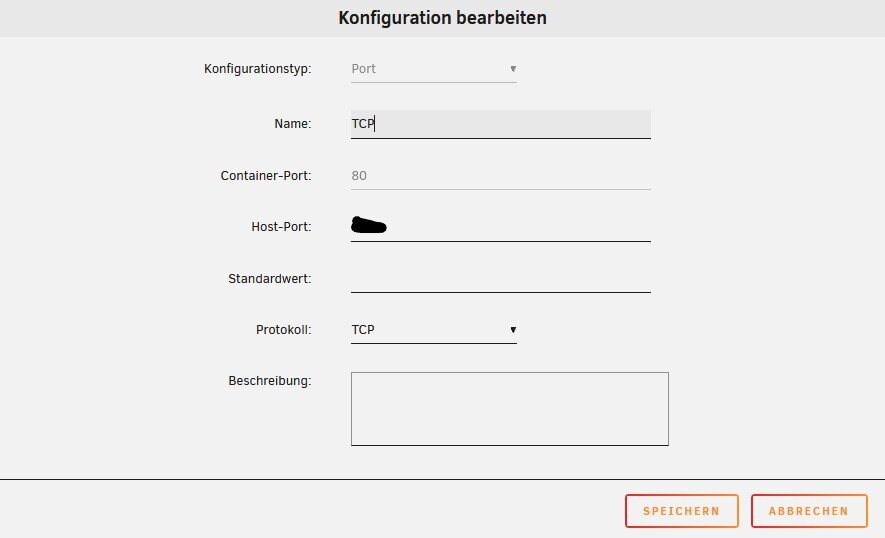
Hello, had the same issue. The trick for everybody who wants to run it, is to point the 8080 to somewhere else and to set the port 80 by hand in the config! It doesn't look good, but it works! Anyway a working template would be the best!
-
Hey Everbody, hopefully the Post is still watched. I had in the past allready an Matrix docker running on a System. So everthing worked fine. Now I need it again on a different Server and had only trouble to get it working. Basically I think it is an permission topic because i get several times: Cannot create pid file: /var/run/turnserver.pid: Permission denied PermissionError: [Errno 13] Permission denied: '/homeserver.log' So i did allready the fix of https://github.com/A75G/docker-templates/issues/77. for the homeserver.log. But i seems that there is still an permission error and I'm not completely sure what is the right solution for it. Maybe someone can help? Thanks!
-
Hello together, I'm working with Tandoor now for 4 Months and find it quite nice. I'm not sure wether this is an Topic fo the Unraid or the Github Forum. I did a little mistake because i used the internal SQLLite which makes some problems now due to the performance with motre Recepies. Is there a way to switch from SQLLite to an external Database without loosing the Data or do i have to export it somehow and import it later? Thanks!
-
Thank you very much! Seems to work. I have changed the Sata Cables to shorter ones and did it after the wiki. One Last question. Is somewhere discribed how to interpret the smart log-files? Would be helpfull for the future
-
Attached you find the Diagnostics. unraid-diagnostics-20220210-0732.zip
-
Hey, i work with unraid for 17 days now and it worked good for me. Tonight i got some Errors from Disk 1. Can someone please help? SMART Error Log Version: 1 ATA Error Count: 66 (device log contains only the most recent five errors) CR = Command Register [HEX] FR = Features Register [HEX] SC = Sector Count Register [HEX] SN = Sector Number Register [HEX] CL = Cylinder Low Register [HEX] CH = Cylinder High Register [HEX] DH = Device/Head Register [HEX] DC = Device Command Register [HEX] ER = Error register [HEX] ST = Status register [HEX] Powered_Up_Time is measured from power on, and printed as DDd+hh:mm:SS.sss where DD=days, hh=hours, mm=minutes, SS=sec, and sss=millisec. It "wraps" after 49.710 days. Error 66 occurred at disk power-on lifetime: 424 hours (17 days + 16 hours) When the command that caused the error occurred, the device was active or idle. After command completion occurred, registers were: ER ST SC SN CL CH DH -- -- -- -- -- -- -- 04 61 46 00 00 00 a0 Device Fault; Error: ABRT Commands leading to the command that caused the error were: CR FR SC SN CL CH DH DC Powered_Up_Time Command/Feature_Name -- -- -- -- -- -- -- -- ---------------- -------------------- ef 03 46 00 00 00 a0 08 14d+14:50:26.171 SET FEATURES [Set transfer mode] ec 00 00 00 00 00 a0 08 14d+14:50:26.170 IDENTIFY DEVICE ec 00 00 00 00 00 a0 08 14d+14:50:26.157 IDENTIFY DEVICE ef 03 46 00 00 00 a0 08 14d+14:50:26.156 SET FEATURES [Set transfer mode] Error 65 occurred at disk power-on lifetime: 424 hours (17 days + 16 hours) When the command that caused the error occurred, the device was active or idle. After command completion occurred, registers were: ER ST SC SN CL CH DH -- -- -- -- -- -- -- 04 61 46 00 00 00 a0 Device Fault; Error: ABRT Commands leading to the command that caused the error were: CR FR SC SN CL CH DH DC Powered_Up_Time Command/Feature_Name -- -- -- -- -- -- -- -- ---------------- -------------------- ef 03 46 00 00 00 a0 08 14d+14:50:26.156 SET FEATURES [Set transfer mode] ec 00 00 00 00 00 a0 08 14d+14:50:26.155 IDENTIFY DEVICE ec 00 00 00 00 00 a0 08 14d+14:50:26.148 IDENTIFY DEVICE ef 03 46 00 00 00 a0 08 14d+14:50:26.147 SET FEATURES [Set transfer mode] Error 64 occurred at disk power-on lifetime: 424 hours (17 days + 16 hours) When the command that caused the error occurred, the device was active or idle. After command completion occurred, registers were: ER ST SC SN CL CH DH -- -- -- -- -- -- -- 04 61 46 00 00 00 a0 Device Fault; Error: ABRT Commands leading to the command that caused the error were: CR FR SC SN CL CH DH DC Powered_Up_Time Command/Feature_Name -- -- -- -- -- -- -- -- ---------------- -------------------- ef 03 46 00 00 00 a0 08 14d+14:50:26.147 SET FEATURES [Set transfer mode] ec 00 00 00 00 00 a0 08 14d+14:50:26.146 IDENTIFY DEVICE ec 00 00 00 00 00 a0 08 14d+14:50:26.141 IDENTIFY DEVICE ef 03 46 00 00 00 a0 08 14d+14:50:26.140 SET FEATURES [Set transfer mode] Error 63 occurred at disk power-on lifetime: 424 hours (17 days + 16 hours) When the command that caused the error occurred, the device was active or idle. After command completion occurred, registers were: ER ST SC SN CL CH DH -- -- -- -- -- -- -- 04 61 46 00 00 00 a0 Device Fault; Error: ABRT Commands leading to the command that caused the error were: CR FR SC SN CL CH DH DC Powered_Up_Time Command/Feature_Name -- -- -- -- -- -- -- -- ---------------- -------------------- ef 03 46 00 00 00 a0 08 14d+14:50:26.140 SET FEATURES [Set transfer mode] ec 00 00 00 00 00 a0 08 14d+14:50:26.139 IDENTIFY DEVICE ec 00 00 00 00 00 a0 08 14d+14:50:26.132 IDENTIFY DEVICE ef 03 46 00 00 00 a0 08 14d+14:50:26.131 SET FEATURES [Set transfer mode] Error 62 occurred at disk power-on lifetime: 424 hours (17 days + 16 hours) When the command that caused the error occurred, the device was active or idle. After command completion occurred, registers were: ER ST SC SN CL CH DH -- -- -- -- -- -- -- 04 61 46 00 00 00 a0 Device Fault; Error: ABRT Commands leading to the command that caused the error were: CR FR SC SN CL CH DH DC Powered_Up_Time Command/Feature_Name -- -- -- -- -- -- -- -- ---------------- -------------------- ef 03 46 00 00 00 a0 08 14d+14:50:26.131 SET FEATURES [Set transfer mode] ec 00 00 00 00 00 a0 08 14d+14:50:26.130 IDENTIFY DEVICE ec 00 00 00 00 00 a0 08 14d+14:50:26.124 IDENTIFY DEVICE ef 03 46 00 00 00 a0 08 14d+14:50:26.123 SET FEATURES [Set transfer mode] SMART Extended Self-test Log (GP Log 0x07) not supported SMART Self-test log structure revision number 1 No self-tests have been logged. [To run self-tests, use: smartctl -t] Selective Self-tests/Logging not supported Hope you can help me.
