





takkischitt
Members
-
Joined
-
Last visited
-
This fixed it! Thank you!
-
Hi I’m trying to exclude the relevant Plex folders from the appdata backup, but the backup is still taking a long time and growing very large. I’ve added entries to the “Global exclusion list” (see below), yet it still spends ages on Plex and the file size keeps increasing. I suspect the path is incorrect, but I’m not sure how to identify the correct one. Can anyone advise? mnt/User/appdata/binhex-plex/Plex Media Server/Cache mnt/User/appdata/binhex-plex/Plex Media Server/Media mnt/User/appdata/binhex-plex/Plex Media Server/Metadata
-
Thanks for the response, itimpi. It shows as "UDMA CRC error count". Is this anything to be worried about, or should I just acknowledge it, but keep an eye out for any more errors appearing?
-
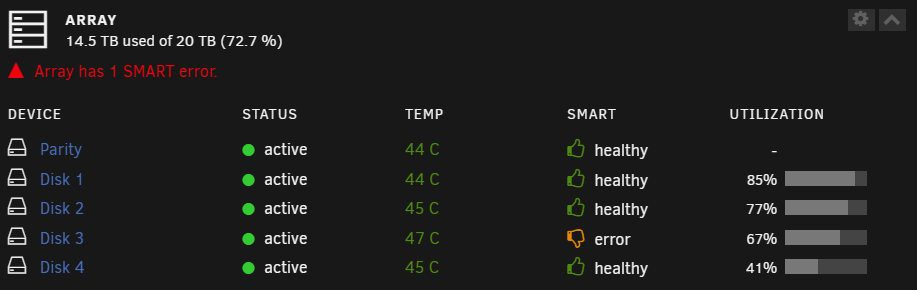
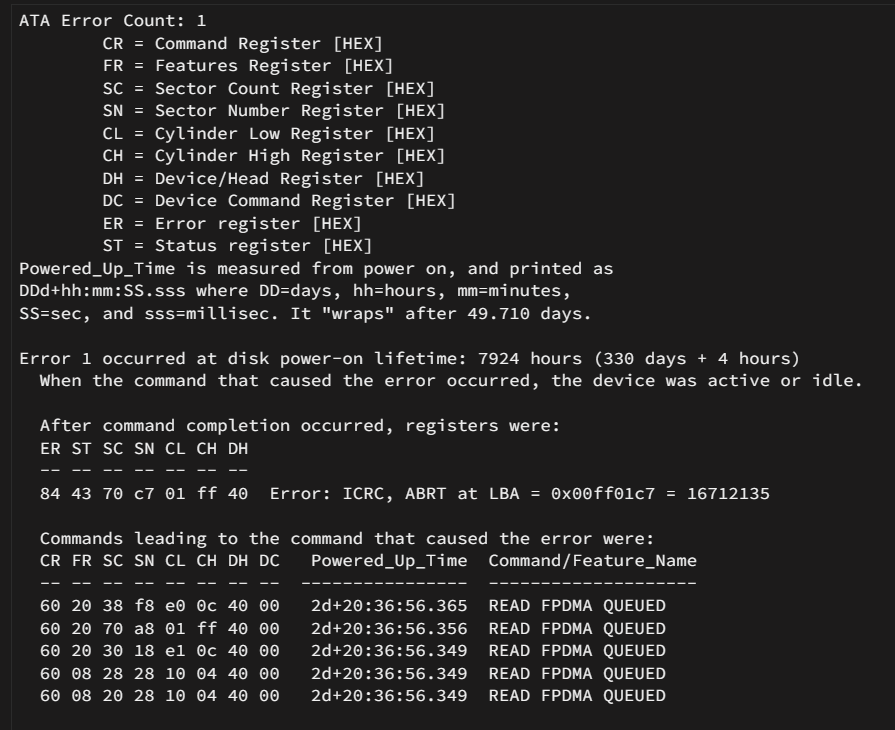
I've just noticed that the Array tile on my dashboard is showing a SMART error with Disk 3. When I run a SMART test of Disk 3, I get no errors. When I look in the SMART error log, I see the details of the error, but I don't know what they mean. Can anyone help/advise?


-
Legend!! I disabled the SMB signing and can now access the shares! Thanks so much for your help!
-
Yes, it's turned on and network is set as private. The computer can see the Unraid server, I just can't open it/access the shares. I just downloaded the Windows 11 image a couple of days ago, and it's fully updated, so it should be the most recent version. How do I look into the SMB signing?
-
unraidserver-diagnostics-20241023-2214.zip
-
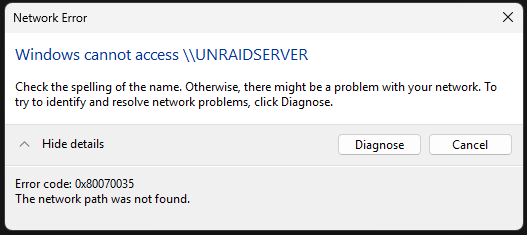
I just recently added some new hardware to my PC, so installed a fresh copy of Windows 11. I've had my Unraid server running fine for a couple of years, and all other machines on my network can still access the SMB shares as normal, but on this fresh install, I'm getting an error that won't allow me to open the shares, but I can see the server on the network. I've tried using the IP in Explorer, but the same happens. This didn't happen before, is this a bugged Windows 11 install or something?
-
I have this issue, did you find a fix?
-
I found out what was causing it. It was a PCI-E X1 to SATA 3.0 Controller Card which I installed just under a year ago. This one in particular - https://www.amazon.co.uk/gp/product/B0B4SD16SM I have since educated myself somewhat and have now installed this HBA Card, which, from what I've read, is a far better device for the job - https://www.ebay.co.uk/itm/326088190913
-
Hi JorgeB, do you have any idea why this might have suddenly happened out of nowhere? I haven’t made any hardware changes or anything like that.
-
I have had another warning this morning (diagnostics attached): Event: Unraid array errors Subject: Warning [UNRAIDSERVER] - array has errors Description: Array has 2 disks with read errors Importance: warning Disk 2 - ******** (sdd) (errors 32) Disk 3 - ******** (sde) (errors 32) and just as I logged into the server to get the diagnostics, I received another email warning: Event: Unraid array errors Subject: Warning [UNRAIDSERVER] - array has errors Description: Array has 3 disks with read errors Importance: warning Disk 2 - ******** (sdd) (errors 34) Disk 3 - ******** (sde) (errors 34) Disk 4 - ******** (sdc) (errors 1) unraidserver-diagnostics-20240903-0938.zip
-
Hi Gragorg, thanks for the help. Please see the attached. unraidserver-diagnostics-20240902-1421.zip
-
I recently powered down my server, using 'Shutdown', but when I turned it back on again, I got a couple of notifications that the array had errors. However, as I did not have time to look into this at the time, I shutdown the server once again. Event: Unraid array errors Subject: Warning [UNRAIDSERVER] - array has errors Description: Array has 2 disks with read errors Importance: warning Disk 2 - ******** (sdd) (errors 4) Disk 3 - ******** (sde) (errors 4) and... Event: Unraid array errors Subject: Warning [UNRAIDSERVER] - array has errors Description: Array has 3 disks with read errors Importance: warning Disk 2 - ******** (sdd) (errors 103) Disk 3 - ******** (sde) (errors 103) Disk 4 - ******** (sdc) (errors 30) and... Event: Fix Common Problems - UnraidServer Subject: Errors have been found with your server (UnraidServer). Description: Investigate at Settings / User Utilities / Fix Common Problems Importance: alert * **disk2 (********) has read errors** * **disk3 (********) has read errors** * **disk4 (********) has read errors** * **Unable to write to disk3** I have just turned it back on again and have received a notification saying "array turned good": Event: Unraid array errors Subject: Notice [UNRAIDSERVER] - array turned good Description: Array has 0 disks with read errors Importance: normal Can someone advise what happened here, and if there is anything I should be worried about?
-
I'd really appreciate a tutorial video—I'm struggling to set up the binhex version and can't figure out what I'm doing wrong.

