





OrdinaryButt
Members
-
Joined
-
Last visited
-
I am curious, can you do iperf3 bidirectional test ("--bidir" tag at the end of the client command line) and report if what you are getting for TX and RX? With my version, which is PCIe3.0 x4 (x2 electrical), I am getting about 10500mbps max combined (if I limit the bandwidth, I can get 5.250 up and down, if I don't limit it, usually around 9G up and 1G down). Can't figure out if its the card, PCIe overhead (PCIe3 x2 should have more than the required) or my other 10g card that is the issue (AQ103). Thanks in advance.tower-diagnostics-20260512-0700.zipGreat explanation. Looks like blacklisted, but there is some sort of "Kernel module" r8169 in use?
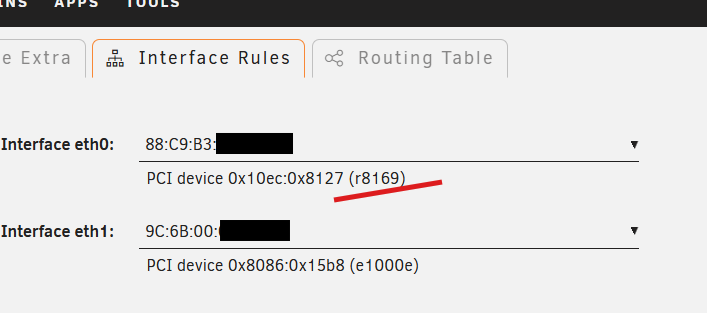
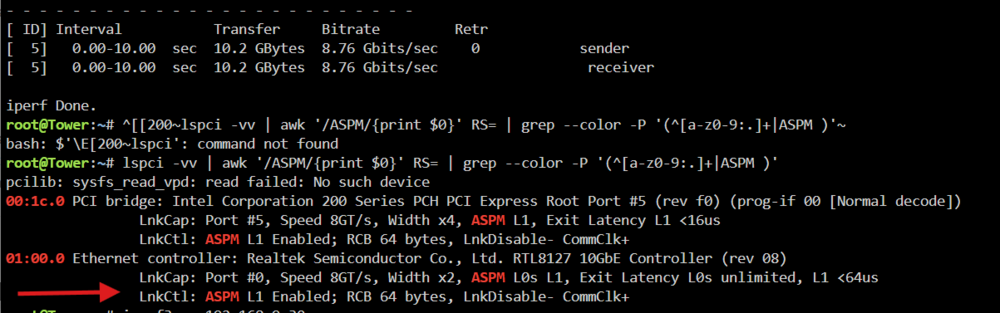
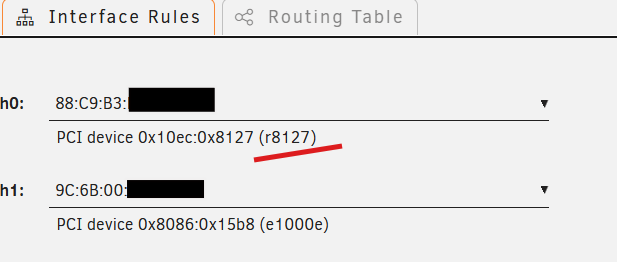
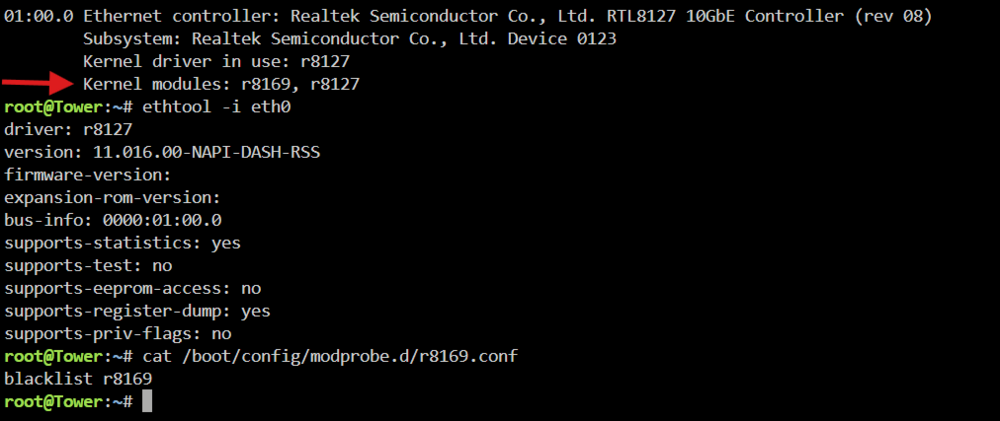 Thank you so much! I did not know plugins can be installed this way. Shame on me. @JorgeB I had above plugin installed, and the SFP+ variation of the card started working on 7.3 rc1. BUT, I am confused, because unRaid still reports using the r8169 driver as seen in screenshot below. Also, GitHub readme states that ASPM is disabled for above plugin/driver, but I see otherwise (and I am not complaining). Did I get into the some sort of "in between" situation here? EDIT: I also tried on 7.2.3 and this time the system reports using the r8127 driver (ASPM is still enabled, so perhaps that was not relevant). Still works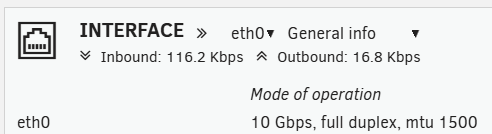
 How exactly does one install the 8127 driver? Please explained for someone that has never done custom driver install outside of the Unraid app store. Thanks.Do any of these plugins support RTL8127? The r8169 kernel driver in Unraid 7.3 has an issue with SFP+ version of this card (erroneously says cable unplugged); After testing multiple Ubuntu kernels, it is only in Kernel 7.0 that the upstream driver was resolved.Is this fixing all hardware revisions of this chip? I remember something about first gen bundled with Intel 400 series motherboards has issues and that the 500 series motherboard supposedly had a hardware revision update that solve that.Updating this old thread with the latest information: you can now change the passphrase or convert from passphrase to keyfile from Settings/Disk Settings (array must be running). I read somewhere, possibly on reddit, that the keyfile is just a unencrypted text, could dump there a password. So I tested this theory and that doesn't seem to be the case. In fact, I created a new text file, gave it exact same name, put the exact same text content inside it, and unraid rejected it as invalid. Can someone shed some light on this? Seems extremely dangerous - what operations to the file change it to be no longer a valid keyfile (example, file renamed) ? Information in official docs that I found here is insufficient: https://docs.unraid.net/unraid-os/system-administration/secure-your-server/securing-your-data/I don't think so, cause if the shut down is unclean, doesn't it force you to do parity check on first array start or is there a situation where the force may be skipped? I had one event where the server took over 10 minutes to shut down, with zero output to HDMI console, so I couldn't see what was going on, but eventually shut down.I am aware. I did my second parity check without correction to see if the changed SATA cables will have any effect (or if SMART errors will increase). And didn't want to correct, before I research possible way to find which files are affected. It sounds like there is no way to find that out, as I have not used file integrity plugin/check summing of any sort.We/I don't know what the issues is, so speaking of kernel 7 etc is vague. Let me ask you again as you are a moderator - are you a volunteer or LT employee/contractor? If the later, how can I officially log a ticket so my voice can heard beyond the "open a forum post" that I got last time. Am I wrong to expect some sort of a support for a product I paid for?Here you go. I had to wait for the second parity check to complete, and it did it finished last night with the same 7 errors. qsc-diagnostics-20260426-1248.zipI have enough hard drives (for the back up server) to use as temporary data swap, should I consider formatting my array hard drives to ZFS to improve future robustness? ZFS was not available when I started Unraid adventure.Hello, First time getting parity errors. Got 7 errors (run without correction). I had two disks with minor (my opinion) SMART warnings, older (no warnings during the parity check): Parity#2: 199 UDMA CRC Error count = 1 DataDisk#5: 188 Command timeout count = 1 Shutdown server, replaced SATA cables (just in case), started a new parity check overnight (no error corrections) and in the morning at about 30% the error count was again 7. SMART errors did not change. I spent 2 hours reading official docs and older posts, and I am not clear on the following: Is there a way to find out what sectors/location of the disks the errors are? Consequently, any tool that can tell me what files are written at those sectors? Ultimate goal is to check the file(s) before checking parity again with error correction. Array drives are XFS file system. I am currently in the process of setting up back server, so at the moment I don't have a good backup to automated compare (no file hashing). I will admit, I haven't educated myself enough on that front, so if you have a good tip where to start - I will take it. But primary focus is how to properly check current files integrity.


