





Moose_Yooper
Members
-
Joined
-
Last visited
-
Moose_Yooper changed their profile photo
-
Thanks mraneri, i got it fixed, for some reason it just didn't take right away.
-
Yeah that's what I use right now is Intel. I don't HW transcode. I was going to pull the current setup to rebuild for better expansion etc and then use my Intel setup for something else and maybe throw an AMD system together but not sure about switching being good or worth it.
-
Glad you figured it out. Anything's possible in the world of IT 🤓
-
Currently running unraid with Asus B460m-a/Intel i5 . Been looking at another build with Asus MB but possible Ryzen 5 5600G. Server is mainly used for media with Plex docker container and a few other containers. Not sure if I should stick with Intel or make a change. Any suggestions? TIA
-
Well i guess one way to test is just unplug it from the wall outlet 😆 Looking at your screenshots if that information is populated and you're getting stat readouts should be good to go.
-
Awesome, yeah i have my modem, router, camera nvr, server, and couple other misc. things connected. After spinning up grafana dashboard i average about 120ish watts pull on it.
-
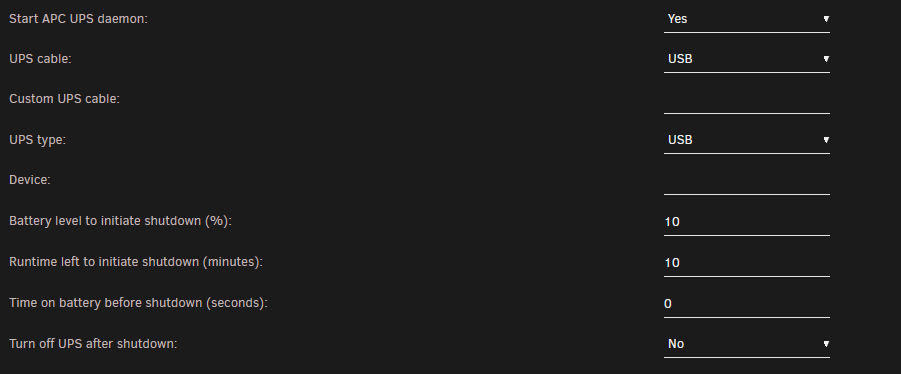
This setting worked for me at least.
-
I went with a CyberPower 1500VA 900 W that has the same Eth and coax in/out options. But my cyber power had USB B also. Then it worked for my setup. My first UPS with USB A both ends was a no go
-
What UPS are you using? I recently upgraded my UPS and via USB I am able to utilize the built in UPS plugin
-
First ones using GIMP. Just quickly thrown together.


-
Same, not sure why i have this fade background. anyone know which setting makes the banner full width?




