





Daxter
Members
-
Joined
-
Last visited
Everything posted by Daxter
-
Just wanted to say thank you for picking up support of this plugin! Much appreciated :)
-
Mine was actually cp /boot/config/plugins/unbalance/unbalance.hist /boot/config/plugins/unbalanced/unbalanced.hist
-
Ok so I can start unbalanced but the button to open the WebUI is now gone? Is that what you meant by only serving it on the http port? My server opens in https.
-
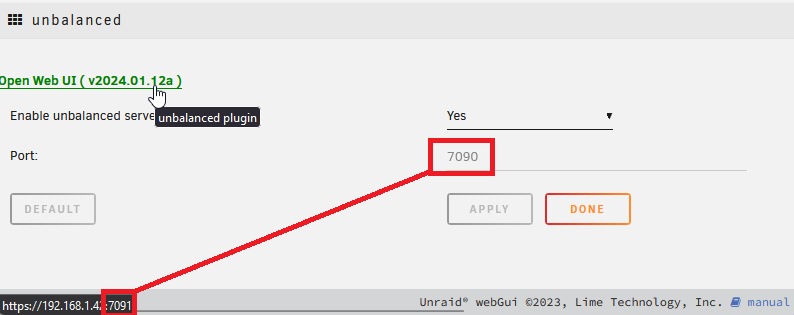
Yeah, it's still doing it on mine when over https
-
This is what was happening for me, didn't realize it was opening on the wrong port.
-
@jbrodriguez I can't seem to get into the WebUI of the new plugin. Do I have to uninstall the old one for the new one to work?
-
Awesome, thanks man.
-
@jbrodriguez Same question as the previous one, but with the Scatter function. Can I scatter while Plex is running?
-
I need to transfer 4.8TB, and the drive I'm going to have 6.7TB free, so yeah space shouldn't be an issue.
-
Hi, I have an unBALANACE question that I saw a vague answer of somewhere else and wanted to get more details. Can I keep Plex running while using the Gather function to move 4.8TB of data from 2 drives to 1? It's all video files, and I want to move them from my disk1 & disk2 to disk3, but when I tried it unBALANCE said it would take 20 hours. I have several friends and family who use my Plex daily and I would prefer not to take it offline for that long. Thanks in advance
-
Update on this topic. The issue came back within a week or so of it going away again, but I wondered if upgrading from Unraid 6.11.5 to 6.12.4 would fix it, and it has for about a week now. No idea what caused this, nothing changed on my router so..... Yeah. Maybe restarting the server fixed it? I don't know.
-
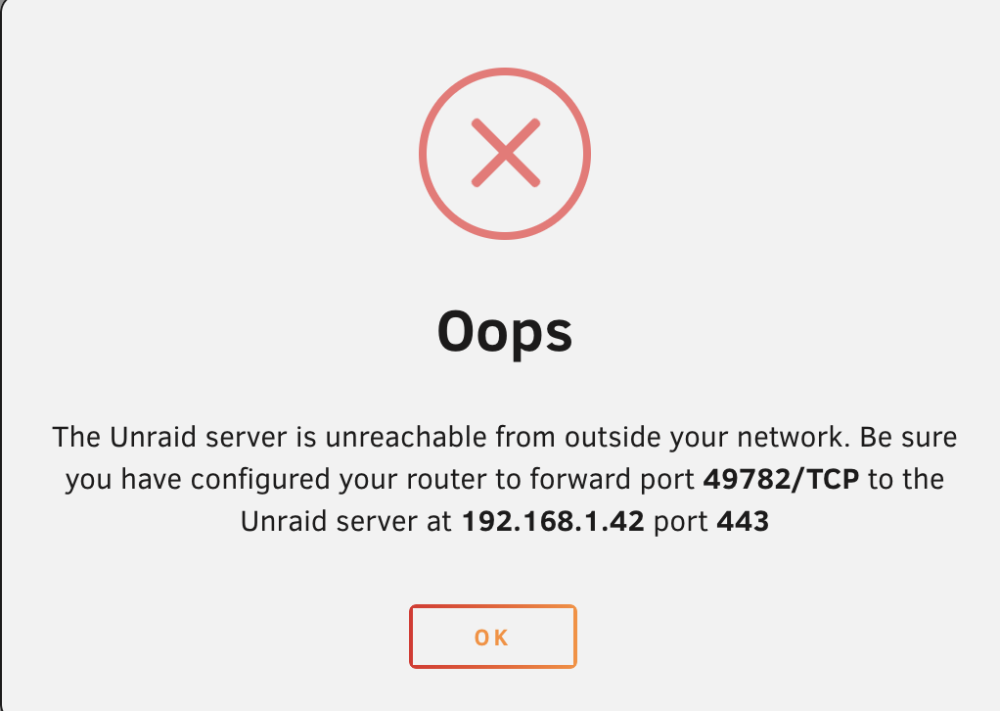
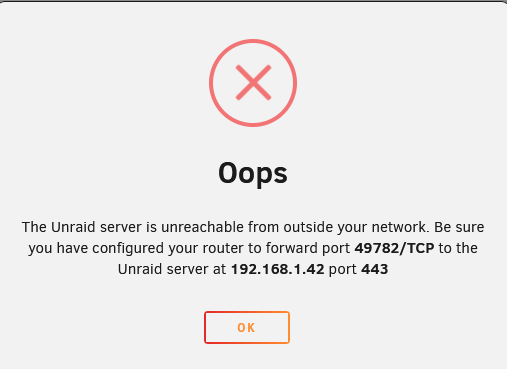
I didn't realize there was an unraid connect section, thanks. Funny story, I still get this error when checking... But I am connected remotely right now.
-
Does it still work natively with Unraid Connect? I like using Unraid Connect and if it doesn't I'd like another answer to this issue.
-
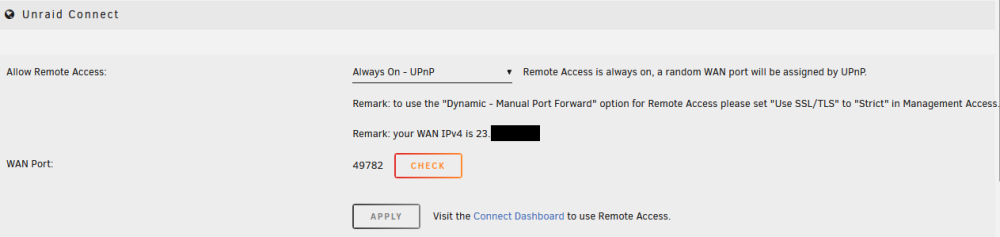
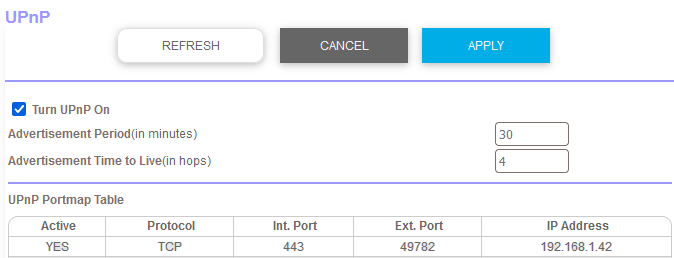
For some reason, even though UPnP is on and working, and the port is forwarded, I still can't remotely access my server. Attached diagnostics too. Any help would be appreciated, thanks! tower-diagnostics-20231017-1228.zip
-
Quick update: Was waiting until after Thanksgiving to do anything more since it was stable with tdarr turned off. I had done this before and found I only needed to enable the "Typical current idle" setting to fix my issue before. I went to change the RAM speed from 3600 down to 2667 but decided to double check the PSU setting.. and it was reverted back to auto! So we'll see what happens now with it put back to "Typical current idle". Edit so as not to bump (Nov 30th 2022): Setting PSU back to typical current idle didn't seem to fix the issue like last time, but also setting RAM to proper settings (In my case RAM set to 2667Mhz) per the thread mentioned did seem to fix it.
-
Here's another log, crash was around 22:11. I'm gonna try changing nvidia drivers to production branch from latest. syslog-192.168.1.42_2022-11-22_22.30.txt
-
Ok so here is the latest syslog server file after a crash. I believe the crash happened at 16:07, I noticed a hard reset the server at 17:00. syslog-192.168.1.42.log It was stable from last night to then, and the only thing I changed was I turned tdarr on. I disabled tdarr to see if it now stays stable. I believe I've already done this before.
-
Will do, hopefully it doesn't crash again but we'll see. Edit: It crashed again before I could enable syslog server...
-
My server has recently started to become unresponsive and I haven't a clue why. I'll go to access my server and the page doesn't load, I turn on the monitor hooked up to my server and nothing, check my router and it doesn't even show as connected. IDK how to read the diagnostic data that Unraid spits out, so I'm hoping someone here can help me figure out what's going. Thanks in advance! tower-diagnostics-20221122-0229.zip
-
I had this issue, and found the resolution here: You need to change the data directory mapping to this: /prometheus/data <-> /mnt/user/appdata/prometheus/data
-
So far so good, ~20 hours later and no issues after setting the PSU idle control to "typical current idle". Edit: ~43 hours now and everything is running perfectly fine, through Tdarr transcodes and thorough health checks on the CPU and GPU.
-
The PSU idle control was set to auto, I changed it to "typical current idle" and will test it when I wake up tomorrow. If that fails it looks like I should set the RAM to 2667MHz or maybe 3200MHz since that worked before? I checked and I have dual rank RAM and a 2nd gen Ryzen CPU.
-
I'll look into this. What did you see that led you to link me to this? Is it that my RAM is overclocked to 3600MHz? My old kit was 3200MHz so I could see that being the issue.
-
So I don't know why, but my server is locking up when running tdarr. It can take 30 minutes, it can take 90 minutes, but whenever it is it does seem to eventually happen. My RAM recently failed and I replaced it but that didn't fix it. I also upgraded from Unraid 6.9.2 to 6.10.3 hoping maybe it was some kind of issue with the Nvidia driver (Which was behind I think due to the old version). None of that has helped. The next thing I'm trying is removing the GPU Statistics plugin by b3rs3rk because I saw something about it maybe causing issues? I'll report back if that works. If someone who knows how to read the system diagnostics better than I can figure it out I would greatly appreciate it! tower-diagnostics-20220815-2344.zip
-
I did in fact have bad RAM, just replaced it today. I also re-created the docker image file, so we'll see what happens now. Edit: 12 hours later so far so good.



