TZodiacK
Members
-
Joined
-
Last visited
-
Hello, I am back.... So shortly after my last message the server frooze again. And ever since it still frezes frequently, some times 10 days apart, sometimes 5 days, sometimes 15 days. Since we solved the C-States, I am unable to find a reason. Do you think it may be do to low disk space? I will attach photo of my disks. And the latest pre-frezzee logs syslog-previous

-
Here are my Diagnostics unraidserver-diagnostics-20231130-1204.zip
-
After updating to the latest version and rebooting it frooze in the "triggering udev events: sbin/udev adm trigger --action=change" message. I tried rebooting several times and always hanged there.
-
I can now confirm that going back to the previous version allows me to boot up my server again
-
I am having the same problem, I tried making a new USB installation and them overriding the config file but it did not work, trying now reverting back to the previuos version of Unraid
-
Just to give feedback, after "completely disabling C-States" my UnRaid server is working non-stop for 28 days! I guess it is solved
-
Tryed the "typical current idle" solution and it hold up until today, but today it frooze, will now try the "completely disabling C-States"
-
Thank you very much! Never thought of that! Will try it, if the server holds for a week I will set as solution. Just do not understand why the server in the past worked months at a time, and now fails with me not having changed the bios settings
-
Hello! I am not sure since when, but for some weeks now, my Unraid server every couple of days freezes, the Web UI is not accessible, nor is any of the apps that I run there, is like the server is dead but the computer still runs. When that happens I have to brute force shutdown the server and turn it on again. From other topics here in the forum I saw that the issue could be solved by setting the docker to ipvlan, but my server was already with that setting, so it is something else. Also I enabled the syslogs as I saw was requested in other topics and I will attach here the log. My server freezed on the 10th of October, but I do not see nothing in the logs strange (I have my discs full except the nvme cache, so some warnings there in the log). I thought maybe it is a bad USB so I have ordered a new Samsung one today, the one suggested in this video https://www.youtube.com/watch?v=jjkaidlZmgs Could someone take a look and help me? I need to have the server reliable again. Best Regards, Pedro syslog
-
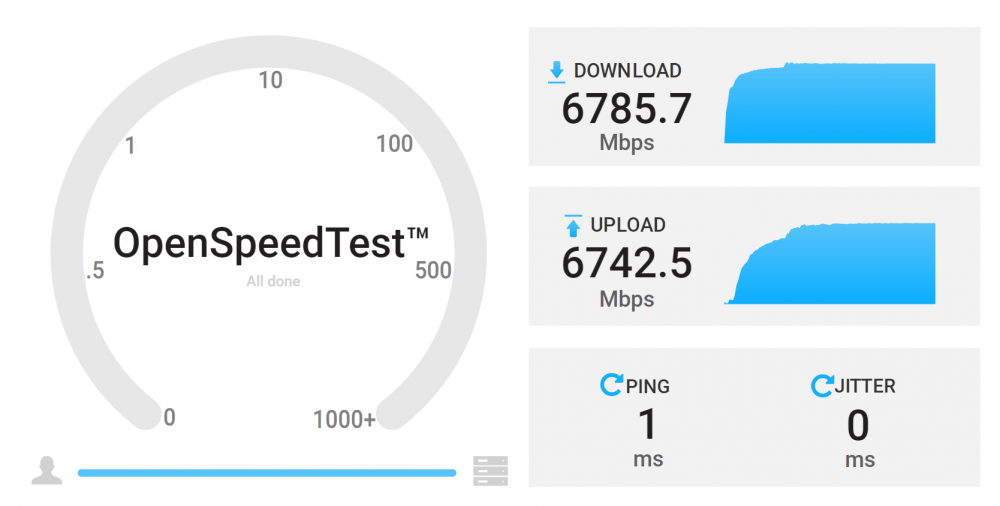
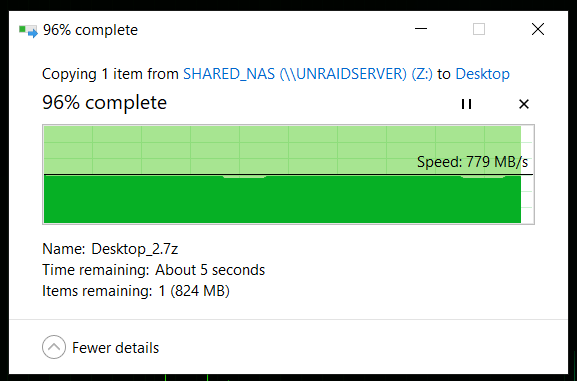
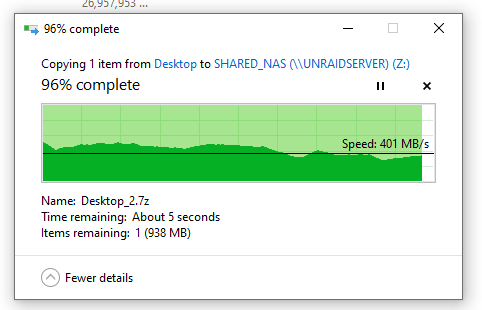
Hello! I need help because I am having difficulty achiving the full speeds of my network and NVME drives using UNRAID. I have the following: - Windows 10 Client with a Samsung 980 PRO 1TB NVME - UNRAID server with a Corsair MP600 1TB NVME Cache drive and DirectIO enabled - 10Gbps Ubiquiti Network with both client and server connected on the same switch, and them and the switch have JUMBO FRAMES enabled at 9014 bytes. - CAT8 cables running to the devices with no more than 6-8 meters on each client 1º Problem: I am unable to get 10gbps connection to the UNRAID server, max is about 6.7Gbps, as stated in the image bellow: Anyone knows what may be happening? 2º Problem: Altough when copying a file from UNRAID to WINDOWS is stable and almost near the speed of the test, at about 777MBps (6.07gbps) When copying from my computer to the UNRAID cache, the speed is very inconsistent (sometimes worse than the image) and maxes around 500MBps The disk being used as cache is capable of well over 10gpbs speeds when writing as can be seen here https://ssd.userbenchmark.com/SpeedTest/843047/Force-MP600 What may be wrongly configured to cause this? Enabling DirectIO did not improve write speeds, but increased drasticly the READ speeds, and that goes against the info on the toggle. Thanks for the help