





Oliver Martin
Members
-
Joined
-
I have an issue where /run keeps filling up and therefore my docker containers will turn unhealthy. After some digging i have found that this is the offending file: /run/docker/containerd/daemon/io.containerd.runtime.v2.task/moby/1669b11159d872bda4662dd88a0848ea89c988cc3dd4589b0365f623c8cdfedf/log.json Looking in the config.json and options.json in the same directory I worked out that this is my Plex container. Sample of logs below, this keeps on going until the drive is full: {"level":"info","msg":"Using low-level runtime /usr/bin/runc","time":"2022-10-04T09:59:15+01:00"} {"level":"info","msg":"Using low-level runtime /usr/bin/runc","time":"2022-10-04T09:59:20+01:00"} {"level":"info","msg":"Using low-level runtime /usr/bin/runc","time":"2022-10-04T09:59:25+01:00"} {"level":"info","msg":"Using low-level runtime /usr/bin/runc","time":"2022-10-04T09:59:31+01:00"} {"level":"info","msg":"Using low-level runtime /usr/bin/runc","time":"2022-10-04T09:59:36+01:00"} {"level":"info","msg":"Using low-level runtime /usr/bin/runc","time":"2022-10-04T09:59:41+01:00"} {"level":"info","msg":"Using low-level runtime /usr/bin/runc","time":"2022-10-04T09:59:46+01:00"} {"level":"info","msg":"Using low-level runtime /usr/bin/runc","time":"2022-10-04T09:59:51+01:00"} {"level":"info","msg":"Using low-level runtime /usr/bin/runc","time":"2022-10-04T09:59:57+01:00"} {"level":"info","msg":"Using low-level runtime /usr/bin/runc","time":"2022-10-04T10:00:02+01:00"} {"level":"info","msg":"Using low-level runtime /usr/bin/runc","time":"2022-10-04T10:00:07+01:00"} {"level":"info","msg":"Using low-level runtime /usr/bin/runc","time":"2022-10-04T10:00:12+01:00"} {"level":"info","msg":"Using low-level runtime /usr/bin/runc","time":"2022-10-04T10:00:17+01:00"} {"level":"info","msg":"Using low-level runtime /usr/bin/runc","time":"2022-10-04T10:00:22+01:00"} I have checked plex is running fine and docker is reporting the container as healthy 1669b11159d8 plexinc/pms-docker:plexpass "/init" 3 weeks ago Up 2 weeks (healthy) Anyone know why this message might be constantly repeating? Diag Attached unraid01-diagnostics-20221004-1004.zip
-
Yes they turned green in the end and it said the parity was valid. Another interesting thing to note was I formatted the drives with unassigned devices plugin and that didn't give off an error even though in hindsight it was never able to due to the protection being enabled.
-
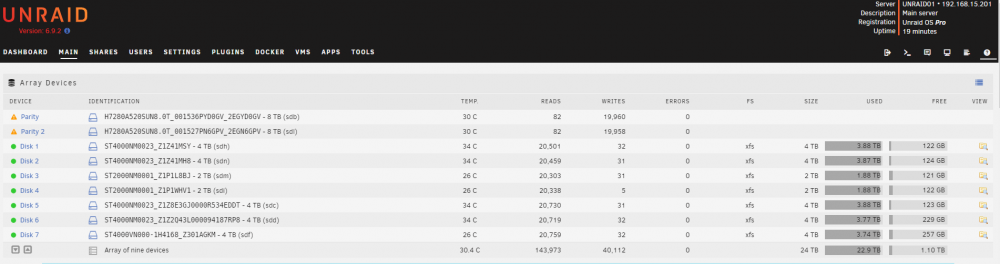
I just tried to use these drives as parity whilst doing a data-rebuild and it failed to read the parity back most likely due to that protection was enabled at a guess. For anyone seeing this in the future and who has the same drives and issues follow the steps here BEFORE you start using the drives whether for data or parity. And since removing the protection i can now see the operations on the drive
-
Thank you for sending me that link I already did try that format command but at the time it didn't work. Ive just power cycled the drives and now they are working so for anyone in the future run: sg_format --format --fmtpinfo=0 /dev/sXX ##NOTE THIS WILL WIPE THE DATA OFF THE DRIVE and then if you have hot swap unplug the drives wait a few seconds and plug them back in, if you dont have hot swap power down the server and wait a few seconds and turn back on
-
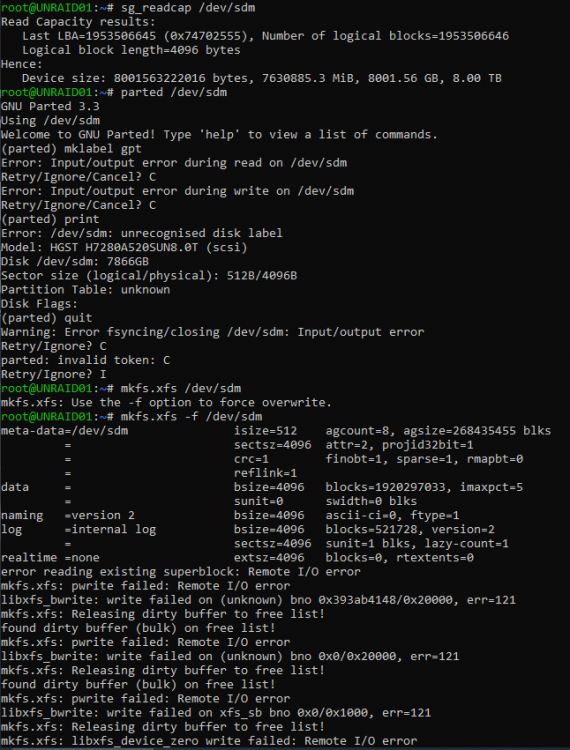
I have purchased some new 8Tb drives, H7280A520SUN8.0T but i am unable to format them in unraid, i tried doing this manually but still didnt work. I then went to go check the partition table and it says "unknown" and i am unable to make one. I have tried formatting the drive first with the following command: sg_format --format --fmtpinfo=0 /dev/sdm and then: sg_format --format --size=4096 /dev/sdm any ideas? unraid01-diagnostics-20220225-1724.zip
-
Yep that seems to be showing some info at least now, be interested to know why it isn't recording operations? Also what about errors will they still display?

-
Attaching diagnostics unraid01-diagnostics-20220223-1547.zip
-
Oliver Martin joined the community
-
Upgrading my array to 8tb drives, so replaced both my parity drives but the new drives don't show any activity on them despite that the rebuild is in progress. unraid01-smart-20220223-1544 (1).zip unraid01-smart-20220223-1544.zip






