





scvg009
Members
-
Joined
-
Last visited
-
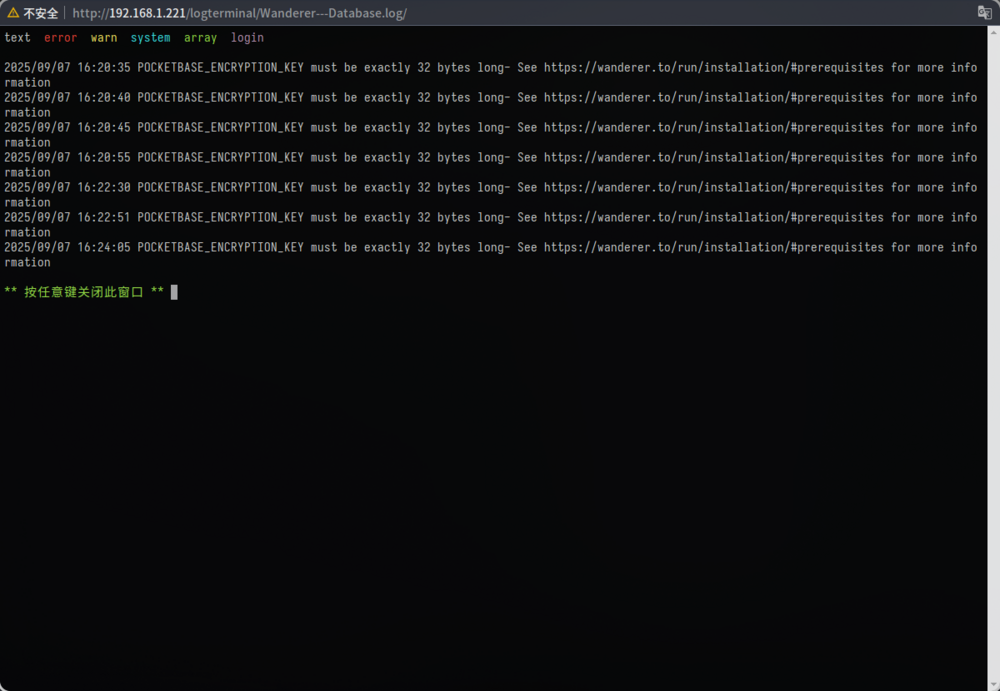
The wanderer-db service failed to start. The system log indicates: 2025/09/07 13:15:22 POCKETBASE_ENCRYPTION_KEY must be exactly 32 bytes in length - see https://wanderer.to/run/installation/#prerequisites However, I have already set it using openssl rand -hex 32.
-
The default template of wallabag is SQLite, can the template be adjusted to PostgreSQL or MariaDB / MySQL?
-
I have removed vnc and also added multifunction='on' as you explained, but once I add the sound card built into the graphics card, the VM reports the following error. internal error: qemu unexpectedly closed the monitor: 2022-09-17T09:20:05.493127Z qemu-system-x86_64: -device vfio-pci,host=0000:07:00.1,id= hostdev1,bus=pci.0,addr=0x6: vfio 0000:07:00.1: failed to setup container for group 12: Failed to set group container: Operation not permitted Translated with DeepL
-
My Passthrough settings are as follows. Settings-VM Manager-PCIe ACS override (both)-vfio (yes) Tools-System devices-PCI devices and IOMMU groups (check the graphics card and graphics card built-in sound card checkboxes) Syslinux configuration: unRAISD os add video=efifb:off After adding the built-in sound card to the graphics card, I get the following error message when starting the virtual machine: internal error: qemu unexpectedly closed the monitor: qxl_send_events: spice-server bug: guest stopped, ignoring 2022-09-17T01:13:07.928976Z qemu-system-x86_64: -device vfio-pci,host=0000:07:00.1,id=hostdev1,bus=pci.0,addr=0x8: vfio 0000:07:00.1: failed to setup container for group 12: Failed to set group container: Operation not permitted Can someone tell me what I should do? Attached is my virtual machine xml file: <?xml version='1.0' encoding='UTF-8'?> <domain type='kvm'> <name>EOS</name> <uuid>8cd262b9-4bfd-d4ce-2c86-da2dff8dcaaa</uuid> <metadata> <vmtemplate xmlns="unraid" name="Linux" icon="arch.png" os="linux"/> </metadata> <memory unit='KiB'>6191456</memory> <currentMemory unit='KiB'>6191456</currentMemory> <memoryBacking> <nosharepages/> </memoryBacking> <vcpu placement='static'>8</vcpu> <cputune> <vcpupin vcpu='0' cpuset='0'/> <vcpupin vcpu='1' cpuset='4'/> <vcpupin vcpu='2' cpuset='1'/> <vcpupin vcpu='3' cpuset='5'/> <vcpupin vcpu='4' cpuset='2'/> <vcpupin vcpu='5' cpuset='6'/> <vcpupin vcpu='6' cpuset='3'/> <vcpupin vcpu='7' cpuset='7'/> </cputune> <os> <type arch='x86_64' machine='pc-i440fx-6.2'>hvm</type> <loader readonly='yes' type='pflash'>/usr/share/qemu/ovmf-x64/OVMF_CODE-pure-efi.fd</loader> <nvram>/etc/libvirt/qemu/nvram/8cd262b9-4bfd-d5ce-2c86-da2dff8dcaaa_VARS-pure-efi.fd</nvram> </os> <features> <acpi/> <apic/> </features> <cpu mode='host-passthrough' check='none' migratable='on'> <topology sockets='1' dies='1' cores='4' threads='2'/> <cache mode='passthrough'/> </cpu> <clock offset='utc'> <timer name='rtc' tickpolicy='catchup'/> <timer name='pit' tickpolicy='delay'/> <timer name='hpet' present='no'/> </clock> <on_poweroff>destroy</on_poweroff> <on_reboot>restart</on_reboot> <on_crash>restart</on_crash> <devices> <emulator>/usr/local/sbin/qemu</emulator> <disk type='file' device='disk'> <driver name='qemu' type='raw' cache='writeback'/> <source file='/mnt/user/vm/EOS/vdisk1.img'/> <target dev='hdc' bus='virtio'/> <boot order='1'/> <address type='pci' domain='0x0000' bus='0x00' slot='0x05' function='0x0'/> </disk> <disk type='file' device='cdrom'> <driver name='qemu' type='raw'/> <source file='/mnt/user/iso/EndeavourOS_Artemis_neo_22_8.iso'/> <target dev='hda' bus='ide'/> <readonly/> <boot order='2'/> <address type='drive' controller='0' bus='0' target='0' unit='0'/> </disk> <controller type='pci' index='0' model='pci-root'/> <controller type='ide' index='0'> <address type='pci' domain='0x0000' bus='0x00' slot='0x01' function='0x1'/> </controller> <controller type='virtio-serial' index='0'> <address type='pci' domain='0x0000' bus='0x00' slot='0x04' function='0x0'/> </controller> <controller type='usb' index='0' model='qemu-xhci' ports='15'> <address type='pci' domain='0x0000' bus='0x00' slot='0x07' function='0x0'/> </controller> <interface type='bridge'> <mac address='51:52:00:f3:2a:86'/> <source bridge='br0'/> <model type='virtio-net'/> <address type='pci' domain='0x0000' bus='0x00' slot='0x03' function='0x0'/> </interface> <serial type='pty'> <target type='isa-serial' port='0'> <model name='isa-serial'/> </target> </serial> <console type='pty'> <target type='serial' port='0'/> </console> <channel type='unix'> <target type='virtio' name='org.qemu.guest_agent.0'/> <address type='virtio-serial' controller='0' bus='0' port='1'/> </channel> <input type='tablet' bus='usb'> <address type='usb' bus='0' port='1'/> </input> <input type='mouse' bus='ps2'/> <input type='keyboard' bus='ps2'/> <graphics type='vnc' port='-1' autoport='yes' websocket='-1' listen='0.0.0.0' keymap='en-us'> <listen type='address' address='0.0.0.0'/> </graphics> <audio id='1' type='none'/> <video> <model type='qxl' ram='65536' vram='65536' vgamem='16384' heads='1' primary='yes'/> <address type='pci' domain='0x0000' bus='0x00' slot='0x02' function='0x0'/> </video> <hostdev mode='subsystem' type='pci' managed='yes'> <driver name='vfio'/> <source> <address domain='0x0000' bus='0x07' slot='0x00' function='0x0'/> </source> <rom file='/mnt/user/vm/Gigabyte.GT610.1024.130107.rom'/> <address type='pci' domain='0x0000' bus='0x00' slot='0x06' function='0x0'/> </hostdev> <hostdev mode='subsystem' type='pci' managed='yes'> <driver name='vfio'/> <source> <address domain='0x0000' bus='0x07' slot='0x00' function='0x1'/> </source> <address type='pci' domain='0x0000' bus='0x00' slot='0x08' function='0x0'/> </hostdev> <memballoon model='none'/> </devices> </domain>
