tony059
Members
-
Joined
-
Last visited
-
Hello, On my side, I also have a problem accessing the Deluge web interface. However, several months ago, it was working fine. Access via a web browser with port 8112 does not work, however access to the deluge server via port 58846 has no problem. Radarr and Sonarr no longer have access to deluge client either. I specify that I use a bridge network for docker corresponding to my LAN network. Here is the docker command launched by UnRaid: docker run -d --name='Deluge-Server' --net='br0' --ip='192.168.22.116' --privileged=true -e TZ="Europe/Paris" -e HOST_OS="Unraid" -e HOST_HOSTNAME="UnRaid" -e HOST_CONTAINERNAME="Deluge-Server" -e 'TCP_PORT_8112'='8112' -e 'TCP_PORT_58846'='58846' -e 'TCP_PORT_58946'='58946' -e 'UDP_PORT_58946'='58946' -e 'TCP_PORT_8118'='8118' -e 'VPN_ENABLED'='yes' -e 'VPN_USER'='userVPN' -e 'VPN_PASS'='passVPN' -e 'VPN_PROV'='custom' -e 'VPN_CLIENT'='openvpn' -e 'VPN_OPTIONS'='' -e 'STRICT_PORT_FORWARD'='no' -e 'ENABLE_PRIVOXY'='no' -e 'LAN_NETWORK'='192.168.22.0/24' -e 'NAME_SERVERS'='209.222.18.222,84.200.69.80,37.235.1.174,1.1.1.1,209.222.18.218,37.235.1.177,84.200.70.40,1.0.0.1' -e 'DELUGE_DAEMON_LOG_LEVEL'='info' -e 'DELUGE_WEB_LOG_LEVEL'='info' -e 'VPN_INPUT_PORTS'='' -e 'VPN_OUTPUT_PORTS'='' -e 'DEBUG'='false' -e 'UMASK'='000' -e 'PUID'='99' -e 'PGID'='100' -e 'DEBUG'='true' -l net.unraid.docker.managed=dockerman -l net.unraid.docker.webui='http://[IP]:[PORT:8112]/' -l net.unraid.docker.icon='https://raw.githubusercontent.com/binhex/docker-templates/master/binhex/images/deluge-icon.png' -v '/mnt/user/Downloads/':'/data':'rw' -v '/mnt/user/Downloads/incomplete/':'/data/incomplete':'rw' -v '/mnt/user/Downloads/completed/':'/data/completed':'rw' -v '/mnt/user/Downloads/Torrents/':'/data/torrents':'rw' -v '/mnt/user/appdata/binhex-delugevpn':'/config':'rw' --sysctl="net.ipv4.conf.all.src_valid_mark=1" 'binhex/arch-delugevpn' Here are the logs of the supervisord.log file: I also specify that I have the same behavior as with other containers using the openVPN service (like binhex-qbittorrentvpn or even binhex-rtorrentvpn) Thank in advance to your help.
-
Thank you for your reply. This works by uninstalling and reinstalling the plugin. Thanks again.
-
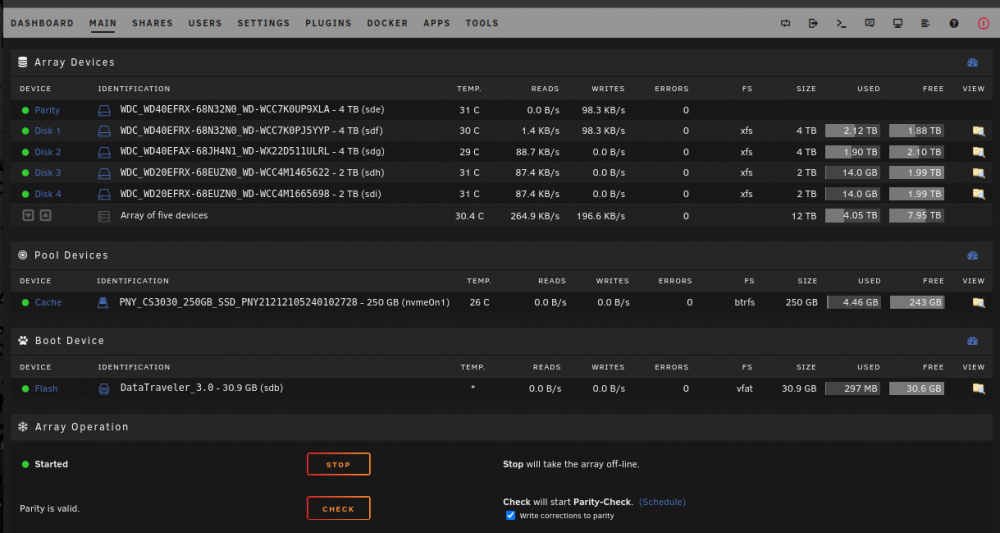
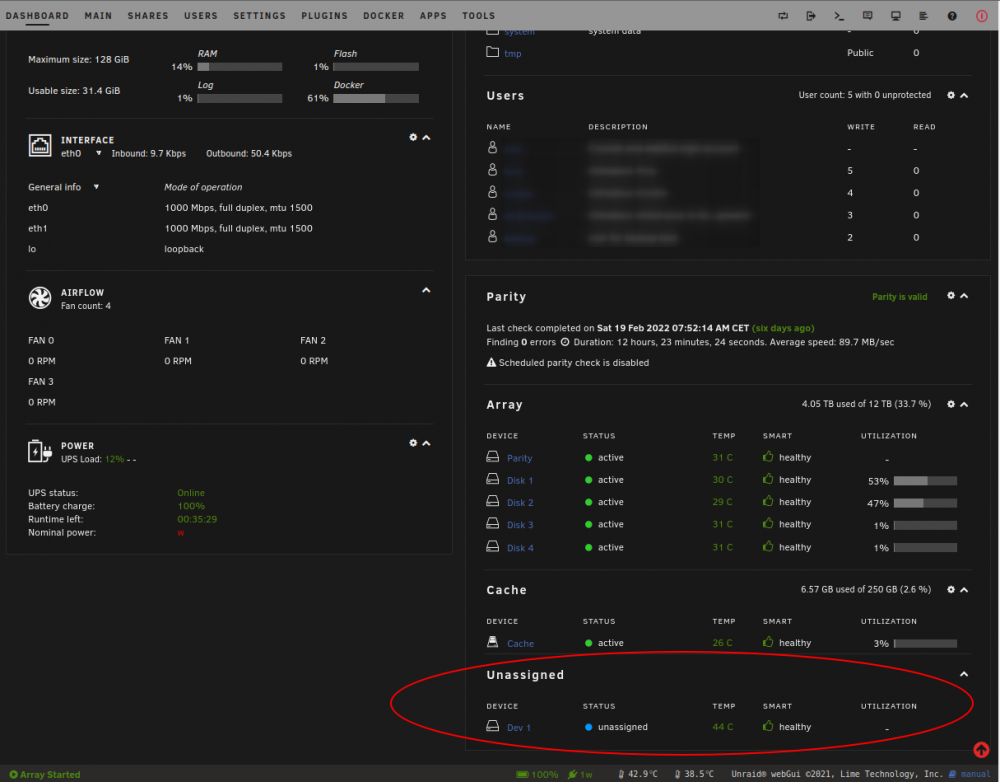
Hello, After updating to version 2022.02.24a, I no longer see my external hard drive from the 'Main' tab in UnRaid : Before this version, I could see my external hard drive in the list of available hard drives with a 'MOUNT' button from this tab. However, I see it in the list of hard drives from the 'Dashboard' tab but without a button to mount the hard drive: Can you help me please? Thx in advance.